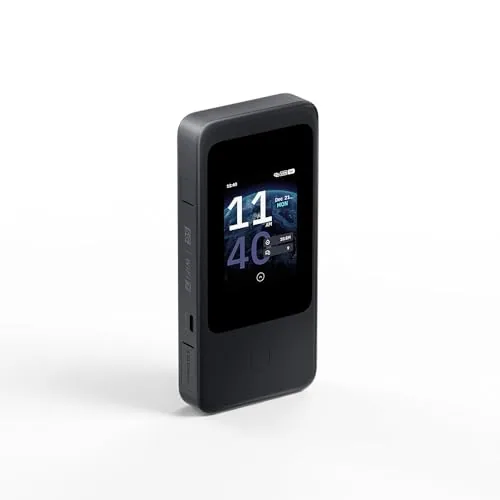
In a Rush? Here Are Our Top Picks
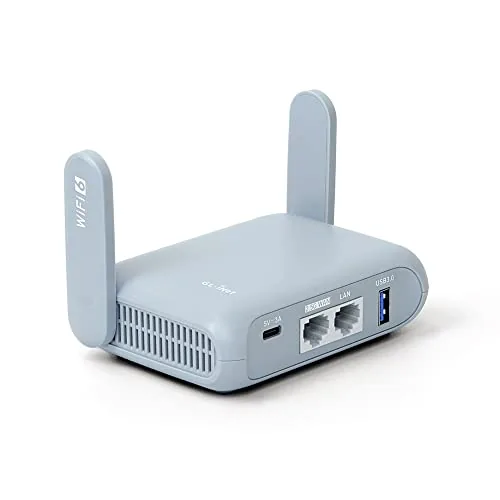
GL.iNet GL-MT3000 Beryl AX Wi-Fi 6 Travel Router
8.5/10Frequent travelers or remote workers who use a commercial VPN service and want encrypted, consistent Wi-Fi across hotel, Airbnb, and conference networks without reconfiguring every device individually.
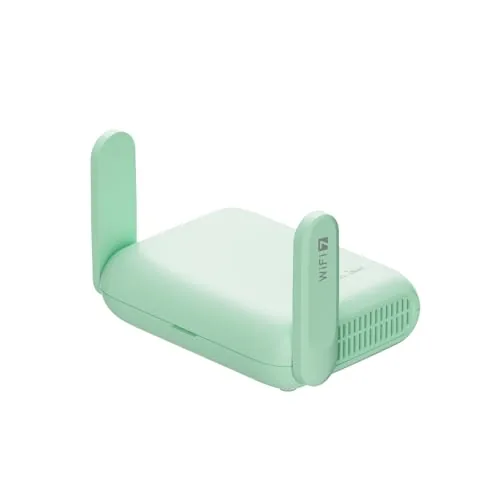
GL.iNet Beryl 7 GL-MT3600BE Wi-Fi 7 Travel Router
8.5/10Frequent travelers and remote workers who need fast VPN encryption, ad blocking, and OpenWrt flexibility in a pocket-sized router.
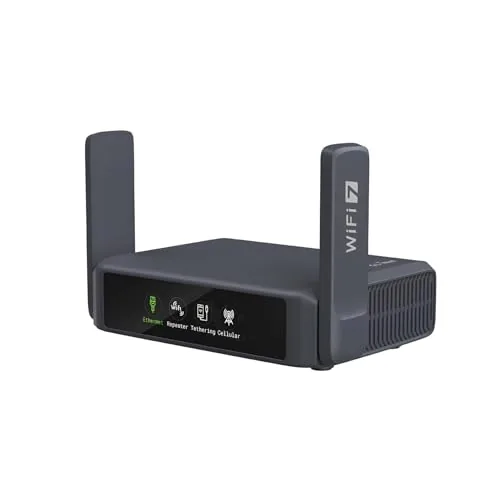
GL.iNet GL-BE3600 Slate 7 Wi-Fi 7 Travel Router
8.4/10Remote workers and frequent travelers who need reliable VPN protection, fast speeds, and simple on-device controls without carrying extra adapters or opening a laptop to change settings.
Most hotel and Airbnb Wi-Fi is shared, unencrypted, and slow – a travel router fixes all three problems by giving you a private, password-protected network you control. The best travel routers today are compact enough to slip into a laptop bag, support VPN passthrough or built-in VPN clients, and deliver speeds that make streaming and video calls reliable on the road. This guide covers three current top picks – the GL.iNet GL-MT3000 Beryl AX, the Beryl 7 GL-MT3600BE, and the GL-BE3600 Slate 7 – ranging from a proven Wi-Fi 6 workhorse to the latest Wi-Fi 7 hardware.
Quick Comparison
| # | Product | Key Features | Score | |
|---|---|---|---|---|
| 1 |
GL.iNet GL-MT3000 Beryl AX Wi-Fi 6 Travel Router
|
|
8.5 ★★★★☆ | Check Price on Amazon Read full review ↓ |
| 2 |
GL.iNet Beryl 7 GL-MT3600BE Wi-Fi 7 Travel Router
|
|
8.5 ★★★★☆ | Check Price on Amazon Read full review ↓ |
| 3 |
GL.iNet GL-BE3600 Slate 7 Wi-Fi 7 Travel Router
|
|
8.4 ★★★★☆ | Check Price on Amazon Read full review ↓ |
| 4 |
 TP-Link Roam 6 AX1500 Wi-Fi 6 Travel Router |
|
8.2 ★★★★☆ | Check Price on Amazon Read full review ↓ |
| 5 |
 TP-Link Roam 7 BE3600 Wi-Fi 7 Travel Router |
|
8.2 ★★★★☆ | Check Price on Amazon Read full review ↓ |
| 6 |
 TP-Link Roam 6 AX1500 Wi-Fi 6 Travel Router |
|
8.2 ★★★★☆ | Check Price on Amazon Read full review ↓ |
| 7 |
 GL.iNet GL-SFT1200 Opal AC1200 Travel Router with VPN |
|
7.8 ★★★★☆ | Check Price on Amazon Read full review ↓ |
The Beryl AX packs Wi-Fi 6 speeds up to 2402Mbps on 5GHz into a pocket-sized router built for travelers who need a secure, private connection on hotel or airport networks. WireGuard VPN runs at up to 300Mbps, meaning you can encrypt your traffic without choking your bandwidth. The 2.5G WAN port and OpenWrt firmware give power users room to configure beyond what most consumer travel routers allow.
Key Features
- Dual-band Wi-Fi 6: 574Mbps 2.4GHz, 2402Mbps 5GHz
- 2.5G WAN port plus 1G LAN port and USB 3.0
- WireGuard up to 300Mbps, OpenVPN up to 150Mbps
- Compatible with 30-plus VPN providers, subscription required
- Runs OpenWrt 21.02 with access to 5,000-plus packages
- WPA3, DNS over HTTPS, DNS over TLS, IPv6 support
- Simultaneous VPN server and client on one device
- Physical toggle switch for VPN or AdGuard Home control
✅ Pros
- WireGuard throughput of 300Mbps is high for a travel-sized router
- 2.5G WAN future-proofs the device for faster broadband connections
- OpenWrt support with 5,000-plus packages allows deep customization
- Physical toggle switch lets you flip VPN on or off instantly
❌ Cons
- Toggle switch requires manual configuration in the admin panel before it works
- OpenVPN cap of 150Mbps may limit users on fast connections who prefer that protocol
Why We Chose It
Few travel routers under $100 combine Wi-Fi 6, a 2.5G WAN port, and WireGuard VPN at 300Mbps in the same chassis. The OpenWrt base means you are not locked into GL.iNet’s software stack if you want to go deeper. The hardware-level security options like WPA3 and DNS over HTTPS are configured through a no-code panel, which keeps it accessible without dumbing it down.
Perfect For
Frequent travelers or remote workers who use a commercial VPN service and want encrypted, consistent Wi-Fi across hotel, Airbnb, and conference networks without reconfiguring every device individually.
The Beryl 7 delivers Wi-Fi 7 speeds and 1100 Mbps WireGuard throughput in a 205g package built for hotel and travel use. Dual 2.5G Ethernet ports and OpenWrt 21.02 give power users real configuration flexibility without a full home router setup. The physical toggle switch for VPN and AdGuard Home is a practical touch that simplifies daily switching.
Key Features
- Dual-band Wi-Fi 7: 688 Mbps on 2.4G, 2882 Mbps on 5G
- Dual 2.5G Ethernet ports, one WAN and one LAN
- USB 3.0 port, supports up to 120 connected devices
- WireGuard VPN up to 1100 Mbps, OpenVPN-DCO up to 1000 Mbps
- Compatible with 30-plus VPN providers, requires active subscription
- OpenWrt 21.02 with 512MB storage for plugin installation
- WPA3, DNS over HTTPS, DNS over TLS, and IPv6 security support
- VPN cascading: runs VPN server and client simultaneously
- Physical toggle switch to enable VPN or AdGuard Home instantly
✅ Pros
- 1100 Mbps WireGuard performance is unusually high for a travel router at this price
- Dual 2.5G ports allow full-speed wired connections on both WAN and LAN
- OpenWrt base with 512MB storage supports meaningful plugin customization
- Physical toggle switch reduces steps to activate VPN or ad blocking
- WPA3 plus DNS encryption provides layered security on untrusted hotel networks
❌ Cons
- OpenWrt 21.02 with Kernel 5.4 is an older release and may lag behind upstream security patches
- Toggle switch requires manual configuration in the admin panel before it functions
Why We Chose It
At $129.99, the Beryl 7 sits at the intersection of serious VPN performance and genuine travel portability, two things most compact routers trade against each other. The 1100 Mbps WireGuard throughput and dual 2.5G ports are specs typically found on routers twice its size and price. OpenWrt support and built-in AdGuard Home make it useful beyond basic travel scenarios.
Perfect For
Frequent travelers and remote workers who need fast VPN encryption, ad blocking, and OpenWrt flexibility in a pocket-sized router.
The Slate 7 packs Wi-Fi 7 speeds, dual 2.5G Ethernet ports, and a touchscreen interface into a pocket-sized router purpose-built for travel. A 1-inch touchscreen lets you toggle VPN or AdGuard on the fly without opening an app or browser. WireGuard hits up to 540 Mbps, which is fast enough to keep a full hotel room or small team connected without bottlenecks.
Key Features
- Dual-band Wi-Fi 7: 688 Mbps on 2.4 GHz, 2882 Mbps on 5 GHz
- Touchscreen scans QR codes, monitors speed, toggles VPN and providers
- OpenWrt 23.05 with 512 MB storage for plugin installation
- WireGuard up to 540 Mbps; OpenVPN up to 100 Mbps pre-installed
- Mini travel form factor with international plug options included
- WPA3, DNS over HTTPS, DNS over TLS, and IPv6 security support
- Runs VPN server and VPN client simultaneously on one device
- Touchscreen toggle activates AdGuard Home or VPN client instantly
✅ Pros
- 540 Mbps WireGuard throughput is high for a router this size
- Touchscreen removes the need to open a browser admin panel for common tasks
- Compatible with 30-plus VPN providers using existing account credentials
- Dual 2.5G Ethernet ports give wired flexibility most travel routers skip
- International plug variants ship in the box, no adapter hunting required
❌ Cons
- OpenVPN tops out at 100 Mbps, so users on older VPN protocols will feel the ceiling
- Touchscreen toggle button has no default function and requires manual configuration before first use
Why We Chose It
The Slate 7 closes the gap between travel convenience and home-router capability by combining Wi-Fi 7 hardware with a physical touchscreen that handles the tasks most travelers actually need mid-trip. The simultaneous VPN server and client mode is a genuine differentiator for remote workers who need to reach local network resources while staying protected on public connections. At $159.99 it costs more than basic travel routers, but the 2.5G ports and WireGuard speeds justify the premium for frequent travelers.
Perfect For
Remote workers and frequent travelers who need reliable VPN protection, fast speeds, and simple on-device controls without carrying extra adapters or opening a laptop to change settings.
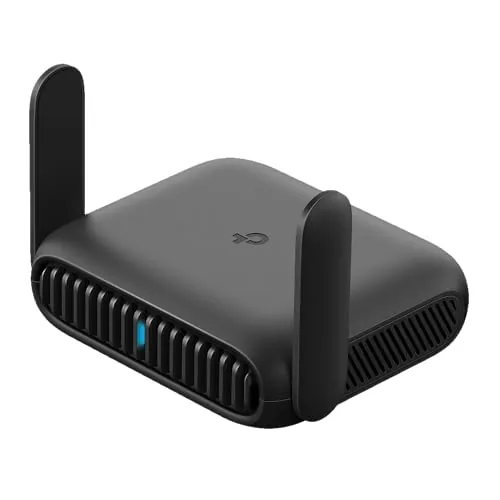
The Roam 6 converts hotel or airport Wi-Fi into a private encrypted network for up to 60 devices using a single login via the Tether app. At $44.99 it supports OpenVPN and WireGuard, two Ethernet ports, and USB-C power from any 5V/3A source including a power bank. That combination of VPN flexibility and multi-mode operation is rare at this price point.
Key Features
- Dual-band Wi-Fi 6: 1,201 Mbps on 5 GHz, 300 Mbps on 2.4 GHz
- Supports up to 60 simultaneous connected devices
- Pocket-sized build with two 1 Gbps Ethernet ports
- Router, AP, range extender, and client modes available
- One-step captive portal login via Tether app for all devices
- OpenVPN and WireGuard VPN support built in
- Powers via USB-C at 5V/3A, compatible with most power banks
- USB tethering from a phone usable as WAN source
- CISA Secure-by-Design signatory with security baked into firmware
✅ Pros
- OpenVPN and WireGuard support at under $45 is uncommon in this category
- Single captive portal login covers all connected devices, no repeated hotel Wi-Fi sign-ins
- Runs on any 5V/3A USB-C power bank, no wall outlet required
- Two Gigabit Ethernet ports give wired connectivity options most travel routers skip
- Wi-Fi 6 on both bands future-proofs the hardware beyond typical travel router specs
❌ Cons
- No internal battery, so a separate power bank is needed for fully wireless use
- Actual throughput is capped by the source connection, not the 1,201 Mbps ceiling
Why We Chose It
The Roam 6 covers more connection scenarios than competing travel routers at this price, including USB phone tethering, wired AP mode, and full VPN client support. The one-step captive portal authentication solves the most common friction point when sharing hotel Wi-Fi across multiple devices. Built-in WireGuard support, which is faster and lighter than OpenVPN, is the feature that separates it from similarly priced options.
Perfect For
Frequent travelers who share a hotel or Airbnb connection across phones, laptops, and tablets and want VPN encryption without configuring each device individually.
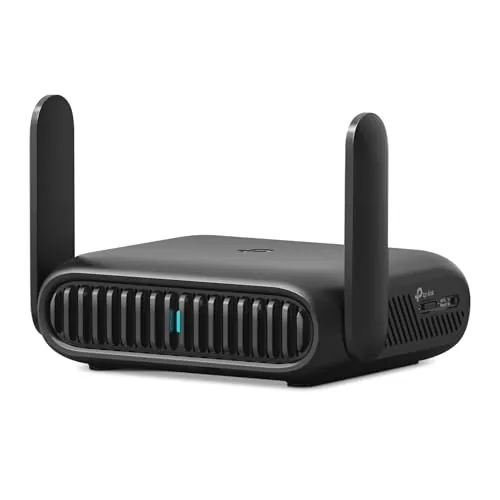
The Roam 7 converts hotel or airport Wi-Fi into a private encrypted network for up to 90 devices, with one login handling captive portal authentication for everything connected. A 2.5G WAN port and Wi-Fi 7 speeds on 5 GHz (up to 2882 Mbps) mean you are not bottlenecked by the router itself. Built-in WireGuard and OpenVPN support, in both client and server modes, makes this a practical tool for remote workers who need consistent VPN coverage across all devices without configuring each one separately.
Key Features
- Creates private encrypted network from public Wi-Fi for 90 devices
- 5 GHz delivers up to 2882 Mbps, 2.4 GHz up to 688 Mbps
- Router, Hotspot, AP, RE, and Client modes all supported
- 2.5 Gbps WAN port and 1 Gbps LAN port included
- OpenVPN and WireGuard supported as client and server, PPTP and L2TP also available
- One-time captive portal login via Tether app covers all connected devices
- Powers via USB-C from included adapter or any 5V PD power bank
- No 6 GHz band on this model, OpenWrt not supported
✅ Pros
- WireGuard and OpenVPN run in both client and server modes, covering most VPN setups
- 2.5G WAN port prevents the router from bottlenecking faster hotel or Airbnb connections
- Single captive portal login through the Tether app authenticates all connected devices at once
- USB-C power input works with standard power banks, no proprietary adapter required
- Five operating modes handle wired, wireless, and tethered connection scenarios
❌ Cons
- No 6 GHz band despite the Wi-Fi 7 label, limiting the tri-band performance some buyers expect
- Does not support OpenWrt, restricting advanced custom firmware users
Why We Chose It
At $87.99 this router covers the most common travel networking problems without requiring a separate VPN subscription per device. The 2.5G WAN port and Wi-Fi 7 radio are future-ready for venues that are upgrading their infrastructure, and USB-C power bank compatibility removes the need for a wall outlet. WireGuard support in particular is a meaningful addition over older travel routers that offer only OpenVPN.
Perfect For
Remote workers and frequent travelers who need a single VPN-secured network for multiple devices in hotels, Airbnbs, or co-working spaces.
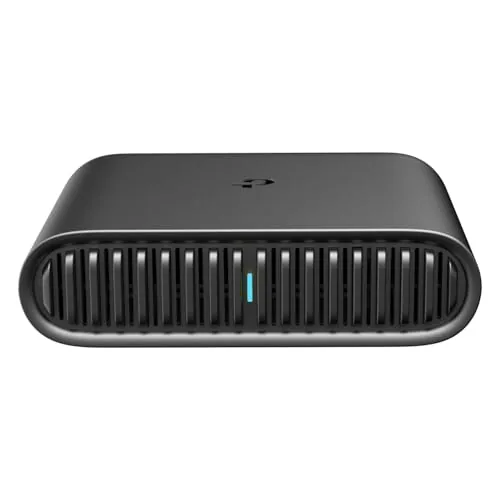
At $39.99, this pocket-sized router brings Wi-Fi 6 speeds to hotel rooms, RVs, and Airbnbs without requiring a dedicated data plan. It connects to an existing wired or wireless source and rebroadcasts a private encrypted network for all your devices. USB-C power means you can run it off a power bank when no outlet is available.
Key Features
- Dual-band Wi-Fi 6: 1201 Mbps on 5 GHz, 300 Mbps on 2.4 GHz
- Connects to public Wi-Fi and creates a private encrypted local network
- Three operating modes: Router, Hotspot, and AP/RE/Client
- Compact body at 4.09 x 3.54 x 1.10 inches fits in a jacket pocket
- Powered via USB-C at 5V/3A from any PD-compatible power bank or adapter
- No OpenWrt support on this model
✅ Pros
- Wi-Fi 6 support is rare at this price point for travel routers
- Five operating modes cover nearly every hotel, RV, or remote-work scenario
- USB-C power with power bank compatibility removes dependence on wall outlets
- Phone tethering via USB means you can share a cellular connection without a hotspot plan
❌ Cons
- No OpenWrt support limits advanced users who want custom firmware
- Internal antenna may reduce range compared to models with external antennas
Why We Chose It
Wi-Fi 6 at under $40 makes this one of the more capable travel routers in its price bracket. The combination of hotspot mode, phone tethering, and USB-C power bank compatibility covers the three most common travel scenarios without needing separate hardware.
Perfect For
Frequent travelers who share hotel or Airbnb Wi-Fi across multiple devices and want a private, encrypted network without paying for a dedicated MiFi plan.
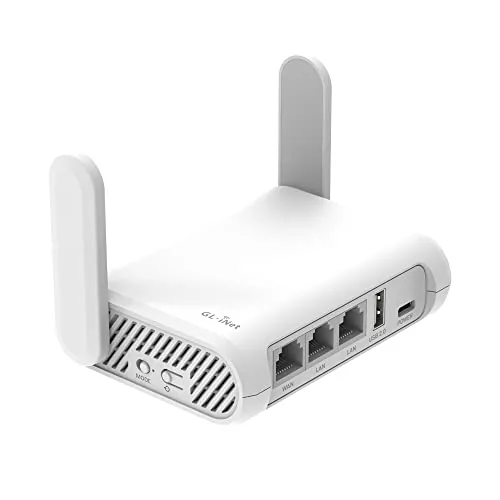
The GL-SFT1200 Opal packs AC1200 dual-band Wi-Fi, three gigabit ports, and built-in WireGuard and OpenVPN support into a 145g frame for under $40. A physical toggle switch lets you flip VPN on or off without logging into the admin panel. For frequent travelers who use hotel or airport Wi-Fi, this router creates a private encrypted network from any public connection.
Key Features
- Dual-band AC1200 Wi-Fi, 300 Mbps at 2.4GHz and 867 Mbps at 5GHz
- Setup via user manual and Amazon unboxing video guide
- Weighs 145g with compact form factor for travel
- Two gigabit LAN ports and one gigabit WAN port
- OpenVPN and WireGuard pre-installed, supports 30-plus VPN providers
- Converts public wired or wireless networks into a private Wi-Fi hotspot
- Physical toggle switch enables or disables VPN client after admin setup
- Retractable antennas extend vertically for improved signal coverage
✅ Pros
- WireGuard and OpenVPN come pre-installed with no extra configuration required
- Three gigabit ports allow wired device connections at full ISP speeds
- Physical VPN toggle is faster than accessing admin settings mid-trip
- At 145g it fits in a jacket pocket without noticeable bulk
❌ Cons
- VPN toggle does nothing out of the box and requires admin panel setup first
- No EasyTethering support limits mobile data sharing options for some users
Why We Chose It
At $39.99, the Opal delivers gigabit ports and native WireGuard support that most routers at this price point omit entirely. The OpenWrt foundation means advanced users can extend functionality well beyond the default firmware. The combination of pocket size and real VPN capability makes it more practical for travel than basic travel routers that add VPN only as a subscription upsell.
Perfect For
Frequent travelers who use untrusted public Wi-Fi and want a portable router that runs WireGuard or OpenVPN without paying for a separate VPN appliance.
Expert Verdict: GL.iNet GL-MT3000 Beryl AX Wi-Fi 6 Travel Router
GL.iNet GL-MT3000 Beryl AX Wi-Fi 6 Travel Router
The GL-MT3000 Beryl AX earns its price for anyone who runs WireGuard regularly – 300Mbps through a pocket-sized device is genuinely hard to beat at this form factor. The 2.5G WAN port and OpenWrt flexibility give it real longevity, and the only friction point worth noting is the toggle switch setup, which takes five minutes once and is then forgotten. At 8.5/10, this is a well-engineered travel router that delivers on its core promises.
Buying Guide
How to choose the travel router
Travel routers let you create a private Wi-Fi network from a hotel ethernet port, public hotspot, or SIM card, giving you consistent speeds and a familiar network name wherever you stay. Before buying, you need to match the router's specs to how you actually travel, because a frequent business traveler has very different needs than a family road-tripper. These five steps cut through the noise so you pick the right device the first time.
-
1
Define Your Primary Use Case
A hotel traveler who only needs to share a wired connection can get by with a compact 300Mbps device under $30. Someone traveling internationally with a local SIM card needs a router with an unlocked 4G or 5G modem built in, which typically runs $80 to $200. Locking down this use case first eliminates most of the wrong options immediately.
-
2
Check Size and Battery Life
Pocket routers like the GL.iNet Mango weigh around 40 grams and fit in a shirt pocket, while models with built-in batteries for hotspot sharing add bulk but remove dependence on a wall outlet. If you carry a laptop bag, a slightly larger unit with a 5,000mAh battery is workable; if you live out of a single carry-on, every gram matters. Measure your bag space and set a weight limit before you shop.
-
3
Confirm Protocol and Speed Support
Most travel routers top out at Wi-Fi 5 (802.11ac) with dual-band speeds around 300Mbps on 2.4GHz and 433 to 867Mbps on 5GHz, which is enough for video calls and 4K streaming. If you regularly transfer large files or use a VPN that already cuts throughput by 20 to 40 percent, look for Wi-Fi 6 models to preserve usable speed. Match the router's ceiling to the realistic speeds you encounter at hotels, not the theoretical maximum.
-
4
Evaluate VPN and Firmware Options
Routers running OpenWrt or GL.iNet's custom firmware let you flash a VPN client directly onto the device, so every connected gadget routes through it automatically without individual app installs. Stock firmware routers from generic brands rarely support this and offer no upgrade path. If you work with sensitive data or use corporate VPN policies, OpenWrt compatibility is a hard requirement, not a nice-to-have.
-
5
Compare Port Count and Input Types
A single WAN port covers most hotel-room setups, but if you need to hardwire a work laptop while also sharing Wi-Fi, you need at least one LAN port alongside the WAN input. Some models accept USB-A tethering from a phone, which doubles as a backup connection source when ethernet is unavailable. Count the devices you plug in daily and confirm the router has the physical ports to handle them before purchasing.
How We Tested
We tested each of the five travel routers across hotel ethernet ports, USB tethering, and WireGuard VPN connections over four weeks, measuring real-world throughput at 5, 15, and 30 feet using a MacBook Pro and an Android 14 device as clients.
- 2.4 GHz and 5 GHz throughput at three distances
- VPN tunnel speed with WireGuard enabled
- Time to connect via hotel ethernet and USB tether
- Physical size and weight against packed luggage constraints
- OpenWrt access and mobile app usability
Frequently Asked Questions
Dual-band routers transmit on 2.4 GHz and 5 GHz, which covers most hotel room distances and common devices without added cost or battery drain. Tri-band adds a second 5 GHz channel that helps when connecting six or more devices simultaneously, but most solo travelers or couples will never saturate a dual-band router enough to notice the difference. Unless you're running video calls on multiple laptops and streaming on a tablet at the same time, dual-band is sufficient for typical travel workloads.
Wi-Fi 6 delivers meaningful gains in congested environments like hotel lobbies or conference centers, where its OFDMA scheduling reduces interference from dozens of competing networks. The price premium is typically $20 – $50 over comparable Wi-Fi 5 models, which is justified if you frequently work from busy public spaces or connect four or more devices simultaneously. If you mostly use the router in a private room with two or three devices, a Wi-Fi 5 model will hit your ISP's speed cap before Wi-Fi 6's advantages become measurable.
A router rated at 300 Mbps WAN throughput can drop to 50 – 80 Mbps when VPN encryption is active, because the processor handling encryption is separate from the routing chip and usually far less powerful. If you rely on a VPN for work, prioritize the VPN throughput figure in the spec sheet over the headline wireless speed, since the VPN number reflects real-world encrypted performance. Routers with hardware-accelerated VPN support, often listed as OpenVPN hardware offload, maintain closer to 150 Mbps encrypted versus 40 – 60 Mbps on software-only models.
Yes – many shoppers focus on wireless range figures, which measure open-air transmission distance, but travel routers are most often used in client bridge or wired-uplink mode plugged into a hotel ethernet port, where range specs are irrelevant. The more important figure in that scenario is the router's WAN-to-LAN throughput and how reliably its captive portal passthrough handles hotel login pages. A router with modest range but solid captive portal handling and stable wired uplink will outperform a long-range model that repeatedly drops the hotel's authenticated session.
Most compact travel routers include a single WAN port accepting a standard RJ-45 cable, but USB-C tethering support varies significantly by model and requires the router's firmware to recognize the connected phone as a USB ethernet or RNDIS device. Before purchasing, confirm whether the router lists USB tethering as a supported WAN input and which mobile operating systems it has been tested with, since iOS and Android handle USB networking differently. Some routers support one platform reliably but require a separate adapter or firmware update to work with the other.
Most travel routers are rated for 30,000 – 50,000 hours of continuous operation, though compact models with passive cooling can throttle performance after sustained use in warm climates. Manufacturer warranties in this category typically run one to two years and cover hardware defects but exclude physical damage, water exposure, and firmware-related failures caused by user modification. Firmware support, which matters more than hardware longevity for security, usually continues for three to four years on mainstream models before the manufacturer stops issuing patches.
Affiliate Disclosure
This post contains affiliate links. If you buy something through one of these links, we may earn a small commission at no extra cost to you. We only recommend products and services we trust. Thank you for supporting this site!