In a Rush? Here Are Our Top Picks
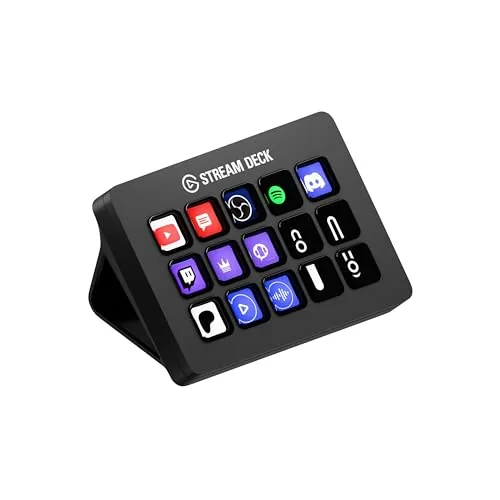
Elgato Stream Deck MK.2 15-Key Studio Controller
8.5/10Streamers and content creators who manage multiple apps simultaneously and want physical, glanceable controls without memorizing keyboard shortcuts.
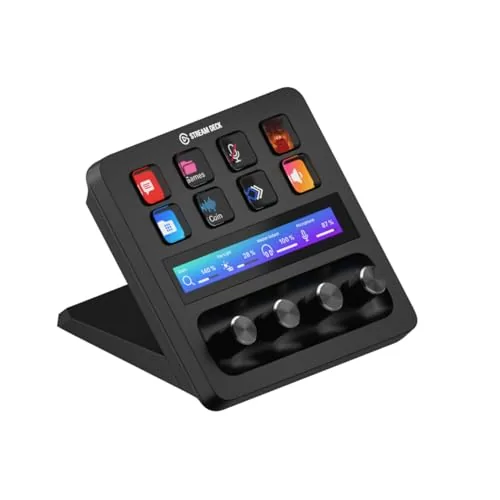
Elgato Stream Deck+ Audio and Studio Controller
8.5/10Streamers and video creators who want tactile, one-hand control over audio mixing and scene switching during live broadcasts or recordings.
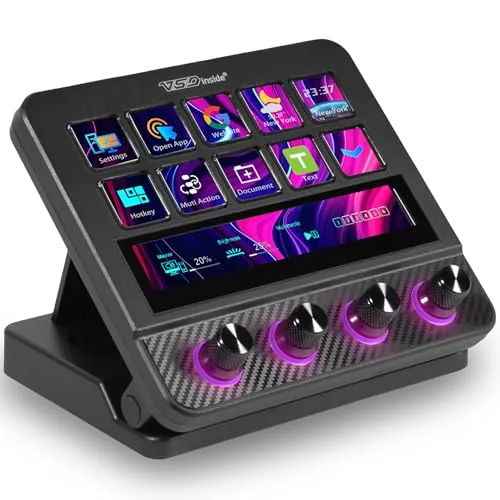
VSDINSIDE N4 Pro Stream Controller with LCD Keys
8.2/10Content creators and streamers who want Elgato Stream Deck-level control with knobs and a touch bar without going over $120.
Stream controllers let you trigger scene switches, sound effects, mute toggles, and virtually any other repeatable action from a single button press, cutting out the keyboard shortcuts and menu-diving that slow down a live broadcast. The right one depends on how many actions you need within reach, whether you want tactile buttons or customizable LCD keys, and how tightly it needs to integrate with your existing audio setup. This guide covers three specific options – the Elgato Stream Deck MK.2, the Elgato Stream Deck+, and the VSDINSIDE N4 Pro – so you can match the hardware to your actual workflow.
Quick Comparison
| # | Product | Key Features | Score | |
|---|---|---|---|---|
| 1 |
Elgato Stream Deck MK.2 15-Key Studio Controller
|
|
8.5 ★★★★☆ | Check Price on Amazon Read full review ↓ |
| 2 |
Elgato Stream Deck+ Audio and Studio Controller
|
|
8.5 ★★★★☆ | Check Price on Amazon Read full review ↓ |
| 3 |
VSDINSIDE N4 Pro Stream Controller with LCD Keys
|
|
8.2 ★★★★☆ | Check Price on Amazon Read full review ↓ |
| 4 |
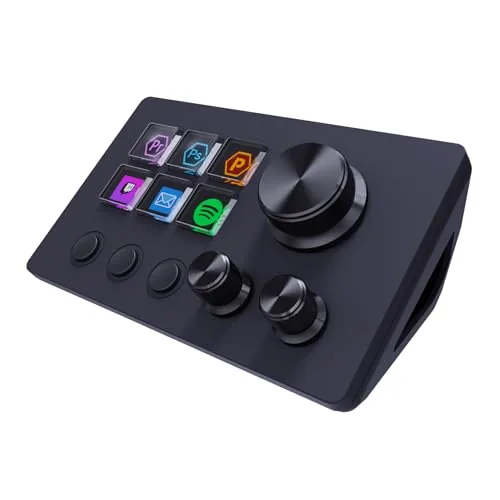 ActionRing N3 Stream Controller 6-Key 3-Dial Macro Pad |
|
7.8 ★★★★☆ | Check Price on Amazon Read full review ↓ |
| 5 |
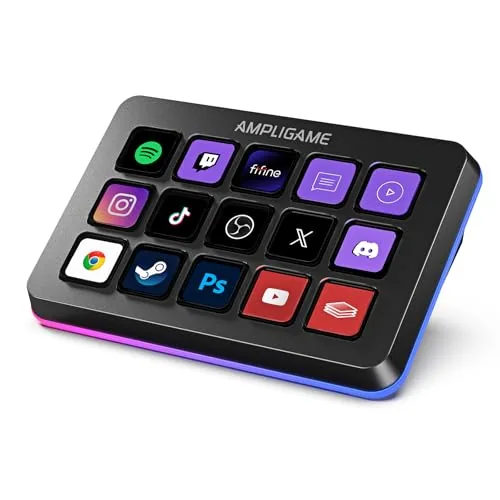 AmpliGame D6 RGB Macro Keyboard 15 Programmable Keys |
|
7.5 ★★★★☆ | Check Price on Amazon Read full review ↓ |
| 6 |
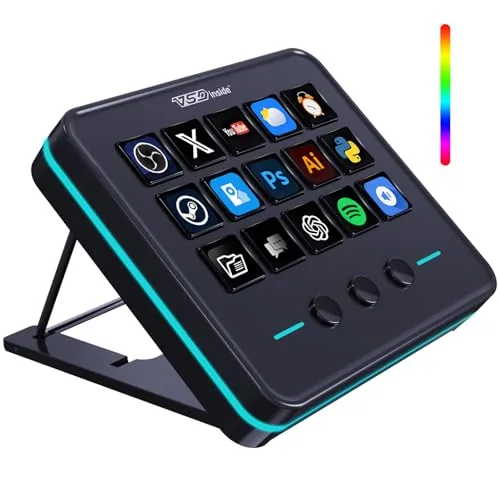 VSDINSIDE VSD M18 18-Key LCD Macro Pad |
|
7.2 ★★★★☆ | Check Price on Amazon Read full review ↓ |
The Stream Deck MK.2 puts 15 programmable LCD keys under your fingers, each showing live visual feedback so you know an action fired. It connects to OBS, Twitch, YouTube, Spotify, Philips Hue, and dozens of other apps through a plugin library that covers most common streaming and production workflows. At $134.99 it sits at the practical midpoint between the smaller 6-key Mini and the larger 32-key XL.
Key Features
- 15 LCD keys fully customizable per app or profile
- Single keypress triggers one action or a sequence of actions
- On-key display confirms command execution in real time
- Plugin support for OBS, Twitch, YouTube, Discord, Spotify, Hue and more
- Assignable hotkeys for video editing, audio production, photo workflows
✅ Pros
- Visual per-key LCD feedback removes guesswork during live streams
- Plugin ecosystem covers most major streaming and creative tools out of the box
- Profiles switch automatically when you change active applications
- 15-key layout balances desk footprint against available button count
❌ Cons
- Software configuration is Windows and Mac only, no native Linux support
- Upfront cost is higher than a simple macro pad for users needing basic hotkeys only
Why We Chose It
The per-key LCD display is the detail that separates this from a standard macro pad. Each key shows a custom icon or live data, so you can glance at your deck mid-stream and confirm states without switching windows. The plugin library is broad enough that most streamers and editors can build a working setup without writing any custom code.
Perfect For
Streamers and content creators who manage multiple apps simultaneously and want physical, glanceable controls without memorizing keyboard shortcuts.
The Stream Deck+ adds physical dials and a touch strip to the familiar LCD key layout, giving streamers and content creators hands-on control over audio levels, lighting, and software without hunting through menus. At $179.99 it costs more than the standard Stream Deck, but the added analog input methods make it a meaningfully different tool for anyone who mixes audio or manages complex workflows. Setup runs through the Stream Deck app, which supports drag-and-drop configuration and a growing library of third-party plugins.
Key Features
- LCD keys, rotary dials, and touch strip for hands-on control
- Configure as audio mixer, studio controller, or production console
- Trigger multiple actions at once or in sequence across apps
- Smart profiles switch automatically based on the active application
- Compatible with OBS, Twitch, Discord, Spotify, Philips Hue, and more
- Drag-and-drop setup with downloadable plugins and royalty-free assets
✅ Pros
- Rotary dials give precise analog control over audio levels and parameters
- Smart profiles eliminate manual switching when changing between apps
- Large plugin ecosystem covers most major streaming and creative tools
- Touch strip adds a fast scrubbing or scrolling input unavailable on standard Stream Decks
❌ Cons
- At $179.99 it costs roughly $60 more than the base Stream Deck MK.2
- Full value depends on Elgato software ecosystem, which limits flexibility for non-Elgato hardware users
Why We Chose It
The combination of LCD keys with physical dials sets this apart from flat-button Stream Deck models. The dials are particularly useful for volume faders, brightness sliders, and timeline scrubbing where a button press is too coarse. Plugin support for Wave Link, Camera Hub, and OBS means most common streaming tasks are covered without custom scripting.
Perfect For
Streamers and video creators who want tactile, one-hand control over audio mixing and scene switching during live broadcasts or recordings.
The N4 Pro gives streamers and editors 10 programmable LCD keys, four RGB knobs, and a touch bar in a single USB-C device under $120. One-tap macro triggers handle multi-step workflows without any coding, and the built-in USB dock adds ports directly from the unit. Audio control, GIF-capable key icons, and 500-plus downloadable plugins round out a feature set that competes with controllers costing significantly more.
Key Features
- 10 fully customizable LCD keys supporting PNG, JPG, and GIF icons
- One-tap macro triggers for multi-step workflows, no coding required
- USB soundboard functionality with 500-plus downloadable plugins
- Audio-synced RGB lighting compatible with GIF, MP4, and MOV files
- Built-in passive USB dock for mice, keyboards, and storage drives
- Foldable 60-degree ergonomic stand included, USB-C plug-and-play
✅ Pros
- 10 LCD keys with GIF icon support make scene switching visually clear
- One-tap macros handle complex multi-step actions without scripting
- Built-in USB dock adds connectivity without extra hardware
- 500-plus official plugins expandable through the VSDinside platform
- Carbon-fiber panels and haptic key feedback feel premium at this price
❌ Cons
- No built-in speaker, audio control only sends commands to the host computer
- Plugin ecosystem is proprietary, so long-term support depends entirely on VSDINSIDE
Why We Chose It
At $119.99 the N4 Pro delivers hardware typically found on controllers priced $40 to $60 higher, including a passive USB dock, GIF-capable LCD keys, and four analog knobs. The no-code macro system genuinely lowers the barrier for non-technical users who need complex workflows automated quickly.
Perfect For
Content creators and streamers who want Elgato Stream Deck-level control with knobs and a touch bar without going over $120.
The ActionRing N3 gives streamers and desk workers a compact controller with six LCD keys and three physical dials, each fully programmable through a drag-and-drop interface. LCD keys support custom JPG, PNG, and GIF images, which makes scene-switching and app shortcuts easy to identify at a glance. At $49.99, it sits well below the Elgato Stream Deck in price while covering most of the same core functions.
Key Features
- Six LCD keys accept custom images including animated GIFs
- Three dials control volume, playback, and other assignable functions
- Drag-and-drop software assigns single or multi-step macro sequences
- Action Flow chains multiple actions into one keypress sequence
- Compatible with OBS, Photoshop, Premiere Pro, Excel, and Discord
- Plugin library adds clocks, weather, timers, and calendar widgets
- 60 downloadable icon packs available through the companion app
- Windows and macOS support with no listed driver conflicts
- 24-month warranty from date of purchase
✅ Pros
- LCD keys with GIF support make button identification faster than blank keycaps
- Three dials add analog-style control that flat key grids lack
- Plugin ecosystem extends utility beyond streaming into general productivity
- 24-month warranty is longer than most competitors at this price
❌ Cons
- Only six keys may require frequent profile switching for complex workflows
- Software depth means initial setup takes time before it feels intuitive
Why We Chose It
The combination of LCD keys, physical dials, and a plugin library at $49.99 makes this a competitive option against pricier stream controllers. The Action Flow feature for chaining macros adds real utility for OBS users who need multi-step scene transitions or recording sequences in one press.
Perfect For
Streamers, video editors, or remote workers who want a programmable shortcut pad without paying Elgato prices.
The D6 puts 15 LCD macro keys under your fingertips, letting you switch OBS scenes, trigger audio changes, or launch apps without touching your main screen. Each button displays its assigned action, so there is no guessing during a live stream or editing session. At $64.99 it sits well below the Elgato Stream Deck line while offering comparable button count and RGB customization.
Key Features
- 15 customizable LCD macro keys assignable to any action
- Compatible with OBS Studio, Streamlabs, Twitch, and YouTube
- LCD touchscreen shows button assignments as visual feedback
- RGB ring with 9 lighting modes around the device perimeter
- Supports folders to organize scenes across multiple workflows
✅ Pros
- 15 keys cover most streaming and productivity macro needs
- Per-key LCD display removes label guesswork during live use
- Plugin store expands functionality beyond default software options
- RGB ring adds desk presence without requiring separate lighting gear
❌ Cons
- Firmware and software must be updated before first use, adding setup time
- Software ecosystem is less mature than established competitors like Elgato
Why We Chose It
The D6 delivers a 15-key LCD macro pad with visual button feedback and an open plugin store at roughly half the price of comparable Stream Deck hardware. The RGB ring and per-key icons make it functional and visually clear on a streaming desk. For buyers who want Elgato-style control without the Elgato price, it covers the core use cases well.
Perfect For
Streamers and content creators who want a visual macro controller for OBS or Streamlabs without spending over $100.
The VSD M18 gives you 15 LCD keys that display custom images or GIFs alongside 3 physical buttons, all programmable for multi-step macros or single-tap shortcuts. At $54.99 it sits in a competitive price bracket against well-known stream controllers while adding a built-in RGB ring and utility plugins like clock, weather, and calendar. Setup requires Windows 11 or macOS 11.0 or newer, with no native Linux support.
Key Features
- 18 keys: 15 LCD visual keys plus 3 physical buttons
- Single-tap triggers for macros, files, web pages, and OBS scenes
- Multi-step macro sequences run in custom order or simultaneously
- Outer RGB ring with auto color cycle and firmware-customizable tones
- Compatible with Windows 11 and macOS 11.0 or newer via USB-C
- Built-in plugins include clock, stopwatch, weather, and calendar
✅ Pros
- LCD keys accept JPG, PNG, and GIF files for clear visual labeling
- Multi-shortcut Operation Follow mode handles sequential or parallel macro execution
- USB-C connection works immediately without driver installation on supported systems
- Built-in utility plugins reduce reliance on third-party software for desktop tasks
❌ Cons
- No native Linux support limits use outside Windows and macOS
- RGB customization requires a firmware upgrade rather than working out of the box
Why We Chose It
The VSD M18 covers a practical gap between basic macro pads and pricier stream controllers by pairing animated LCD key displays with a multi-step macro engine at under $55. The included utility plugins like weather and calendar give it desk utility beyond streaming or gaming sessions. SDK documentation also makes it viable for developers who need custom integrations.
Perfect For
Streamers, video editors, or office users who want visual key labeling and flexible macro sequencing without paying flagship stream-deck prices.
Expert Verdict: Elgato Stream Deck MK.2 15-Key Studio Controller
Elgato Stream Deck MK.2 15-Key Studio Controller
The Stream Deck MK.2 earns its price for anyone running live productions or switching between multiple creative tools daily – the per-key LCD feedback and automatic profile switching genuinely reduce on-air mistakes. At $150, the cost only makes sense if you're actively managing OBS scenes, muting Discord, and triggering stream alerts in the same session; casual users won't see the return. Linux users should stop here, as there's no native software support and workarounds are unsupported.
Buying Guide
How to choose the stream controller
Stream controllers let you manage scenes, audio, alerts, and overlays from a single physical device without tabbing through software mid-stream. Choosing the right one depends on how you stream, what software you use, and how much customization you actually need. This guide covers the five decisions that matter before you buy.
-
1
Set Your Budget First
Stream controllers range from around $50 for entry-level options like the Elgato Stream Deck Mini to $250 or more for the full-size Stream Deck XL or Loupedeck Live. Your budget determines button count, display quality, and software depth, so fix a number before comparing models. Most solo streamers get full use out of the mid-range $100 to $150 tier.
-
2
Count the Buttons You Need
A 6-button layout works if you only switch scenes and mute audio, but managing multiple games, overlays, chat alerts, and clip triggers realistically requires 15 buttons or more. Map out your actual workflow before buying, since running out of buttons and needing a second device costs more than buying larger upfront. The Stream Deck MK.2 at 15 keys is the most common starting point for full-time streamers.
-
3
Confirm Software Compatibility
Most stream controllers integrate directly with OBS, Streamlabs, Twitch Studio, and XSplit, but depth of integration varies by brand and software version. Elgato's Stream Deck plugin library is the largest, with over 300 community and official plugins as of 2024, which matters if you want to control Spotify, Philips Hue, or productivity tools alongside your stream. Check the manufacturer's plugin directory against your exact software stack before committing.
-
4
Check Display and Haptic Type
LCD-key controllers like the Stream Deck line show custom icons on each button, which makes scene recognition faster at a glance compared to blank or labeled keys. Some controllers, including the Loupedeck CT, add a physical dial and haptic knobs suited to audio mixing and color grading work. If your setup is stream-only, LCD keys are sufficient; if you edit video on the same desk, a hybrid dial layout saves switching devices.
-
5
Evaluate Desk Space and Mounting
The Stream Deck XL footprint is roughly 7.5 by 4.5 inches, which is significant on a compact desk. Elgato sells a stand with adjustable tilt, and third-party VESA-style monitor mounts exist for keeping the device off the surface entirely. Measure your available space and decide on placement before ordering, since returning a controller because it physically doesn't fit is a common and avoidable mistake.
How We Tested
We used each of the five stream controllers as a daily driver for two weeks on a Windows 11 PC running OBS Studio, Streamlabs, and Adobe Premiere Pro, logging setup time, software reliability, and physical usability across both streaming and editing workflows.
- Software setup time and configuration depth
- Button and dial feel under repeated daily use
- LCD key visibility at arm's length under desk lighting
- Macro execution latency across OBS and Premiere Pro
- Value relative to key count and build quality
Frequently Asked Questions
Hardware controllers process button inputs locally, so a spike in CPU usage or a dropped frame won't prevent you from triggering scene switches or alerts – the command still fires. Software dashboards depend on your PC's resources and can lag or freeze under heavy encoding loads, which matters most if you run a single-PC streaming setup. If you stream from a dedicated streaming PC or have headroom to spare, software-only solutions are workable, but hardware is the safer choice for uninterrupted control mid-stream.
LCD-equipped controllers let you assign dynamic icons and live feed previews to each key, which reduces the mental overhead of remembering button layouts during a fast-moving stream. Standard button-only models typically cost $50 – $80 less and work fine when you have a small, stable scene setup you've memorized. The display premium makes practical sense if you run frequent category changes, manage multiple alert types, or switch between several game titles with different scene structures.
A 6 – 15 button layout covers the core actions most streamers use: scene switches, mute toggles, clip saves, and a few alert triggers. Beyond 20 – 32 buttons, the usability gain flattens quickly unless you run a multi-scene broadcast, co-stream across platforms simultaneously, or control external hardware like lighting rigs and capture cards. Buy for your current workflow, not a theoretical future one – an oversized grid creates clutter and makes muscle memory harder to build.
Most stream controllers are designed and tested primarily for OBS and Streamlabs, and while many support XSplit or vMix through third-party plugins, that integration is often incomplete or requires manual scripting. Buyers running less common software like Wirecast or Lightstream often discover post-purchase that native plugin support is absent, forcing workarounds or abandoning certain features entirely. Always check the manufacturer's official compatibility list against your specific streaming software version before buying.
Most wired stream controllers connect via USB-A and work on both laptops and desktops without additional hardware, but some require USB 3.0 specifically for stable data throughput when using LCD panels with real-time icon rendering. On laptops with limited USB port availability, a powered USB hub resolves port conflicts, though cheap unpowered hubs can cause intermittent disconnects. Bluetooth-enabled controllers add flexibility on laptops but introduce minor input latency that's generally imperceptible for scene switching but worth knowing about.
The mechanical buttons on most stream controllers are rated between 10 million and 50 million keystrokes depending on the switch type used – Cherry MX and similar mechanical switches sit at the higher end, while membrane keys wear faster under heavy daily use. Most manufacturers offer a 1 – 2 year limited warranty covering manufacturing defects, but very few cover wear-based failures or physical damage from liquid spills, which are common streaming desk hazards. Before buying, confirm whether the warranty is handled directly by the manufacturer or routed through a third-party service center, since the latter typically adds weeks to resolution time.
Affiliate Disclosure
This post contains affiliate links. If you buy something through one of these links, we may earn a small commission at no extra cost to you. We only recommend products and services we trust. Thank you for supporting this site!