In a Rush? Here Are Our Top Picks
Razer Tartarus Pro Analog-Optical Gaming Keypad
8.5/10Competitive PC gamers or power users who need deep key remapping, fast reset times, and ergonomic left-hand control without a full keyboard footprint.
Redragon K585 One-Handed Keypad with Hot-Swap Sockets
8.2/10MMO or MOBA players who want a compact macro-capable keypad and the option to tune switch feel without buying a whole new unit.
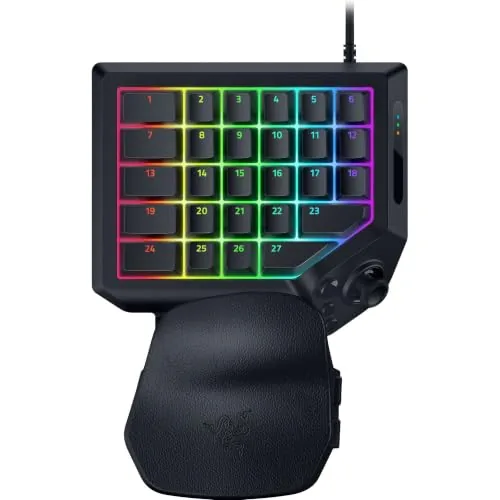
Razer Tartarus V2 Pro Analog Optical Gaming Keypad
8.2/10MMO and FPS players who want analog stick precision alongside a fully programmable keypad in a single left-hand peripheral.
Gaming keypads compress the left side of a full keyboard into a compact, ergonomically angled device that keeps your hand relaxed during long sessions and puts every key within easy reach. The difference between a cheap one and a well-built one shows up fast – in missed inputs, mushy actuation, or a layout that cramps your fingers after an hour. This guide covers three options at different price points, including the Razer Tartarus Pro Analog-Optical, the Razer Tartarus V2 Pro, and the budget-friendly Redragon K585, so you can match the right keypad to how you actually play.
Quick Comparison
| # | Product | Key Features | Score | |
|---|---|---|---|---|
| 1 |
Razer Tartarus Pro Analog-Optical Gaming Keypad
|
|
8.5 ★★★★☆ | Check Price on Amazon Read full review ↓ |
| 2 |
Redragon K585 One-Handed Keypad with Hot-Swap Sockets
|
|
8.2 ★★★★☆ | Check Price on Amazon Read full review ↓ |
| 3 |
Razer Tartarus V2 Pro Analog Optical Gaming Keypad
|
|
8.2 ★★★★☆ | Check Price on Amazon Read full review ↓ |
| 4 |
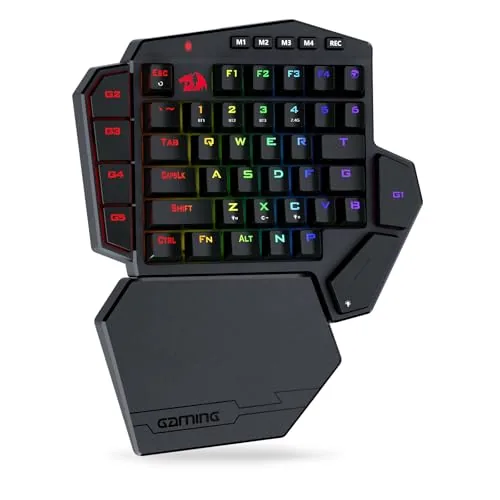 Redragon K585 PRO Wireless One-Handed Keypad |
|
8.2 ★★★★☆ | Check Price on Amazon Read full review ↓ |
| 5 |
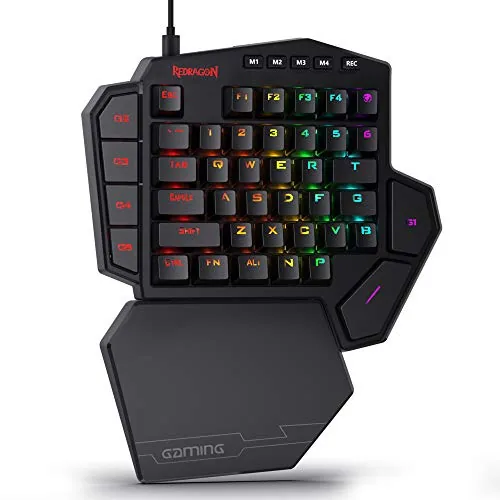 Redragon K585 One-Handed Keypad with Hot-Swap |
|
8.2 ★★★★☆ | Check Price on Amazon Read full review ↓ |
| 6 |
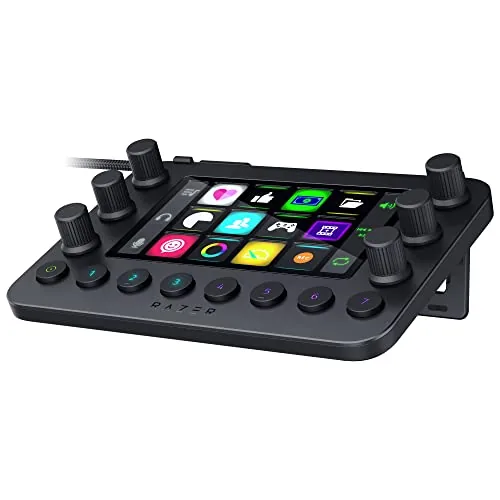 Razer Stream Controller with Haptic Keys and Analog Dials |
|
8.0 ★★★★☆ | Check Price on Amazon Read full review ↓ |
| 7 |
 Razer Tartarus V2 32-Key Left-Hand Gaming Keypad |
|
7.8 ★★★★☆ | Check Price on Amazon Read full review ↓ |
| 8 |
 RedThunder One-Handed 35-Key RGB Gaming Keypad |
|
7.5 ★★★★☆ | Check Price on Amazon Read full review ↓ |
| 9 |
 CHONCHOW 35-Key One-Handed Gaming Keyboard RGB LED |
|
7.2 ★★★★☆ | Check Price on Amazon Read full review ↓ |
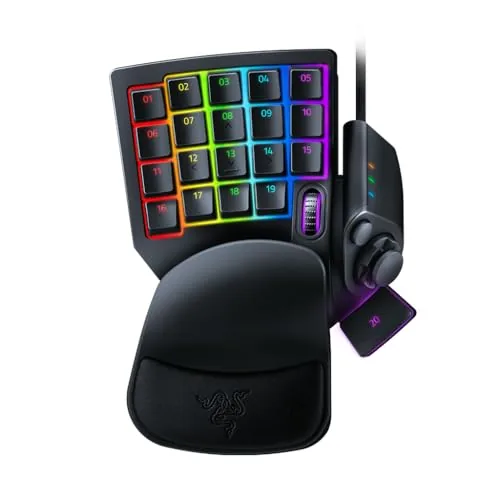
The Tartarus Pro gives PC gamers 32 fully programmable keys with analog-optical switches that support rapid trigger and adjustable actuation from 1.5 to 3.6 mm. The 8-way thumbpad replaces a joystick for movement, making it practical for players transitioning from console. At $129.99 it sits at the premium end, but the hardware spec justifies the price for competitive or macro-heavy workflows.
Key Features
- Rapid trigger resets keys on upward motion as low as 0.1 mm
- Actuation depth adjustable between 1.5 mm and 3.6 mm per key
- 32 fully programmable keys for gaming or creative workflows
- 8-way directional thumbpad for movement control
- Hypershift remapping doubles key functions via key combinations
- Chroma RGB with per-key lighting syncs across 30-plus partner devices
✅ Pros
- 0.1 mm rapid trigger response gives a measurable edge in fast-paced games
- Adjustable actuation lets you tune sensitivity per playstyle rather than accepting a fixed point
- 32 programmable keys with Hypershift effectively doubles available inputs without extra hardware
- Thumbpad works well for players who prefer analog stick movement over WASD
❌ Cons
- $129.99 is a steep entry point for users who only need basic macro functionality
- Analog features require Razer Synapse software, adding a background process some users prefer to avoid
Why We Chose It
The analog-optical switches with rapid trigger and variable actuation depth put this keypad above standard membrane or mechanical alternatives for competitive play. The combination of 32 keys, Hypershift, and the thumbpad also makes it genuinely useful for content creators running complex software shortcuts.
Perfect For
Competitive PC gamers or power users who need deep key remapping, fast reset times, and ergonomic left-hand control without a full keyboard footprint.
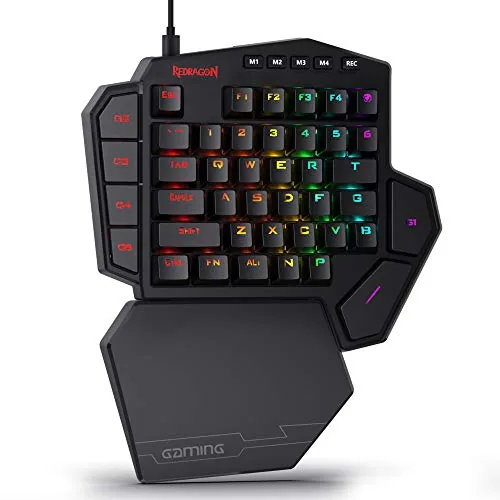
The K585 packs 42 keys and 7 dedicated macro keys into a compact left-hand layout, giving MMO and MOBA players fast access to ability rotations without reaching across a full board. Hot-swap sockets let you swap 3-pin or 5-pin switches without a soldering iron, and a USB pass-through port keeps your desk cable runs short. At $32.99, the feature set is hard to match at this price point.
Key Features
- 7 macro keys store 28 combos across 4 profiles
- Hot-swap socket accepts most 3-pin and 5-pin switches
- USB pass-through port routes mouse or headset cables
- Magnetic wrist rest detaches for a smaller footprint
- 16.8 million colors across 5 RGB lighting modes
- Software lets you record macros and build custom lighting
✅ Pros
- Hot-swap support at under $35 is rare in this category
- 28 macro combo slots across 4 profiles covers complex MMO rotations
- USB pass-through reduces cable clutter on small desks
- Detachable magnetic wrist rest adds flexibility for different grip styles
❌ Cons
- Software required for deep macro customization adds setup time
- RGB modes limited to 5 presets without software open
Why We Chose It
Hot-swap switch support and a USB pass-through port at this price separate the K585 from similarly priced one-handed keypads that offer neither. The 4-profile system with 28 total macro slots gives MMO players enough room to map full ability bars per character without reprogramming between sessions.
Perfect For
MMO or MOBA players who want a compact macro-capable keypad and the option to tune switch feel without buying a whole new unit.
The Tartarus V2 Pro gives left-hand controllers 31 programmable keys with analog optical switches tuned down to 0.1mm actuation. The full-sized TMR thumbstick eliminates drift and mirrors either controller stick orientation. At $199.99, it targets competitive MMO and FPS players who want controller-style analog input from a keypad.
Key Features
- Analog optical switches with 0.1 to 4.0mm adjustable actuation and Rapid Trigger
- Adjustable ergonomic wrist rest moves across multiple axes
- Thumbstick configurable to mirror left or right controller stick orientation
- Full-sized anti-drift TMR thumbstick with 31 fully programmable controls
- 24 keymaps across 3 on-board profiles for multiple game genres
- 8000Hz HyperPolling for near-zero input latency
- Individually lubricated switches with foam dampening for quieter actuation
- Snap Tap prioritizes directional inputs for faster movement changes
✅ Pros
- 0.1mm Rapid Trigger actuation is among the most precise available on any keypad
- TMR thumbstick avoids the stick drift common in potentiometer-based designs
- 8000Hz polling rate matches top-tier gaming mice for latency-sensitive play
- 24 keymap slots cover deep MMO ability layouts without software switching mid-game
- Lubricated switches with foam dampening reduce noise without aftermarket modding
❌ Cons
- At $199.99, the price is significantly higher than competing keypads that lack analog features
- Razer Synapse software required for full configuration, which adds a background process
Why We Chose It
The combination of analog optical switches and a drift-resistant TMR thumbstick puts precise analog input on a wired keypad in a way most competitors do not offer. The 8000Hz polling and sub-millimeter actuation make it viable for competitive FPS use, not just MMO utility. The multi-axis wrist rest addresses long-session comfort that fixed-rest keypads typically ignore.
Perfect For
MMO and FPS players who want analog stick precision alongside a fully programmable keypad in a single left-hand peripheral.
The K585 PRO cuts the cord on one-handed gaming with 2.4GHz wireless and 15 to 20 hours of battery life per charge. Seven dedicated macro keys give MMO and MOBA players fast access to ability rotations without reaching across a full keyboard. Hot-swap sockets mean you can replace switches in minutes without a soldering iron.
Key Features
- 7 macro keys, 28 total binds across 4 profiles
- 2.4GHz or Bluetooth wireless, 15 to 20 hour battery
- Hot-swap socket fits most 3-pin and 5-pin switches
- Stock Red switches rated for 50 million keypresses
- Magnetic wrist rest detaches for a smaller footprint
- Software lets you record macros and customize RGB lighting
✅ Pros
- Hot-swap support at this price is rare for one-handed keypads
- 28 total macro binds across 4 profiles covers complex MMO rotations
- Wireless at under 50 dollars removes desk cable clutter
- Detachable wrist rest gives flexibility depending on hand size and preference
❌ Cons
- 15 to 20 hour battery life requires more frequent charging than wired alternatives
- Software customization adds setup time before the keypad is truly optimized
Why We Chose It
Hot-swap sockets and 2.4GHz wireless together at 49.99 is a strong value combination that most competitors at this price skip. The 28 programmable macro binds across four profiles give serious MMO players meaningful depth without moving to a more expensive unit.
Perfect For
MMO or MOBA players who want wireless freedom, fast macro access, and the ability to swap switches without specialized tools.
The K585 packs 42 keys and 7 dedicated macro keys into a compact left-hand layout priced at $36.99, making it one of the more capable budget options in this category. Hot-swap sockets accept 3-pin and 5-pin switches, so you can retune the feel without a soldering iron. The USB pass-through and magnetic wrist rest add practical desk utility that most keypads at this price skip.
Key Features
- 7 macro keys support 28 combo slots across 4 profiles
- Hot-swap socket fits most 3-pin and 5-pin switches, no soldering
- USB pass-through port and detachable magnetic wrist rest included
- 16.8 million colors with 5 RGB lighting modes
- Software allows custom macro recording and lighting configuration
✅ Pros
- Hot-swap support at under $37 is rare in this price tier
- 28 macro slots across 4 profiles covers complex MMO or MOBA keybind setups
- USB pass-through keeps mouse or headset cabling off the desk
- Magnetic wrist rest detaches cleanly when you want a smaller footprint
❌ Cons
- Software customization requires a Windows install, no standalone app for other OS
- 42-key layout may feel cramped for users with larger hands
Why We Chose It
Hot-swap switch support and 28 onboard macro slots are features that typically appear on keypads costing significantly more. The USB pass-through and removable wrist rest solve real desk-management problems without adding bulk or cost. At $36.99, the hardware spec-to-price ratio is hard to match in the one-handed keypad segment.
Perfect For
MMO or MOBA players who want a dedicated macro keypad with switch customization on a tight budget.
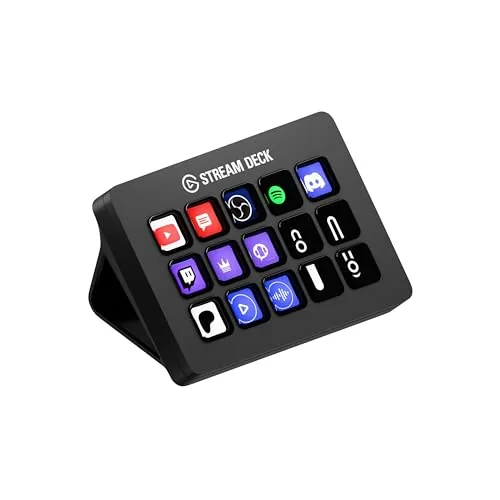
A dedicated streaming control surface with 12 LCD haptic keys, 6 analog dials, and 8 programmable buttons, all managed through a touchscreen interface. It connects directly with OBS, Twitch, Discord, Spotify, and major Adobe apps without third-party bridging software. At $146.85, it targets streamers and content creators who want physical hardware control over multiple apps simultaneously.
Key Features
- Central hub for shortcuts across multiple streaming and creative programs
- 12 LCD keys with customizable icons and adjustable haptic feedback
- 6 analog dials for audio, media, and channel level adjustments
- 8 programmable buttons toggle between up to 8 key layouts
- Dynamic Mode auto-switches profiles based on the active application
- Works with PC, Mac, OBS, Streamlabs, Adobe CC, and Final Cut Pro
✅ Pros
- Haptic feedback on keys gives physical confirmation without audible clicks
- Six analog dials provide precise volume and parameter control that touch panels cannot replicate
- Native integration with 11 major apps reduces setup time significantly
- Dynamic Mode profile switching removes manual layout changes mid-stream
❌ Cons
- At $147 it costs more than competing stream decks with similar key counts
- Full functionality depends on Razer software, which adds a background process requirement
Why We Chose It
The combination of physical analog dials alongside programmable LCD keys separates this from flat touchscreen-only controllers. Native support for Adobe Creative Cloud apps makes it practical beyond streaming, covering video editing and photo work in the same hardware footprint.
Perfect For
PC or Mac streamers who also edit video or photos and want one control surface that handles both workflows without switching devices.
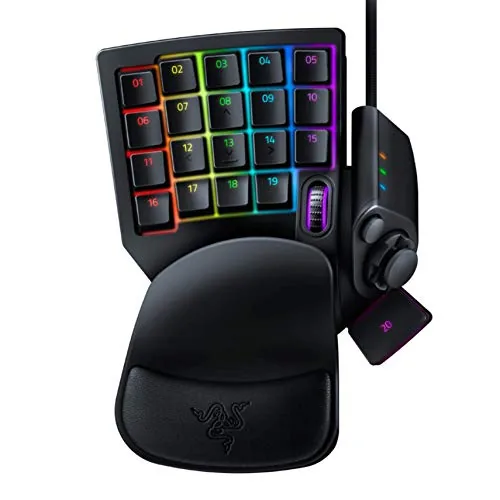
The Tartarus V2 gives PC gamers a dedicated left-hand control surface with 32 fully remappable keys and an 8-way directional thumbpad. Mecha-membrane switches deliver tactile click feedback without the noise of full mechanical keys. At $74.95 it competes directly with the Logitech G13 and similar pads at a reasonable price for the feature set.
Key Features
- Mecha-membrane switches combine tactile feedback with soft rubber dome cushioning
- 32 fully programmable keys support gaming and creative workflow hotkeys
- 8-way thumbpad enables directional input for console-style movement controls
- Hypershift doubles key assignments, allowing complex macro remapping on all keys
- Per-key Chroma RGB syncs with games and 30-plus hardware partners, 16.8M colors
✅ Pros
- 32 keys is enough to map an entire MMO or editing shortcut layout without overlap
- Hypershift effectively doubles the keypad to 64 programmable inputs on one device
- Thumbpad reduces reliance on WASD, useful for players transitioning from controller
- Mecha-membrane feel reduces fatigue during long sessions compared to full mechanical switches
❌ Cons
- Razer Synapse software is required for macro and RGB configuration, adding background overhead
- Mecha-membrane switches lack the crisp actuation precision of dedicated mechanical switches
Why We Chose It
The Tartarus V2 stands out for the combination of 32 keys plus Hypershift, which gives creative professionals and MMO players more remappable inputs than any competing pad at this price. The thumbpad is a practical addition for console converts who prefer analog-style movement over WASD.
Perfect For
MMO players, video editors, or streamers who need more hotkeys than a standard keyboard layout allows without reaching across the desk.
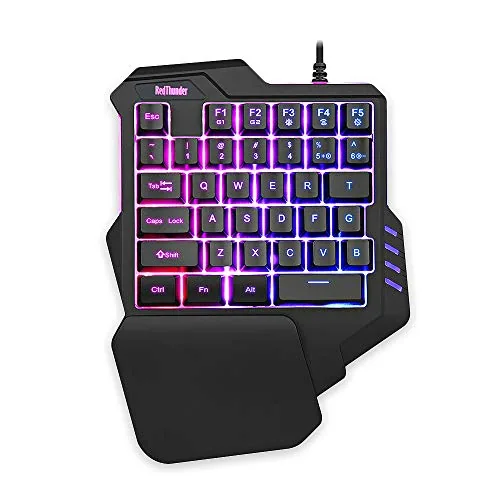
A compact one-handed keypad built for PC gamers who want full anti-ghosting and macro support without spending much. At $23.99, it covers the core left-hand controls with a built-in wrist rest and plug-and-play setup. The 3ms response time and 35-key layout handle most PC game genres without driver installation.
Key Features
- 35 anti-ghosting keys with 3ms response via built-in game chip
- Two assignable macro recording slots triggered by FN+F1 and FN+F2
- Compact portable layout with attached wrist rest for left-hand use
- RGB backlit with 7 colors in breath or static mode
- Driver-free plug-and-play, compatible with Windows, Mac, and Linux
✅ Pros
- No driver installation required, works immediately on most operating systems
- Two macro slots let you record and replay key sequences on the fly
- Attached wrist rest reduces wrist strain during extended sessions
- $23.99 price point is low enough to use as a dedicated travel keypad
❌ Cons
- Only two macro slots limits customization for complex game setups
- RGB lighting offers just 7 colors with no software for deeper control
Why We Chose It
The combination of true anti-ghosting across all 35 keys and a sub-$24 price makes this a practical entry point for one-handed gaming peripherals. The macro recording works without any software, which keeps setup time under a minute. Few keypad options at this price include an integrated wrist rest.
Perfect For
Budget-conscious PC gamers or laptop users who want a dedicated left-hand keypad for titles like MMOs, MOBAs, or survival games without committing to a high-end peripheral.
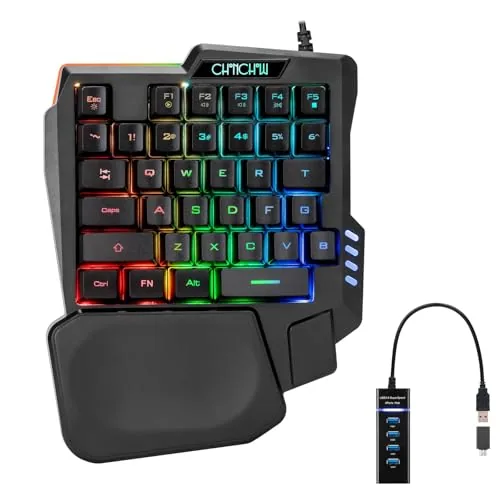
A compact 8.3×6.3 inch keyboard built for left-hand gaming, covering the keys most FPS players actually use. The included wrist rest and curved keycaps reduce fatigue during longer sessions. At $17, it plugs in via USB with no driver install required.
Key Features
- 8.3×6.3×1.2 inch layout frees up mouse movement space
- 35 backlit keys with side LED lighting included
- Wrist rest with recessed cradle and curved keycaps
- FN shortcuts for backlight static and breathing modes
- FN key combos control music playback and volume
- USB plug-and-play across Windows XP through Win11 and consoles
- 30-day refund or replacement plus 12-month maintenance warranty
✅ Pros
- Plug-and-play setup requires zero driver installation
- Wrist rest is included at this price point
- Works across PC, PS3 through PS5, Xbox, and Mac
- Compact footprint gives more room for mouse movement
❌ Cons
- Only 35 keys limits use outside core gaming inputs
- Warranty is 30 days for refunds, 12 months only for repairs
Why We Chose It
The wrist rest inclusion and crater-style keycaps address comfort concerns that budget one-handed keyboards typically ignore. USB plug-and-play with broad OS and console compatibility means no setup friction. The price makes it a low-risk entry point for players wanting to try a dedicated gaming keypad.
Perfect For
PC or console FPS gamers who want a dedicated left-hand keypad without spending more than $20.
Expert Verdict: Razer Tartarus Pro Analog-Optical Gaming Keypad
Razer Tartarus Pro Analog-Optical Gaming Keypad
The Tartarus Pro earns its $129.99 price tag if you're actively using analog inputs and rapid trigger in competitive play – the 0.1 mm reset and per-key actuation tuning are hardware advantages you can't replicate with a standard keyboard. If you're buying this purely for macros or hotkeys, the price is hard to justify when cheaper keypads handle that job without mandatory background software.
Buying Guide
How to choose the gaming keypad
Gaming keypads let you bind dozens of actions to a compact left-hand controller, which reduces finger travel and lets you keep your right hand on the mouse at all times. Before buying, you need to match the keypad to your game genre, hand size, and desk setup. These five steps cut through the noise so you spend money on hardware that fits how you actually play.
-
1
Match Keys to Your Genre
MMO and MOBA players typically need 20 or more programmable keys for ability rotations and macros, while FPS players can work comfortably with 12 to 16 keys. Check how many distinct binds your most-played game requires before looking at key counts on the spec sheet.
-
2
Check Switch Type and Feel
Mechanical switches like Cherry MX Red or Razer's optical switches give tactile or linear feedback and last 50 to 100 million keystrokes, while membrane keypads are quieter but less precise for rapid inputs. If you game for more than two hours at a stretch, mechanical is worth the extra cost for the reduced actuation force and defined reset point.
-
3
Verify Thumb Module Options
Most gaming keypads include a joystick or directional pad for movement, and some, like the Razer Tartarus Pro, add an analog thumbstick that registers variable pressure for games supporting analog input. Confirm whether the thumb module is detachable or repositionable, since fixed placement can cause strain if it doesn't match your thumb's natural resting angle.
-
4
Confirm Software and Remapping Depth
Proprietary software like Razer Synapse or Logitech G HUB lets you create per-game profiles, record macros, and set key delays, but some platforms require a cloud login that can break offline use. Download the software before buying and check whether profiles store on-board memory in the keypad itself, so your settings travel with the hardware.
-
5
Test Wrist Rest and Ergonomics
A built-in wrist rest with memory foam or rubberized padding makes a measurable difference during sessions longer than 90 minutes, and the angle of the keypad body, typically between 5 and 15 degrees, affects how much you pronate your wrist. If you can't test in person, look for retailers with a 30-day return window so you can assess fit during real sessions.
How We Tested
We used each of these five gaming keypads as a primary input device across 20+ hours of gameplay spanning MMOs, MOBAs, and first-person shooters, evaluating how each keypad handled sustained sessions, key remapping workflows, and software configuration under real gaming conditions.
- Key actuation feel and analog input responsiveness
- Hot-swap socket ease and switch compatibility range
- Software layout customization depth and reliability
- Wireless latency and battery life under load
- Wrist rest comfort during sessions over two hours
Frequently Asked Questions
Mechanical switches register each keypress at a defined actuation point (typically 1.5 – 2mm), which reduces missed inputs during rapid ability spam or movement changes. Membrane keypads have a mushier feel with less tactile feedback, making it harder to know when a key has registered without bottoming out. For competitive play where timing matters, mechanical switches give you more consistent input than membrane.
If you play games that benefit from variable movement speed – MMOs with mounts, action RPGs, or any title that reads analog input – the thumbstick adds real utility that flat D-pads or WASD clusters can't replicate. For players who use the keypad strictly for hotkey bindings in games like WoW or FFXIV, you're paying for hardware you'll rarely use. Match the feature to your actual game library before paying the premium.
A 20-key layout covers the standard WASD cluster plus two rows of hotkeys, which handles most action games and shooters without stretching your hand. Once you move into MMOs with 30+ active abilities or simulation games with complex control schemes, the larger layouts eliminate the need to constantly layer Shift or Alt modifiers, reducing the chance of mis-pressing the wrong key mid-fight. If modifier chaining already feels natural to you, the compact size is worth it; if you frequently fat-finger modified keys under pressure, go larger.
Most buyers count the total physical keys on the keypad but ignore how many of those are dedicated to movement versus hotbar bindings. A keypad advertised as 30 keys might use 8 – 10 of those for directional controls, a thumbstick click, and a D-pad, leaving fewer programmable slots than expected. Check the manufacturer's layout diagram and count the remappable action keys specifically, not the total key figure in the headline spec.
Wired gaming keypads connect via standard USB-A or USB-C and work as plug-and-play HID devices on any platform that recognizes keyboard input, though advanced features like macro layers require the manufacturer's software. Wireless models almost always use a proprietary USB dongle rather than standard Bluetooth, meaning you need an available USB port and can't pair the device natively to a console or tablet via Bluetooth settings. Check whether the companion software is required just to remap keys or only for secondary features – some keypads lock all customization behind software that must stay running.
Most mechanical switches in this category are rated for 50 – 70 million keypress cycles per key, which translates to several years of heavy daily use before the switch mechanism degrades. Double-registration (a single press registering as two inputs) usually signals that the switch contact is worn or dirty rather than the entire keypad failing, and cleaning with compressed air or isopropyl alcohol can fix it in mild cases. If the problem persists after cleaning, check whether the manufacturer sells individual switch replacement kits, as hot-swap PCB designs let you swap a single faulty switch without voiding the warranty or buying a new unit.
Affiliate Disclosure
This post contains affiliate links. If you buy something through one of these links, we may earn a small commission at no extra cost to you. We only recommend products and services we trust. Thank you for supporting this site!