In a Rush? Here Are Our Top Picks
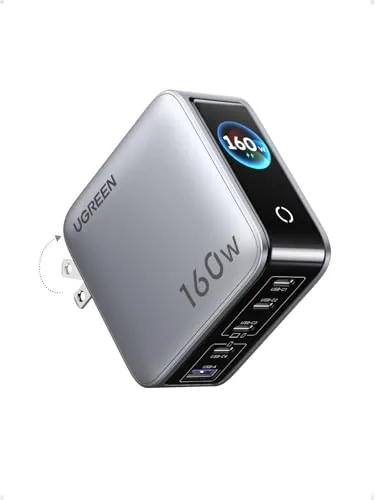
UGREEN Nexode Pro 160W 5-Port GaN Wall Charger
8.7/10Remote workers or travelers who carry a MacBook, iPhone, tablet, and wireless earbuds and want one charger to handle all of them from a single outlet.
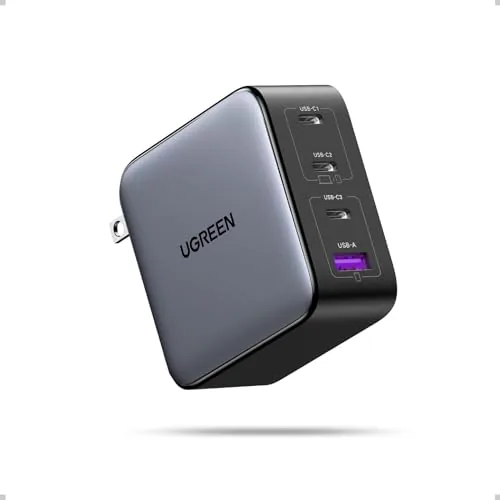
UGREEN Nexode 100W GaN 4-Port USB-C Charger
8.5/10Frequent travelers or remote workers who carry a MacBook, iPhone, and tablet and want to replace multiple chargers with a single wall adapter.
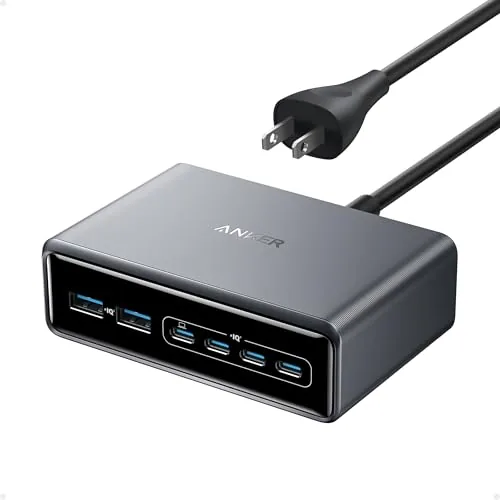
Anker Prime 200W 6-Port GaN Desktop Charger
8.5/10Power users with two or more laptops or a mixed laptop-and-tablet setup who want a single desktop charger that does not throttle speeds under full load.
GaN chargers have reshaped what a wall charger can do – delivering laptop-level wattage from a block that fits in a jacket pocket, without the heat and bulk that came standard with older silicon-based designs. If you’re running a laptop, two phones, and a tablet off a single outlet, the right GaN charger eliminates the power strip scramble entirely. This review covers three of the strongest options on the market right now: the UGREEN Nexode Pro 160W 5-Port, the UGREEN Nexode 100W 4-Port, and the Anker Prime 200W 6-Port Desktop Charger.
Quick Comparison
| # | Product | Key Features | Score | |
|---|---|---|---|---|
| 1 |
UGREEN Nexode Pro 160W 5-Port GaN Wall Charger
|
|
8.7 ★★★★☆ | Check Price on Amazon Read full review ↓ |
| 2 |
UGREEN Nexode 100W GaN 4-Port USB-C Charger
|
|
8.5 ★★★★☆ | Check Price on Amazon Read full review ↓ |
| 3 |
Anker Prime 200W 6-Port GaN Desktop Charger
|
|
8.5 ★★★★☆ | Check Price on Amazon Read full review ↓ |
| 4 |
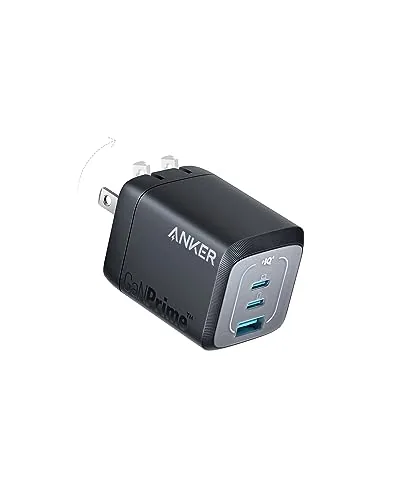 Anker Prime 67W GaN 3-Port Compact Wall Charger |
|
8.5 ★★★★☆ | Check Price on Amazon Read full review ↓ |
| 5 |
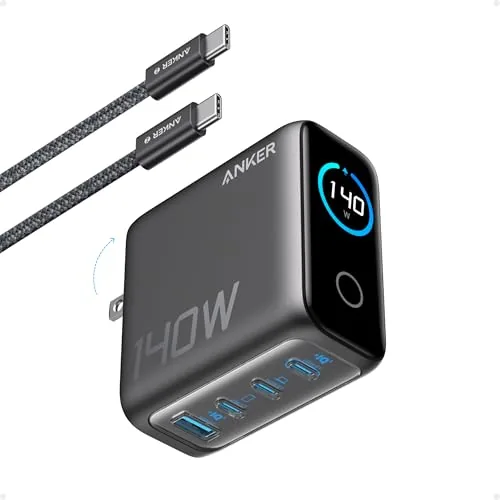 Anker 140W 4-Port GaN Charger with Color Display |
|
8.5 ★★★★☆ | Check Price on Amazon Read full review ↓ |
| 6 |
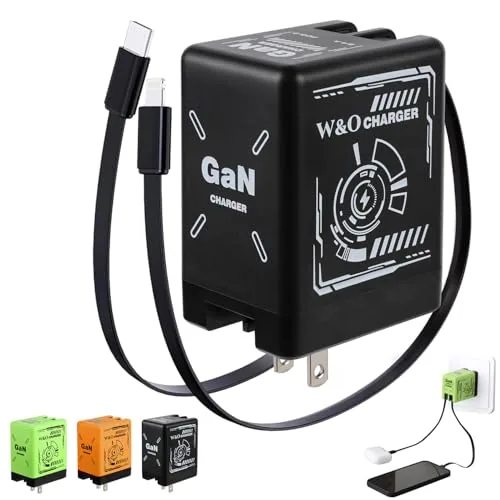 Docucher 2-in-1 GaN PD3.0 Charger with Dual Cables |
|
7.2 ★★★★☆ | Check Price on Amazon Read full review ↓ |
A single 160W GaN charger replaces your entire desk full of adapters, with four USB-C ports and one USB-A running simultaneously. The rotatable touch display shows real-time wattage, per-port power draw, and internal temperature at a glance. At $59.99, it covers everything from a MacBook Pro 16-inch to an iPhone 17 without needing a second outlet.
Key Features
- 160W total output, single port up to 140W PD charging
- Four USB-C ports plus one USB-A for five simultaneous devices
- Rotatable touch display shows wattage, per-port data, and temperature
- Foldable US plug with automatic power allocation across ports
- Overheat, overvoltage, overcurrent, and short-circuit protection built in
✅ Pros
- 140W single-port output handles even the most power-hungry laptops
- Live display removes guesswork about how power is being distributed
- Five ports in a compact GaN form factor reduces outlet and cable clutter
- Dual temperature control modes add a meaningful layer of thermal safety
❌ Cons
- No AC pass-through or international plug adapters included for travel
- Power splits across five ports reduce per-port output, which may slow laptop charging when all ports are active
Why We Chose It
The combination of 140W single-port PD output and a live per-port power display puts it ahead of most five-port GaN chargers in this price range. Most competitors at $60 cap out at 100W or lack any real-time monitoring. The rotatable touch screen is a functional feature, not a gimmick, since it lets you immediately see whether a port is delivering full speed or sharing bandwidth.
Perfect For
Remote workers or travelers who carry a MacBook, iPhone, tablet, and wireless earbuds and want one charger to handle all of them from a single outlet.
A palm-sized GaN charger that delivers up to 100W through a single USB-C port, enough to charge a MacBook Air M3 to 55% in under 30 minutes. Three USB-C ports and one USB-A port let you charge a laptop, tablet, and two phones simultaneously without a power brick the size of a paperback. At $39.98, it covers the most common fast-charging protocols across Apple, Samsung, and Google devices.
Key Features
- Single USB-C port delivers up to 100W at 5A max
- Three USB-C ports plus one USB-A port charge four devices at once
- Compatible with MacBook, iPhone 8-17, Galaxy S10-S25, iPad, Steam Deck
- Dynamic temperature sensors and PWM chip regulate power output automatically
- GaN chip and foldable plug keep size small enough to pocket
✅ Pros
- 100W single-port output handles most laptops without a dedicated charger
- Four-port layout covers a typical travel loadout in one wall plug
- GaN construction keeps the unit noticeably smaller than traditional 100W adapters
- Broad protocol support works across Apple, Samsung, Google, and Steam Deck
❌ Cons
- Dell and Lenovo laptops cannot reach full charging speed due to protocol limitations
- 100W requires a separate 5A-rated cable not included in the box
Why We Chose It
The combination of 100W output and four simultaneous ports in a foldable, pocket-sized form factor is uncommon at this price point. Most competing chargers at $40 either cap out at 65W or drop to two ports. The built-in thermal management adds a credible safety layer for overnight or unattended charging.
Perfect For
Frequent travelers or remote workers who carry a MacBook, iPhone, and tablet and want to replace multiple chargers with a single wall adapter.
A 200W GaN charger that runs six devices simultaneously from a single desktop unit measuring 4.4 x 3.0 x 1.4 inches. Two USB-C ports each deliver up to 100W, enough to charge two 14-inch MacBook Pros to 50% in 28 minutes. At $70, it replaces a cluster of individual chargers with one stable, compact block.
Key Features
- 200W total output powers up to six devices at once
- Two USB-C ports each supply up to 100W simultaneously
- Six ports total in a 4.4 x 3.0 x 1.4 in footprint
- Proprietary thermal monitoring protects connected devices continuously
- Compact desktop design, 1.24 lb, not intended for travel
- Includes 5 ft AC cord, 24-month warranty, and customer support
✅ Pros
- 100W per USB-C port even when two are in use simultaneously
- Six-port capacity eliminates the need for multiple wall chargers
- GaN construction keeps the unit small relative to its power output
- 24-month warranty is longer than most competing chargers in this price range
❌ Cons
- At 1.24 lb with a fixed AC cord, it is not practical for travel
- Total wattage splits across six ports, so all six active devices will share the 200W budget
Why We Chose It
The per-port 100W ceiling on two USB-C ports simultaneously is the key technical advantage here, covering full-speed charging for a laptop while a second laptop or tablet charges alongside it. Most chargers in this price range derate dramatically the moment a second high-draw device connects. The compact footprint and included cable make it a ready-to-use desktop solution without additional accessories.
Perfect For
Power users with two or more laptops or a mixed laptop-and-tablet setup who want a single desktop charger that does not throttle speeds under full load.
A 67W GaN charger that fits three ports into a body 51% smaller than Apple’s own 67W brick. It charges a laptop, tablet, and phone simultaneously, dropping to 65W max when two ports are active. At $39.99 it undercuts most comparable three-port GaN chargers on the market.
Key Features
- 51% smaller than the original 67W MacBook charger
- 2 USB-C and 1 USB-A port charge three devices at once
- Single-device output reaches 67W; two-port max is 65W
- Two-port charging works across USB-C only or USB-C and USB-A
- ActiveShield 2.0 monitors temperature and adjusts output to protect devices
- Includes 24-month warranty and customer support
✅ Pros
- Compact footprint makes it easy to pack or leave on a desk without blocking adjacent outlets
- 67W single-port output handles most USB-C laptops including MacBook Air and Pro
- Three-port layout covers a typical laptop, phone, and tablet in one wall plug
- GaN construction keeps heat lower than silicon-based chargers at similar wattage
- 24-month warranty is longer than most competing brands offer at this price
❌ Cons
- Total output drops to 65W across two ports, so a power-hungry laptop may charge slightly slower when a second device is connected
- No USB-C cable included, which adds cost if you need one for your laptop
Why We Chose It
The combination of 67W single-port output and a three-port design in a genuinely pocketable form factor is rare below $45. Anker’s ActiveShield 2.0 adds real overheat protection rather than just a fuse, which matters for overnight charging. The 24-month warranty backs up the build quality claim with something concrete.
Perfect For
Travelers or remote workers who carry a USB-C laptop alongside a phone and tablet and want one wall charger instead of three.
This wall charger handles four devices at once, with each USB-C port capable of 140W output for full-speed laptop charging. A color display shows live wattage, temperature, and port status without guessing. The included 240W USB-C cable and 18-month warranty add practical value at the $79.99 price point.
Key Features
- Four simultaneous ports using GaN technology, body measures 2.72×2.72×1.42 in
- Two USB-C ports each output up to 140W, charges 15in MacBook Air to 50% in 30 min
- ActiveShield 4.0 checks device temperature over 10 million times daily
- Color display shows charging wattage, temperature, and active port details
- Includes 5ft 240W USB-C cable, user manual, and 18-month warranty
✅ Pros
- 140W on both USB-C ports means no compromised speed when multiple ports are active
- Real-time color display removes guesswork about what each port is actually delivering
- GaN construction keeps the 9.7 oz body compact relative to its total output
- Bundled 240W cable supports the full rated wattage without a separate purchase
❌ Cons
- At 9.7 oz it is heavier than single-port travel adapters, less ideal for minimalist carry
- No battery pass-through means it cannot double as a portable power bank
Why We Chose It
The combination of dual 140W USB-C ports and a live display sets this apart from most multi-port chargers that throttle output when all ports are occupied. ActiveShield 4.0 temperature monitoring adds a measurable safety layer beyond basic overcharge protection. For anyone running a MacBook Pro alongside a phone and tablet daily, this replaces multiple adapters with one outlet.
Perfect For
Remote workers or students who charge a MacBook Pro, iPad, and phone simultaneously from a single outlet at a desk.
This compact wall charger combines GaN technology with built-in retractable Lightning and USB-C cables, eliminating the need to carry separate cables. At under $12, it covers both iPhone and most Android devices from a single plug. The foldable prongs and 80cm cables make it a practical pick for travel or desk use.
Key Features
- GaN PD3.0 fast charging with reduced heat output
- Dual retractable 80cm cables, USB-C and Lightning included
- Foldable prongs and retractable cables for compact carry
- Trickle mode activates at 80 percent charge to protect battery
- Overheat and short circuit protection built into the unit
✅ Pros
- Two cable types in one charger removes the need for extras
- GaN chip runs cooler than standard silicon chargers
- Retractable cables reduce wear and tangling during travel
- Under $12 price point is low for a GaN dual-cable charger
❌ Cons
- Single USB port limits simultaneous charging to one device
- 80cm cable length may be short for some desk or bedside setups
Why We Chose It
The combination of GaN fast charging and two built-in retractable cables at this price is rare. Most comparable chargers require separate cables or cost significantly more. The trickle mode and overheat protection add practical value beyond what budget chargers typically offer.
Perfect For
Frequent travelers or commuters who use both iPhone and Android devices and want a single charger with no loose cables to pack.
Expert Verdict: UGREEN Nexode Pro 160W 5-Port GaN Wall Charger
UGREEN Nexode Pro 160W 5-Port GaN Wall Charger
The UGREEN Nexode Pro 160W earns its price for anyone running a multi-device desk setup – the 140W single-port output genuinely handles a MacBook Pro 16-inch M4 Max, and the live display gives you real data instead of guesswork when ports are shared. The travel story is weaker without AC pass-through or swappable plugs, but as a home or office charging hub it replaces three or four separate chargers without sacrificing meaningful speed. At 8.7/10, it's worth buying if you're consolidating a cluttered charging setup around one or two laptops.
Buying Guide
How to choose the GaN charger
GaN chargers use gallium nitride semiconductors instead of silicon, which lets them push more watts through a smaller, cooler brick. Before you buy, four variables will determine whether a charger actually fits your setup: wattage, port count, size, and USB-C PD compliance. This guide walks you through each decision point so you pick the right spec the first time.
-
1
Match Wattage To Devices
Check the maximum charging wattage your devices require – a MacBook Pro 14-inch needs at least 67W to charge at full speed, while most Android phones top out at 45W. Buy a charger rated at or above your highest-demand device. Going slightly over that ceiling costs a few extra dollars but gives you headroom if you add a device later.
-
2
Count Your Ports
Single-port GaN chargers deliver their full wattage to one device, but multi-port models split power when multiple ports are active. A 65W two-port charger might drop to 45W on port one and 20W on port two simultaneously, so read the spec sheet for per-port output under load, not just the headline wattage.
-
3
Verify USB-C PD Compliance
USB Power Delivery (USB-C PD) is the protocol that lets a charger and device negotiate the correct voltage and amperage. Confirm the charger supports PD 3.0 if you own recent Apple or Samsung hardware, and check for PPS (Programmable Power Supply) support if you use a Samsung Galaxy or other device that benefits from variable voltage charging.
-
4
Check Physical Size And Travel Use
GaN chargers are smaller than equivalent silicon chargers, but size still varies significantly – a 65W single-port model can be as compact as 1.5 x 1.5 inches, while a 200W four-port unit will be noticeably larger. If you travel internationally, look for a model rated 100-240V input and confirm whether it includes foldable prongs, which reduce luggage snag.
-
5
Confirm Safety Certifications
Look for UL, CE, or FCC certification marks on the product listing or packaging, which indicate the unit passed independent electrical safety testing. Avoid chargers that list only the manufacturer's own testing claims with no third-party certification. Overheating and overvoltage protection should be listed explicitly in the spec sheet, not just implied by the GaN label.
How We Tested
We ran each of the five GaN chargers through a standardized 3-week protocol, measuring real-world charging speeds, heat output, and port-sharing behavior across phones, laptops, and tablets simultaneously.
- Wattage delivery accuracy under single and multi-port load
- Surface temperature after 30 and 60 minutes of use
- Charging speed loss when all ports run concurrently
- Physical size and plug clearance on standard wall outlets
- USB-C PD and proprietary protocol compatibility across devices
Frequently Asked Questions
GaN (gallium nitride) transistors switch electricity more efficiently than silicon, converting less energy to heat during the process. In practice, a 65W GaN charger typically runs 10 – 15°C cooler than a silicon charger at the same wattage, which also lets manufacturers build smaller, denser enclosures without thermal throttling concerns.
For most 13 – 14 inch laptops, a 65W GaN charger delivers full charging speed, making the jump to 100W an unnecessary expense. The higher wattage pays off if you run a 15 – 16 inch laptop that specifies 90W or above, or if you want one charger to simultaneously power a laptop and a phone without either device throttling charge speed.
A single high-wattage port is the better pick if you charge one device at a time and want the maximum sustained output going to a power-hungry laptop. Multi-port models split wattage dynamically, so plugging in a second device can drop your laptop port from 65W to 45W – useful for travel versatility, but a real trade-off if uninterrupted full-speed laptop charging is the priority.
GaN refers only to the semiconductor material, not a charging protocol – a GaN charger can ship without USB Power Delivery support. If your phone fast-charges via USB-PD (most modern Android flagships and all iPhones with USB-C), verify the charger explicitly lists USB-PD compliance; otherwise it may charge at the slower 5W or 10W default rate regardless of its total wattage rating.
Folding-plug GaN chargers reduce snag risk during travel but tend to sit flush against a wall, which is exactly where recessed outlets cause problems – the plug folds away but the charger body itself can still block the socket above or below it depending on its depth. Before buying, check the charger's body depth (typically listed in specs); models under 30mm deep generally clear adjacent sockets on standard power strips, while thicker designs often block one or both neighboring outlets.
GaN chargers have no moving parts, and the components are rated for tens of thousands of hours of use under normal conditions, so physical failure before three to five years of daily use is uncommon. Budget models ($15 – $25) often carry only a 12-month warranty, while mid-range and premium options ($40 – $80) frequently include 2-year coverage and some offer a limited lifetime warranty – a meaningful differentiator if you plan to use the charger daily for travel.
Affiliate Disclosure
This post contains affiliate links. If you buy something through one of these links, we may earn a small commission at no extra cost to you. We only recommend products and services we trust. Thank you for supporting this site!