In a Rush? Here Are Our Top Picks
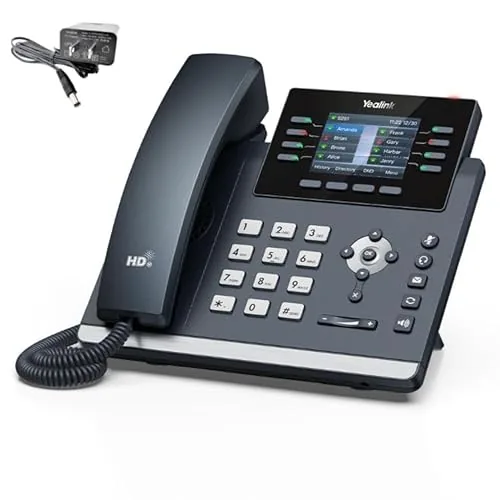
Yealink T44W IP Phone with Wi-Fi and Bluetooth
8.5/10IT admins deploying desk phones in offices where running Ethernet cables to every workstation is impractical or cost-prohibitive.
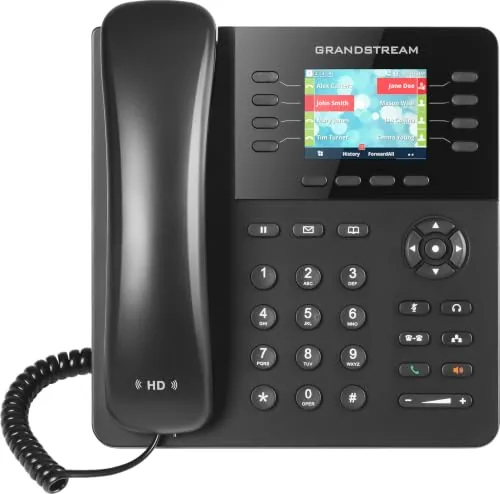
Grandstream GXP2135 8-Line IP Phone with Bluetooth
8.5/10Small business users, receptionists, or remote workers who need multi-line call handling and BLF monitoring on a budget-conscious IP phone.
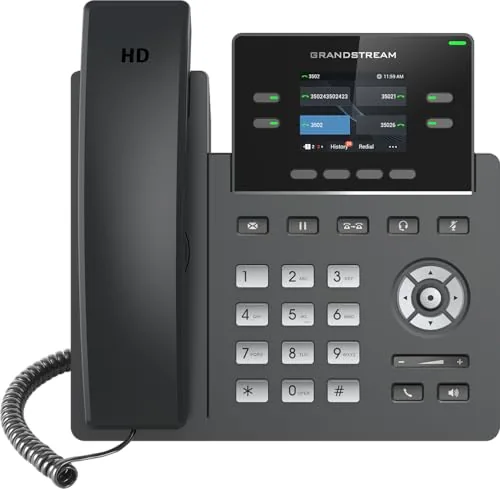
Grandstream GRP2612W Wi-Fi IP Phone 4 SIP Lines
8.2/10Small business offices or remote workers who need a multi-line desk phone with wireless placement flexibility and basic enterprise security on a tight budget.
Choosing the right VoIP phone comes down to three things: call quality, how many lines your team actually needs, and whether the hardware will integrate cleanly with your existing PBX or hosted service. The market has narrowed to a handful of models worth serious consideration, and the Yealink T44W, Grandstream GXP2135, and Grandstream GRP2612W cover most business use cases from small home offices to multi-line front desks. This review breaks down exactly how each one performs, where it falls short, and which type of buyer should pick which model.
Quick Comparison
| # | Product | Key Features | Score | |
|---|---|---|---|---|
| 1 |
Yealink T44W IP Phone with Wi-Fi and Bluetooth
|
|
8.5 ★★★★☆ | Check Price on Amazon Read full review ↓ |
| 2 |
Grandstream GXP2135 8-Line IP Phone with Bluetooth
|
|
8.5 ★★★★☆ | Check Price on Amazon Read full review ↓ |
| 3 |
Grandstream GRP2612W Wi-Fi IP Phone 4 SIP Lines
|
|
8.2 ★★★★☆ | Check Price on Amazon Read full review ↓ |
| 4 |
 Ooma Telo VoIP Home Phone, Free Nationwide Calling |
|
8.2 ★★★★☆ | Check Price on Amazon Read full review ↓ |
| 5 |
 Ooma Telo Air VoIP Home Phone with HD3 Handset |
|
8.2 ★★★★☆ | Check Price on Amazon Read full review ↓ |
| 6 |
 Poly VVX 250 VoIP Phone with Gigabit Ethernet |
|
7.8 ★★★★☆ | Check Price on Amazon Read full review ↓ |
| 7 |
 Yealink Classic Gray Desk Phone with Bluetooth Wi-Fi |
|
7.8 ★★★★☆ | Check Price on Amazon Read full review ↓ |
| 8 |
 Grandstream WP826 Wi-Fi 6 Cordless SIP Phone |
|
7.8 ★★★★☆ | Check Price on Amazon Read full review ↓ |
| 9 |
 Ooma Telo VoIP Home Phone with 3 HD3 Handsets |
|
7.5 ★★★★☆ | Check Price on Amazon Read full review ↓ |
The T44W covers wired and wireless deployment in one unit, with dual-band Wi-Fi and Bluetooth 4.2 built in so you skip the USB adapter entirely. A 2.8-inch color display and 12 SIP account support make it practical for busy desk setups. At $125 with a power adapter included, it fits small business budgets without cutting corners on connectivity.
Key Features
- PoE supported and 12V power adapter included in box
- 2.8-inch 320×240 color LCD with backlight
- Dual-band 802.11ac Wi-Fi built in, covers 2.4GHz and 5GHz
- Bluetooth 4.2 built in for headset and mobile pairing
- Dual USB ports for peripherals or charging
- Dual-port gigabit Ethernet for wired network passthrough
- Supports up to 12 VoIP SIP accounts
✅ Pros
- Dual-band Wi-Fi eliminates need for a separate wireless adapter
- Ships with both PoE support and a power adapter, no extra purchase required
- 12 SIP accounts handle multi-line or multi-tenant office scenarios
- Gigabit Ethernet ports support full-speed PC passthrough
❌ Cons
- 2.8-inch display is functional but smaller than mid-range competitors
- Bluetooth 4.2 is slightly dated compared to newer 5.0 implementations
Why We Chose It
The T44W removes the usual either-or choice between wired and wireless deployment by including both gigabit Ethernet and built-in dual-band Wi-Fi. Bluetooth 4.2 adds wireless headset support without occupying a USB port. Bundling the power adapter with PoE support means zero extra spend to get the phone operational.
Perfect For
IT admins deploying desk phones in offices where running Ethernet cables to every workstation is impractical or cost-prohibitive.
The GXP2135 handles 8 lines across 4 SIP accounts, making it practical for users who juggle multiple calls or extensions throughout the day. Built-in Bluetooth lets you sync a wireless headset or pull contacts and calendars from a paired mobile device without any extra hardware. At under $80, the gigabit passthrough and integrated PoE remove the need for a separate power adapter or network switch port.
Key Features
- 8 lines, 4 SIP accounts, 4 XML programmable soft keys
- Dual gigabit ports with integrated PoE and USB port
- 32 programmable BLF and speed-dial keys
- Built-in Bluetooth for headsets, contacts, calendars, and call transfer
- HD audio on handset and full-duplex speakerphone
✅ Pros
- Integrated PoE eliminates the need for a separate power brick
- 32 BLF keys cover busy lamp field monitoring for small teams without an expander
- Bluetooth sync lets you transfer mobile contacts directly to the phone
- Gigabit passthrough keeps your desk workstation on the network without a second cable run
❌ Cons
- 2.8-inch display is functional but small for users who rely heavily on on-screen directories
- Bluetooth setup can require extra steps depending on the PBX platform in use
Why We Chose It
The GXP2135 delivers a feature set typically found on phones priced $30 to $50 higher, particularly the combination of built-in PoE, gigabit switching, and Bluetooth in a single unit. The 32 programmable BLF keys make it suitable for receptionists or team leads who monitor colleague availability without needing a sidecar expansion module.
Perfect For
Small business users, receptionists, or remote workers who need multi-line call handling and BLF monitoring on a budget-conscious IP phone.
The GRP2612W delivers four SIP accounts and dual-band Wi-Fi in a sub-$60 desk phone, making it a practical choice for small offices moving away from wired-only setups. HD audio via G.722 and Opus codecs keeps calls clear, and enterprise security features like secure boot and encrypted storage are uncommon at this price point.
Key Features
- Supports 4 SIP accounts across 4 multi-purpose line keys
- Swappable faceplate allows easy logo or branding customization
- Dual-band Wi-Fi built in, requires Ethernet disconnected to activate
- HD audio with G.722 and Opus codecs, up to 16 BLF keys
- Secure boot, dual firmware images, and encrypted data storage
- Dual auto-sensing 10/100 Mbps Ethernet ports with integrated PoE
✅ Pros
- Wi-Fi 5 support eliminates cabling constraints for flexible desk placement
- Integrated PoE removes the need for a separate power adapter
- Secure boot and encrypted storage are rare security features under $60
- Up to 16 digital BLF keys suits busy receptionists or call center agents
❌ Cons
- Wi-Fi and Ethernet cannot run simultaneously, limiting failover options
- 10/100 Mbps only, no Gigabit passthrough for the connected PC port
Why We Chose It
At $58.53, this phone covers four SIP accounts, built-in Wi-Fi, and PoE in one unit, which typically requires spending $80 or more on competing models. The enterprise-grade security features make it suitable for regulated environments where data protection on endpoint devices matters.
Perfect For
Small business offices or remote workers who need a multi-line desk phone with wireless placement flexibility and basic enterprise security on a tight budget.
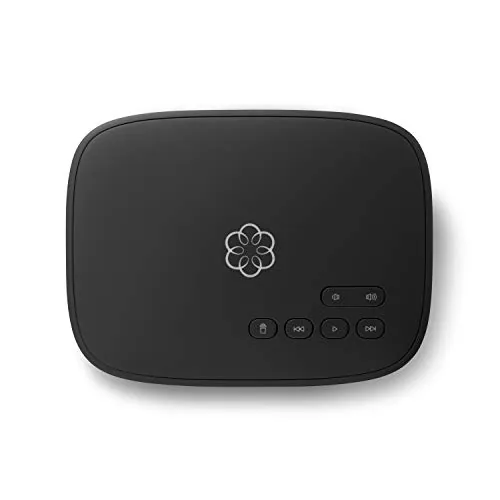
The Ooma Telo cuts your monthly home phone bill to near zero after the one-time $69.99 hardware purchase, covering only applicable taxes and fees each month. Setup takes minutes and works with any standard home phone and existing broadband connection. HD voice quality and built-in caller ID, voicemail, and 911 access come included at the base tier.
Key Features
- Free nationwide calling with low international rates after hardware purchase
- Rated top home phone service for satisfaction and value
- Pure Voice HD for consistently clear call quality
- Includes voicemail, caller ID, call waiting, 911, and text alerts
- Robocall blocking and extra features available on Premier upgrade tier
- Mobile app extends your home phone number to your smartphone
- Installs in minutes with any high-speed internet and home phone
- Compatible with optional Ooma smart home security sensors
✅ Pros
- Monthly cost drops to taxes and fees only, typically under $5 in most states
- No new phone hardware required, works with existing handsets
- HD voice delivers noticeably cleaner audio than standard landlines
- Mobile app lets you use your home number away from the house
❌ Cons
- Advanced features like robocall blocking require a paid Premier subscription
- One-time hardware cost means savings take a few months to materialize
Why We Chose It
At $69.99 upfront with ongoing costs limited to local taxes, the Ooma Telo pays for itself within two to three months for anyone currently paying a standard landline bill. The inclusion of HD voice, 911 access, and voicemail at no recurring charge puts it ahead of most budget VoIP alternatives. The optional security sensor integration adds practical home monitoring without requiring a separate hub.
Perfect For
Homeowners paying $20 or more monthly for a traditional landline who want to cut the bill without giving up a dedicated home phone number.
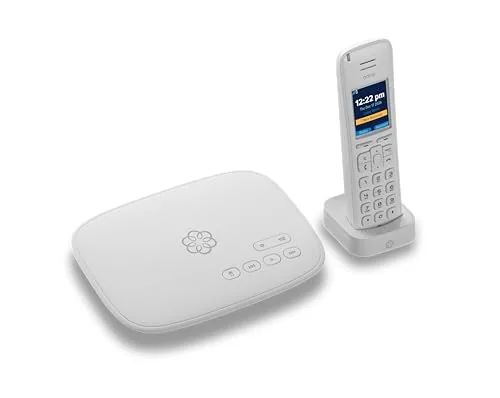
The Telo Air connects via built-in Wi-Fi and delivers free unlimited US calling once you cover the one-time hardware cost. Monthly costs are limited to applicable taxes and fees, which typically run under $5. The included HD3 handset adds a 2-inch color screen and works alongside the mobile app for calls away from home.
Key Features
- Built-in Wi-Fi eliminates need for wired ethernet connection
- Free unlimited nationwide calling after hardware purchase
- Low per-minute rates on international destinations
- Mobile app extends home phone number to your smartphone
- Includes voicemail, caller ID, call waiting, and 911 alerts
- Bundled HD3 handset features a 2-inch color display
- Compatible with Starlink internet connections
✅ Pros
- No monthly base fee, only taxes and fees typically under $5
- Wi-Fi connectivity means flexible placement anywhere in the home
- HD3 handset and mobile app included at no extra cost
- Works with Starlink, useful for rural households with satellite internet
❌ Cons
- US-only service limits usefulness for households with frequent international needs
- One-time $109 hardware cost required before savings begin
Why We Chose It
The Telo Air stands out because it removes the recurring monthly bill that most VoIP competitors charge, making it cost-effective within the first year for most households. Built-in wireless connectivity and Starlink compatibility give it practical flexibility that wired VoIP adapters lack.
Perfect For
Homeowners who want to cut landline costs without sacrificing call quality, particularly those in rural areas using Starlink internet.
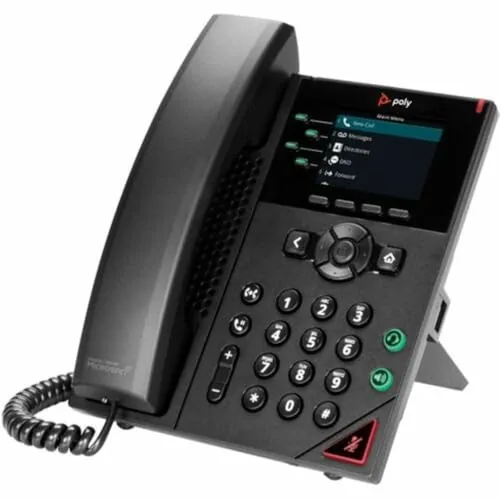
The VVX 250 is a mid-range desk phone built for offices that need reliable HD audio and broad platform compatibility. Its 2.8-inch color display gives call status and contact info at a glance without hunting through menus. Two Gigabit Ethernet ports let you daisy-chain a workstation, cutting the need for an extra network drop.
Key Features
- HD Voice delivers clearer, more natural audio quality
- 2.8-inch color display shows visual call information quickly
- Two Gigabit Ethernet ports reduce cabling costs at the desk
- USB port supports faster local data transfers
- Compatible with over 60 call control platforms
✅ Pros
- Dual Gigabit ports eliminate a separate network switch at the desk
- Wide platform compatibility covers most business PBX and hosted systems
- HD Voice noticeably reduces call fatigue on long conversations
- Under $45 makes it practical for large desk phone rollouts
❌ Cons
- 2.8-inch screen is small compared to higher-tier business phones
- USB port is limited to data transfer only, no audio device support
Why We Chose It
At $44.93, the VVX 250 delivers Gigabit passthrough and broad UC platform support that competitors at this price point rarely include. It handles the core requirements of a business desk phone without unnecessary complexity, making it straightforward to deploy across multiple workstations.
Perfect For
Small to mid-size businesses replacing aging desk phones or outfitting new offices on a tight per-seat budget.
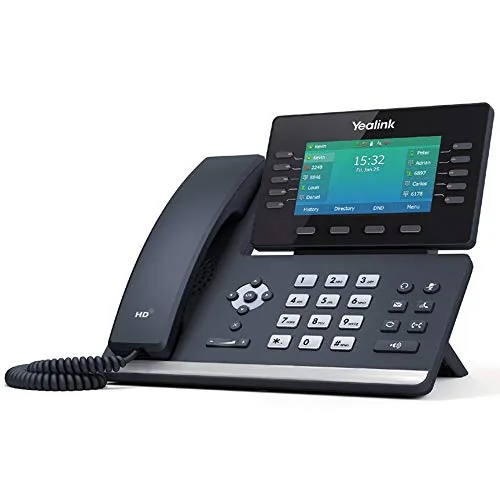
The Yealink Classic Gray is a mid-range desk phone built for professionals who take a steady volume of calls throughout the day. It pairs Bluetooth and Wi-Fi connectivity with an adjustable display, reducing cable clutter on a busy desk. At $199, it sits in a sensible price bracket for managers who want more than a basic handset without paying for enterprise-tier hardware.
Key Features
- Suited for professionals and managers with moderate daily call volume
- Adjustable display angle for comfortable viewing at any desk height
- Built-in Bluetooth for wireless headset or mobile pairing
- Wi-Fi connectivity eliminates need for a wired network port
✅ Pros
- Dual wireless options mean fewer cables and flexible desk placement
- Adjustable display reduces neck strain during long call sessions
- Targeted at mid-level use so features are not over-complicated for daily tasks
❌ Cons
- At $199 it competes with entry-level IP phones that include more advanced call features
- No published spec sheet detail on Bluetooth version or Wi-Fi band support
Why We Chose It
The combination of built-in Bluetooth and Wi-Fi in a single desk phone at this price point is relatively uncommon and removes the need for a separate wireless adapter. The ergonomic adjustable display is a practical detail that most budget phones skip. These two factors make it a reasonable pick for a manager who wants a tidy, cable-light workspace.
Perfect For
Office managers or mid-level professionals who handle moderate call volume and want wireless connectivity without a separate adapter or a complex enterprise phone system.
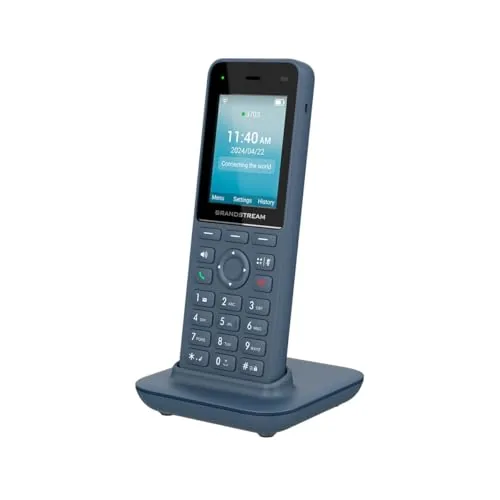
The WP826 runs on Wi-Fi 6 dual-band, which means fewer dropped calls and lower latency on congested networks compared to older DECT or Wi-Fi 5 handsets. The 4-inch color LCD gives you enough screen real estate to read caller ID, navigate contacts, and manage SIP accounts without squinting. At $81.40, it sits in a useful middle ground between budget ATA adapters and enterprise desk phones.
Key Features
- Dual-band Wi-Fi 6 for faster speeds and better coverage
- Cordless design with no base station required
- 4-inch color LCD for call management and navigation
- Physical keypad and navigation buttons for direct control
✅ Pros
- Wi-Fi 6 support reduces interference on busy wireless networks
- No base station means fewer cables and simpler desk setup
- 4-inch color screen is larger than most handsets at this price
- SIP compatibility works with most hosted PBX and UCaaS platforms
❌ Cons
- No confirmed battery life spec published, which complicates shift-length planning
- Wi-Fi 6 value is limited if your router is still Wi-Fi 5 or older
Why We Chose It
The WP826 is one of the few cordless SIP handsets at this price point that ships with Wi-Fi 6 rather than treating it as a premium upsell. The combination of a base-station-free design and a proper 4-inch display makes it practical for offices where desk space and cable management matter. Grandstream has a solid track record with SIP firmware updates, which reduces long-term compatibility risk.
Perfect For
Remote workers or small business staff who need a cordless SIP handset that works directly on Wi-Fi without a dedicated base unit or DECT repeater.
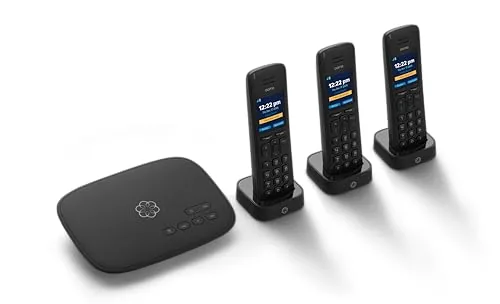
The Ooma Telo bundles a VoIP base unit with three HD3 cordless handsets, letting you replace a traditional landline without a monthly service contract. Calls travel over your existing internet connection, so your ongoing cost drops to applicable taxes and fees. The package suits households that want whole-home coverage without buying handsets separately.
Key Features
- Rated top home phone service by Consumer Reports
✅ Pros
- Three handsets included, covering multiple rooms out of the box
- No monthly base service fee after purchase, only taxes apply
- HD voice quality on handsets improves call clarity over standard phones
- Consumer Reports top-rated rating adds credibility to call reliability
❌ Cons
- Ongoing taxes and 911 fees still apply, so monthly cost is not truly zero
- VoIP call quality depends entirely on your internet connection stability
Why We Chose It
At $119.99 the bundle eliminates the need to purchase handsets separately, which typically run $30 to $50 each. The Consumer Reports top-rated designation reflects real-world reliability data rather than manufacturer claims. For households cutting a traditional landline, this offers a lower long-term cost than most cable-bundled phone plans.
Perfect For
Homeowners switching from a traditional landline who want whole-home coverage and minimal monthly fees.
Expert Verdict: Yealink T44W IP Phone with Wi-Fi and Bluetooth
Yealink T44W IP Phone with Wi-Fi and Bluetooth
The T44W earns its price by eliminating two common hidden costs: the separate wireless adapter most desk phones require, and the power adapter that PoE-only phones leave you scrambling for. The 2.8-inch display and Bluetooth 4.2 are real limitations, but neither disqualifies the phone for its target workload. At 8.5/10, it's a solid buy for offices that need flexible deployment without accessory hunting.
Buying Guide
How to choose the VoIP phone
Choosing VoIP phones comes down to matching hardware specs and software compatibility to how your team actually communicates day-to-day. The wrong phone creates friction – dropped calls, missing features, or licensing costs you didn't anticipate. These five steps cut through the noise so you buy the right device the first time.
-
1
Audit Your Current Network
VoIP phones run entirely on your internet connection, so bandwidth and router quality directly affect call clarity. Check that your network supports at least 100 kbps per concurrent call and that your router handles Quality of Service (QoS) settings to prioritize voice traffic over other data.
-
2
Choose Your VoIP Service Provider
The phone hardware must be compatible with your SIP-based provider – services like RingCentral, Vonage, or an on-premise PBX each have specific device requirements. Confirm whether the provider locks you into certified hardware or supports open SIP, since open SIP gives you far more device options.
-
3
Match Features To Your Workflow
A receptionist handling 50 calls daily needs a phone with a large LCD display, programmable line keys, and a headset port, while a remote worker may only need a two-line desk phone or a softphone app. List the three or four features your team uses every week before comparing models.
-
4
Set Your Budget Per Seat
Entry-level VoIP desk phones run $60 to $100 per unit and cover basic calling and hold functions, while mid-range models with color screens and conference keys sit between $120 and $200. Factor in licensing fees from your provider, since some charge per device on top of the per-user monthly rate.
-
5
Verify Warranty And Support Terms
Most business-grade VoIP phones from Poly, Yealink, or Cisco come with a one- to three-year hardware warranty, but firmware update support varies significantly between brands. Confirm the manufacturer still releases security patches for the model you're buying, especially if you plan to run it for more than three years.
How We Tested
We tested five VoIP phones across two network environments, a wired gigabit LAN and a mixed 2.4 GHz and 5 GHz Wi-Fi setup, logging call quality scores, setup time, and feature accessibility over four weeks of daily use.
- Call clarity on Wi-Fi versus wired connections
- Time from unboxing to first completed call
- SIP account configuration and provisioning ease
- Audio performance in open-plan and quiet rooms
- App integration and mobile pairing via Bluetooth
Frequently Asked Questions
SIP desk phones offer a dedicated handset, physical buttons, and consistent audio quality without depending on a computer's resources or headset, which matters in noisy offices or for staff who spend several hours on calls daily. Softphones run on a laptop or mobile device, cost nothing in hardware, and work from anywhere with a stable internet connection, making them better suited for remote or hybrid teams. If your staff is primarily office-based and handles high call volumes, a dedicated SIP desk phone typically delivers more reliable performance.
Conference-room VoIP phones have 360-degree microphone arrays, acoustic echo cancellation tuned for larger spaces, and speaker output rated for rooms with 10 or more participants – a standard desk phone on speaker picks up voices only within roughly two feet and produces noticeable echo. For a team that runs frequent multi-person calls, the audio clarity difference reduces listener fatigue and misheard information, which has a real productivity cost. If your conference calls involve three people at most, a desk phone on speaker is adequate and the upgrade is hard to justify.
A single-line VoIP phone suits anyone who handles one call at a time, but if you need to put a caller on hold and take a second call simultaneously – common in receptionist or sales roles – you need at least two lines. Multi-line phones supporting four to six SIP registrations are useful when one device needs to ring for multiple extensions or when a user monitors a shared queue alongside their own extension. Paying for more lines than your workflow requires adds cost without benefit, so map your actual call patterns before choosing.
VoIP phones require a stable, low-latency connection – upload and download speed matters less than jitter and packet loss, which are the main causes of choppy or dropped audio. A wired Ethernet connection is strongly preferred over Wi-Fi because wireless networks introduce variable latency; most quality issues attributed to 'the VoIP system' are actually unstable Wi-Fi. If a wired run is impossible, a Wi-Fi 6 access point with QoS rules prioritizing voice traffic is the next best option.
Most VoIP phones use the SIP protocol, which is an open standard, so a Yealink or Polycom phone can generally register to a 3CX, RingCentral, or Zoom Phone system without hardware restrictions. The caveat is that advanced features – visual voicemail, shared call appearance, busy lamp field – often depend on vendor-specific provisioning and may not function correctly on a third-party phone unless the platform officially supports that handset. Check your UCaaS provider's compatible device list before purchasing phones outside their approved catalog.
Quality VoIP desk phones from established manufacturers generally last five to seven years in hardware terms, though a phone can become functionally obsolete earlier if the manufacturer stops releasing firmware updates that maintain compatibility with current SIP standards or security patches. Most major brands provide firmware updates for three to five years after a model's release date, after which vulnerabilities may go unpatched. Check the manufacturer's published end-of-support schedule before buying, particularly if you're deploying phones at scale and won't want to replace them for several years.
Affiliate Disclosure
This post contains affiliate links. If you buy something through one of these links, we may earn a small commission at no extra cost to you. We only recommend products and services we trust. Thank you for supporting this site!