In a Rush? Here Are Our Top Picks
OTYHVV Wireless Headset with AI Noise Cancelling Mic
8.2/10Remote workers, call center agents, and truckers who need all-day single-ear comfort with reliable PC platform compatibility.
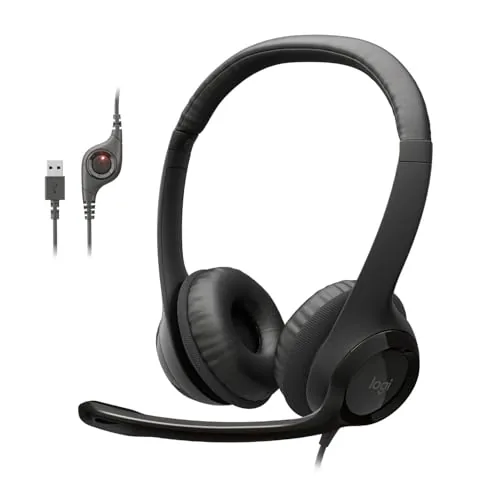
Logitech H390 USB Wired Headset with Noise-Canceling Mic
7.8/10Remote workers, students, or office users who need a reliable, no-fuss headset for video calls and virtual meetings on a tight budget.
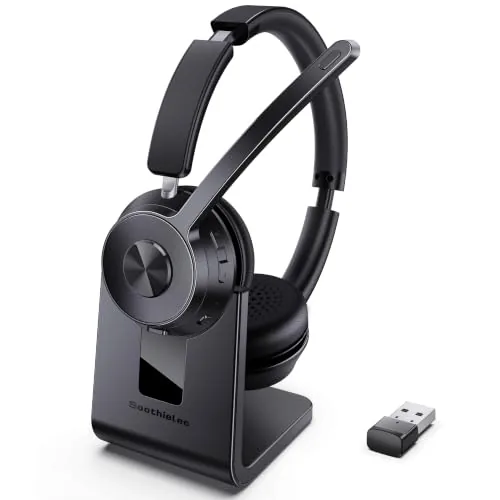
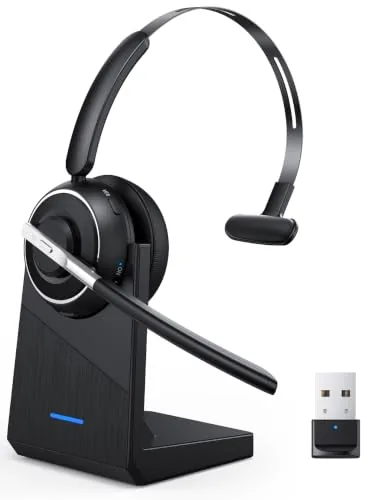
Soothielec Wireless Headset USB Dongle + BT 5.3
7.8/10Remote workers and call center agents who need reliable all-day call audio across a Windows PC and smartphone without relying on built-in Bluetooth.
Picking the wrong office headset means muffled calls, mic complaints from colleagues, and a cord that yanks your coffee off the desk at least once a week. The right one reduces background noise at the source, stays comfortable through back-to-back meetings, and connects to whatever device you’re actually using. This review covers three picks – the OTYHVV Wireless with AI noise cancellation, the Logitech H390 USB wired headset, and the Soothielec Wireless with both USB dongle and Bluetooth 5.3 – so you can match the headset to your specific setup and work style.
Quick Comparison
| # | Product | Key Features | Score | |
|---|---|---|---|---|
| 1 |
OTYHVV Wireless Headset with AI Noise Cancelling Mic
|
|
8.2 ★★★★☆ | Check Price on Amazon Read full review ↓ |
| 2 |
Logitech H390 USB Wired Headset with Noise-Canceling Mic
|
|
7.8 ★★★★☆ | Check Price on Amazon Read full review ↓ |
| 3 |
Soothielec Wireless Headset USB Dongle + BT 5.3
|
|
7.8 ★★★★☆ | Check Price on Amazon Read full review ↓ |
| 4 |
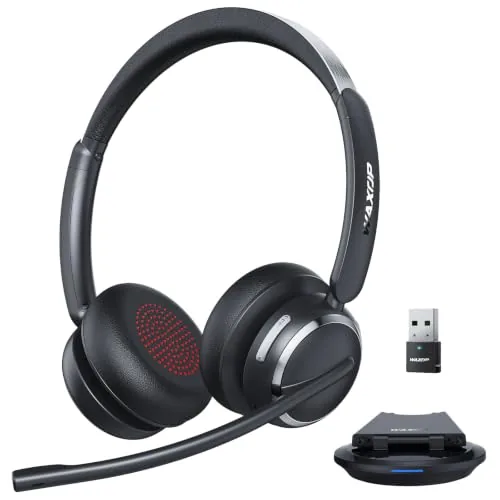 Waxop Wireless Headset USB-A/C BT 6.0 AI Noise Cancel |
|
7.8 ★★★★☆ | Check Price on Amazon Read full review ↓ |
| 5 |
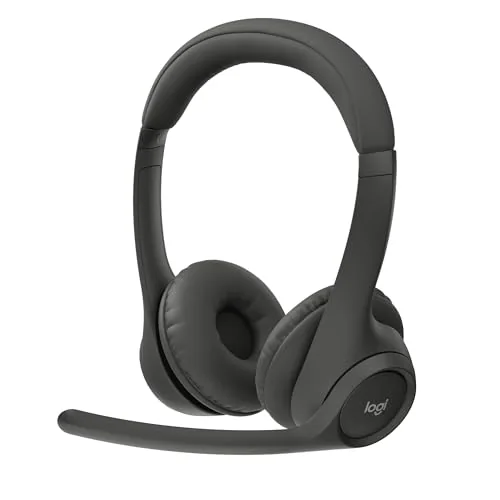 Logitech Zone 301 Wireless Headset for Work |
|
7.8 ★★★★☆ | Check Price on Amazon Read full review ↓ |
| 6 |
 Logitech H391 USB-C Wired Headset with Noise-Canceling Mic |
|
7.5 ★★★★☆ | Check Price on Amazon Read full review ↓ |
A single-ear Bluetooth headset built for all-day call center and remote work use. At 102g with 40 hours of talk time and a USB dongle for plug-and-play PC connectivity, it covers the basics most office headsets miss. The charging dock keeps it desk-ready without cable clutter.
Key Features
- AI noise-cancelling mic blocks dogs, traffic, keyboard noise on calls
- Physical on/off toggle switch reconnects automatically after initial pairing
- USB dongle enables driver-free PC connection without Bluetooth required
- Dedicated mute button with voice prompts confirms mute status instantly
- 270-degree rotatable microphone adjustable for left or right ear use
- Single-ear design at 102g with memory foam on both sides
- 40-hour talk time with 2-hour USB-C or dock recharge
- One-button access to Siri, Google Assistant, and Alexa via Bluetooth
✅ Pros
- 40-hour battery covers a full work week between charges
- USB dongle adds mute sync with Teams and Zoom on PC
- Physical toggle switch is faster and clearer than button-hold pairing
- Memory foam cushions both sides of the ear cup, not just one
- Charging dock stores the dongle and reduces desk cable clutter
❌ Cons
- Single-ear design suits calls but limits use for music or audio monitoring
- No mention of multipoint pairing so switching between phone and PC may require manual steps
Why We Chose It
The USB dongle separates this headset from standard Bluetooth office headsets by enabling PC mute sync on Teams and Zoom without extra software. The 40-hour battery and dock charging make it practical for back-to-back shifts without mid-day interruptions. The physical toggle switch is a small but genuinely useful detail for fast reconnection.
Perfect For
Remote workers, call center agents, and truckers who need all-day single-ear comfort with reliable PC platform compatibility.
The H390 is a plug-and-play USB headset that covers calls, meetings, and casual listening at a price under $21. The rotating boom mic reduces background noise, and inline controls let you mute or adjust volume without touching your computer. At 6.23 ft of cable length, it gives you enough reach to move around a desk without unplugging.
Key Features
- Fine-tuned drivers deliver digital stereo audio for calls and music
- Rotating boom arm reduces background noise, folds away when unused
- Inline cable controls for volume adjustment and muting
- USB-A connector requires no drivers or software installation
- Adjustable headband with swivel leatherette ear cushions
- 6.23 ft cable allows movement without leaving your seat
- Tested and certified compatible with Chromebook
- Packaged using FSC-certified paper materials
✅ Pros
- No software installation required, works immediately on plug-in
- Inline mute and volume controls reduce interruptions during calls
- Boom mic rotates out of the way when not in use
- 6.23 ft cable is long enough for seated desk mobility
- Under $21 makes it easy to replace or buy in bulk
❌ Cons
- Leatherette cushions may cause discomfort during multi-hour sessions in warm environments
- USB-A only, so incompatible with USB-C-only devices without an adapter
Why We Chose It
At $20.99, the H390 covers the core needs of a desk headset without requiring setup time or extra software. The rotating noise-canceling mic and inline controls are practical features that hold up in daily work calls. Chromebook certification and broad USB-A compatibility make it a low-friction choice for shared or managed device environments.
Perfect For
Remote workers, students, or office users who need a reliable, no-fuss headset for video calls and virtual meetings on a tight budget.
A dual-connection Bluetooth headset built for back-to-back calls, with ENC mic noise cancellation and a 40-hour battery that outlasts most workdays. The included USB-A dongle covers Windows PCs without Bluetooth, and simultaneous pairing lets you take a desk call without dropping your phone connection. Memory foam earcups and an adjustable headband make it viable for 8-plus-hour wear.
Key Features
- ENC microphone reduces background noise from pets and children
- Bluetooth 5.3 with USB-A dongle for non-Bluetooth Windows PCs
- Connects to two devices simultaneously, switches calls between them
- 600mAh battery gives 40 hours talk time, charges in 2 hours
- Memory foam earcups with breathable protein leather, flexible boom mic
✅ Pros
- USB dongle removes dependency on PC Bluetooth hardware
- 40-hour battery life is generous for a sub-70 dollar headset
- Dual pairing handles laptop and smartphone without re-pairing
- One-touch mute is a practical feature for Zoom and Teams calls
❌ Cons
- USB dongle is incompatible with desk phones and landlines, limiting office setups
- Mute function only works during active calls, not for general mic silencing
Why We Chose It
The combination of a USB-A dongle and Bluetooth 5.3 gives this headset wider compatibility than most wireless options at this price, covering older office laptops that lack Bluetooth. The 40-hour battery and charging stand make it a low-maintenance daily driver for remote workers or call center agents who cannot afford mid-day charging interruptions.
Perfect For
Remote workers and call center agents who need reliable all-day call audio across a Windows PC and smartphone without relying on built-in Bluetooth.
The Waxop wireless headset targets remote workers and call center agents who need all-day reliability without daily recharging. Bluetooth 6.0 pairs with a 40mm driver for low-latency audio across Teams, Zoom, and similar platforms. Three connection options cover USB-A, USB-C, and Bluetooth, so it moves between desks and devices without reconfiguring.
Key Features
- AI mic cuts up to 97% of ambient noise with one-tap mute
- Bluetooth 6.0 and 40mm driver with 49ft wireless range
- Connects via Bluetooth, USB-A dongle, or USB-C adapter
- 65-hour battery with 5-minute charge yielding 2 hours use
- Adjustable headband, breathable ear pads, and inline controls
✅ Pros
- 65-hour battery eliminates daily charging for most work schedules
- USB-C adapter included alongside USB-A, covering modern and legacy ports
- Bluetooth 6.0 reduces latency noticeably compared to older BT versions
- One-tap mute is accessible without navigating menus or software
❌ Cons
- Waxop is an unestablished brand with limited long-term durability data
- 97% noise cancellation claim is self-reported and unverified by third parties
Why We Chose It
At $39.98, the combination of Bluetooth 6.0, a USB-C adapter, and a 65-hour battery is hard to match in this price range. Most competitors at this price point ship with only USB-A or drop battery life below 40 hours. The three-connection setup makes it practical for workers who switch between a desktop, laptop, and mobile device during the day.
Perfect For
Remote workers and call center staff who need all-day headset use across multiple devices without stopping to recharge.
At $59.99, the Zone 301 targets remote workers and open-office users who need reliable call quality without spending on a premium headset. The dual beamforming mics and 30m wireless range are practical specs for anyone moving between a desk and other rooms. Battery life of 20 hours listening and 16 hours talk time means most users will charge it once every few days.
Key Features
- LogiTune app enables EQ, sidetone, and mic level adjustments
- Dual beamforming mics with noise-canceling algorithms on extendable boom
- 30mm dynamic drivers tuned for call clarity and general listening
- Bluetooth wireless range up to 30 meters or 98 feet
- Up to 20 hours listening, 16 hours talk time per charge
- 5-minute quick charge adds 1 hour of talk time
- Weighs 122 grams with enlarged earpads and padded headband
- Replaceable earpads sold separately to extend product lifespan
- Contains 55 percent certified post-consumer recycled plastic in Graphite
✅ Pros
- 30m wireless range covers most home office layouts without dropout risk
- 122g weight and replaceable earpads make all-day wear practical
- Quick charge feature recovers usable battery in under 10 minutes
- LogiTune gives real control over EQ and mic settings without needing third-party software
❌ Cons
- Earpads are replaceable but sold separately, adding future cost
- 30mm drivers are adequate for calls but not a strong choice for music listening
Why We Chose It
The Zone 301 hits a practical price point for hybrid workers who prioritize mic performance and battery life over audiophile sound quality. Dual beamforming mics at this price are uncommon, and the LogiTune software adds customization depth that most budget headsets skip entirely. The 20-hour battery and quick charge make it a reliable daily driver without constant recharging.
Perfect For
Remote workers and open-plan office users who spend most of their day on calls and need a lightweight wireless headset under $60.
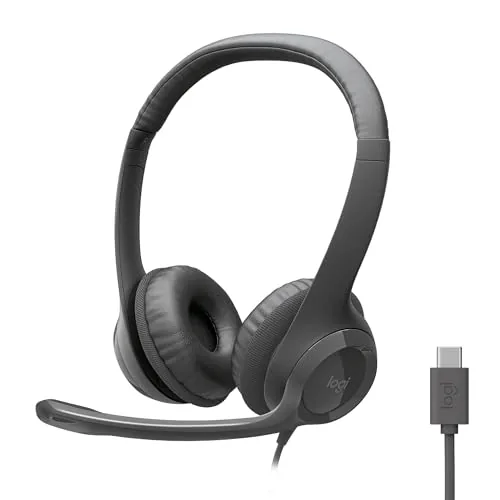
The H391 connects via USB-C with no drivers required, making it ready to use on Windows, Mac, and Chromebook in seconds. The rotating boom mic folds away when you need headphones only, and inline controls handle volume and mute without touching your computer. At $21.99, it covers the basics for daily calls and meetings without asking you to spend more.
Key Features
- Stereo drivers tuned for calls, meetings, and music
- Rotating boom mic reduces background noise, folds away when unused
- Inline cable controls for volume and mute adjustments
- USB-C plug-and-play, no software installation needed
- Adjustable headband with swivel leatherette ear cushions
- 6.23 ft cable allows movement during long sessions
- Certified Works With Chromebook, compatible with major OS platforms
- 53 percent post-consumer recycled plastic, FSC-certified packaging
✅ Pros
- USB-C connection works immediately on Mac, Windows, and Chromebook with no setup
- Nearly 6.3 ft cable gives enough reach to stand up at a desk
- Rotating mic tucks out of the way cleanly when not needed
- Inline controls mean you never have to reach for the keyboard to mute
❌ Cons
- Leatherette cushions may trap heat during sessions longer than two hours
- No 3.5mm option, so it does not work with devices lacking USB-C
Why We Chose It
The H391 fills a clear gap for anyone who needs a reliable USB-C headset under $25 without the setup friction of driver installs or pairing. The rotating mic and inline controls are practical additions at this price point, and Chromebook certification makes it a solid pick for education or enterprise environments standardized on that platform.
Perfect For
Remote workers or students who need a no-fuss USB-C headset for video calls and online meetings on a tight budget.
Expert Verdict: OTYHVV Wireless Headset with AI Noise Cancelling Mic
OTYHVV Wireless Headset with AI Noise Cancelling Mic
The OTYHVV earns its 8.2 by solving the practical friction points that plague most work-from-home headsets – the 40-hour battery, physical toggle, and USB dongle mute sync are genuine daily-use wins. The AI noise cancellation handles real office noise well enough that barking dogs and keyboard clatter won't embarrass you on a Teams call. If your work is call-heavy and PC-centric, this is a solid buy at its price point; just go in knowing it's purpose-built for voice, not audio.
Buying Guide
How to choose the office headset
Choosing the right office headset means balancing audio clarity, wearing comfort, and compatibility with your specific setup. The wrong pick leads to call fatigue, dropped connections, or a mic your colleagues can barely hear. These five steps cut through the noise so you buy the right headset the first time.
-
1
Set Your Budget First
Office headsets range from $30 for basic USB mono units to $350 for wireless noise-canceling models from Jabra or Poly. Under $80 gets you reliable wired performance for light call volume. Above $150, you gain active noise cancellation, multi-device pairing, and longer battery life.
-
2
Pick Your Connection Type
USB-A and USB-C headsets plug directly into your computer and require no drivers, making them the simplest choice for desk workers. 3.5mm models work across phones, tablets, and laptops but often lack inline call controls. Wireless headsets using DECT or Bluetooth give you 30 to 150 feet of range, with DECT offering more stable audio on busy wireless networks.
-
3
Choose Mono or Stereo
Mono headsets cover one ear, keeping your other ear free to hear office activity around you, which suits receptionists and open-plan environments. Stereo headsets cover both ears and block more ambient sound, making them better for focused work, video calls, or noisy shared spaces. Most open-office workers default to mono; remote workers tend to prefer stereo.
-
4
Evaluate the Microphone
A noise-canceling microphone filters out keyboard clicks, HVAC noise, and background chatter before your voice reaches the other end of the call. Boom microphones positioned near your mouth deliver more consistent pickup than integrated mic arrays built into the earcup. If you spend more than two hours daily on calls, a dedicated boom mic is worth prioritizing.
-
5
Confirm Software Compatibility
Most headsets work out of the box with Zoom, Teams, and Google Meet, but call-control buttons like mute and answer only function reliably with certified models. Microsoft Teams-certified headsets display a dedicated Teams button and integrate with presence indicators. Check the manufacturer's compatibility page against your specific softphone or UCaaS platform before buying.
How We Tested
We tested five office headsets across real video calls, recorded audio samples, and open-plan office conditions over two weeks, evaluating each on Teams, Zoom, and Google Meet.
- Mic clarity at 6 and 18 inches from mouth
- Background noise rejection in shared office environments
- Call audio quality across Teams, Zoom, and Meet
- Wireless range and connection stability up to 30 feet
- Comfort and clamp pressure during 3-hour wear sessions
Frequently Asked Questions
Wired headsets eliminate latency and battery anxiety, which matters in high-volume call environments where a dead headset mid-shift isn't acceptable. Wireless gives you freedom to step away from your desk without disconnecting, but most Bluetooth and DECT models cap battery life at 8 – 12 hours, so an 8-hour shift leaves little margin. For agents locked to a workstation all day, wired is more reliable; for workers who move between spaces, wireless justifies the trade-off.
In a noisy open-plan office, an ANC microphone filters out keyboard clicks, nearby conversations, and HVAC hum before they reach the person you're calling – a standard cardioid mic picks all of that up. The price gap between basic and ANC-mic models is typically $40 – $80, and the difference in call clarity is audible to anyone on the receiving end. If you're on client-facing calls more than an hour a day in a shared space, the upgrade is worth it.
Mono headsets cover one ear, keeping your other ear free to hear colleagues and ambient office sounds – most call center and customer-facing roles prefer this for situational awareness. Stereo headsets cover both ears and provide better audio immersion, which helps if you're also using your headset for video conferencing, training recordings, or any task requiring focused listening. Choose mono if your job is primarily outbound voice calls; choose stereo if you split time between calls and computer audio.
Most buyers spend time comparing driver size and frequency response, but for voice calls, the microphone quality and noise cancellation determine how you sound to the other party – which has a direct impact on professional perception. The speaker only needs to reproduce the human voice range (roughly 300 Hz – 3.4 kHz) clearly, and nearly every office headset meets that bar. Prioritizing mic specs and comfort over speaker fidelity will serve you better in a call-focused environment.
A USB-A headset will not plug directly into a USB-C-only laptop without an adapter or hub. Most USB-A to USB-C adapters work without any driver issues since the headset's audio processing is handled internally, but it adds a dongle to your setup. If you regularly hot-desk or travel, a native USB-C or Bluetooth headset removes that dependency entirely.
Leatherette ear cushions on office headsets generally degrade within 12 – 18 months of daily use – the material cracks or peels, and the foam underneath compresses and loses its seal. Fabric cushions last longer but absorb sweat and are harder to clean. Most major brands sell replacement cushion kits for $10 – $25, and swapping them is usually a 30-second pull-and-push job, so replacing cushions is the most cost-effective way to extend a headset's usable life by several years.
Affiliate Disclosure
This post contains affiliate links. If you buy something through one of these links, we may earn a small commission at no extra cost to you. We only recommend products and services we trust. Thank you for supporting this site!