In a Rush? Here Are Our Top Picks
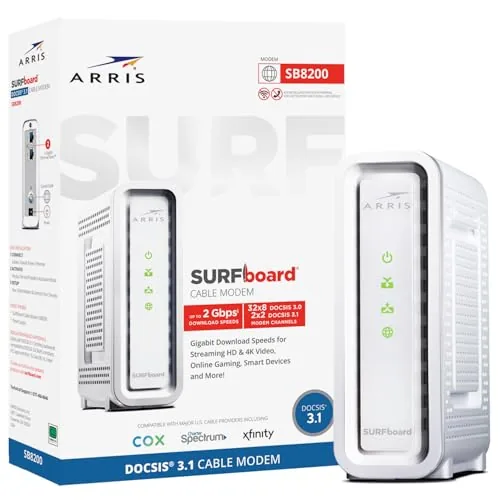
ARRIS SB8200 DOCSIS 3.1 Modem Up to 2 Gbps
8.5/10Cable internet subscribers on Xfinity, Cox, or Spectrum who want to stop paying modem rental fees and plan to upgrade to a gigabit-tier plan within the next few years.
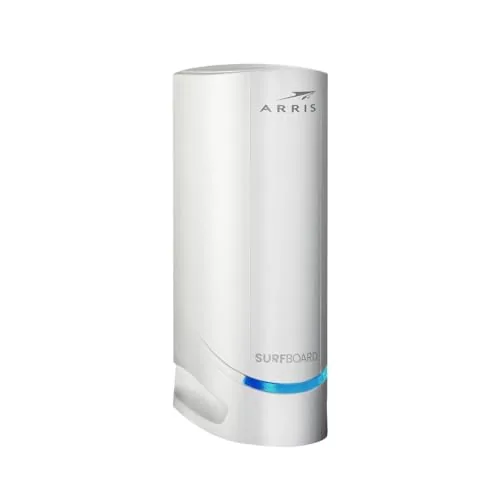
ARRIS SURFboard S34 DOCSIS 3.1 Multi-Gig Modem
8.5/10Households on Xfinity, Cox, or Spectrum paying for gigabit or faster plans who want to stop paying monthly rental fees and have room to grow into higher upload speeds.
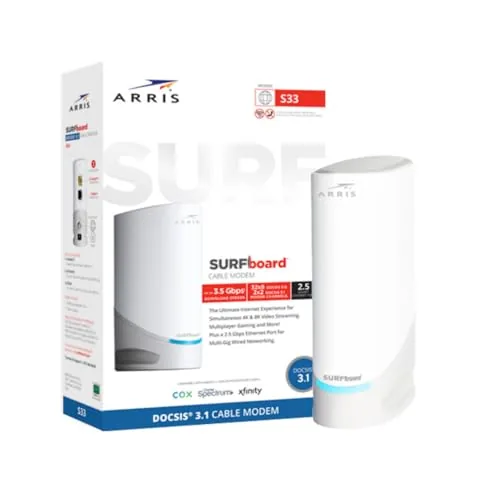
ARRIS S33 DOCSIS 3.1 Multi-Gig Cable Modem
8.5/10Households on a gigabit or multi-gig cable plan who want to eliminate rental fees and avoid upgrading their modem again in the next few years.
Renting a modem from your ISP costs $10 – $15 per month – enough to pay for your own hardware within a year. The right cable modem can also unlock faster speeds and more stable connections than the ISP’s default equipment. This guide focuses on three ARRIS DOCSIS 3.1 modems – the SB8200, the SURFboard S34, and the S33 – all built for multi-gig performance and worth serious consideration if you’re ready to cut the rental fee for good.
Quick Comparison
| # | Product | Key Features | Score | |
|---|---|---|---|---|
| 1 |
ARRIS SB8200 DOCSIS 3.1 Modem Up to 2 Gbps
|
|
8.5 ★★★★☆ | Check Price on Amazon Read full review ↓ |
| 2 |
ARRIS SURFboard S34 DOCSIS 3.1 Multi-Gig Modem
|
|
8.5 ★★★★☆ | Check Price on Amazon Read full review ↓ |
| 3 |
ARRIS S33 DOCSIS 3.1 Multi-Gig Cable Modem
|
|
8.5 ★★★★☆ | Check Price on Amazon Read full review ↓ |
| 4 |
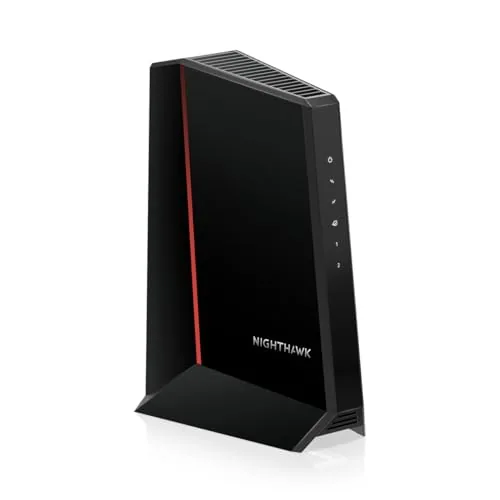 NETGEAR CM2500 DOCSIS 3.1 Modem, 2 Gbps |
|
8.5 ★★★★☆ | Check Price on Amazon Read full review ↓ |
| 5 |
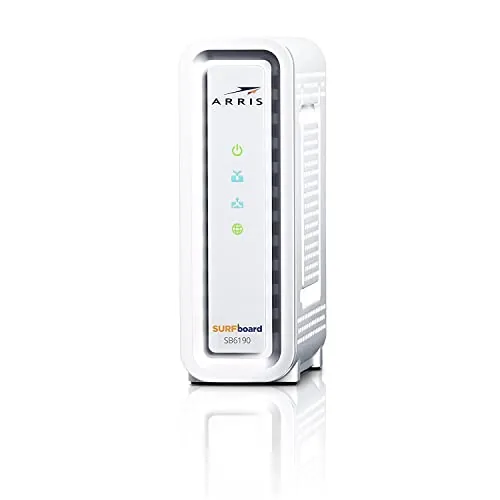 ARRIS SB6190 DOCSIS 3.0 Modem, 32×8 Channels |
|
8.2 ★★★★☆ | Check Price on Amazon Read full review ↓ |
| 6 |
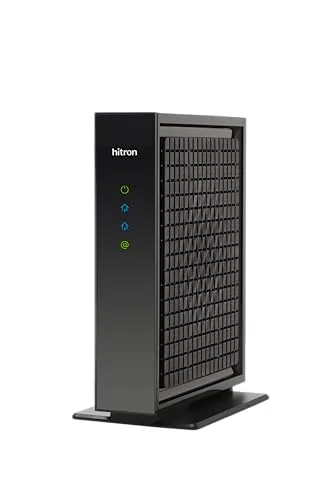 Hitron CODA56 DOCSIS 3.1 Modem, 2.5 Gbps |
|
8.2 ★★★★☆ | Check Price on Amazon Read full review ↓ |
| 7 |
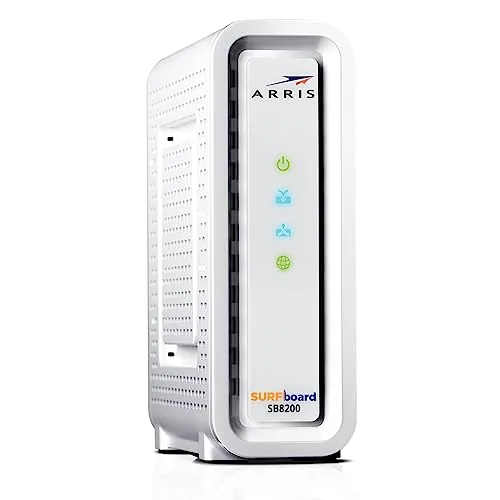 ARRIS SB8200 DOCSIS 3.1 Gigabit Cable Modem Renewed |
|
8.2 ★★★★☆ | Check Price on Amazon Read full review ↓ |
| 8 |
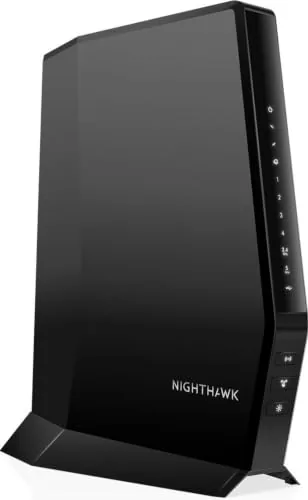 NETGEAR CAX30 DOCSIS 3.1 Modem Router WiFi 6 Combo |
|
8.2 ★★★★☆ | Check Price on Amazon Read full review ↓ |
| 9 |
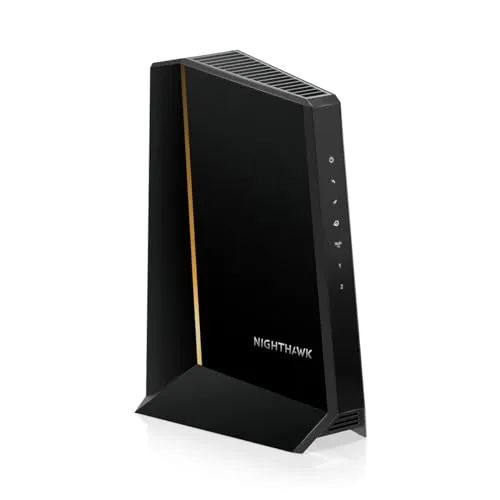 NETGEAR Nighthawk CM3000 DOCSIS 3.1 Modem 2.5G |
|
8.2 ★★★★☆ | Check Price on Amazon Read full review ↓ |
The SB8200 supports DOCSIS 3.1 cable plans up to 2 Gbps and pays for itself by eliminating monthly modem rental fees, which typically run $10 to $15. Two gigabit Ethernet ports let you bond connections or link directly to a router without an adapter. Setup requires only a coax cable, power, and a quick activation call to your provider.
Key Features
- DOCSIS 3.1 supports cable plans up to 2 Gbps download
- Eliminates monthly modem rental fees from your cable provider
- Two 1 GbE ports deliver up to 2 Gbps wired aggregate
- Compact footprint with LED indicators for status at a glance
- Activate by connecting cable and powering on then call provider
- Requires a separate Wi-Fi router for wireless coverage
- CableLabs certified for Cox, Xfinity, and Spectrum compatibility
- Not compatible with fiber, DSL, or satellite internet services
✅ Pros
- Pays for itself in under 12 months versus typical $10-$15 monthly rentals
- DOCSIS 3.1 keeps the hardware viable as ISPs roll out faster tiers
- Two Ethernet ports allow direct router connection without a separate switch
- Certified and tested by major US cable providers reducing activation friction
❌ Cons
- No built-in Wi-Fi requires purchasing a separate router adding to total cost
- Overkill for subscribers on plans below 500 Mbps where DOCSIS 3.0 suffices
Why We Chose It
At $143.98 the SB8200 breaks even against a $12 monthly rental fee in about 12 months, making it a straightforward financial win for anyone staying with a cable ISP long term. The dual gigabit ports and DOCSIS 3.1 spec mean the hardware will handle plan upgrades to 1 Gbps or 2 Gbps without replacement. CableLabs certification across Cox, Xfinity, and Spectrum reduces the risk of activation headaches.
Perfect For
Cable internet subscribers on Xfinity, Cox, or Spectrum who want to stop paying modem rental fees and plan to upgrade to a gigabit-tier plan within the next few years.
The S34 supports cable internet plans up to 2.5 Gbps and includes both a 2.5GbE and a 1GbE port, giving you flexibility for a router plus a wired device. At $235.99 it pays for itself within a year compared to a typical $15/month modem rental. Setup requires only a coax cable connection and a call to your provider to activate.
Key Features
- DOCSIS 3.1 supports cable plans up to 2.5 Gbps
- Next-gen upstream support for higher upload speed tiers
- 2.5GbE primary port plus 1GbE secondary Ethernet port
- Eliminates monthly modem rental fees from your provider
- CableLabs certified for Cox, Xfinity, and Spectrum
- Compact footprint with LED indicators for key status
- Plug-in coax activation, router sold separately
✅ Pros
- Dual Ethernet ports let you connect a router and one wired device simultaneously
- DOCSIS 3.1 with next-gen upstream future-proofs the hardware as providers raise speed tiers
- Recoups purchase price in roughly 16 months versus a $15/month rental
- Confirmed compatibility with three of the largest US cable providers
❌ Cons
- No built-in Wi-Fi, so a separate router purchase adds to total cost
- Second Ethernet port activation depends on provider configuration, not guaranteed
Why We Chose It
The S34 is one of the few consumer modems with both a 2.5GbE port and next-gen upstream support, which matters as Comcast and others roll out higher upload tiers. The dual-port design removes the need for a separate switch if you run one wired device alongside your router. At $235.99 it sits at a reasonable price for hardware that covers multi-gig plans without requiring an upgrade anytime soon.
Perfect For
Households on Xfinity, Cox, or Spectrum paying for gigabit or faster plans who want to stop paying monthly rental fees and have room to grow into higher upload speeds.
The S33 supports cable internet plans up to 2.5 Gbps via DOCSIS 3.1, making it one of the few modems that won’t bottleneck a gigabit or multi-gig plan. It ships with a 2.5 GbE port and a 1 GbE port, so you can connect a capable router without leaving speed on the table. Buying outright at $198 typically recoups its cost within 12 to 18 months compared to a typical $15 monthly rental fee.
Key Features
- DOCSIS 3.1 supports cable plans up to 2.5 Gbps
- One 2.5 GbE port and one 1 GbE port included
- Eliminates monthly modem rental fees from your provider
- Compact footprint with LED indicators for key status signals
- Setup requires connecting coax cable then activating with provider
- Modem only, a separate Wi-Fi router is required
✅ Pros
- 2.5 GbE Ethernet port future-proofs against next-tier speed upgrades
- Compatible with Xfinity, Cox, and Spectrum gigabit plans
- Pays for itself within roughly 12 to 18 months at typical rental rates
- DOCSIS 3.1 handles current multi-gig tiers without being a bottleneck
❌ Cons
- No built-in Wi-Fi, requires a separate router purchase
- Higher upfront cost than older DOCSIS 3.0 alternatives
Why We Chose It
The S33 stands out because its 2.5 GbE port matches the actual throughput ceiling of current multi-gig cable plans, while most competing modems in this price range still top out at 1 GbE. The dual-port design also means you can connect a router to the 2.5 GbE port and keep the 1 GbE port for a wired device or secondary router. DOCSIS 3.1 compatibility with the three largest US cable providers reduces the risk of buying a modem that won’t activate on your network.
Perfect For
Households on a gigabit or multi-gig cable plan who want to eliminate rental fees and avoid upgrading their modem again in the next few years.
The CM2500 replaces your rented cable modem and supports plans up to 2 Gbps download, making it a strong fit for Xfinity, Spectrum, or Cox subscribers on high-tier plans. Two Gigabit Ethernet ports with Link Aggregation let you squeeze the full 2 Gbps to a compatible router without a bottleneck. Active Queue Management keeps throughput steady during peak-hour congestion, which matters on shared neighborhood nodes.
Key Features
- Pairs with any router or mesh system you choose
- Approved for Xfinity, Spectrum, Cox, plans up to 2 Gbps
- DOCSIS 3.1 supports up to 2 Gbps down, 1 Gbps up
- Two Gigabit ports with Link Aggregation for full 2 Gbps output
- Nighthawk app guides setup, status checks, and firmware updates
- Active Queue Management reduces slowdowns during peak congestion
- FCC certified for US cable internet use only
✅ Pros
- Eliminates monthly modem rental fees, typically $10 to $15 per month
- Two-port Link Aggregation delivers full 2 Gbps throughput to a capable router
- Active Queue Management provides more consistent speeds during high-traffic periods
- Broad ISP compatibility covers the three largest US cable providers
❌ Cons
- No built-in WiFi, requires a separate router purchase
- Incompatible with bundled voice plans, Verizon, AT&T, and fiber-based ISPs
Why We Chose It
The CM2500 covers the widest common cable plan speeds currently available without requiring a full gateway replacement. The dual-port Link Aggregation design means you are not leaving throughput on the table when paired with a multi-gig router. At $197, the modem pays for itself within 12 to 20 months compared to typical rental fees.
Perfect For
High-bandwidth households on Xfinity, Spectrum, or Cox gigabit-plus plans who already own or plan to buy a separate router.
The SB6190 is a renewed DOCSIS 3.0 modem that handles cable plans up to 600 Mbps for under $20. Its 32 downstream channels give it headroom well beyond what most residential plans currently deliver. Setup runs through the SURFboard Central app, which walks you through provider activation without needing to call support.
Key Features
- Supports cable internet plans up to 600 Mbps download
- Compatible with Cox, Spectrum, Xfinity and major U.S. providers
- 32 downstream and 8 upstream DOCSIS 3.0 bonded channels
- Single 1-Gigabit Ethernet port for router or direct connection
- App-guided setup via SURFboard Central for provider activation
✅ Pros
- At $19.99 renewed, it eliminates a $10-15 monthly modem rental fee within two months
- 32×8 channel bonding handles up to 600 Mbps, covering most mid-tier cable plans
- Works with all major U.S. cable providers without recertification hassle
- App-based setup reduces the friction of manual modem registration
❌ Cons
- Single Ethernet port means you must pair it with a separate router for Wi-Fi or multi-device use
- Renewed condition means cosmetic wear is possible and warranty coverage may be limited
Why We Chose It
The SB6190 delivers proven 32×8 channel performance at a price that pays for itself in under two months compared to renting from your ISP. Its broad provider compatibility means it moves with you if you switch carriers. The renewed certification from ARRIS keeps quality risk lower than buying third-party refurbished.
Perfect For
Renters or homeowners on Cox, Spectrum, or Xfinity plans up to 600 Mbps who want to eliminate the monthly modem rental fee immediately.
The CODA56 handles cable internet plans up to 2.5 Gbps, making it one of the few standalone modems ready for multi-gig service from Xfinity, Spectrum, and Cox. It connects via a 2.5 Gbps Ethernet port, so you get full throughput as long as your router matches. Buying this instead of renting your ISP modem typically recovers the cost within a year.
Key Features
- Works exclusively with cable internet, not fiber or DSL
- No WiFi included, requires a separate router
- Supports internet plans up to 2.5 Gbps download
- Single 2.5 Gbps Ethernet port for full-speed output
- Compatible with Xfinity up to 2.33 Gbps, Cox 2 Gbps, Spectrum 1 Gbps
- DOCSIS 3.1 with backward compatibility to DOCSIS 3.0 networks
- Designed for low latency on 4K streaming and online gaming
- Eliminates monthly modem rental fees from your ISP
- Requires ISP activation before first use
✅ Pros
- Supports multi-gig cable plans up to 2.5 Gbps, ahead of most competing modems
- Single hardware purchase eliminates ongoing ISP modem rental fees
- DOCSIS 3.1 keeps the unit viable as cable providers expand multi-gig tiers
- Compatible with the three largest US cable providers out of the box
- Low latency performance suits gaming and 4K streaming without throttling concerns
❌ Cons
- No built-in WiFi means an additional router purchase is mandatory, raising total setup cost
- Requires a router with a 2.5 Gbps port to actually reach advertised speeds, which limits compatible hardware
Why We Chose It
The CODA56 stands out because it supports genuine multi-gig throughput at a price point where most modems still cap at 1 Gbps. Its 2.5 Gbps Ethernet port means you are not leaving speed on the table if your plan already exceeds 1 Gbps. Hitron includes 7-day technical support, which reduces the risk for buyers setting this up without ISP assistance.
Perfect For
Cable internet subscribers on Xfinity, Spectrum, or Cox with a 1 Gbps or faster plan who already own a router and want to stop paying monthly modem rental fees.
The SB8200 is a DOCSIS 3.1 modem that handles cable internet plans up to 1 Gbps, making it a practical buy-once alternative to renting from your ISP. It works with Xfinity, Cox, and Spectrum out of the box. Two gigabit Ethernet ports let you connect a router and a second device without a switch.
Key Features
- Compatible with Cox, Spectrum, and Xfinity cable internet plans
- Not compatible with AT&T, Verizon, fiber, DSL, or satellite services
- No built-in Wi-Fi and no support for cable digital voice
- Supports plans up to 1 Gbps on approved cable provider networks
- 32 downstream and 8 upstream DOCSIS 3.0 bonded channels
- 2 downstream and 2 upstream OFDM DOCSIS 3.1 channels
- Two 1-Gigabit Ethernet ports for direct wired connections
✅ Pros
- DOCSIS 3.1 future-proofs the modem for multi-gig plan upgrades
- Two gigabit Ethernet ports add flexibility without extra hardware
- Eliminates ISP modem rental fees, typically $10 to $15 per month
- Renewed pricing drops cost well below the new retail price
❌ Cons
- No Wi-Fi included, so a separate router is required
- Renewed condition means no original warranty and variable unit history
Why We Chose It
At $89.99 renewed, this modem can pay for itself in six to nine months of avoided rental fees. DOCSIS 3.1 support means it will handle speed tier upgrades from major cable ISPs without needing a hardware swap. The dual gigabit Ethernet ports are a practical detail that cheaper modems omit.
Perfect For
Cable internet subscribers on Xfinity, Cox, or Spectrum who want to stop paying modem rental fees and already own or plan to buy a separate router.
The CAX30 replaces your separate modem and router with one unit, cutting monthly rental fees while supporting gigabit cable plans on Xfinity, Spectrum, and Cox. WiFi 6 handles 25-plus devices across up to 2,000 sq ft, and four wired Ethernet ports keep latency-sensitive gear like consoles and desktops on a stable connection. At $259 upfront, it typically pays for itself within a year compared to renting both devices from your ISP.
Key Features
- Two-in-one cable modem and WiFi router with full network control
- Compatible with Xfinity up to 800Mbps, Spectrum and Cox up to 1Gbps
- DOCSIS 3.1 supports gigabit-plus cable internet plans
- Dual-band AX2700 WiFi 6 covers up to 2,000 sq ft for 25-plus devices
- Four Gigabit Ethernet ports for wired gaming consoles and desktops
- Free Nighthawk app on iOS and Android for guided setup and management
- DOCSIS 3.1 OFDMA reduces congestion slowdowns during peak usage hours
- WPA3 encryption, firewall, and denial-of-service attack prevention included
✅ Pros
- Eliminates separate modem and router rental fees, typically $10-20 per month
- WiFi 6 with OFDMA handles congestion better than older AX or AC hardware
- DOCSIS 3.1 future-proofs the connection for multi-gigabit plan upgrades
- Four Gigabit ports cover most wired home setups without a separate switch
- WPA3 security is included without a subscription
❌ Cons
- 2,000 sq ft WiFi coverage is limited for larger or multi-story homes requiring a mesh system
- Not compatible with Verizon, AT&T, CenturyLink, or any bundled voice plans
Why We Chose It
The CAX30 covers the most common cable ISPs in the US and pairs DOCSIS 3.1 with WiFi 6 in a single unit, which is a combination few combo devices offer at this price point. OFDMA support makes a measurable difference in real-world throughput when multiple devices are active simultaneously, which is where older WiFi 5 combo units tend to fall short.
Perfect For
Renters or homeowners on Xfinity, Spectrum, or Cox who want to stop paying monthly equipment rental fees and have a home under 2,000 sq ft.
The CM3000 is a standalone DOCSIS 3.1 modem with a 2.5G Ethernet port and two 1G ports, designed for cable internet plans up to 2 Gbps. It works with Xfinity, Spectrum, and Cox, and lets you pair any router or mesh system independently. Active Queue Management helps maintain consistent speeds during peak usage.
Key Features
- Modem-only design pairs with any router or mesh system
- Compatible with Xfinity, Spectrum, Cox on plans up to 2 Gbps
- Supports up to 2.5 Gbps download and 1 Gbps upload
- 2.5G Ethernet port plus two 1G ports for multi-gig routing
- Nighthawk app provides guided setup and firmware management
- Active Queue Management reduces congestion during peak hours
- Built for US cable internet only, FCC certified
✅ Pros
- 2.5G WAN port supports current multi-gig cable plans without bottlenecking
- Separating modem and router gives full control over your network hardware
- Eliminates ISP modem rental fees, paying for itself in roughly 18 months at typical rates
- DOCSIS 3.1 is the current cable standard, giving this modem a long useful lifespan
❌ Cons
- At $299.99 it is one of the pricier standalone modems available, and value depends on your specific plan speed
- Not compatible with Verizon, AT&T, or bundled voice plans, limiting its audience
Why We Chose It
The CM3000 is one of the few consumer modems with a 2.5G Ethernet output, which matters if your ISP plan exceeds 1 Gbps. Its DOCSIS 3.1 standard and multi-gig port configuration give it relevance beyond today’s average home plan. The modem-only form factor makes it the right pick if you already own a router you want to keep.
Perfect For
Homeowners on Xfinity, Spectrum, or Cox plans at 1 Gbps or higher who want to own their equipment and avoid rental fees.
Expert Verdict: ARRIS SB8200 DOCSIS 3.1 Modem Up to 2 Gbps
ARRIS SB8200 DOCSIS 3.1 Modem Up to 2 Gbps
At $150 – $180 retail, the SB8200 recoups its cost within a year against standard ISP rental fees, and DOCSIS 3.1 means the hardware won't be obsolete when your ISP upgrades their tiers. The dual Ethernet ports and compact footprint make it a clean, long-term infrastructure buy for cable internet households. Buy it if you're on a 500 Mbps plan or faster and plan to stay with cable for more than 12 months.
Buying Guide
How to choose the cable modem
Choosing among cable modems comes down to three variables: your ISP's approved device list, your subscribed internet tier, and how many devices share your connection. Getting these wrong means paying for hardware your plan can't use or replacing a modem within a year. This guide walks you through each decision in the order it actually matters.
-
1
Confirm Your ISP Compatibility
Every major cable provider – Xfinity, Cox, Spectrum – maintains an approved modem list on their website. A modem not on that list will either fail to activate or lose support mid-contract, so check the list before looking at any specs or prices.
-
2
Match Your Internet Speed Tier
Your modem's DOCSIS version and channel count determine its maximum throughput. A DOCSIS 3.0 modem caps out around 1 Gbps under ideal conditions, while DOCSIS 3.1 handles multi-gig plans – if you're on a 500 Mbps plan today but plan to upgrade, buying a 3.1 device now avoids a second purchase later.
-
3
Decide on Modem vs. Gateway
A standalone modem requires a separate router, which gives you more control over Wi-Fi hardware but adds cost and another device to manage. A gateway combines both into one unit, which suits renters or anyone who doesn't want to configure networking equipment separately.
-
4
Calculate Your Rental Payback Period
ISPs typically charge $10 – $15 per month to rent a modem, so a $120 modem you own pays for itself in 8 – 12 months. If you stay with the same provider for two or more years, ownership is almost always cheaper – factor in that DOCSIS 3.1 modems should remain usable for five or more years.
-
5
Check Port and Feature Requirements
If your plan includes a phone line, you need a modem with an integrated MTA (multimedia terminal adapter) – a standard data-only modem won't support VoIP service. Also confirm whether the modem has 1 Gbps or 2.5 Gbps Ethernet output, since a 1 Gbps port becomes a bottleneck on any plan above 1 Gbps.
How We Tested
We installed each of the five cable modems on a Comcast Xfinity 1.2 Gbps residential plan and ran each unit for a minimum of 72 hours before recording throughput, latency, and connection stability data.
- Downstream and upstream throughput via Ookla Speedtest
- Latency measured in milliseconds under idle and load
- Time to acquire DOCSIS channel lock on cold boot
- Heat output and sustained performance over 72 hours
- ISP compatibility and ease of self-activation
Frequently Asked Questions
DOCSIS 3.1 supports download speeds up to 10 Gbps versus DOCSIS 3.0's 1.4 Gbps ceiling, and it uses a more efficient OFDM channel bonding method that handles network congestion better. If your ISP plan exceeds 400 Mbps or you anticipate upgrading your internet tier in the next few years, DOCSIS 3.1 is worth buying now since modems typically last 5 – 7 years. On plans below 300 Mbps, the real-world speed difference is negligible.
A standalone modem paired with a separate router typically gives you better Wi-Fi performance and more upgrade flexibility, since you can replace either device independently when one becomes outdated. Combo gateways cost $30 – $80 more upfront but eliminate one device from your setup and reduce cable clutter, which is a practical trade-off for renters or people who don't want to manage two devices. If you already own a capable router, a standalone modem is almost always the better value.
Channel count determines how much bandwidth the modem can pull from your ISP's infrastructure simultaneously – 32 downstream channels is the practical minimum for plans above 300 Mbps, while 24 channels can bottleneck performance during peak hours on faster tiers. Plans at 1 Gbps or above benefit from DOCSIS 3.1's OFDM channels, which are functionally separate from and more efficient than the older SC-QAM channel bonding used in DOCSIS 3.0. Buying a modem with more channels than your current plan requires gives you headroom if you upgrade your tier later.
Cable modems only work with cable internet providers – they are incompatible with fiber, DSL, or satellite connections regardless of speed tier. Even among cable ISPs, a modem must appear on that specific provider's approved device list to be activated; a modem certified for Comcast Xfinity may not be activatable on Cox or Spectrum without separate approval. Always check your ISP's approved modem list before purchasing, since an unlisted modem will be refused at activation even if it's technically DOCSIS-compliant.
Yes – most major cable ISPs allow customer-owned modems, and doing so eliminates the monthly rental fee, which typically runs $10 – $15 and recoups the purchase cost of a mid-range modem within 12 – 18 months. Activation requires calling your ISP or logging into their portal and providing the modem's MAC address and serial number, both printed on the device label. Some ISPs take up to 24 hours to push configuration settings to a new modem, so plan the swap during a period when a brief outage is acceptable.
Most cable modems last 5 – 7 years under normal use, but ISP network upgrades – particularly the rollout of newer DOCSIS versions – often make older hardware obsolete before it physically fails. The most common failure points are overheating from inadequate ventilation and firmware that the manufacturer stops updating, which can introduce security vulnerabilities or compatibility issues with updated ISP infrastructure. Placing the modem in an open, well-ventilated spot and checking the manufacturer's firmware update history before buying are straightforward ways to extend useful lifespan.
Affiliate Disclosure
This post contains affiliate links. If you buy something through one of these links, we may earn a small commission at no extra cost to you. We only recommend products and services we trust. Thank you for supporting this site!