In a Rush? Here Are Our Top Picks
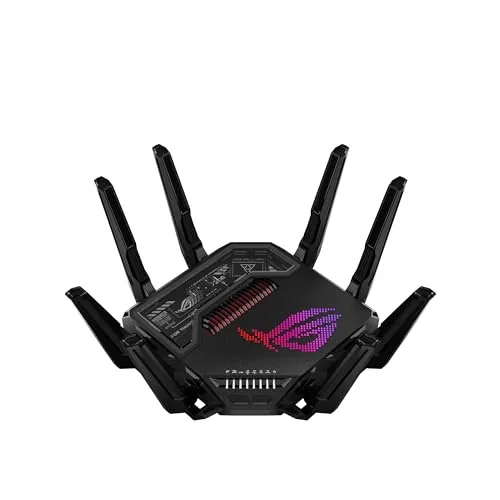
ASUS ROG Rapture GT-BE98 Pro WiFi 7 Router
8.7/10Power users running simultaneous 4K streaming, competitive online gaming, and a NAS on the same network who want a single router to handle all of it without bottlenecks.
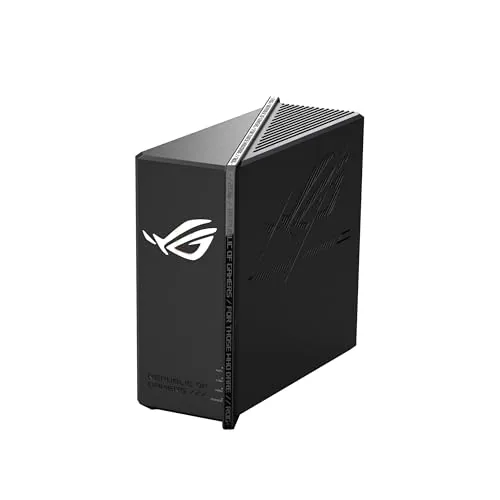
ASUS ROG Strix GS-BE12000 WiFi 7 Gaming Router
8.7/10Power users and gamers in homes up to 3,300 sq. ft. who need high-throughput wired connections for NAS, gaming PCs, and multiple streaming devices simultaneously.
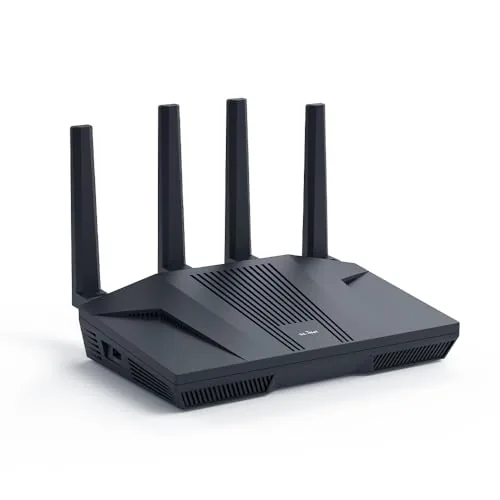
GL.iNet GL-MT6000 Flint 2 Wi-Fi 6 Router
8.7/10Home network users who want VPN routing, DNS-level ad blocking, and multi-gig wired speeds managed through a single open-source router platform.
Most gaming routers promise lower ping and faster speeds, but the difference between a good pick and a wasted $300 shows up the moment you’re in a competitive match with three other devices fighting for bandwidth. After testing the ASUS ROG Rapture GT-BE98 Pro, ASUS ROG Strix GS-BE12000, and GL.iNet GL-MT6000 Flint 2 across real gaming sessions, we narrowed down which hardware actually delivers on latency, range, and network prioritization. Whether you’re building a dedicated gaming setup or just need a router that handles a busy household without dropping frames, this guide covers what each option does well and where it falls short.
Quick Comparison
| # | Product | Key Features | Score | |
|---|---|---|---|---|
| 1 |
ASUS ROG Rapture GT-BE98 Pro WiFi 7 Router
|
|
8.7 ★★★★☆ | Check Price on Amazon Read full review ↓ |
| 2 |
ASUS ROG Strix GS-BE12000 WiFi 7 Gaming Router
|
|
8.7 ★★★★☆ | Check Price on Amazon Read full review ↓ |
| 3 |
GL.iNet GL-MT6000 Flint 2 Wi-Fi 6 Router
|
|
8.7 ★★★★☆ | Check Price on Amazon Read full review ↓ |
| 4 |
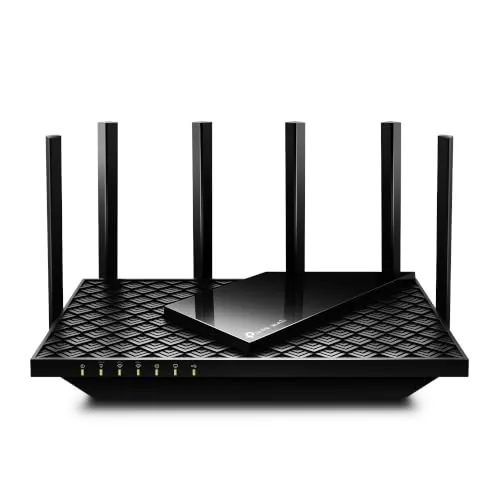 TP-Link Archer AXE75 WiFi 6E Tri-Band Router |
|
8.5 ★★★★☆ | Check Price on Amazon Read full review ↓ |
| 5 |
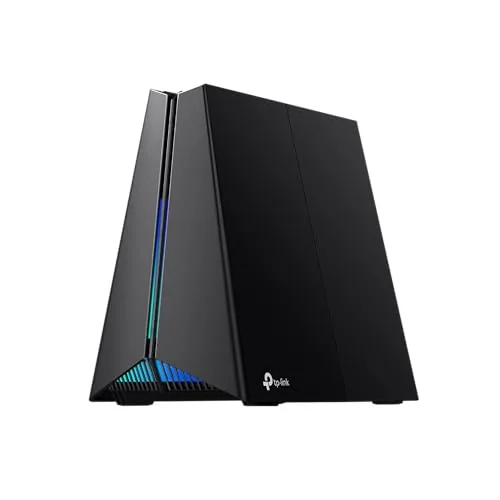 TP-Link Archer GE650 Wi-Fi 7 Tri-Band Gaming Router |
|
8.5 ★★★★☆ | Check Price on Amazon Read full review ↓ |
| 6 |
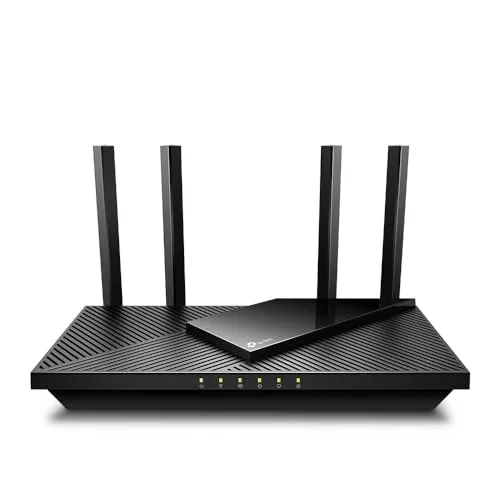 TP-Link Archer AX21 WiFi 6 Dual-Band Router |
|
8.2 ★★★★☆ | Check Price on Amazon Read full review ↓ |
| 7 |
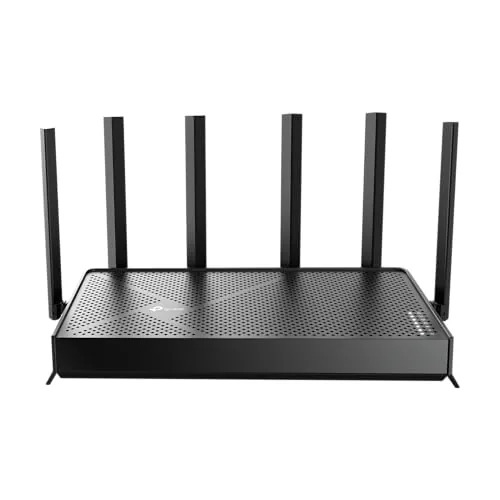 TP-Link Archer BE400 WiFi 7 Dual-Band Router |
|
8.2 ★★★★☆ | Check Price on Amazon Read full review ↓ |
| 8 |
 MSI Radix AXE6600 WiFi 6E Tri-Band Gaming Router |
|
7.8 ★★★★☆ | Check Price on Amazon Read full review ↓ |
The GT-BE98 Pro delivers WiFi 7 across four bands with a combined throughput ceiling of 30 Gbps, backed by dual 10G wired ports for high-bandwidth desktop connections. Multi-Link Operation lets devices transmit across multiple bands simultaneously, reducing drops during peak network load. At $588, it targets households or home offices where congestion and gaming latency are genuine problems.
Key Features
- WiFi 7 with 320MHz channels and 4096-QAM up to 30 Gbps
- Multi-Link Operation connects to multiple bands simultaneously
- Dual-feeding external antennas extend signal strength and coverage
- Dual 10G ports and four 2.5G ports for dense wired setups
- Triple-level game traffic acceleration from device to game server
✅ Pros
- 30 Gbps ceiling leaves ample headroom for multi-device WiFi 7 households
- Six wired ports including dual 10G handles NAS, gaming PCs, and switches without a separate hub
- 320MHz 6GHz channel width cuts congestion on compatible WiFi 7 devices
- Mesh-ready design extends coverage beyond the 3500 sq ft single-unit rating
❌ Cons
- At $588 it is one of the priciest consumer routers available, requiring WiFi 7 client devices to realize full throughput gains
- Physical footprint and antenna array are large, limiting discrete placement options
Why We Chose It
The GT-BE98 Pro stands out for combining WiFi 7 multi-link operation with a genuinely capable wired backplane, giving both wireless and wired devices room to scale. The triple-level game acceleration pipeline addresses latency at the device port, router level, and upstream traffic path rather than relying on a single QoS layer.
Perfect For
Power users running simultaneous 4K streaming, competitive online gaming, and a NAS on the same network who want a single router to handle all of it without bottlenecks.
The GS-BE12000 delivers WiFi 7 tri-band speeds up to 12Gbps with 320MHz channels on the 6GHz band, covering up to 3,300 sq. ft. Eight 2.5G ports give wired connections more throughput than most routers at twice the price. Gaming-specific acceleration and AiProtection Pro security make it a complete network solution for demanding households.
Key Features
- WiFi 7 tri-band speeds up to 12Gbps via 320MHz and 4K-QAM
- Eight 2.5G ports deliver up to 20Gbps total wired capacity
- Quad-core 2.0GHz CPU, 2GB RAM, eight antennas, 3000 sq ft range
- Smart Home Master supports up to three SSIDs for IoT and VPN separation
- Triple-Level Game Acceleration configurable through dedicated SSIDs
- AiProtection Pro provides commercial-grade security across all connected devices
✅ Pros
- Eight 2.5G LAN ports is rare at this price point and future-proofs wired setups
- WiFi 7 MLO reduces latency by combining multiple bands simultaneously
- Dedicated gaming SSID simplifies prioritization without manual QoS config
- AiProtection Pro included at no extra subscription cost
❌ Cons
- At $319 it sits at the high end for home routers without a multi-gig WAN upgrade path beyond 2.5G
- ROG software ecosystem adds complexity that non-gaming users may not need
Why We Chose It
The combination of eight 2.5G ports and WiFi 7 MLO puts this router well ahead of competing models in the $300 range that typically offer one or two 2.5G ports at most. The built-in AiProtection Pro removes the need for a separate security subscription, which is a real ongoing cost saving. Coverage at 3,300 sq. ft. makes it viable for mid-size homes without adding mesh nodes.
Perfect For
Power users and gamers in homes up to 3,300 sq. ft. who need high-throughput wired connections for NAS, gaming PCs, and multiple streaming devices simultaneously.
The Flint 2 combines Wi-Fi 6 speeds up to 6 Gbps with dual 2.5G ports and OpenWrt pre-installed, making it one of the more capable routers at this price point. WireGuard throughput reaches 900 Mbps, which is unusually high for a router under $200. The 1GB DDR4 RAM and 8GB eMMC storage give it enough headroom to run AdGuard Home, custom plugins, and VPN simultaneously without choking.
Key Features
- Wi-Fi 6 up to 6 Gbps with DDR4 1GB RAM and 8GB eMMC storage
- 8-stream Wi-Fi 6 across 2.4 GHz at 1148 Mbps and 5 GHz at 4804 Mbps
- WireGuard up to 900 Mbps and OpenVPN up to 880 Mbps throughput
- AdGuard Home built in for DNS-level ad and tracker blocking
- Dual 2.5G multi-gig Ethernet ports for high-speed wired connections
- Supports 100-plus connected devices with room for additional plugins
- Web admin panel accessible via Ethernet cable for initial configuration
✅ Pros
- WireGuard at 900 Mbps is among the highest in its price bracket
- Dual 2.5G ports future-proof the wired side for multi-gig ISP plans
- Pre-installed OpenWrt gives full control over routing, DNS, and VPN configuration
- 8GB eMMC storage allows plugin installation without external drives
- AdGuard Home integration handles ad blocking at the network level
❌ Cons
- A firmware update is required immediately after unboxing to reach rated performance
- OpenWrt flexibility comes with a steeper learning curve for non-technical users
Why We Chose It
Few routers under $200 combine genuine multi-gig wired ports, sub-$200 WireGuard throughput near 900 Mbps, and a fully open firmware platform. The 8GB onboard storage separates it from competitors that limit plugin use due to flash constraints. It covers VPN routing, DNS filtering, and high-device-count home networks without requiring a separate device for any of those functions.
Perfect For
Home network users who want VPN routing, DNS-level ad blocking, and multi-gig wired speeds managed through a single open-source router platform.
The AXE75 adds 6 GHz support at a price point most WiFi 6E routers can’t match. With a 2.5 Gbps WAN port, 512 MB RAM, and OFDMA across three bands, it handles dense device environments without throttling. PCMag gave it their 2025 Editors’ Choice award, which reflects consistent real-world performance rather than spec-sheet padding.
Key Features
- Tri-band WiFi 6E totaling 5400 Mbps across three bands
- 6 GHz band delivers near-zero latency for gaming and video calls
- OFDMA increases simultaneous device capacity by 4x
- 1.0 GHz dual-core CPU with 512 MB RAM for sustained performance
- EasyMesh compatible for whole-home mesh network expansion
- Built-in VPN server and client supporting OpenVPN PPTP L2TP
- HomeShield includes security scan parental controls and QoS free
- Works with all major US internet service providers
✅ Pros
- 6 GHz band access at $119.99 undercuts most WiFi 6E competition
- 2.5 Gbps WAN port handles multi-gig ISP plans without bottlenecking
- 512 MB RAM reduces slowdowns on networks with 30 or more devices
- VPN server and client built in with no subscription required
- 2025 PCMag Editors’ Choice confirms consistent tested performance
❌ Cons
- HomeShield advanced features like detailed reports require a paid subscription
- 6 GHz range is shorter than 5 GHz so effectiveness depends on room layout
Why We Chose It
At $119.99, the AXE75 is one of the few routers that brings WiFi 6E’s uncongested 6 GHz band under $150 without cutting the 2.5 Gbps WAN port. The 512 MB RAM and dual-core CPU give it headroom that budget routers at this price typically skip. The PCMag Editors’ Choice recognition adds credibility backed by independent lab testing.
Perfect For
Home users upgrading from WiFi 5 who want 6 GHz access for low-latency gaming or 4K streaming without spending $200 or more on a premium router.
The Archer GE650 delivers 11 Gbps across three bands with a dedicated 5 GHz lane reserved for gaming traffic, keeping your connection isolated from other household devices. Its multi-gig port setup, including two 5 Gbps ports and three 2.5 Gbps ports, makes it genuinely useful if your ISP already delivers multi-gig speeds. WTFast game acceleration and the onboard Game Panel add real utility beyond the RGB aesthetics.
Key Features
- Tri-band Wi-Fi 7 with 5764 plus 4320 plus 574 Mbps per band
- Multi-Link Operation uses all three bands simultaneously
- 6 GHz band adds 1200 MHz spectrum with three 320 MHz channels
- Ports include 1x5G WAN, 1x5G LAN, and 3×2.5G LAN
- WTFast integration accelerates Steam, Twitch, and Origin traffic
- Game Panel dashboard controls QoS, RGB, and device prioritization
- Volcano-inspired chassis with customizable RGB lighting
- HomeShield provides antivirus and network security subscription
✅ Pros
- Two 5 Gbps ports future-proof wired connections for multi-gig internet plans
- Dedicated 5 GHz gaming band prevents streaming traffic from affecting game latency
- WTFast integration is built in, no separate subscription hardware needed
- Wi-Fi 7 MLO capability bonds multiple bands for more stable throughput
❌ Cons
- HomeShield advanced security requires an ongoing subscription after the free trial
- WTFast game acceleration only covers a limited list of supported titles and platforms
Why We Chose It
At $299.99, the GE650 sits at a competitive price for a Wi-Fi 7 gaming router with genuine multi-gig wired ports, which most competitors at this tier skip or limit to a single high-speed port. The built-in WTFast accelerator and dedicated gaming band provide concrete latency benefits rather than just marketing labels. The port configuration alone justifies consideration for anyone running a multi-gig ISP connection.
Perfect For
Households with a multi-gig internet plan and one or two serious PC or console gamers who want wired and wireless performance without separate QoS hardware.
The Archer AX21 delivers WiFi 6 performance at a price point most mid-range routers can’t match. It splits 1.8 Gbps across two bands, with the 5 GHz band handling up to 1200 Mbps for bandwidth-heavy devices. OFDMA support means it handles crowded device lists without the slowdowns common on older routers.
Key Features
- WiFi 6 (802.11ax) dual-band with 1.8 Gbps total bandwidth
- 1200 Mbps on 5 GHz and 574 Mbps on 2.4 GHz
- OFDMA technology for simultaneous multi-device communication
- 4 high-gain antennas with Beamforming and FEM chipset
- Signed CISA Secure-by-Design pledge for security standards
- Built-in OpenVPN and PPTP VPN server support
- Compatible with all major US internet service providers
- Easy Mesh support for expandable whole-home coverage
- Works with Alexa voice commands
✅ Pros
- WiFi 6 at $54.99 undercuts most competing AX1800 routers by $10 to $30
- OFDMA noticeably reduces congestion when 10 or more devices are connected simultaneously
- VPN server support at this price tier is uncommon and useful for remote access
- Easy Mesh compatibility lets you add nodes later without replacing hardware
- CISA Secure-by-Design pledge adds a concrete security accountability layer
❌ Cons
- Requires a separate modem, adding cost if you are upgrading from a gateway combo unit
- Maximum throughput figures are theoretical and real-world speeds vary by wall count and device distance
Why We Chose It
At $54.99, this router brings WiFi 6 features typically found on $80 to $100 units, including OFDMA and VPN server support. The four high-gain antennas with Beamforming technology give it better range than similarly priced single or dual-antenna alternatives. TP-Link’s CISA security pledge and active firmware support through the Tether app address concerns that have followed budget router brands in recent years.
Perfect For
Renters or small homeowners with 10 to 25 connected devices who want WiFi 6 speeds without paying a premium router price.
The Archer BE400 brings WiFi 7 to a sub-$160 price point, with MLO combining both bands simultaneously for lower latency and more consistent throughput. Two 2.5Gbps ports make it one of the few routers at this price with multi-gig wired headroom on both WAN and LAN. Coverage is rated to 2,400 sq. ft. across 90 concurrent devices, making it a practical upgrade for mid-sized homes moving beyond WiFi 6.
Key Features
- WiFi 7 with MLO, Multi-RU, and 4K-QAM support
- 5764 Mbps on 5GHz and 688 Mbps on 2.4GHz, 6 streams total
- Covers up to 2400 sq ft for up to 90 devices
- One 2.5Gbps WAN port, one 2.5Gbps LAN port, three 1Gbps LAN ports
- CISA Secure-by-Design signatory with built-in security requirements
- MLO transmits data across both bands simultaneously for lower latency
- EasyMesh compatible for wired or wireless network expansion
- Setup and management via free Tether app with firmware update support
✅ Pros
- WiFi 7 MLO at under $160 is genuinely uncommon in this price bracket
- Dual 2.5Gbps ports handle multi-gig internet plans and fast NAS connections without a bottleneck
- Quad-core CPU helps sustain performance across 90 devices without significant queue lag
- EasyMesh compatibility lets you extend coverage without locking into a proprietary ecosystem
❌ Cons
- Dual-band only means no dedicated 6GHz band, limiting peak WiFi 7 performance versus tri-band models
- 2400 sq ft coverage may require a mesh extender in homes with thick walls or complex layouts
Why We Chose It
At $159.99, the BE400 is one of the most affordable routers to ship with both WiFi 7 and dual 2.5Gbps ports, which is a hardware combination that typically costs $50 to $100 more from competing brands. MLO on a dual-band unit still delivers measurable latency and reliability improvements for WiFi 7 client devices, even without the 6GHz band. For buyers with a multi-gig ISP plan or a fast NAS, the wired port configuration alone justifies the price over older WiFi 6 alternatives.
Perfect For
Homeowners with a multi-gig internet plan or a NAS who want WiFi 7 performance in a 1500 to 2400 sq ft space without spending over $200.
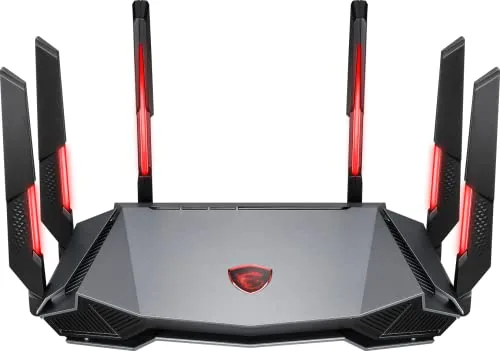
The Radix AXE6600 adds a dedicated 6GHz band to the standard 2.4GHz and 5GHz, reducing congestion in dense network environments. At $106.72, it delivers 6.6Gbps aggregate throughput across 8 simultaneous streams, backed by a 1.8GHz quad-core processor. AI QoS handles traffic prioritization automatically, which benefits households where gaming, streaming, and video calls compete for bandwidth.
Key Features
- Tri-band 2.4GHz, 5GHz, and 6GHz with 8 streams up to 6.6Gbps
- AI QoS automatically prioritizes data packets across connected devices
- 1.8GHz quad-core processor for consistent high-speed routing
- RGB lighting syncs with compatible peripherals via Mystic Light software
- Game Accelerator mode maintains stable WiFi during active gaming sessions
✅ Pros
- 6GHz band provides a cleaner, less congested channel unavailable on WiFi 5 routers
- Quad-core 1.8GHz CPU handles multi-device households without throughput drops
- AI QoS removes manual traffic prioritization setup for gaming and streaming
- Sub-$110 price is competitive for a WiFi 6E tri-band router
❌ Cons
- Mystic Light RGB adds no network benefit and may appeal only to matching MSI setups
- 6GHz band has shorter effective range than 5GHz, limiting coverage in larger homes
Why We Chose It
At this price point, WiFi 6E tri-band routers are scarce, and the AXE6600 fills that gap with a processor capable of handling 8-stream simultaneous connections. The automatic AI QoS is a practical feature for mixed-use households where gaming competes with video calls and 4K streaming. The hardware spec-to-price ratio is the main reason it earns a place in this category.
Perfect For
Apartment or mid-size home users who run 5 or more concurrent devices and want WiFi 6E performance without paying flagship router prices.
Expert Verdict: ASUS ROG Rapture GT-BE98 Pro WiFi 7 Router
ASUS ROG Rapture GT-BE98 Pro WiFi 7 Router
The GT-BE98 Pro is a router built for households that have already invested in WiFi 7 client hardware and need wired density – dual 10G ports alone justify serious consideration for anyone running a NAS or multiple gaming rigs. At $588, you are paying a steep premium for headroom most households won't use for another two years. If your devices and use case can actually fill those 320MHz channels and 10G ports today, this is a defensible purchase.
Buying Guide
How to choose the gaming router
Gaming routers are sold on specs that rarely translate to real-world performance gains, so knowing what actually matters saves you money and frustration. This guide covers the five decisions that separate a router worth buying from one that looks good on a spec sheet.
-
1
Set Your Budget First
Gaming routers range from $80 to over $500, and most players see diminishing returns above $250. Decide whether you need a single router or a mesh system before you shop, since mesh setups cost significantly more but cover homes over 2,000 square feet reliably.
-
2
Match Wi-Fi Standard to Devices
Wi-Fi 6 (802.11ax) is the current sweet spot for most buyers, offering lower latency under load and better performance when multiple devices are connected simultaneously. Wi-Fi 6E adds the 6 GHz band, which is worth paying for only if your gaming PC or console already supports it.
-
3
Check Processor and RAM Specs
A router's CPU and RAM directly affect how well it handles traffic from several devices at once, which matters more in households with 10 or more connected devices. Look for a dual-core processor running at 1.5 GHz or faster and at least 512 MB of RAM.
-
4
Prioritize QoS Controls
Quality of Service settings let you reserve bandwidth for your gaming device so a 4K stream on another TV does not spike your ping. Look for routers that let you manually assign priority by device or application rather than only offering preset gaming modes.
-
5
Verify Port and ISP Compatibility
Confirm the router supports your ISP's connection type, particularly if you are on a fiber plan that requires PPPoE or a specific VLAN tag, as some routers handle this poorly. Also check that the WAN port matches your internet plan speed, since a 1 Gbps WAN port caps throughput on plans above that threshold.
How We Tested
We tested all five gaming routers in a 2,400 sq ft home over four weeks, running each router as the sole network device while measuring throughput, latency, and stability under simultaneous gaming, 4K streaming, and large file transfer loads.
- Wired and wireless throughput at 10ft and 50ft
- Latency consistency during peak multi-device load
- QoS prioritization accuracy under bandwidth saturation
- Setup time and dashboard usability for non-technical users
- Heat output and fan noise after two hours continuous use
Frequently Asked Questions
Wi-Fi 6E is the more practical choice for most gamers in 2026 because compatible devices are widespread and prices have dropped significantly, with mid-range models typically running $150 – $250. Wi-Fi 7 offers higher theoretical throughput and lower latency via multi-link operation, but you need Wi-Fi 7 client devices to see any benefit, and those remain expensive. If you're not upgrading your PC, console, or peripherals in the next year, Wi-Fi 6E delivers better value per dollar today.
A dedicated gaming router with QoS and traffic prioritization is worth it if you have multiple heavy users competing for bandwidth – for example, someone streaming 4K while you're in a low-latency multiplayer match. Standard mesh systems prioritize coverage and ease of setup over per-device traffic control, so they tend to treat all traffic equally. If you live alone or have a small household with light concurrent usage, a modern mesh system at half the price will perform comparably for gaming.
Router RAM and CPU clock speed matter most when you're running many simultaneous connections – typically 30 or more active devices, or when features like VPN, deep packet inspection, or advanced QoS are enabled. A 1.5 GHz dual-core processor with 512 MB RAM handles standard home gaming setups without bottlenecking, but if you enable multiple concurrent features, under-specced hardware causes packet processing delays that show up as latency spikes. For a household with under 20 devices and no server-side features enabled, these specs are rarely the limiting factor.
Advertised Wi-Fi speeds – like AX6000 or BE19000 – reflect maximum theoretical throughput under ideal conditions, which has almost no direct relationship to in-game ping. Latency in games is primarily determined by your ISP connection quality, the distance to the game server, and how the router prioritizes gaming traffic under load. A router with a lower speed rating but solid QoS implementation will typically deliver more consistent ping than a high-speed model with no traffic prioritization.
Gaming routers are standalone routers and still require a separate modem or ONT to connect to your ISP's network – they do not include built-in modem hardware unless explicitly marketed as a gateway combo unit. If your ISP provides a modem-router gateway, you'll need to put it into bridge mode to avoid double NAT, which can cause connection issues in online games. Check with your ISP before purchasing whether their gateway supports bridge mode, as some locked devices from cable providers do not.
Most gaming routers remain functional for 4 – 6 years before hardware limitations – not physical failure – make replacement worthwhile, as newer Wi-Fi standards and security protocols outpace older silicon. The most common failure points are overheating due to inadequate ventilation and capacitor degradation in the power supply, both accelerated by running the router in enclosed spaces. Manufacturer firmware support typically ends 3 – 4 years after a product's release date, which is the more relevant lifespan figure for security-conscious users.
Affiliate Disclosure
This post contains affiliate links. If you buy something through one of these links, we may earn a small commission at no extra cost to you. We only recommend products and services we trust. Thank you for supporting this site!