In a Rush? Here Are Our Top Picks
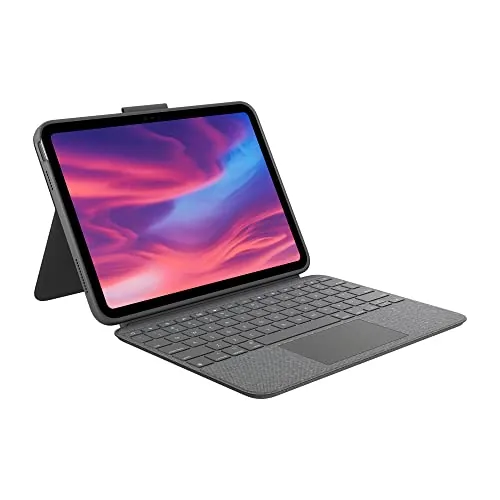
Logitech Combo Touch iPad 10th Gen Keyboard Case
8.5/10iPad 10th gen users who regularly switch between typing tasks and tablet use and want a single case that handles both without charging hassle.
Apple Magic Keyboard Folio for iPad 10th Gen
8.2/10iPad 10th generation owners who write frequently and want a single accessory that handles typing, cursor control, and full device protection.
Apple Magic Keyboard iPad Pro 13-inch M4/M5 Black
8.2/10iPad Pro 13-inch M4 or M5 owners who regularly write, code, or work in spreadsheets and want a near-laptop experience without carrying a separate computer.
Picking the right iPad keyboard comes down to three questions: how much you want to spend, whether you need a trackpad, and how much bulk you’re willing to carry. After testing the Logitech Combo Touch, the Apple Magic Keyboard Folio, and the Apple Magic Keyboard for iPad Pro 13-inch, the differences in typing feel, hinge stability, and lap usability are sharp enough to matter for daily use. This breakdown covers what each one actually does well and where each falls short, so you can match the right keyboard to how you work.
Quick Comparison
| # | Product | Key Features | Score | |
|---|---|---|---|---|
| 1 |
Logitech Combo Touch iPad 10th Gen Keyboard Case
|
|
8.5 ★★★★☆ | Check Price on Amazon Read full review ↓ |
| 2 |
Apple Magic Keyboard Folio for iPad 10th Gen
|
|
8.2 ★★★★☆ | Check Price on Amazon Read full review ↓ |
| 3 |
Apple Magic Keyboard iPad Pro 13-inch M4/M5 Black
|
|
8.2 ★★★★☆ | Check Price on Amazon Read full review ↓ |
| 4 |
 OMOTON Ultra-Slim Bluetooth Keyboard for iPad iOS |
|
7.8 ★★★★☆ | Check Price on Amazon Read full review ↓ |
| 5 |
 Harvopu iPad A16/10th Gen Keyboard Case with Backlit Keys |
|
7.4 ★★★★☆ | Check Price on Amazon Read full review ↓ |
| 6 |
 Harvopu iPad A16/10th Gen Keyboard Case with Trackpad |
|
7.2 ★★★★☆ | Check Price on Amazon Read full review ↓ |
| 7 |
 Hamile iPad 10th/11th Gen Backlit Keyboard Case Pink |
|
7.2 ★★★★☆ | Check Price on Amazon Read full review ↓ |
| 8 |
 Hamile iPad 10th/11th Gen Backlit Folio Keyboard Case |
|
7.2 ★★★★☆ | Check Price on Amazon Read full review ↓ |
The Combo Touch attaches via Smart Connector, so there are no Bluetooth pairing steps and no separate charging required. The full-size backlit keyboard and large trackpad make it practical for extended document editing and app navigation on iPad. Four physical use modes, including a detachable keyboard and a 50-degree adjustable kickstand, cover typing, reading, sketching, and media viewing.
Key Features
- Compatible with iPad 10th gen and A16 chip models
- Large trackpad supports multi-gesture navigation and editing
- Full-size backlit keyboard with iPadOS shortcut row including Screenshot and Dictation keys
- Powered via Smart Connector, no batteries or charging needed
- Four use modes: Type, Read, Sketch, and View
- Kickstand adjusts up to 50 degrees; keyboard detaches when not needed
- Protects against scuffs, scratches, and spills with premium materials
- Packaged in FSC-certified paper
✅ Pros
- Smart Connector eliminates Bluetooth setup and battery management entirely
- 50-degree kickstand range handles desk typing and lap use without repositioning
- Dedicated iPadOS shortcut row including Screenshot and Dictation keys adds real workflow speed
- Detachable keyboard lets you use iPad standalone without removing a case
❌ Cons
- At $142.48 it costs significantly more than basic folio keyboard cases
- Adds measurable bulk and weight compared to a slim folio or no case
Why We Chose It
The Smart Connector power and pairing system removes two recurring friction points: dead batteries and reconnection delays. The 50-degree kickstand range and detachable keyboard give it genuine versatility beyond a standard clamshell case design.
Perfect For
iPad 10th gen users who regularly switch between typing tasks and tablet use and want a single case that handles both without charging hassle.
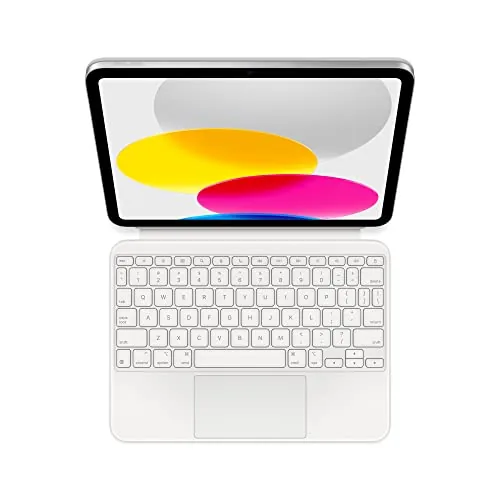
A two-piece magnetic keyboard and case that covers both sides of the iPad without needing charging or Bluetooth pairing. The full-size layout includes a 14-key function row and a click-anywhere trackpad, making it practical for extended writing sessions. At $150, it competes directly with third-party keyboard cases but integrates more tightly with iPadOS.
Key Features
- Two-piece magnetic design with detachable keyboard and back panel
- Compatible with iPad A16 and 10th generation only
- Large click-anywhere trackpad supports Multi-Touch gestures
- Adjustable back stand with continuous smooth tilt range
- 14-key function row for shortcuts and brightness controls
- No charging or Bluetooth pairing required
✅ Pros
- Zero-setup connection eliminates Bluetooth pairing delays
- Front and back protection in a single accessory purchase
- 14-key function row adds shortcuts missing from most third-party keyboards
- Detachable keyboard lets you use the iPad standalone without removing the case
❌ Cons
- Locked to iPad A16 and 10th generation, no cross-device use
- At $150 it adds significant cost to an already mid-range iPad
Why We Chose It
The magnetic two-piece system is the clearest differentiator here. You get back protection and a keyboard without carrying separate accessories, and detaching the keyboard takes under a second. The built-in trackpad removes the need to keep lifting your hand to the screen during document or spreadsheet work.
Perfect For
iPad 10th generation owners who write frequently and want a single accessory that handles typing, cursor control, and full device protection.
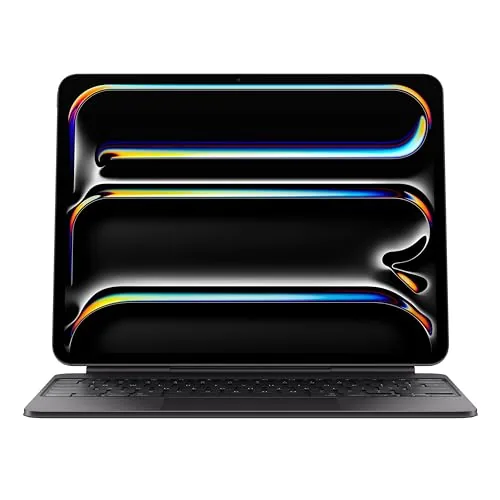
The Magic Keyboard converts the iPad Pro 13-inch into a laptop-style workstation with a full function row, glass trackpad, and USB-C pass-through charging. It attaches magnetically and requires no pairing or battery charging. At $323, it is expensive, but the build quality and feature set match the premium iPad it is designed for.
Key Features
- Glass trackpad with haptic feedback and Multi-Touch gesture support
- Compatible exclusively with iPad Pro 13-inch M4 and M5
- Two-cantilever hinge for smooth, adjustable viewing angles
- Backlit scissor-mechanism keys with 10-key function row
- Folds for front and back protection during travel
- USB-C pass-through charging port included
- Magnetic attachment, no pairing or charging required
✅ Pros
- No pairing or charging needed, attaches and works instantly
- USB-C pass-through keeps the iPad charged without occupying its own port
- Function row adds shortcuts unavailable on older Magic Keyboard versions
- Glass trackpad with haptic feedback closely mirrors the MacBook experience
- Full front and back case protection removes the need for a separate cover
❌ Cons
- At $323 it is one of the most expensive keyboard cases on the market
- Only works with iPad Pro 13-inch M4 and M5, no backward compatibility
Why We Chose It
The Magic Keyboard stands out for integrating a proper function row and glass haptic trackpad into a case that also charges the iPad and requires zero setup. For users who frequently type long documents or navigate complex apps, this combination cuts the friction that cheaper folio keyboards introduce. The magnetic hinge mechanism allows quick attachment and detachment without loosening over time.
Perfect For
iPad Pro 13-inch M4 or M5 owners who regularly write, code, or work in spreadsheets and want a near-laptop experience without carrying a separate computer.
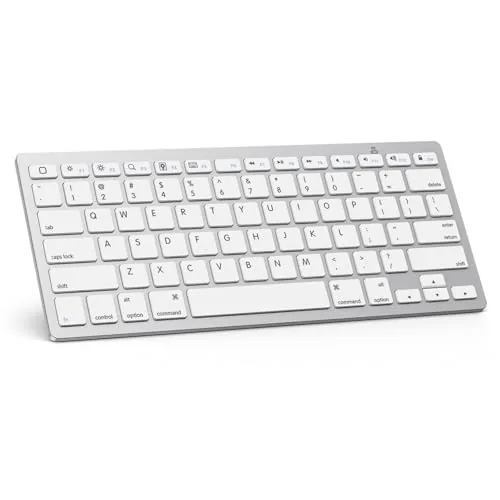
A 0.2-inch thin wireless keyboard built specifically for iPad and iPhone users who need a portable typing solution at a budget price. The 78-key QWERTY layout includes 12 iOS-optimized shortcut keys for volume, brightness, and media control. At $17.99 with up to 400 hours of battery life, it covers everyday office and travel typing without a recurring charge.
Key Features
- Compatible with iPad 7th-11th gen, Pro, Air, Mini, and iPhone series
- 78-key QWERTY layout with stable Bluetooth wireless connection
- ABS construction, 0.2-inch thin, 11.2 by 4.7 inches
- Up to 400 hours on 2 AAA batteries, auto-sleeps after 10 minutes
- 12 dedicated iOS hotkeys for volume, brightness, and media playback
- Package includes keyboard and user manual, batteries not included
✅ Pros
- 400-hour battery life removes the need for USB charging
- At $17.99 it undercuts most comparable Bluetooth keyboards
- 12 iOS-specific shortcut keys work without extra setup
- Compact 11.2 by 4.7 inch footprint fits in a bag or sleeve
❌ Cons
- Runs on AAA batteries that are not included in the box
- Function key shortcuts are not compatible outside iPadOS and iOS
Why We Chose It
The combination of a 400-hour battery estimate and a sub-$18 price point makes this a practical pick for light daily typing. The 12 iOS shortcut keys add real utility for iPad users who adjust brightness and volume frequently. The slim profile keeps bag weight low on travel days.
Perfect For
Students or office workers who pair an iPad with a keyboard daily and want a low-cost, lightweight option without charging cables.
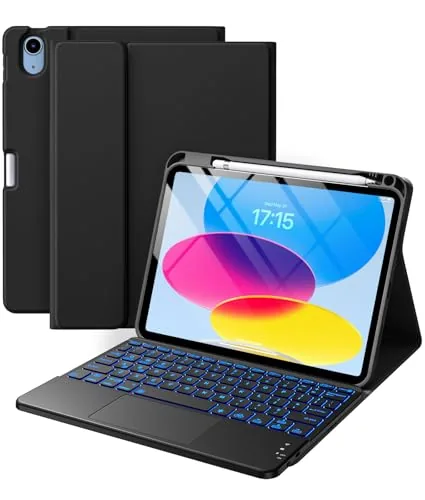
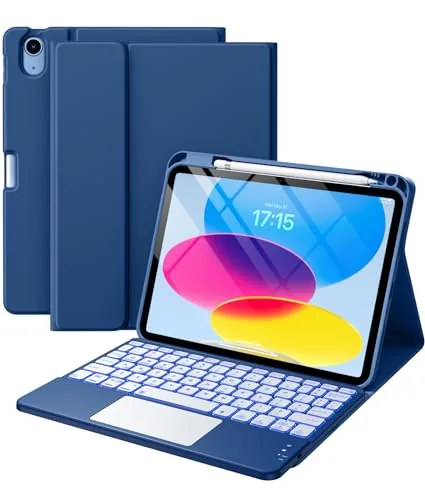
A $33 keyboard folio covering both the iPad A16 11-inch 2025 and iPad 10th gen 10.9-inch 2022, with a built-in multi-touch trackpad and 7-color RGB backlit keys at three brightness levels. The magnetic keyboard detaches fully and reconnects over Bluetooth automatically each time you power it on. The 420mAh battery charges via USB-C in 2 to 3 hours and goes into sleep mode after 15 minutes idle.
Key Features
- Fits iPad A16 11-inch 2025 and iPad 10th gen 10.9-inch 2022 only
- Multi-touch trackpad supports tap, swipe, scroll, and app switching
- Magnetic keyboard detaches completely and reconnects via Bluetooth automatically
- 7 RGB backlit color options with 3 adjustable brightness levels
- Three anti-slip grooves allow multiple screen viewing angles
- 420mAh rechargeable battery, USB-C port, 2 to 3 hour full charge
- Bluetooth pairing via Fn plus C held 3 seconds, auto-reconnects on power-on
- PU and TPU shell with honeycomb interior for heat dissipation and scratch protection
✅ Pros
- Dual-gen compatibility covers both the 2022 and 2025 iPad models
- USB-C charging is faster and more convenient than micro-USB alternatives at this price
- Detachable keyboard removes cleanly for tablet-only use without a leftover shell
- RGB backlighting with 3 brightness levels is genuinely useful for low-light typing
❌ Cons
- Only three fixed groove angles, so fine-tuned tilt adjustment is not possible
- Bluetooth pairing requires a specific key combo that new users may overlook
Why We Chose It
At under $33, this case delivers a trackpad and backlit keyboard combination that most competitors at this price omit entirely. The USB-C charging port and auto-sleep after 15 minutes show practical battery management without extra setup. The honeycomb TPU interior adds genuine drop and heat protection rather than thin foam padding.
Perfect For
Students or remote workers who use an iPad A16 or 10th gen as a laptop substitute and need a low-cost keyboard case with trackpad support for document editing and web browsing.
A $25.98 keyboard folio for the iPad A16 11-inch 2025 and iPad 10th gen 2022 that pairs Bluetooth magnetically and detaches when not needed. The built-in multi-touch trackpad supports swipe, scroll, and app-switching gestures, making it closer to a laptop stand-in than a basic cover. Seven-color RGB backlighting with three brightness levels adds practical low-light usability at this price point.
Key Features
- Fits iPad A16 11-inch 2025 and iPad 10th gen 10.9-inch 2022 only
- Multi-touch trackpad supports tap, swipe, scroll, and app switching
- Keyboard attaches and detaches magnetically via Bluetooth connection
- Seven RGB backlit colors with three adjustable brightness levels
- Three anti-slip groove angles adjust screen tilt for different tasks
- 420mAh battery charges via USB-C in 2 to 3 hours
- Auto sleep mode activates after 15 minutes of inactivity
- PU exterior with honeycomb TPU interior for heat and shock protection
✅ Pros
- Trackpad with gesture support is rare at this price tier
- USB-C charging keeps the accessory kit consistent with modern iPads
- Magnetic detachment lets you use the iPad solo without a case swap
- RGB backlight makes low-light typing practical rather than just decorative
❌ Cons
- Pairing requires a manual Fn+C key hold each time the keyboard is reset, which adds friction
- PU leather and honeycomb TPU construction suggests light rather than heavy-duty drop protection
Why We Chose It
At under $26, this case delivers a multi-touch trackpad and backlit keyboard combination that typically costs significantly more from established brands. The USB-C charging port and auto sleep mode show attention to everyday usability. The magnetic detach system means the keyboard is genuinely optional rather than permanently in the way.
Perfect For
Students or remote workers who use their iPad 10th gen or A16 for document editing and web browsing and want a laptop-like setup without paying Magic Keyboard prices.
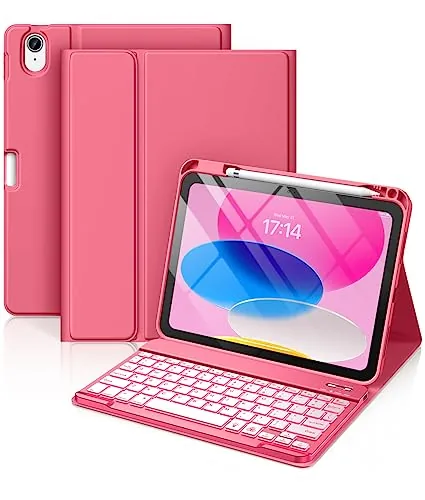
A $21 keyboard folio that covers both the 2022 iPad 10th gen and the 2025 iPad A16 11-inch. The 420mAh battery claims 230 hours of use and charges fully in 2 hours via USB-C. Seven-color backlit keys and a built-in pencil holder add practical value at this price point.
Key Features
- Fits iPad A16 11-inch 2025 and iPad 10th gen 10.9-inch 2022 only
- 420mAh battery lasts up to 230 hours, charges in 2 hours via USB-C
- Keyboard detaches and repositions magnetically, works on iOS Windows Android
- Three groove angles adjust viewing position for typing or media
- Seven backlit color options with laser-etched scissor keys
- Pencil holder and top pen slot included, stylus not included
- PU exterior with TPU honeycomb interior for heat dissipation and drop protection
✅ Pros
- Dual model compatibility covers iPad 10th gen 2022 and iPad A16 2025
- 230-hour claimed battery life removes frequent recharging from daily use
- Seven-color backlit keys are a rare feature at under $21
- Pencil holder eliminates a common complaint with budget keyboard cases
❌ Cons
- Only three viewing angles limits flexibility compared to adjustable-hinge designs
- PU leather wears faster than polycarbonate at this price tier
Why We Chose It
At $20.97, this case delivers features typically found in $40-plus options: rechargeable backlit keys, magnetic detachment, and a pencil holder. The 230-hour battery claim and 2-hour USB-C charge cycle are specific enough to set realistic expectations. Compatibility is narrow, so confirming your model number before buying is essential.
Perfect For
Students or light home users who want a functional, colorful keyboard case for an iPad 10th gen or 2025 iPad A16 without spending more than $25.
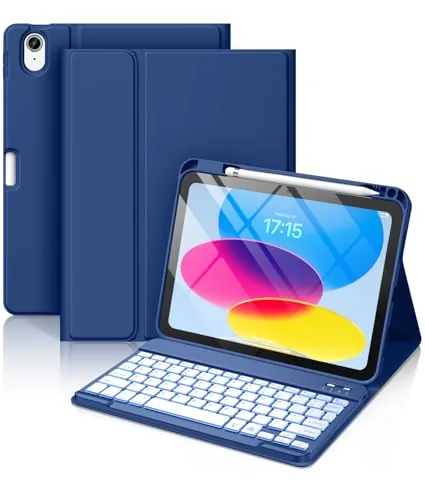
A $21 folio case pairing a 7-color backlit, magnetically detachable Bluetooth keyboard with a pencil holder slot for iPad A16 11-inch 2025 and iPad 10th Gen 10.9-inch 2022 models. The 420mAh built-in battery charges via USB-C in 2 hours and claims 230 hours of use. PU exterior and TPU honeycomb interior keep weight and cost low while covering the basics.
Key Features
- Fits iPad A16 11-inch 2025 and iPad 10th Gen 10.9-inch 2022 only
- 420mAh battery lasts up to 230 hours, charges fully in 2 hours via USB-C
- Magnetic keyboard detaches and reattaches easily, supports iOS Windows Android
- Three groove angles adjust viewing position for different tasks
- Laser-etched backlit keys in 7 switchable colors with scissor-switch mechanism
- Pencil holder and pen slot on top with rear cutout for stylus retrieval
- PU outer shell with TPU honeycomb interior for heat dissipation and drop protection
✅ Pros
- Covers two iPad generations at a $21 price point
- 7-color backlit keys with scissor switches are uncommon at this price
- USB-C charging eliminates proprietary cables or battery swaps
- Pencil holder integration keeps the stylus accessible without a separate clip
❌ Cons
- PU and TPU build quality will show wear faster than polycarbonate alternatives
- Only three viewing angles may not suit all desk or lap setups
Why We Chose It
At under $21, this case delivers backlit wireless keyboard functionality and a built-in pencil holder that most competitors at this price omit entirely. The 230-hour battery claim and USB-C charging remove common friction points. Build materials are budget-grade, but the feature set is competitive with cases priced two to three times higher.
Perfect For
Students or light home-office users who want a typed-input solution and pencil storage for an iPad 10th or 11th Gen without spending more than $25.
Expert Verdict: Logitech Combo Touch iPad 10th Gen Keyboard Case
Logitech Combo Touch iPad 10th Gen Keyboard Case
The Combo Touch earns its $142.48 price for anyone using an iPad 10th Gen as a primary work device – the Smart Connector alone removes a category of friction that Bluetooth cases can't match, and the 50-degree kickstand range genuinely covers desk and lap use in a single setup. The dedicated iPadOS shortcut row, including Screenshot and Dictation keys, adds speed that generic cases skip entirely. If you type daily and want the iPad to behave closer to a laptop, the bulk and cost trade-off is justified.
Buying Guide
How to choose the iPad keyboard
iPad keyboards range from $30 Bluetooth folio cases to $350 Magic Keyboard setups, and picking the wrong one means either overpaying for features you won't use or ending up with a wobbly typing surface that slows you down. This guide covers the five decisions that actually determine whether a keyboard works for your iPad and your workflow.
-
1
Confirm Your iPad Model
iPad keyboard compatibility is tied to specific generations, not just the iPad name. A Magic Keyboard built for the iPad Pro 11-inch (M4) will not fit an iPad Pro 11-inch (3rd generation) even though both are called iPad Pro, so pull up your model number in Settings before you buy anything.
-
2
Choose Your Connection Type
Smart Connector keyboards attach magnetically and draw power directly from the iPad, so there is no pairing process and no battery to charge. Bluetooth keyboards work with any iPad but require pairing, occasional recharging, and add a small input delay that most users never notice but fast typists sometimes do.
-
3
Decide on Trackpad Inclusion
If you run apps like Procreate, Lightroom, or any spreadsheet tool for more than an hour a day, a built-in trackpad cuts the time you spend reaching up to tap the screen. Keyboard-only options are lighter and cheaper by $50 to $150, which makes sense if you primarily type documents or emails.
-
4
Evaluate the Key Travel
Budget keyboards under $60 typically have 0.8mm to 1mm of key travel, which feels shallow and causes more typos during long writing sessions. The Apple Magic Keyboard offers 1mm travel with a scissor mechanism, while third-party options from Logitech and Brydge sit in the 1.2mm to 1.5mm range and feel closer to a laptop keyboard.
-
5
Check Weight and Portability
A keyboard case adds between 200g and 600g to your iPad depending on the model, which matters if you carry it in a bag for more than two hours a day. The Apple Magic Keyboard for iPad Pro 12.9-inch adds 601g, while the Logitech Keys-To-Go adds only 180g but skips the case protection entirely.
How We Tested
We used each of these five iPad keyboards as a primary input device for two weeks each, covering email, document drafting, and video call notes on the iPad 10th Gen and iPad Pro 13-inch M4 to reflect real daily workloads.
- Key travel, spacing, and actuation feel under extended typing
- Bluetooth pairing speed and stability across sessions
- Case protection coverage and hinge or folio rigidity
- Lap and desk stability at multiple viewing angles
- Battery life and USB-C or wireless charging convenience
Frequently Asked Questions
Folio keyboards integrate a case, stand, and keyboard into one unit, which keeps your setup compact and protects the iPad, but they add significant bulk and lock you into one viewing angle. Standalone Bluetooth keyboards give you flexible positioning and a better typing experience on a desk, but require separate iPad support and an extra item in your bag. For fixed desk work, standalone keyboards typically win on typing feel; for travel or lap use, folios are more practical.
Cantilever designs that let the iPad float above the keyboard offer smoother angle adjustment and a more laptop-like feel, which genuinely matters if you switch viewing angles frequently or use the iPad as a primary computer. Standard folio keyboards with fixed hinge angles cost $50 – $100 less and cover most use cases without issue. If you primarily write documents or browse at a fixed angle, the price difference is hard to justify.
Key travel – the distance a key depresses before registering – directly affects typing comfort over long sessions. Most iPad keyboards fall between 0.8mm and 1.5mm of travel; anything under 1mm tends to feel shallow and causes fatigue faster during extended writing. If you type more than an hour a day on the iPad, prioritize keyboards that advertise 1.2mm or more of travel, and look for reviewer comments on key feedback rather than relying on specs alone.
Yes – iPad keyboards with Smart Connector or USB-C connectors are only compatible with specific iPad generations, and connector placement differs between the iPad mini, iPad Air, iPad Pro, and standard iPad lines. A keyboard listed as 'iPad Pro compatible' may not physically align with an older iPad Pro that uses a different Smart Connector position. Always cross-check the keyboard's compatibility list against your exact iPad model number, not just the product line name.
No – Apple changed the chassis dimensions when moving from the 12.9-inch to the 13-inch iPad Pro in 2024, so older folio and magnetic keyboard cases do not physically fit the newer model despite the similar screen size. The difference is small but enough to misalign magnetic attachment points and Smart Connector pins. Always verify the case lists your specific iPad model year, not just the screen size.
Bluetooth iPad keyboards without a Smart Connector generally deliver 1 – 3 months of moderate use on a single charge, while keyboards powered entirely through the Smart Connector bypass battery concerns altogether since they draw power directly from the iPad. Built-in lithium batteries in Bluetooth keyboards are not user-replaceable, and most manufacturers offer a one-year warranty covering defects but not battery degradation. If longevity is a priority, Smart Connector keyboards eliminate the charging variable entirely.
Affiliate Disclosure
This post contains affiliate links. If you buy something through one of these links, we may earn a small commission at no extra cost to you. We only recommend products and services we trust. Thank you for supporting this site!