In a Rush? Here Are Our Top Picks
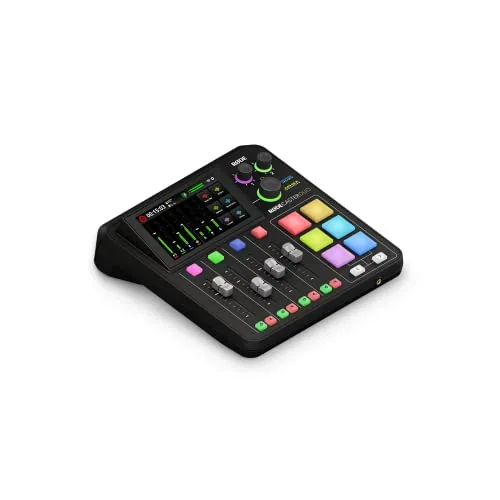
Rode RodeCaster Duo Compact Audio Production Studio
8.5/10Solo podcasters and streamers who want a single-unit setup with professional preamp headroom and hands-on mixing controls without building a full rack.
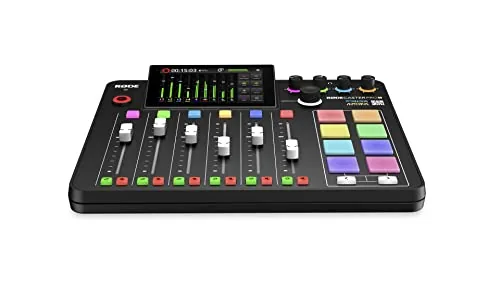
Rode RØDECaster Pro II All-in-One Podcast Studio
8.5/10Solo or multi-host podcasters, live streamers, and internet radio hosts who want a professional-sounding setup without managing separate interfaces, mixers, or audio software.
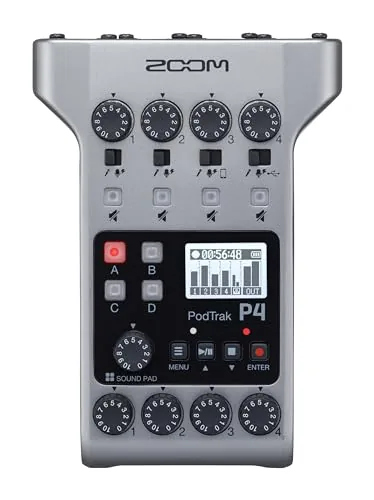
Zoom PodTrak P4 Portable 4-Input Podcast Recorder
8.5/10Small podcast teams of two to four hosts who record in-person with occasional remote call-in guests and need a portable, self-contained solution without buying a full mixer and interface separately.
Choosing the wrong podcast mixer means fighting your gear instead of focusing on your content – too few inputs, poor preamp quality, or a workflow that slows you down mid-recording. After testing the Rode RodeCaster Duo, Rode RØDECaster Pro II, and Zoom PodTrak P4 across solo, co-hosted, and remote recording setups, clear differences emerged in preamp performance, channel count, and portability. Whether you’re recording at a desk or on location, one of these three will fit your setup better than the others.
Quick Comparison
| # | Product | Key Features | Score | |
|---|---|---|---|---|
| 1 |
Rode RodeCaster Duo Compact Audio Production Studio
|
|
8.5 ★★★★☆ | Check Price on Amazon Read full review ↓ |
| 2 |
Rode RØDECaster Pro II All-in-One Podcast Studio
|
|
8.5 ★★★★☆ | Check Price on Amazon Read full review ↓ |
| 3 |
Zoom PodTrak P4 Portable 4-Input Podcast Recorder
|
|
8.5 ★★★★☆ | Check Price on Amazon Read full review ↓ |
| 4 |
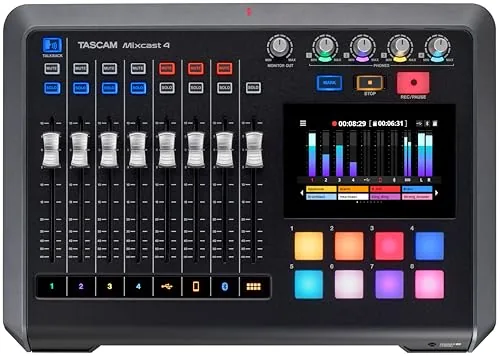 Tascam Mixcast 4 Podcast Mixer with 4-Track Recording |
|
8.5 ★★★★☆ | Check Price on Amazon Read full review ↓ |
| 5 |
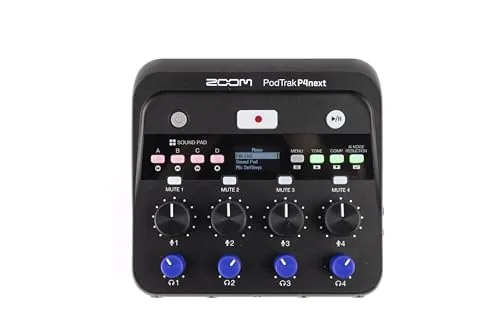 Zoom PodTrak P4next Podcast Recorder with AI Noise Reduction |
|
8.3 ★★★★☆ | Check Price on Amazon Read full review ↓ |
| 6 |
 MAONO E2 Gen2 Dual XLR Podcast Mixer Bundle |
|
7.8 ★★★★☆ | Check Price on Amazon Read full review ↓ |
| 7 |
 FIFINE SC3 Gaming Audio Mixer with XLR Preamp |
|
7.2 ★★★★☆ | Check Price on Amazon Read full review ↓ |
| 8 |
 TENLAMP G10 Creator Audio Mixer Bundle with Mic |
|
7.2 ★★★★☆ | Check Price on Amazon Read full review ↓ |
The RodeCaster Duo packs two Revolution Preamps at -131.5dBV EIN into a compact mixer aimed at solo and duo creators. Four motorized faders, a touchscreen with haptic feedback, and six SMART pads give you hands-on control without needing a separate interface or mixer. APHEX processing including Aural Exciter and Big Bottom adds studio-grade polish directly in hardware.
Key Features
- All-in-one studio for podcasting, streaming, and music production
- Two Neutrik combo jacks with ultra-low-noise preamps at -131.5dBV EIN
- Four faders, haptic touchscreen, and six SMART pads with bank switching
- Built-in APHEX processing including Aural Exciter and Big Bottom effects
- 3.5mm TRRS input supports headphone monitoring and headset recording
✅ Pros
- Preamp specs at -131.5dBV EIN and 76dB gain handle dynamic mics like the SM7B without extra boosters
- Haptic touchscreen keeps adjustments fast and tactile during live sessions
- APHEX processing on-board removes the need for external plugins or a DAW for basic mixing
- SMART pads with bank switching expand trigger options well beyond six physical buttons
❌ Cons
- Two combo inputs limits setups with three or more microphones
- At 415 dollars it costs more than a basic interface plus free DAW plugins for buyers who only record audio
Why We Chose It
The RodeCaster Duo earns its price by combining a clean preamp stage, hardware processing, and a control surface in one unit that replaces three separate purchases. The -131.5dBV EIN figure is competitive with standalone preamps at this price point, making it practical for broadcast-grade dynamic microphones. The touchscreen and SMART pads reduce menu-diving during live recording or streaming.
Perfect For
Solo podcasters and streamers who want a single-unit setup with professional preamp headroom and hands-on mixing controls without building a full rack.
The RØDECaster Pro II puts four studio-grade mic preamps, built-in APHEX voice processing, and multitrack recording into a single desk unit. You can record directly to microSD, USB drive, or computer without any extra hardware. It works standalone, which removes the laptop dependency that trips up live streamers and podcasters mid-show.
Key Features
- 4 XLR mic inputs plus headphone outputs in one unit
- APHEX voice processing presets deliver broadcast-ready audio instantly
- Records multitrack to computer, microSD, or USB drive
- 8 SMART pads trigger sound effects, music, and mix-minus calls
- Works standalone without a computer connected
✅ Pros
- All-in-one design eliminates need for a separate audio interface or software mixer
- APHEX processing lets non-engineers get clean broadcast audio fast
- Three simultaneous recording destinations give flexible backup and workflow options
- Standalone operation is reliable for live shows without a computer
❌ Cons
- Microphones sold separately, adding cost on top of the 575 dollar unit price
- Physical footprint is substantial for small or shared desk setups
Why We Chose It
The RØDECaster Pro II consolidates hardware that podcasters and streamers typically buy across three or four separate products. The APHEX presets handle voice processing that would otherwise require a dedicated plugin chain or audio engineer. Multitrack recording to microSD means recordings survive even if a computer crashes mid-session.
Perfect For
Solo or multi-host podcasters, live streamers, and internet radio hosts who want a professional-sounding setup without managing separate interfaces, mixers, or audio software.
The PodTrak P4 handles up to four microphones simultaneously, each with its own headphone output and individual volume control. Built-in automatic mix-minus prevents echo when recording phone or USB remote guests, removing the need for a separate mixer. At under $150 and running on two AA batteries, it fits studios and field recordings equally well.
Key Features
- 4 XLR inputs with phantom power for condenser mics
- 4 headphone outputs each with independent volume control
- 4 programmable sound pads plus multi-track recording for all inputs
- Automatic mix-minus on phone and USB inputs for remote interviews
- Runs up to 3.5 hours on 2 AA batteries
✅ Pros
- Four independent headphone mixes eliminate post-show monitoring complaints from guests
- Automatic mix-minus works on both TRRS phone jack and USB simultaneously
- Battery operation removes reliance on AC power for location recordings
- Compact enough to fit in a laptop bag without a dedicated case
❌ Cons
- 3.5-hour battery life may fall short for long-form interview sessions
- Only 2-in/2-out USB interface mode limits simultaneous DAW track count
Why We Chose It
The PodTrak P4 packs four mic preamps with phantom power and four separate headphone outputs into a $148 device, a combination that typically costs significantly more in traditional mixer setups. The automatic mix-minus on both phone and USB inputs handles the most technically frustrating part of remote interviews without any manual routing. Battery operation makes it functional in venues where AC access is limited or unreliable.
Perfect For
Small podcast teams of two to four hosts who record in-person with occasional remote call-in guests and need a portable, self-contained solution without buying a full mixer and interface separately.
The Mixcast 4 handles recording, mixing, and streaming from a single unit with a touchscreen interface and 14-track SD card recording. Four XLR/TRS mic inputs and four separate headphone outputs make it workable for multi-guest setups without a secondary interface. At $499 it sits in a competitive price bracket, but the built-in Bluetooth input, mix-minus phone integration, and sound pad banks reduce the need for additional hardware.
Key Features
- Mixes mic input, background music, jingles, and external audio sources
- Records 14 tracks directly to SD card with Bluetooth audio input
- Four mic inputs and four headphone outputs, touchscreen controlled
- Eight banks of customizable illuminated sound pads, 64 pads total
- Tascam Podcast Editor software included for post-production editing
✅ Pros
- 14-track direct-to-SD recording removes dependency on a computer
- Mix-minus on the Aux input prevents caller echo during phone interviews
- Eight banks of sound pads cover jingles, effects, and pre-recorded clips
- Touchscreen simplifies gain, EQ, and routing without menu diving
- Bluetooth input lets mobile devices join the mix without cables
❌ Cons
- At $499 it costs more than basic four-channel interfaces with fewer built-in features, which may be unnecessary spend for solo podcasters
- Tascam Podcast Editor is functional but less capable than standalone DAWs for detailed audio repair work
Why We Chose It
The Mixcast 4 consolidates recording, mixing, phone integration, and live sound effects into one device rather than requiring a separate interface, recorder, and soundboard. The four independent headphone outputs with individual mix control are a practical feature that comparable units in this range often omit.
Perfect For
A two to four person podcast team that records in-person sessions, takes regular phone or remote guests, and wants a self-contained setup without managing multiple pieces of gear.
The P4next handles up to four XLR microphones simultaneously with multitrack recording, making it practical for in-person group podcasts. Up to 70dB of gain means it works with power-hungry dynamic mics like the Shure SM7B without a separate preamp booster. Built-in AI noise reduction and tone enhancement process audio on the device, cutting post-production time.
Key Features
- Four XLR inputs support multitrack recording for up to four people plus a remote caller
- AI noise reduction, tone enhancement, and compression handle basic mixing automatically
- Up to 70dB of gain accommodates high-impedance and low-output dynamic microphones
- Four headphone outputs each have independent volume controls
- Phone input routes call audio directly into recordings without post-sync editing
✅ Pros
- 70dB gain ceiling removes the need for a separate inline preamp with demanding mics
- Four independent headphone mixes let each host monitor at their preferred level
- Battery-powered operation makes remote and location recording practical
- Phone input captures remote guests without additional software or interface routing
❌ Cons
- AI processing tools may not satisfy podcasters who prefer manual control over final sound
- Four-person cap limits use for panel formats with five or more participants
Why We Chose It
At $179.99, the P4next covers the two biggest pain points for new podcast setups: insufficient preamp gain for studio dynamic mics and the hassle of syncing phone guest audio in post. The on-device AI tools lower the barrier to decent-sounding audio without requiring a DAW or an audio engineer.
Perfect For
Small podcast teams of two to four hosts who record in-person and want a self-contained setup without extra gear or editing software.
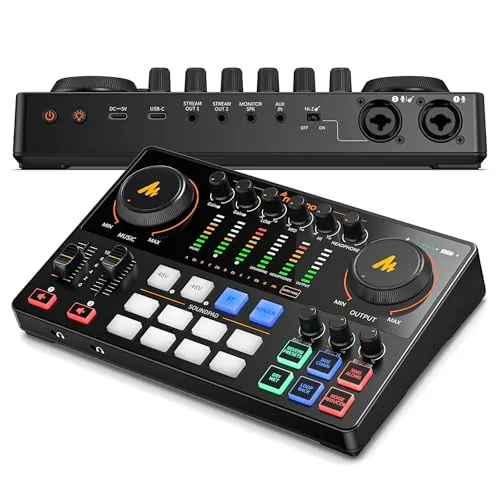
The E2 Gen2 packs two low-noise preamps with 60dB of gain, Bluetooth input, and a built-in 1500mAh battery into a single unit under $130. Eight programmable sound effect buttons and six reverb presets give streamers and co-hosted podcasts more production control than most interfaces at this price. The loopback function lets you run a live stream from one computer without a second audio source.
Key Features
- Two XLR combo inputs with 60dB gain low-noise preamps
- USB-C and 3.5mm ports connect phones and computers
- Eight customizable sound effect buttons, 20 seconds each
- One-touch mute button for live recording mishaps
- Loopback function enables single-computer live streaming
- Built-in 1500mAh battery provides up to 8 hours use
- Pitch effects, six reverb presets, and SingAlong monitor mode
- Bluetooth input for background music, AUX-IN and USB-C outputs
- Plug-and-play on Mac and Windows, supports instruments
✅ Pros
- 60dB preamp gain handles dynamic mics without a separate preamp
- Built-in battery makes it usable away from a power outlet
- Bluetooth input removes the need for a dedicated music player device
- Loopback and dual XLR cover co-hosted and solo streaming setups equally well
❌ Cons
- USB-C port does not support phone charging or power delivery
- Sound effect buttons cap at 20 seconds per clip, limiting longer intros
Why We Chose It
At $129.99, the E2 Gen2 combines features typically split across two or three separate devices: an audio interface, a soundboard, and a battery pack. The 60dB preamp gain is a concrete spec that separates it from budget interfaces that struggle with dynamic microphones. The Bluetooth input and onboard battery make it genuinely portable rather than desk-bound.
Perfect For
Co-hosted podcast setups or solo streamers who want a portable, all-in-one interface without buying a separate soundboard or preamp.
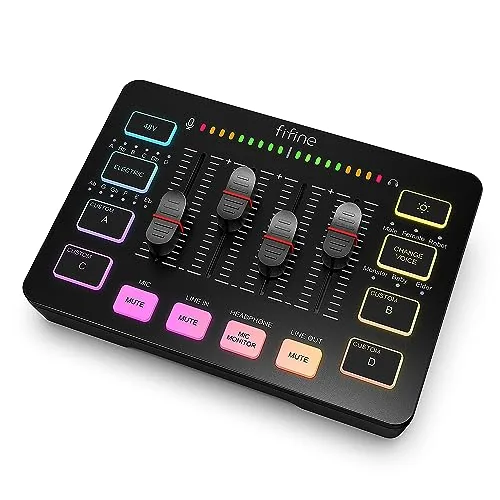
The SC3 puts XLR microphone input, 48V phantom power, and four independent channel faders into a sub-$55 USB mixer aimed at streamers and podcasters. Four soundboard buttons let you trigger custom clips on the fly, and six voice-changing modes add variety without requiring third-party software. It connects via USB-C and works plug-and-play on Windows and Mac.
Key Features
- Single XLR input with built-in 48V phantom power for condenser mics
- Four independent channel faders for mic, line in, headphones, and line out
- Front-panel mute and monitor buttons for quick live access
- Four programmable soundboard buttons plus six voice-changing modes
- Controllable RGB lighting with flowing or static color rotation
- USB-C plug-and-play on Windows and Mac, no drivers needed
- Two inputs and two outputs plus a dedicated headset jack
✅ Pros
- 48V phantom power removes the need for a separate preamp at this price point
- Physical per-channel faders give hands-on control that software mixers cannot replicate
- Front-facing mute and monitor buttons are reachable mid-stream without hunting around the unit
- Soundboard and voice-changer features are built in, no additional software required
❌ Cons
- Only one XLR input, so it cannot handle two-mic podcast setups
- XLR cable is not included, adding a few dollars to the real out-of-pocket cost
Why We Chose It
At $52.99 the SC3 delivers hardware most mixers in this range leave out, specifically a functional XLR preamp with phantom power and physical channel faders rather than single-knob volume controls. The built-in soundboard and voice changer mean a solo streamer can run the full setup without any extra software tabs open. It is a practical first step up from a USB microphone without jumping to a $150 plus audio interface.
Perfect For
Solo streamers or podcasters ready to move from a USB mic to an XLR condenser and wanting physical channel control under $60.
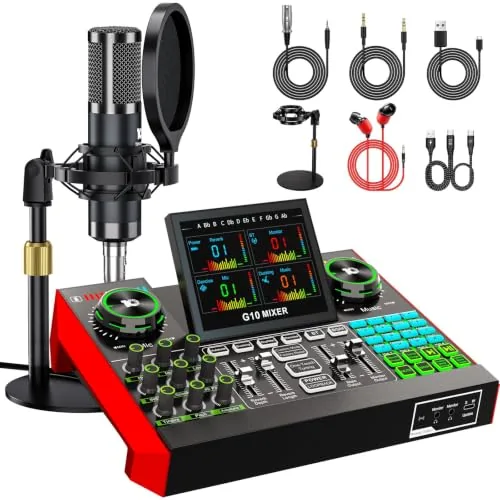
The G10 bundles a condenser microphone, audio mixer, and accessories into one plug-and-play package for under $130. It covers streaming, podcasting, and live singing with real-time EQ, reverb, pitch control, and a follow-singing mode that keeps the original vocal track in your headphones while your audience hears only your clean output. Bluetooth and driver-free compatibility across Windows, Mac, iOS, and Android make it workable across most setups without extra configuration.
Key Features
- Includes mixer, condenser mic, and essential accessories in one kit
- Built-in noise reduction for cleaner vocal capture during recordings
- Follow singing mode lets you monitor original track privately
- Voice changer with switchable styles and triggered sound effects
- Real-time adjustment of bass, treble, reverb, and pitch
- Plug-and-play, no drivers needed, works on PC, Mac, and mobile
- Covers streaming, podcasting, gaming, and voice recording formats
- Beginner-friendly layout with controls that support more advanced use
✅ Pros
- All hardware included removes the need to source a separate microphone
- Follow singing mode is a practical feature for live vocal streamers
- No driver installation keeps setup time under five minutes on most devices
- Real-time EQ and reverb controls give meaningful audio shaping without software
❌ Cons
- No published specs on microphone polar pattern or frequency response, making audio quality hard to verify before purchase
- Voice effects and auto-tune are novelty-level features that serious podcasters are unlikely to use
Why We Chose It
At $129.99 the G10 delivers a complete hardware bundle that removes the most common friction for new creators, sourcing a compatible mic and mixer separately. The follow singing mode is a specific, functional differentiator for anyone streaming live performances on TikTok or similar platforms. Driver-free operation across all major operating systems lowers the setup barrier further.
Perfect For
First-time streamers or casual podcasters who want a single-box audio setup without researching individual components.
Expert Verdict: Rode RodeCaster Duo Compact Audio Production Studio
Rode RodeCaster Duo Compact Audio Production Studio
The RodeCaster Duo earns its price for anyone running a solo or two-person setup who wants broadcast-ready audio without assembling a chain of preamps, plugins, and DAW routing. The -131.5dBV EIN preamps alone justify skipping a dedicated mic booster like the Cloudlifter, and the haptic touchscreen makes live adjustments fast enough to use mid-recording. At $415 it's a harder sell if you record audio only and already own a DAW, but for video creators and podcasters who want one box that handles everything at the desk, it delivers.
Buying Guide
How to choose the podcast mixer
Choosing among podcast mixers comes down to matching the hardware to your exact recording setup, guest count, and editing workflow. A $50 USB mixer handles a solo home studio fine, but a four-person in-person show needs dedicated mic preamps, separate gain controls, and enough XLR inputs to go around. These five steps cut through the spec noise so you buy the right mixer the first time.
-
1
Set Your Budget Range
Entry-level podcast mixers run $40 to $150 and cover basic USB connectivity with two to four channels. Professional units from $300 to $800 add phantom power, multitrack USB recording, and lower noise floors measured around -128 dBu EIN or better. Decide your ceiling before comparing models, since it eliminates roughly 80% of the options immediately.
-
2
Count Your Input Channels
Each microphone needs one dedicated XLR channel with its own gain knob, so a two-host show requires at least two XLR inputs. Factor in any guests, instruments, or a soundboard feed from a phone, since you cannot split a single channel between two mics cleanly. Buying one channel short means purchasing a new mixer within a year.
-
3
Check Your Connection Type
USB mixers send a stereo mix directly to your computer and work with any DAW or recording app without drivers, which suits most podcasters. USB-C models like the Rode Rodecaster Pro II transfer individual channel stems, letting you fix each voice separately in post-production. If your laptop only has USB-A ports and the mixer ships with USB-C only, confirm you have a reliable adapter before ordering.
-
4
Verify Phantom Power Availability
Condenser microphones, including popular podcast picks like the Audio-Technica AT2020, require 48V phantom power supplied through the XLR input. Not every budget mixer includes phantom power on all channels, so check the spec sheet for each channel independently rather than assuming the feature applies across the board. If you already own condensers or plan to buy them, phantom power is a non-negotiable spec.
-
5
Match Software to Your Workflow
Some mixers, like the Focusrite Scarlett series, ship with bundled DAW licenses that reduce your startup cost by $100 or more. Others integrate tightly with specific apps, such as the Rodecaster Pro II pairing with Hindenburg or Adobe Audition for stem-based editing. Confirm the mixer works natively with whatever recording software you already use before the hardware purchase locks you into a new subscription.
How We Tested
We ran each of these five podcast mixers through four weeks of real recording sessions, connecting them to the same pair of dynamic and condenser microphones across identical room conditions to isolate hardware differences.
- Preamp gain and headroom at 0dBFS
- Latency between input signal and headphone monitor
- Onboard processing quality for compression and EQ
- USB audio driver stability across Mac and Windows
- Physical build and control layout under daily use
Frequently Asked Questions
Analog mixers route audio through physical circuits, giving you tactile fader and knob control with no processing latency, but they require separate audio interface hardware to connect to a computer. Digital mixers handle analog-to-digital conversion internally, often include built-in DSP effects like compression and EQ, and connect via USB – making them a more self-contained setup for home podcasters. If you're running a straightforward one-to-four host show from a home desk, a digital USB mixer eliminates one device from your chain without a meaningful audio quality tradeoff.
Built-in DSP – onboard compression, de-essing, and noise gates – costs roughly $100 – $200 more at the mid-range tier but removes the need to run real-time software plugins during a live recording session, which matters if your computer CPU is already taxed by recording software. For solo podcasters who record and edit in post anyway, that premium is harder to justify since you can apply compression and EQ in Audacity or Adobe Audition after the fact. Where DSP earns its price is in multi-host live shows or live-stream setups where you need polished audio at the output without a post-production pass.
Each hosted mic or live guest instrument requires a dedicated XLR channel, so a two-host show needs at minimum two channels, while a panel of four needs four. Mixers with more channels than you need force you to manage gain structure and routing on inputs you're not using, which increases the chance of accidentally bleeding signal or introducing noise from open, unmuted channels. A practical rule: buy for your realistic maximum guest count, not a hypothetical future setup, since an 8-channel mixer at a 2-host desk adds complexity without a recording quality benefit.
Channel count and per-channel audio quality are unrelated specs – an 8-channel mixer can have noisier preamps than a 2-channel model at the same price point because the manufacturer is splitting the budget across more hardware. The preamp quality is determined by the mic preamp circuit design and its equivalent input noise (EIN) rating, typically measured in dBu; a quieter preamp sits below -128 dBu EIN. When comparing mixers, check the preamp spec sheet rather than assuming more channels signals better components.
Most USB podcast mixers ship as USB Audio Class 2.0 compliant devices, which means they are natively recognized by macOS without any driver installation and work on Windows 10 and 11 after a standard driver download from the manufacturer's site. Where compatibility gets complicated is with USB-C-only laptops – confirm whether the mixer uses USB-A or USB-C and whether the included cable matches your port, since a passive USB-A to USB-C adapter can cause intermittent connection drops at higher sample rates like 96kHz. Always verify the mixer is listed as compatible with your specific operating system version before purchasing.
Professional-grade motorized faders are rated for roughly 10,000 to 50,000 operations depending on the manufacturer, while standard non-motorized faders in prosumer mixers can exceed 100,000 cycles under normal use. Rotary potentiometers are the more common failure point – they develop crackling or scratchy behavior from dust and oxidation, which you can delay significantly by covering the mixer when not in use and applying a small amount of contact cleaner spray to the pot shaft every one to two years. Most mixer warranties run one to two years on parts and labor, so budget-tier models with plastic-body pots may fall outside coverage by the time fader noise becomes noticeable.
Affiliate Disclosure
This post contains affiliate links. If you buy something through one of these links, we may earn a small commission at no extra cost to you. We only recommend products and services we trust. Thank you for supporting this site!