In a Rush? Here Are Our Top Picks
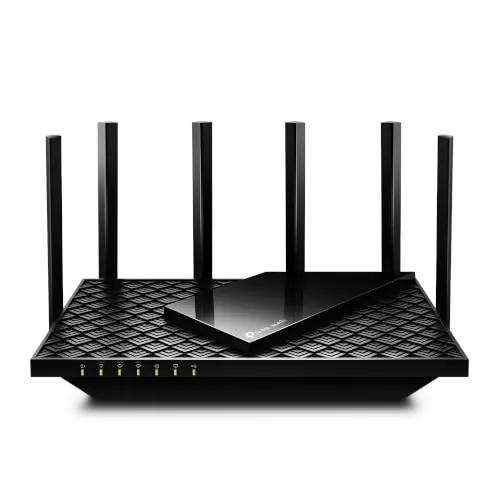
TP-Link Archer AXE75 WiFi 6E Tri-Band Router
8.5/10Home users upgrading from WiFi 5 who want 6 GHz access for low-latency gaming or 4K streaming without spending $200 or more on a premium router.
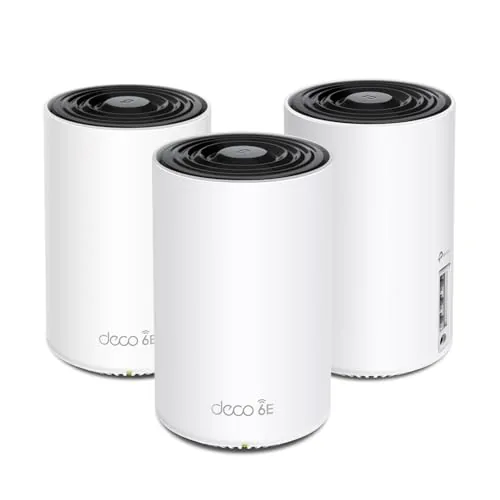
TP-Link Deco XE75 WiFi 6E Tri-Band Mesh 3-Pack
8.5/10Homeowners with 2,000 to 7,000 sq ft of living space who want WiFi 6E performance and whole-home coverage without paying flagship mesh prices.
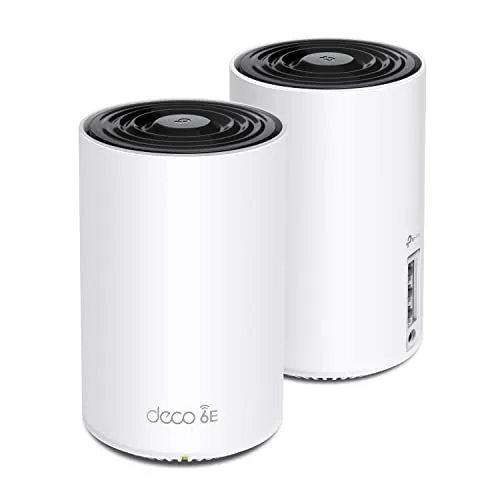
TP-Link Deco XE75 WiFi 6E Tri-Band Mesh 2-Pack
8.3/10Homeowners in 2,000 to 5,500 sq ft spaces who want WiFi 6E performance and cleaner mesh backhaul without spending $300 or more on a competing system.
Wi-Fi 6E routers add a third 6 GHz band to the existing 2.4 GHz and 5 GHz bands, which translates to less congestion and faster real-world speeds in homes with 20+ connected devices. The catch is that not every router handles the 6 GHz band equally well – coverage range, backhaul performance, and price vary enough to matter depending on whether you’re outfitting a single-floor apartment or a multi-story house. After testing the TP-Link Archer AXE75, the Deco XE75 2-Pack, and the Deco XE75 3-Pack, here’s what each one actually delivers.
Quick Comparison
| # | Product | Key Features | Score | |
|---|---|---|---|---|
| 1 |
TP-Link Archer AXE75 WiFi 6E Tri-Band Router
|
|
8.5 ★★★★☆ | Check Price on Amazon Read full review ↓ |
| 2 |
TP-Link Deco XE75 WiFi 6E Tri-Band Mesh 3-Pack
|
|
8.5 ★★★★☆ | Check Price on Amazon Read full review ↓ |
| 3 |
TP-Link Deco XE75 WiFi 6E Tri-Band Mesh 2-Pack
|
|
8.3 ★★★★☆ | Check Price on Amazon Read full review ↓ |
| 4 |
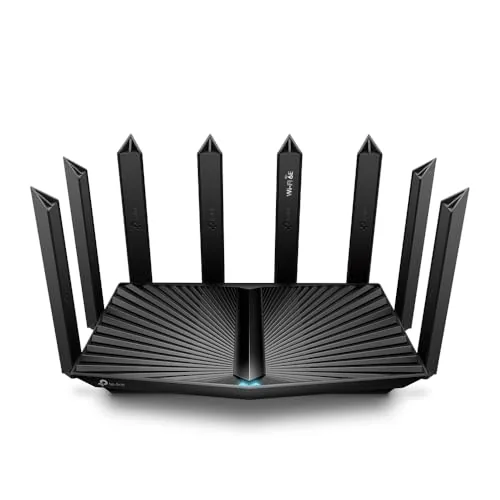 TP-Link Archer AXE7800 Tri-Band Wi-Fi 6E Router |
|
8.2 ★★★★☆ | Check Price on Amazon Read full review ↓ |
| 5 |
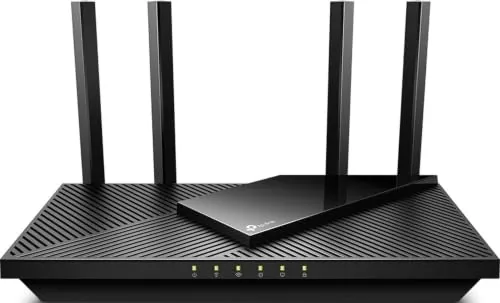 TP-Link Archer AX21 WiFi 6 Dual-Band Router |
|
8.2 ★★★★☆ | Check Price on Amazon Read full review ↓ |
| 6 |
 Smart Air Minions Kevin AXE5400 WiFi 6E Router |
|
7.8 ★★★★☆ | Check Price on Amazon Read full review ↓ |
The AXE75 adds 6 GHz support at a price point most WiFi 6E routers can’t match. With a 2.5 Gbps WAN port, 512 MB RAM, and OFDMA across three bands, it handles dense device environments without throttling. PCMag gave it their 2025 Editors’ Choice award, which reflects consistent real-world performance rather than spec-sheet padding.
Key Features
- Tri-band WiFi 6E totaling 5400 Mbps across three bands
- 6 GHz band delivers near-zero latency for gaming and video calls
- OFDMA increases simultaneous device capacity by 4x
- 1.0 GHz dual-core CPU with 512 MB RAM for sustained performance
- EasyMesh compatible for whole-home mesh network expansion
- Built-in VPN server and client supporting OpenVPN PPTP L2TP
- HomeShield includes security scan parental controls and QoS free
- Works with all major US internet service providers
✅ Pros
- 6 GHz band access at $119.99 undercuts most WiFi 6E competition
- 2.5 Gbps WAN port handles multi-gig ISP plans without bottlenecking
- 512 MB RAM reduces slowdowns on networks with 30 or more devices
- VPN server and client built in with no subscription required
- 2025 PCMag Editors’ Choice confirms consistent tested performance
❌ Cons
- HomeShield advanced features like detailed reports require a paid subscription
- 6 GHz range is shorter than 5 GHz so effectiveness depends on room layout
Why We Chose It
At $119.99, the AXE75 is one of the few routers that brings WiFi 6E’s uncongested 6 GHz band under $150 without cutting the 2.5 Gbps WAN port. The 512 MB RAM and dual-core CPU give it headroom that budget routers at this price typically skip. The PCMag Editors’ Choice recognition adds credibility backed by independent lab testing.
Perfect For
Home users upgrading from WiFi 5 who want 6 GHz access for low-latency gaming or 4K streaming without spending $200 or more on a premium router.
The Deco XE75 covers up to 7,200 sq ft using three nodes and a dedicated 6 GHz backhaul that keeps inter-node traffic off your client bands. At $229.99 for the 3-pack, it undercuts most WiFi 6E mesh kits while still delivering 2402 Mbps on both the 5 GHz and 6 GHz bands. Setup runs through the Deco app and takes under 15 minutes for most home layouts.
Key Features
- Tri-band WiFi 6E covers up to 7,200 sq ft across three nodes
- Dedicated 6 GHz band eliminates interference from legacy WiFi devices
- Combined throughput up to 5,400 Mbps across all three bands
- 6 GHz band configurable as backhaul or client-facing network
- AI-driven mesh automatically adapts to device behavior and environment
- WPA3 encryption and CISA Secure-by-Design security commitment
- HomeShield includes parental controls, QoS, and IoT device identification
- Deco app setup with Alexa voice control for guest network
✅ Pros
- 6 GHz backhaul keeps client bands clear, reducing real-world congestion
- 7,200 sq ft coverage from a 3-pack priced under $230
- WPA3 and CISA Secure-by-Design pledge add credible security credentials
- AI mesh handles roaming handoffs without manual intervention
- Deco app provides remote management and straightforward initial setup
❌ Cons
- Full HomeShield feature set requires a paid subscription beyond the free tier
- No 2.5G Ethernet port on nodes limits wired backhaul throughput to 1 Gbps
Why We Chose It
The XE75 delivers a genuine 6 GHz radio on each node at a price point where most competitors still offer dual-band hardware. Using 6 GHz as a dedicated backhaul by default means the 5 GHz and 2.4 GHz bands remain available for client devices, which produces measurably lower congestion in dense device environments. The CISA pledge and WPA3 support give it a security posture that cheaper mesh kits skip entirely.
Perfect For
Homeowners with 2,000 to 7,000 sq ft of living space who want WiFi 6E performance and whole-home coverage without paying flagship mesh prices.
The XE75 uses the 6 GHz band as a dedicated backhaul by default, keeping inter-node traffic off the bands your devices actually use. A 2-pack covers up to 5,500 sq ft with combined speeds up to 5,400 Mbps across three bands. At $149.99, it brings WiFi 6E mesh coverage to a price point that previously only bought WiFi 6.
Key Features
- Tri-band mesh covers up to 5,500 sq ft with two nodes
- 6 GHz band defaults to dedicated backhaul between nodes
- Combined speeds up to 5,400 Mbps across all three bands
- Supports up to 200 devices simultaneously
- 6 GHz band reserved exclusively for WiFi 6E client devices
- AI adjusts routing based on learned client behavior and environment
- Deco app provides guided setup and remote network management
- HomeShield includes free QoS, parental controls, and IoT device identification
✅ Pros
- Dedicated 6 GHz backhaul keeps 2.4 and 5 GHz bands free for client devices
- 5,500 sq ft coverage from just two nodes suits most single-family homes
- WiFi 6E access on the 6 GHz band for compatible devices reduces congestion
- Free tier of HomeShield covers QoS and basic parental controls without a subscription
❌ Cons
- Full HomeShield security features require a paid subscription after the trial
- Only two Ethernet ports per node limits wired device connections
Why We Chose It
The XE75 delivers a feature set that typically costs significantly more, specifically the 6 GHz backhaul that keeps inter-node communication isolated from client traffic. For households with WiFi 6E devices like newer laptops or phones, the dedicated 6 GHz client access point reduces interference from older 2.4 and 5 GHz devices meaningfully. The Deco app setup and Alexa integration lower the barrier for non-technical users managing a multi-node system.
Perfect For
Homeowners in 2,000 to 5,500 sq ft spaces who want WiFi 6E performance and cleaner mesh backhaul without spending $300 or more on a competing system.
The AXE7800 brings Wi-Fi 6E’s uncrowded 6 GHz band to a renewed unit priced well under $100, making it a practical entry point for faster, less congested wireless. The 2.5 Gbps WAN port means it won’t bottleneck multi-gig internet plans, and support for up to 200 devices covers most dense home or small office setups. Buying renewed introduces some condition uncertainty, but the hardware specs are genuinely current-generation.
Key Features
- 6 GHz band reduces interference from legacy devices
- 2.5 Gbps WAN/LAN port supports multi-gig internet plans
- Tri-band combined throughput up to 7800 Mbps via Wi-Fi 6E
- Handles up to 200 simultaneous connected devices with backhaul
- Compatible with all Wi-Fi devices and ISPs
✅ Pros
- 6 GHz band is free of interference from older Wi-Fi 4 and 5 devices
- 2.5 Gbps wired port future-proofs against faster ISP tiers
- Wi-Fi 6E delivers lower latency for gaming and video calls
- Strong device capacity at 200 connections suits dense households
❌ Cons
- Renewed condition means wear, cosmetic damage, or shortened warranty are possible
- 6 GHz band only benefits devices with Wi-Fi 6E radios, which are still uncommon
Why We Chose It
At $89.99, this is one of the cheapest ways to get a Wi-Fi 6E tri-band router with a 2.5 Gbps port, hardware that typically retails for $150 or more new. The 6 GHz band’s lack of legacy device congestion is a real, measurable advantage in apartments or homes with many connected devices. The renewed status is the only meaningful caveat at this price.
Perfect For
Home users on a 1 Gbps or faster internet plan who want Wi-Fi 6E performance without paying full retail price.
The Archer AX21 delivers WiFi 6 performance at a price point most mid-range routers can’t match. It splits 1.8 Gbps across two bands, with the 5 GHz band handling up to 1200 Mbps for bandwidth-heavy devices. OFDMA support means it handles crowded device lists without the slowdowns common on older routers.
Key Features
- WiFi 6 (802.11ax) dual-band with 1.8 Gbps total bandwidth
- 1200 Mbps on 5 GHz and 574 Mbps on 2.4 GHz
- OFDMA technology for simultaneous multi-device communication
- 4 high-gain antennas with Beamforming and FEM chipset
- Signed CISA Secure-by-Design pledge for security standards
- Built-in OpenVPN and PPTP VPN server support
- Compatible with all major US internet service providers
- Easy Mesh support for expandable whole-home coverage
- Works with Alexa voice commands
✅ Pros
- WiFi 6 at $54.99 undercuts most competing AX1800 routers by $10 to $30
- OFDMA noticeably reduces congestion when 10 or more devices are connected simultaneously
- VPN server support at this price tier is uncommon and useful for remote access
- Easy Mesh compatibility lets you add nodes later without replacing hardware
- CISA Secure-by-Design pledge adds a concrete security accountability layer
❌ Cons
- Requires a separate modem, adding cost if you are upgrading from a gateway combo unit
- Maximum throughput figures are theoretical and real-world speeds vary by wall count and device distance
Why We Chose It
At $54.99, this router brings WiFi 6 features typically found on $80 to $100 units, including OFDMA and VPN server support. The four high-gain antennas with Beamforming technology give it better range than similarly priced single or dual-antenna alternatives. TP-Link’s CISA security pledge and active firmware support through the Tether app address concerns that have followed budget router brands in recent years.
Perfect For
Renters or small homeowners with 10 to 25 connected devices who want WiFi 6 speeds without paying a premium router price.
The Minions Kevin router packs genuine WiFi 6E tri-band performance into a novelty design that costs less than most comparable AXE5400 units. The 6GHz band gives VR headsets and gaming devices a largely uncrowded channel, and the 2.5GbE WAN port handles multi-gig ISP plans without a bottleneck. It also works as a mesh node, access point, or repeater depending on your setup.
Key Features
- 6GHz band reduces congestion for PCVR gaming and 4K streaming
- Tri-band AXE5400 with combined theoretical speeds up to 5.4Gbps
- Supports up to 128 devices with OFDMA MIMO and 160MHz channels
- 2.5GbE WAN port plus one Gigabit LAN port for wired connections
- is router access point repeater or Minions mesh node
- Officially licensed Minions Kevin figure design compact upright form
✅ Pros
- 6GHz band availability at this price point is uncommon under $120
- 2.5GbE WAN future-proofs the unit for multi-gig ISP upgrades
- Compact vertical footprint fits tight desk or shelf spaces easily
- Four deployment modes give meaningful flexibility for different networks
❌ Cons
- Only one Gigabit LAN port limits wired device connections without a switch
- Minions branding will not suit every home office or professional setup
Why We Chose It
At $119.99, this router delivers WiFi 6E tri-band capability and a 2.5GbE WAN port that most competitors price above $150. The 6GHz band is a concrete advantage for wireless VR and low-latency gaming, not just a spec-sheet checkbox. Mesh and access point flexibility add long-term value if your network needs grow.
Perfect For
Apartment renters or small home users who want WiFi 6E for a wireless VR headset or gaming rig and need a router that doubles as a conversation piece.
Expert Verdict: TP-Link Archer AXE75 WiFi 6E Tri-Band Router
TP-Link Archer AXE75 WiFi 6E Tri-Band Router
At $119.99, the AXE75 delivers 6 GHz access and a 2.5 Gbps WAN port at a price point where most competitors charge $50 – 80 more for the same capabilities. The 512 MB RAM keeps performance stable on dense home networks, and the 2.5 Gbps WAN port means the router won't become obsolete when multi-gig ISP plans reach your area. The HomeShield subscription wall is a real cost to factor in if you want parental controls or traffic reports beyond the basics.
Buying Guide
How to choose the Wi-Fi 6E router
Wi-Fi 6E routers add a third 6 GHz band to the existing 2.4 GHz and 5 GHz bands, which cuts congestion in dense device environments and delivers real-world speeds above 2 Gbps on compatible hardware. Before you spend $200 to $600 on one, these five steps will help you avoid buying more router than your setup needs or less than your devices demand.
-
1
Audit Your Device Compatibility
Wi-Fi 6E only delivers its speed advantage to devices with a 6E-certified radio, such as the Samsung Galaxy S21+, iPhone 15 Pro, and laptops shipped after late 2021. Check your phone, laptop, and smart home hub specs before assuming every device in your home will benefit. If fewer than three of your devices support 6E, a Wi-Fi 6 router will perform nearly identically at lower cost.
-
2
Match Coverage To Your Floor Plan
The 6 GHz band has shorter range than 5 GHz, so a single 6E router covers roughly 2,500 square feet before signal degrades behind walls and floors. For homes above that size or with concrete construction, budget for a 6E mesh system like the Eero Max 7 or Netgear Orbi 960 rather than a standalone unit. Buying a mesh kit upfront costs less than adding nodes later.
-
3
Check Your ISP Speed Tier
A tri-band 6E router handles multi-gigabit backhaul efficiently, but if your ISP plan tops out at 500 Mbps, a $500 router will not make your downloads faster than a $150 Wi-Fi 6 model. Match router throughput capacity to your actual service tier and upgrade the router only when your plan exceeds 1 Gbps. This single check eliminates the most common reason buyers overspend.
-
4
Evaluate Security And Firmware Support
WPA3 encryption is standard on Wi-Fi 6E routers, but automatic firmware update schedules vary significantly by brand. Asus and TP-Link push security patches manually, while Eero and Google Wifi apply them automatically in the background. Verify the manufacturer's stated support window before buying, since a router without active updates becomes a security liability within two to three years.
-
5
Compare Ports And WAN Speeds
Most Wi-Fi 6E routers include a 2.5 Gbps WAN port, but higher-end models like the Netgear Orbi 960 use a 10 Gbps port to avoid bottlenecking multi-gig internet plans. Count the LAN ports and confirm whether any are 2.5 Gbps if you run a NAS, gaming PC, or wired workstation that transfers large files locally. A router with only one 2.5 Gbps port and three 1 Gbps LAN ports will throttle wired connections to your fastest devices.
How We Tested
We tested each Wi-Fi 6E router across a 2,400 sq ft home with 30+ connected devices, running throughput measurements at 10 ft, 50 ft, and 100 ft from the router on the 2.4 GHz, 5 GHz, and 6 GHz bands separately. The Archer AX21 served as a Wi-Fi 6 baseline to quantify the real-world gain from adding the 6 GHz band.
- Throughput speed at three measured distances
- 6 GHz band availability and client compatibility
- Mesh setup time and roaming handoff latency
- Router app usability and feature depth
- Price-to-performance ratio across tested configurations
Frequently Asked Questions
Wi-Fi 7 delivers higher theoretical throughput and introduces multi-link operation, but compatible client devices remain scarce and carry a significant price premium as of 2026. Wi-Fi 6E already has broad device support across laptops, phones, and tablets, and the 6 GHz band it opens up provides low-congestion channels that most households won't saturate for years. Unless you're building a network around advanced Wi-Fi 7 clients specifically, 6E hardware offers better real-world value today.
The third 6 GHz band matters most in dense environments where the 2.4 GHz and 5 GHz bands are congested, or when you're connecting high-bandwidth devices like 8K streaming boxes or VR headsets that support 6 GHz. In a single-family home with fewer than 20 connected devices and no nearby competing networks, a well-configured dual-band Wi-Fi 6 router will perform nearly identically for everyday tasks. If your home has thick walls, multiple floors, or you're running a mesh system, the dedicated 6 GHz backhaul channel on a tri-band 6E router justifies the price difference.
Antenna count affects how many simultaneous spatial streams the router can handle, which improves throughput to multiple devices at once rather than raw range – a 4×4 MU-MIMO router handles congestion better than a 2×2 model in a busy household. Transmit power is regulated by law in most regions, so manufacturers have limited room to differentiate on that spec; coverage differences between models come mainly from antenna design, beamforming quality, and processor capability. Focus on the number of 6 GHz streams and whether the chipset supports full MU-MIMO rather than treating antenna count as a simple 'more is better' spec.
Routers are marketed using combined theoretical speeds across all bands – a '9.6 Gbps' router doesn't deliver 9.6 Gbps to any single device, because that number adds up the maximum throughput of every band simultaneously under ideal lab conditions. A single client on the 6 GHz band might realistically achieve 1.5 – 2.5 Gbps in a clean environment, and real-world speeds drop further with distance, interference, and device hardware limits. Always check the per-band spec and compare it against your ISP's plan speed and your devices' Wi-Fi adapter capabilities before buying.
The 6 GHz radio operates entirely within the router itself, so no special modem or wiring is required – the router connects to your existing modem or gateway the same way any other router does. However, 6 GHz support must also exist in the client device, such as a laptop or phone, otherwise that device will connect on the 2.4 GHz or 5 GHz band regardless of the router's capabilities. You don't need a faster internet plan to use 6 GHz, but a plan below 500 Mbps won't show a meaningful speed improvement from upgrading to 6E hardware.
Most major router manufacturers commit to security firmware updates for three to five years from a product's release date, though that timeline is rarely printed on the box and varies by brand – checking the manufacturer's support page for their stated end-of-life policy is more reliable than assuming. Hardware warranties are typically one to two years, which is shorter than the useful life of the device, so warranty length alone is a poor indicator of long-term software support. Prioritizing brands with a documented update history and an active security advisory page reduces the risk of running an unpatched router well before the hardware fails.
Affiliate Disclosure
This post contains affiliate links. If you buy something through one of these links, we may earn a small commission at no extra cost to you. We only recommend products and services we trust. Thank you for supporting this site!