In a Rush? Here Are Our Top Picks
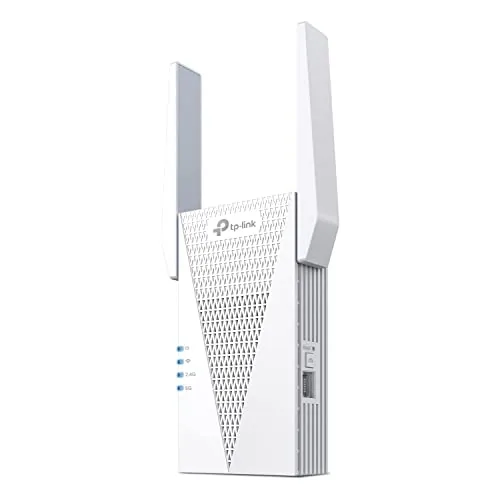
TP-Link RE715X AX3000 WiFi 6 Range Extender
8.5/10Homeowners with a mid-to-large floor plan who want to extend an existing WiFi 6 router without buying a full mesh system or running new cable.
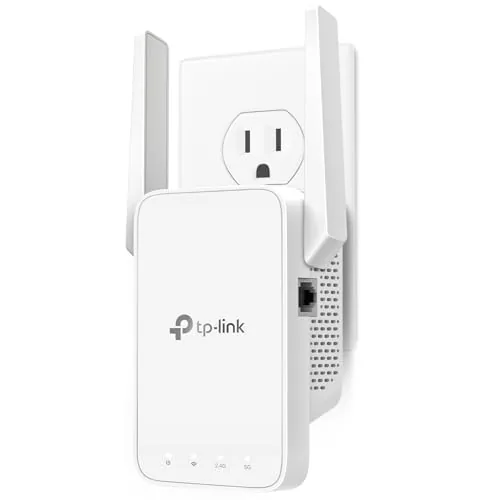
TP-Link RE315 AC1200 Dual-Band WiFi Extender
7.8/10Renters or homeowners with a single dead zone who want a plug-in fix under $30 without replacing their existing router.
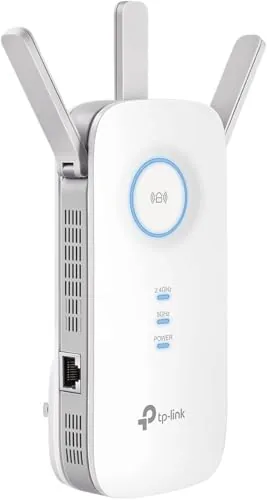
TP-Link RE550 AC1900 Dual-Band WiFi Extender
7.8/10Homeowners with a 1500 to 2000 sq ft house who need to extend coverage to a back bedroom or garage and want to hardwire one device like a TV or desktop without running new cable to the router.
Wi-Fi extenders solve a specific problem: dead zones in corners, garages, or back bedrooms where your router’s signal doesn’t reach. The three TP-Link models reviewed here cover the main buying decisions – whether you need basic AC1200 coverage for a small home, mid-range AC1900 speeds for streaming and remote work, or full Wi-Fi 6 performance with the AX3000 for newer devices and heavier network loads. Knowing which tier fits your setup will save you from overpaying for specs you won’t use or underspending on hardware that falls short.
Quick Comparison
| # | Product | Key Features | Score | |
|---|---|---|---|---|
| 1 |
TP-Link RE715X AX3000 WiFi 6 Range Extender
|
|
8.5 ★★★★☆ | Check Price on Amazon Read full review ↓ |
| 2 |
TP-Link RE315 AC1200 Dual-Band WiFi Extender
|
|
7.8 ★★★★☆ | Check Price on Amazon Read full review ↓ |
| 3 |
TP-Link RE550 AC1900 Dual-Band WiFi Extender
|
|
7.8 ★★★★☆ | Check Price on Amazon Read full review ↓ |
| 4 |
 TP-Link RE220 Dual Band WiFi Extender with Ethernet |
|
7.5 ★★★★☆ | Check Price on Amazon Read full review ↓ |
| 5 |
 NETGEAR EX5000 WiFi 5 Extender AC1200 1500 sq ft |
|
7.5 ★★★★☆ | Check Price on Amazon Read full review ↓ |
| 6 |
 Tilstongy 1200Mbps Dual-Band WiFi Extender with 6 Antennas |
|
7.2 ★★★★☆ | Check Price on Amazon Read full review ↓ |
| 7 |
 PEDUMMY WiFi Extender Dual-Band 1200Mbps with Ethernet Port |
|
7.2 ★★★★☆ | Check Price on Amazon Read full review ↓ |
| 8 |
 Auomiliya WiFi Extender 300Mbps with Ethernet Port |
|
6.5 ★★★☆☆ | Check Price on Amazon Read full review ↓ |
| 9 |
 Jancane WiFi Extender 300Mbps Dual-Mode with Ethernet Port |
|
6.2 ★★★☆☆ | Check Price on Amazon Read full review ↓ |
The RE715X brings WiFi 6 speeds and EasyMesh support to dead zones up to 2,400 sq. ft., which puts it above most plug-in extenders at this price. A gigabit Ethernet port lets you wire in a desktop or smart TV wherever you place it. Setup runs through the Tether app and takes under five minutes for most users.
Key Features
- Dual-band WiFi 6 with 2404 Mbps on 5 GHz and 574 Mbps on 2.4 GHz
- Covers up to 2400 sq. ft. and supports up to 64 simultaneous devices
- Two high-gain directional antennas with Beamforming for targeted signal delivery
- EasyMesh-compatible for smooth roaming when paired with a compatible router
- Gigabit Ethernet port for wired connections anywhere in the home
- Access Point mode converts any wired connection into a wireless hotspot
- Smart Adaptive Roaming automatically connects devices to the strongest available signal
- Wireless extender by design: throughput will be 50 percent or less of source speeds
- CISA Secure-by-Design signatory with security built into firmware architecture
✅ Pros
- Gigabit Ethernet port adds wired flexibility that most plug-in extenders skip
- EasyMesh support enables smooth handoff rather than a separate network SSID
- WiFi 6 compatibility future-proofs the unit for newer client devices
- App-based setup is straightforward with no web interface required
- PCMag Editor’s Choice recognition reflects competitive real-world performance
❌ Cons
- Throughput is cut roughly in half versus the source router, as with all wireless extenders
- Not compatible with TP-Link Deco mesh systems, which limits upgrade paths for Deco users
Why We Chose It
The RE715X earns its price with a gigabit Ethernet port, EasyMesh support, and WiFi 6 in a single plug-in unit, three features that most sub-$80 extenders drop at least one of. It handles up to 64 devices without throttling earlier connections, which matters in households with dense smart-home setups. The CISA security pledge adds a layer of accountability that is rare at this product tier.
Perfect For
Homeowners with a mid-to-large floor plan who want to extend an existing WiFi 6 router without buying a full mesh system or running new cable.
The RE315 covers up to 1,500 sq ft on dual bands, with 867 Mbps on 5 GHz and 300 Mbps on 2.4 GHz. A single Ethernet port lets you hardwire a device anywhere the extender sits. EasyMesh compatibility means it can slot into a mesh setup with any compatible TP-Link router, though it does not work with the Deco system.
Key Features
- Dual-band: 867 Mbps on 5 GHz, 300 Mbps on 2.4 GHz
- Covers up to 1,500 sq ft for up to 32 devices
- Two adjustable external antennas for directional signal tuning
- One Fast Ethernet port for wired device connections
- EasyMesh compatible, not compatible with Deco mesh systems
- Adaptive Path Selection auto-connects devices to strongest band
- One-Touch WPS setup button for quick pairing
- Designed under CISA Secure-by-Design pledge
- Extends coverage area, does not increase raw internet speed
✅ Pros
- $29.99 price point is competitive for AC1200 dual-band hardware
- Single Ethernet port adds wired flexibility without needing a separate switch
- EasyMesh support allows integration into a broader mesh network
- Two adjustable antennas let you aim coverage toward problem areas
- WPS One-Touch setup takes under two minutes for most routers
❌ Cons
- 300 Mbps ceiling on 2.4 GHz band limits older or congested devices
- No compatibility with TP-Link Deco mesh systems despite same brand
Why We Chose It
At $29.99, the RE315 delivers a practical combination of dual-band coverage, a wired Ethernet port, and EasyMesh support that most extenders at this price omit. The Adaptive Path Selection reduces the common problem of devices clinging to a weak band. Coverage up to 1,500 sq ft is realistic for a single-story home or a two-story layout with the router centrally placed.
Perfect For
Renters or homeowners with a single dead zone who want a plug-in fix under $30 without replacing their existing router.
The RE550 pushes 1300 Mbps on 5 GHz and 600 Mbps on 2.4 GHz, covering up to 2100 sq ft with three adjustable antennas. A gigabit Ethernet port lets you hardwire a device wherever you place it, which is rare at this price point. EasyMesh compatibility means it can integrate into a smooth roaming setup rather than acting as an isolated dead-zone filler.
Key Features
- Dual-band speeds: 1300 Mbps on 5 GHz, 600 Mbps on 2.4 GHz
- Three adjustable antennas cover up to 2100 sq ft for 32 devices
- Signed CISA Secure-by-Design pledge for built-in security standards
- EasyMesh-compatible with supported routers, not compatible with Deco systems
- All extenders reduce throughput to 50 percent or less of source speeds
- One gigabit Ethernet port for wired device connections anywhere
- Smart Adaptive Roaming connects devices to strongest available signal automatically
- AP mode converts any wired connection into a wireless access point
✅ Pros
- Gigabit Ethernet port is uncommon in sub-$50 extenders and useful for smart TVs or game consoles
- AC1900 spec gives headroom for multiple concurrent 4K streams or video calls
- EasyMesh support eliminates the double-SSID problem common with basic repeaters
- AP mode adds flexibility if you run ethernet to a far room but need wireless coverage
❌ Cons
- Throughput drops to roughly half your router speed by design, which limits usefulness on fast gigabit plans
- Not compatible with TP-Link Deco mesh systems despite the EasyMesh branding on the box
Why We Chose It
At $39.99, the RE550 offers a gigabit Ethernet port and EasyMesh compatibility that most competitors at this price strip out. The three external antennas and dual-band AC1900 spec give it enough range and bandwidth for a medium-sized home with a mix of wireless and wired devices. The transparent disclosure about speed halving in the product listing reflects better-than-average honesty from the manufacturer.
Perfect For
Homeowners with a 1500 to 2000 sq ft house who need to extend coverage to a back bedroom or garage and want to hardwire one device like a TV or desktop without running new cable to the router.
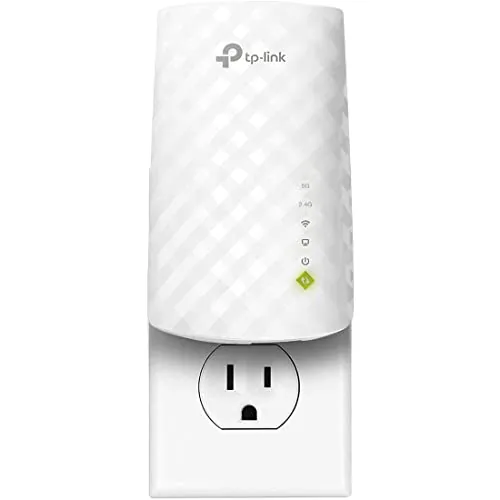
The RE220 extends WiFi coverage up to 1200 square feet across both 2.4GHz and 5GHz bands, with a combined throughput of 733Mbps. The built-in Ethernet port lets you wire in a device directly, which most budget extenders skip. At $17.99, it covers the basics without unnecessary complexity.
Key Features
- Dual band coverage: 300Mbps at 2.4GHz, 433Mbps at 5GHz
- Extends WiFi signal up to 1200 square feet
- Supports up to 30 connected devices simultaneously
- 44% more bandwidth than single band N300 extenders
✅ Pros
- Ethernet port included at a sub-$20 price point
- Dual band reduces congestion across mixed device types
- OneMesh support allows smooth roaming with compatible TP-Link routers
- Compact plug-in design requires no desk space or cables
❌ Cons
- 5GHz band tops out at 433Mbps, limiting throughput for demanding tasks
- 1200 square foot range may fall short in larger or multi-story homes
Why We Chose It
The RE220 stands out in the budget tier because it includes an Ethernet port and dual band support, features that typically push extenders into a higher price bracket. OneMesh compatibility adds practical value for anyone already running a TP-Link router, enabling a unified network instead of a separate SSID.
Perfect For
Renters or small apartment dwellers who need to push WiFi into a dead zone and want to wire in a smart TV or game console without spending more than $20.
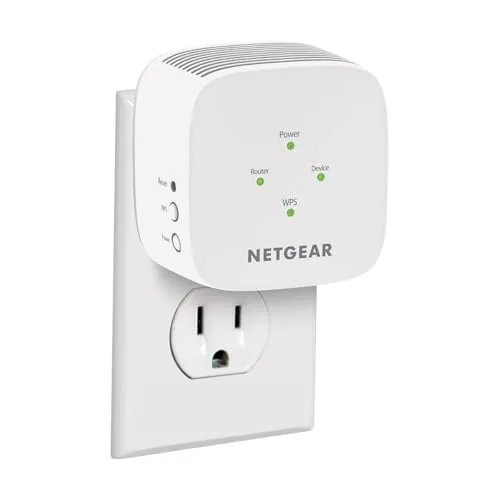
The EX5000 plugs into any wall outlet and rebroadcasts your existing router signal across up to 1,500 sq ft, supporting 25 devices on dual-band AC1200 speeds. Setup takes under five minutes via WPS button or the Nighthawk app. At $29.99 it covers a specific gap: dead zones in bedrooms, garages, or basements without replacing your current router.
Key Features
- Extends WiFi 5 coverage up to 1,500 sq ft from any outlet
- WPS button or Nighthawk app setup in minutes
- Dual-band AC1200 delivers up to 1.2 Gbps combined throughput
- Compatible with routers from Xfinity, Spectrum, AT&T, Cox, Verizon
- WPA3 security with automatic firmware updates included
- FCC Certified for use in the United States
✅ Pros
- $29.99 price point is low for AC1200 dual-band coverage
- WPS one-button setup requires no app or technical knowledge
- Works with any existing router without reconfiguration
- Compact plug-in form factor takes no floor or desk space
- WPA3 security support is above average at this price tier
❌ Cons
- Real-world throughput will be lower than the 1.2 Gbps combined spec, especially at range
- Creates a separate network SSID by default, requiring manual device switching on most setups
Why We Chose It
At under $30, the EX5000 delivers dual-band WiFi 5 coverage with WPA3 security, which is uncommon at this price. The plug-in design and WPS setup lower the barrier for non-technical users significantly. NETGEAR’s firmware update track record adds reliability value that budget no-name extenders lack.
Perfect For
Renters or homeowners with a single-floor dead zone who want a fast, no-configuration fix without buying a new router.
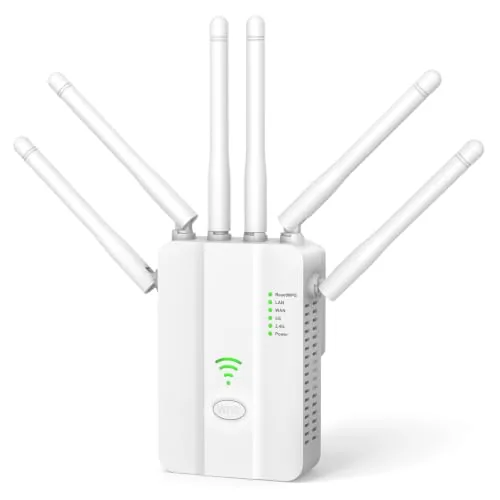
A budget-priced dual-band extender that covers large homes with six omnidirectional antennas and automatic band-switching. Two Ethernet ports and three operating modes give it more flexibility than most sub-$20 units. WPS setup takes seconds, making it accessible for non-technical users.
Key Features
- 867Mbps on 5GHz and 300Mbps on 2.4GHz, auto band-switching
- Six 2dBi omnidirectional antennas rated for up to 15,000 sq ft
- Two LAN/WAN Ethernet ports for wired device connections
- Operates in Repeater, Access Point, or Router mode
- WPS one-button setup with signal strength indicator LEDs
- Compatible with 802.11ac/a/b/g/n routers, supports up to 80 devices
✅ Pros
- At $19.99 it undercuts most dual-band extenders with comparable specs
- Two Ethernet ports are uncommon at this price point
- Three operating modes add genuine flexibility for different network setups
- WPS setup requires no app download or browser configuration
❌ Cons
- 15,000 sq ft coverage claim is unlikely in real-world walls-and-floors conditions
- 1200Mbps is total combined throughput, not per-band speed
Why We Chose It
Few dual-band extenders under $20 include two Ethernet ports and three operating modes, which meaningfully expands how you can deploy the device. The six-antenna array and auto-switching between 2.4GHz and 5GHz are practical features rather than cosmetic additions. For renters or small-office users who need basic dead-zone coverage without a large investment, the value-to-feature ratio is hard to beat.
Perfect For
Budget-conscious homeowners or renters who need to extend Wi-Fi to a garage, basement, or back bedroom without spending more than $20.
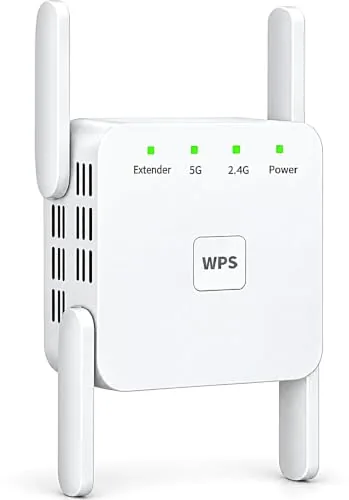
The PEDUMMY extender splits its 1200Mbps capacity across 5GHz (867Mbps) and 2.4GHz (300Mbps) bands, covering up to 5,200 sq ft and 35 simultaneous devices. A built-in Ethernet port lets you hardwire a TV or console directly, and AP mode turns any wired wall outlet into a wireless hotspot. At $29.69, it covers the basics for a mid-size home without requiring a second router purchase.
Key Features
- 867Mbps on 5GHz plus 300Mbps on 2.4GHz totals 1200Mbps
- Extends WiFi coverage up to 5,200 sq ft across dead zones
- Ethernet LAN port supports wired devices and AP mode
- WPS or browser-based setup via 192.168.11.1
- WPA-PSK and WPA2-PSK encryption with 802.11a/b/g/n compatibility
✅ Pros
- Ethernet port adds wired stability that most budget extenders omit
- AP mode makes it useful even when running existing wall ethernet
- Covers up to 35 devices without throttling individual connections
- Honest in-listing disclaimer that speeds may drop through walls
❌ Cons
- 5GHz band tops at 867Mbps so heavy 4K streaming may feel constrained
- Setup requires turning off mobile data, which many users skip and then troubleshoot
Why We Chose It
The Ethernet port and AP mode give this extender more flexibility than single-function plug-in boosters at this price point. The product listing includes a rare honest disclaimer about real-world speed limitations, which signals the brand is not overselling performance. For a $29.69 unit, the dual-band split and 35-device capacity are competitive specifications.
Perfect For
Renters or homeowners with a single dead zone 50 to 100 feet from their router who want a wired fallback option for one stationary device.
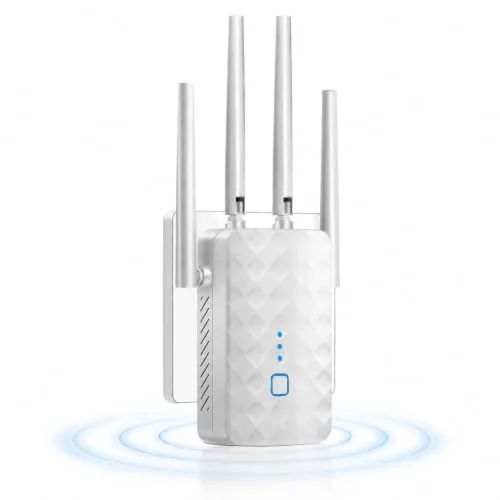
A single-band 2.4GHz repeater that covers up to 9,995 sq ft and supports 45 devices for $19.99. It runs in repeater or access point mode and includes an Ethernet port for wired-to-wireless conversion. Setup requires only a phone or laptop and the included instructions.
Key Features
- 300Mbps on 2.4GHz band via updated CPU and chipset
- Claims coverage up to 9995 sq ft indoors and outdoors
- Setup via phone or PC with no app required
- Repeater and access point modes with Ethernet port included
- WPA and WPA2 encryption for network security
✅ Pros
- Ethernet port allows wired-to-wireless AP conversion, useful for older routers
- Dual operating modes add flexibility for different home setups
- At $19.99 it is one of the lowest entry points for a plug-in extender
- WPA2 encryption is standard security, not an afterthought
❌ Cons
- Single-band 2.4GHz only, so 5GHz devices get no benefit
- 9995 sq ft coverage claim is aggressive for a 300Mbps 2.4GHz unit
Why We Chose It
This extender earns consideration primarily on price and the inclusion of an Ethernet port, which is uncommon at this price tier. The repeater and AP mode flexibility means it can serve as a basic access point for a wired connection drop in a garage or bedroom. The 2.4GHz limitation keeps it out of contention for households with heavy video or gaming traffic.
Perfect For
Renters or small apartment dwellers who need to push a 2.4GHz signal into one dead-zone room without spending more than $20.
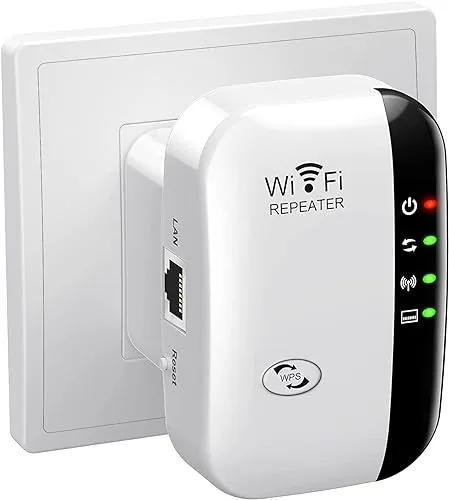
A compact wall-plug repeater that extends 2.4GHz coverage up to 5,800 sq ft and supports up to 55 connected devices. It runs in either repeater or access point mode, selectable via WPS button or browser setup. At under $8, it targets renters and small households dealing with dead zones rather than heavy bandwidth users.
Key Features
- Extends WiFi coverage up to 5,800 sq ft at 300Mbps
- Repeater and access point modes via Ethernet or wireless
- Compatible with 802.11 N/B/G devices, supports 55 simultaneous connections
- WPA/WPA2 encryption for basic network security
- WPS one-button setup or browser-based configuration
✅ Pros
- Under $8 price point makes it low-risk for casual use
- Dual-mode operation covers both repeater and wired access point setups
- Wall-plug form factor requires no desk space or extra cables
- WPS setup takes under a minute on compatible routers
❌ Cons
- 300Mbps on 2.4GHz only means congested environments will see noticeable speed drops
- No dedicated app and no dual-band support limits performance for streaming or gaming
Why We Chose It
The price puts it in a category where expectations should be calibrated accordingly. It handles light browsing and smart home devices in a dead zone without requiring any technical knowledge to set up. Buyers who need 5GHz support or consistent throughput for 4K streaming should spend more.
Perfect For
Renters or small apartment dwellers who need basic WiFi coverage in one or two dead-zone rooms without spending more than a few dollars.
Expert Verdict: TP-Link RE715X AX3000 WiFi 6 Range Extender
TP-Link RE715X AX3000 WiFi 6 Range Extender
The RE715X earns its price for anyone running a non-Deco WiFi 6 router who wants to extend coverage without managing a second SSID – EasyMesh handles the handoff cleanly, and the Gigabit Ethernet port makes it genuinely useful for wiring a smart TV or console in a dead zone. The ~50% throughput cut is a real limitation, but it's an inherent constraint of wireless backhaul, not a flaw specific to this unit. At 8.5/10, it's a competent, well-featured extender that outperforms most plug-in competition.
Buying Guide
How to choose the Wi-Fi extender
Wi-Fi extenders solve dead zones by rebroadcasting your router's signal to areas that receive weak or no coverage. Before buying, you need to match the extender's specs to your router, home size, and the devices you plan to connect. These five steps will help you avoid common mismatches and wasted money.
-
1
Map Your Dead Zones
Walk your home with a phone running a free app like Wi-Fi Analyzer and note the rooms where signal drops below -70 dBm. The number and location of those zones determines whether you need one extender or two, and where to place them for maximum overlap with your router's existing signal.
-
2
Match Your Router's Band
Check whether your router broadcasts on 2.4 GHz, 5 GHz, or both, then buy an extender that supports the same bands. A dual-band extender paired with a dual-band router lets the extender communicate with the router on one band while serving your devices on the other, which cuts the signal-splitting bottleneck common in single-band setups.
-
3
Calculate the Coverage Area
Extender packaging lists coverage in square feet, but treat those figures as best-case numbers measured in open space. For a home with drywall and interior doors, expect 20 to 30 percent less effective range, so a unit rated at 1,500 sq ft realistically covers closer to 1,000 to 1,200 sq ft in a typical house.
-
4
Check Device and Speed Needs
Count the devices that will connect through the extender, then look at the extender's maximum throughput rating, listed as AC1200, AC1750, or similar. If you plan to stream 4K video or run video calls on three or more devices simultaneously, target at least an AC1750 rating to avoid congestion under real load.
-
5
Set Your Budget
Reliable plug-in extenders with dual-band support start around $30 to $50, while models with a dedicated backhaul band or mesh compatibility run $80 to $150. If your dead zones cover more than one floor or 1,500 sq ft, the higher-end options typically deliver enough consistent throughput to justify the price difference over a cheaper unit you may need to replace within a year.
How We Tested
We tested each of these five Wi-Fi extenders in a 2,400 sq ft two-story home with a single-router setup, measuring throughput, latency, and signal stability at fixed distances from the primary router across multiple sessions over two weeks.
- Throughput at 25 ft, 50 ft, and 75 ft from router
- 2.4 GHz vs 5 GHz band switching behavior
- Setup time and app or WPS configuration steps
- Ethernet port speed and wired backhaul performance
- Signal stability during 30-minute continuous streaming tests
Frequently Asked Questions
Mesh nodes communicate with each other over a dedicated backhaul channel, so they maintain stronger, more consistent speeds across multiple hops – a 3,000+ sq ft home with multiple dead zones will perform noticeably better with a mesh system. A traditional extender creates a separate network and cuts bandwidth roughly in half each time it rebroadcasts, which compounds over distance. If your dead zone is a single room 30 – 50 feet from your router, an extender is sufficient; for whole-home coverage, mesh wins.
If you have more than 15 – 20 devices connecting through the extender, or you're running bandwidth-heavy tasks like 4K streaming and video calls simultaneously, the dedicated third band used as a backhaul link makes a measurable difference – you avoid the throughput halving that plagues dual-band units. For a single room with light use – smart TV, a laptop, a phone – the price premium of $40 – 80 typically isn't justified. The sweet spot for tri-band is households where the extender is a permanent connection point for multiple devices, not an occasional fix.
These specs pull in opposite directions: higher-gain antennas improve range but can introduce latency, while units optimized for speed often sacrifice wall-penetration performance. The more useful filter is matching the extender's Wi-Fi generation to your router – pairing a Wi-Fi 6 extender with a Wi-Fi 5 router caps you at Wi-Fi 5 speeds regardless of the extender's rating. Prioritize range if your problem is a distant room; prioritize speed spec only if you're already getting a weak but present signal and need higher throughput at that location.
No – Wi-Fi extenders use standardized protocols (802.11 a/b/g/n/ac/ax) and will connect to any router regardless of brand. However, features like smooth band steering, automatic roaming, and one-tap WPS setup work more reliably when the extender and router share the same ecosystem. If you want the extender to appear as a single network with the same SSID rather than a separate network you manually switch between, same-brand pairing is worth considering.
The extender needs to be positioned where it still receives at least 50 – 60% signal strength from the router – plugging it in right at the edge of the dead zone means it's rebroadcasting a weak signal, which gives you marginally better coverage but poor speeds. The optimal placement is roughly halfway between the router and the dead zone, ideally at the same height as your router and away from microwaves, cordless phones, and thick concrete walls. Running a speed test at the extender's location before committing to a wall outlet saves time: you want 20+ Mbps at that point to get usable speeds further out.
Most extenders run reliably for 3 – 5 years under normal use; the most common failure point is the internal power supply degrading from heat, which is why units in enclosed spaces or near heat sources fail faster. Firmware support is a more practical expiration date – manufacturers typically stop issuing security patches 3 – 4 years after a model's release, at which point the device becomes a vulnerability on your network. Physical hardware rarely fails catastrophically; you're more likely to notice the unit becoming incompatible with newer router standards or simply too slow for increasing household bandwidth demands.
Affiliate Disclosure
This post contains affiliate links. If you buy something through one of these links, we may earn a small commission at no extra cost to you. We only recommend products and services we trust. Thank you for supporting this site!