In a Rush? Here Are Our Top Picks
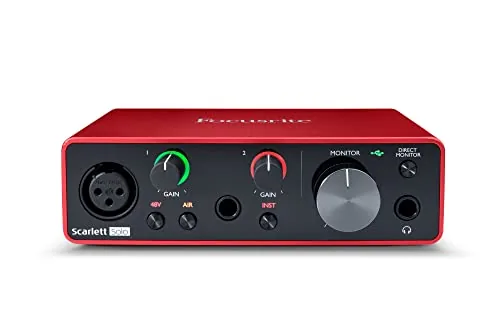
Focusrite Scarlett Solo 3rd Gen USB-C Audio Interface
8.7/10Solo musicians, podcasters, or first-time home studio builders who need one mic and one instrument input without spending more than $150.
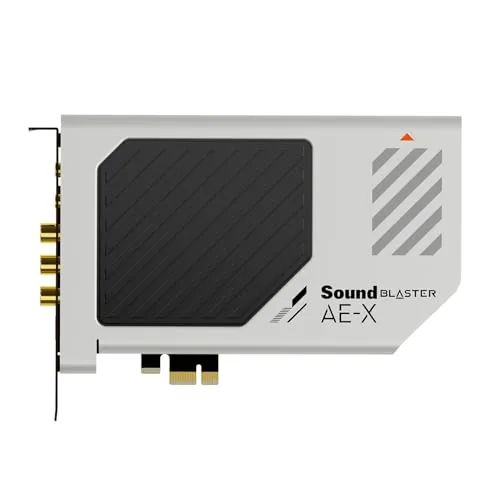
Creative Sound Blaster AE-X PCIe Hi-Res Sound Card
8.5/10PC users who own studio or audiophile headphones and want a measurable audio upgrade without adding a separate DAC and amp to their desk.
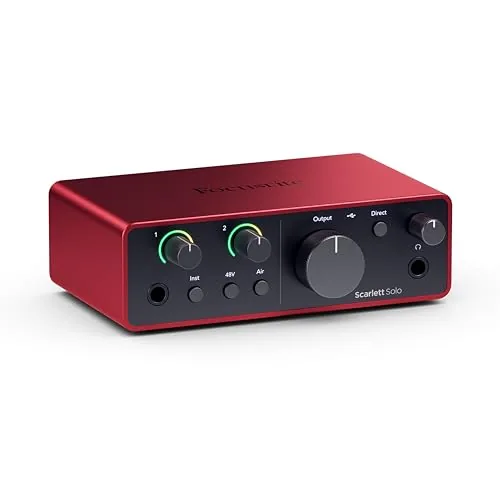
Focusrite Scarlett Solo 4th Gen USB-C Interface
8.5/10Singer-songwriters or guitarists who record one source at a time and want professional preamp quality without paying for inputs they will never use.
If you record vocals, produce music, or just want audio that doesn’t sound like it’s coming through a tin can, the sound card you’re using matters more than most people realize. Onboard motherboard audio cuts corners on components – thin dynamic range, audible background hiss, and no clean preamp for a microphone. The Focusrite Scarlett Solo 3rd Gen, Creative Sound Blaster AE-X, and Focusrite Scarlett Solo 4th Gen each solve those problems differently, and the right one depends on whether you’re recording, gaming, or purely listening.
Quick Comparison
| # | Product | Key Features | Score | |
|---|---|---|---|---|
| 1 |
Focusrite Scarlett Solo 3rd Gen USB-C Audio Interface
|
|
8.7 ★★★★☆ | Check Price on Amazon Read full review ↓ |
| 2 |
Creative Sound Blaster AE-X PCIe Hi-Res Sound Card
|
|
8.5 ★★★★☆ | Check Price on Amazon Read full review ↓ |
| 3 |
Focusrite Scarlett Solo 4th Gen USB-C Interface
|
|
8.5 ★★★★☆ | Check Price on Amazon Read full review ↓ |
| 4 |
 Creative Sound Blaster Play! 3 USB DAC 24-bit/96kHz |
|
8.2 ★★★★☆ | Check Price on Amazon Read full review ↓ |
| 5 |
 Creative Sound Blaster Audigy Fx Pro PCIe Sound Card |
|
7.8 ★★★★☆ | Check Price on Amazon Read full review ↓ |
| 6 |
 SABRENT AU-MMSA USB to 3.5mm Stereo Audio Adapter |
|
7.8 ★★★★☆ | Check Price on Amazon Read full review ↓ |
The Scarlett Solo delivers 24-bit/192kHz recording in a compact one-mic, one-instrument format that suits home studios and podcasters on a budget. Gain Halos give you a visible clipping warning before distortion hits, which removes a lot of guesswork during live takes. At $119.99 with a three-year warranty and four bundled DAWs, the value-to-performance ratio is hard to match at this price point.
Key Features
- High-gain preamp with switchable Air mode for acoustic clarity
- One XLR mic input and one Hi-Z instrument input with Gain Halos
- Records and monitors at up to 24-bit/192kHz resolution
- Two balanced outputs and headphone jack for low-noise playback
- Includes Pro Tools Intro, Ableton Live Lite, Cubase LE, and Hitmaker Expansion
- Compatible with macOS, Windows, and iPadOS via USB-C
- Three-year manufacturer warranty covering hardware defects
✅ Pros
- 56dB gain range handles dynamic mics like the SM7B without a preamp boost
- Air mode adds presence to acoustic guitars and vocals at the flip of a switch
- Gain Halos show green to red clipping feedback directly on the hardware
- Four DAW licenses included reduce day-one software cost significantly
❌ Cons
- Only one mic preamp, so recording two simultaneous sources requires a second interface
- Bus-powered via USB-C only, which can cause issues with some older USB hubs
Why We Chose It
The Scarlett Solo 3rd Gen holds its position as the entry-level benchmark because it pairs clean preamp performance with practical hardware feedback in a sub-$120 package. The Air mode is a genuine differentiator at this price, adding top-end shimmer without post-processing. The three-year warranty and bundled software reduce the total cost of getting a functional recording setup running from day one.
Perfect For
Solo musicians, podcasters, or first-time home studio builders who need one mic and one instrument input without spending more than $150.
The AE-X replaces noisy onboard audio with an ESS ES9039Q2M DAC capable of 130 dB SNR and 32-bit/384 kHz playback. Its built-in headphone amp outputs up to 350mW at 32 ohms, enough to properly drive most studio headphones. The Creative Nexus app adds a 10-band parametric EQ with AutoEq profiling for fine-grained tuning without third-party software.
Key Features
- ESS ES9039Q2M DAC with 130 dB SNR and 32-bit/384 kHz support
- Headphone amplifier outputs up to 350mW at 32 ohms
- DSD256 and ASIO 2.3 support for low-latency playback
- 10-band parametric EQ with AutoEq via Creative Nexus app
- Coaxial output and optical input for desktop audio integration
✅ Pros
- 130 dB SNR is a measurable step above typical onboard audio
- 350mW headphone amp handles high-impedance studio headphones without an external unit
- ASIO 2.3 support reduces latency for DAW and production workflows
- AutoEq in Creative Nexus removes guesswork from headphone tuning
❌ Cons
- PCIe form factor limits use to desktop PCs only
- Creative Nexus app is required for full EQ and DSP features
Why We Chose It
The ESS ES9039Q2M DAC is a well-regarded chip found in dedicated audiophile equipment, and 130 dB SNR is a concrete, verifiable spec rather than a vague claim. The onboard headphone amp at 350mW covers a wide range of headphones without requiring a separate amplifier, which keeps the desktop setup simpler and the total cost lower.
Perfect For
PC users who own studio or audiophile headphones and want a measurable audio upgrade without adding a separate DAC and amp to their desk.
The Scarlett Solo 4th Gen gives solo songwriters a single XLR preamp and one Hi-Z instrument input in a compact USB-C interface at an accessible price. It records at 24-bit/192kHz with a 120dB dynamic range, matching the converter quality found in Focusrite’s higher-end studio gear. The bundled software package covers recording, mixing, and mastering without any additional purchases.
Key Features
- Single XLR preamp and Hi-Z input for mic and guitar
- 120dB dynamic range with 24-bit/192kHz conversion
- Air mode adds presence and harmonic character to recordings
- Includes Pro Tools Intro, Ableton Live Lite, and Cubase LE
- Hitmaker Expansion adds effects, instruments, and mastering tools
✅ Pros
- 120dB dynamic range matches Focusrite flagship converter specs
- USB-C connection works with PC, Mac, and iPad without extra adapters
- Bundled DAW and plugin suite has genuine retail value for new producers
- Air mode gives a usable tonal option without external hardware
❌ Cons
- Only one mic preamp, so recording two sources simultaneously is not possible
- Air mode and converter quality gains are modest compared to the 3rd Gen at direct A/B listening levels
Why We Chose It
The 4th Gen Solo improves on its predecessor with better converters, a refined Air mode, and a USB-C connection that removes the need for an adapter on modern laptops and iPads. The software bundle alone represents real value for anyone starting out, covering the core tools needed without additional spending. At $159.99 it remains one of the most cost-efficient entry points into professional-quality home recording.
Perfect For
Singer-songwriters or guitarists who record one source at a time and want professional preamp quality without paying for inputs they will never use.
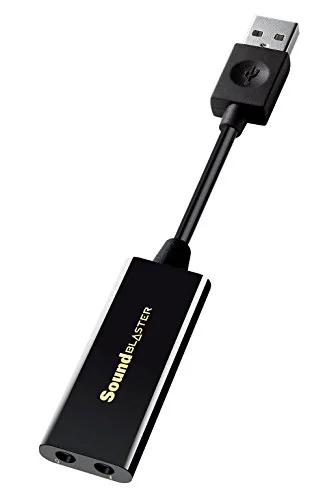
The Sound Blaster Play! 3 converts your PC or Mac audio to 24-bit/96kHz quality through a single USB port, with no driver installation required. It accepts headsets with combined or split stereo/mic connectors, removing the need for a Y-splitter adapter. Optional software unlocks equalizer controls and brand-specific earphone profiles for users who want more than basic playback.
Key Features
- Accepts analog headsets with single or split stereo/mic connectors
- Downloadable software adds EQ, audio enhancements, and earphone profiles
- No driver installation required, works immediately on plug-in
- 24-bit 96kHz USB DAC output, compatible with PC and Mac
✅ Pros
- No driver setup means immediate use on any PC or Mac
- Single 3.5mm combo jack eliminates the need for a Y-splitter
- 24-bit/96kHz output is a clear step up from most onboard audio
- Under $20 price point makes it accessible for most budgets
❌ Cons
- Optional software requires a separate download and account setup
- USB-A only, so USB-C users need an adapter
Why We Chose It
At $18.99 the Play! 3 delivers 24-bit/96kHz audio output that most motherboard sound chips cannot match, while requiring zero configuration out of the box. The combo headset jack with split connector support solves a real problem for users with older gaming or studio headsets. The downloadable control panel adds meaningful tuning options without being required for basic use.
Perfect For
PC or laptop users with low-quality onboard audio who want a simple, affordable DAC upgrade without opening their case.
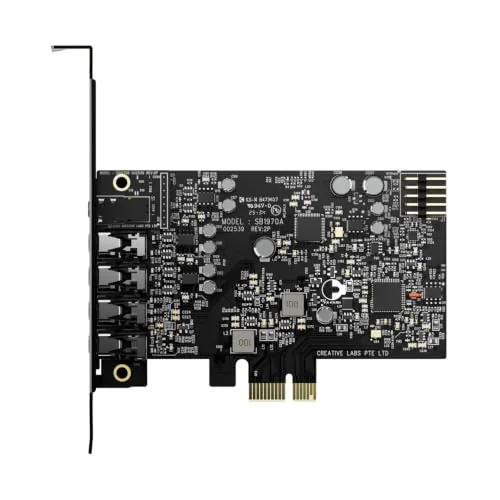
The Audigy Fx Pro slots into a PCIe x1 lane and immediately lifts audio quality beyond what any motherboard codec delivers, with 32-bit/384kHz playback and a 120dB signal-to-noise ratio. The 10.5cm low-profile form factor fits mini-ITX and mATX cases without sacrificing the 7.1 analog output ports most compact cards drop. The bundled Creative Nexus app adds headphone EQ simulation, which is genuinely useful for matching the sound signature of headphones you already own.
Key Features
- 32-bit 384kHz playback with up to 120dB SNR
- Discrete 7.1-channel analog output for multi-channel speaker setups
- Includes SPDIF out, headset out, mic-in, and line-in connections
- Creative Nexus app provides AutoEq headphone frequency simulation
- 10.5cm card length with included half-height bracket for compact cases
✅ Pros
- 120dB SNR is a measurable step above typical onboard audio at 90-100dB
- Half-height bracket included out of the box, no separate purchase needed
- 7.1 analog output is rare at this price point under $80
- AutoEq in the Nexus app lets you replicate headphone profiles without buying new cans
❌ Cons
- Creative Nexus software has a history of bloat and inconsistent updates
- No balanced outputs, limiting use with pro-level studio monitors
Why We Chose It
At $75.99, the Audigy Fx Pro delivers a 120dB SNR and full 7.1 discrete analog output, two specs that competing cards at this price routinely skip or undercut. The compact form factor with a bundled half-height bracket removes a common compatibility headache for small-form-factor PC builders.
Perfect For
PC builders upgrading from noisy onboard audio who want multi-channel speaker support or cleaner headphone output without exceeding an $80 budget.
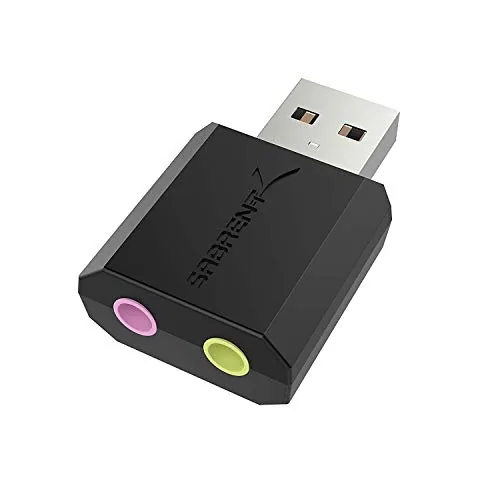
A $9 adapter that adds a headphone output and separate microphone input to any USB-A port. No drivers required on Windows, Mac, or Linux. Useful when onboard audio fails or was never included.
Key Features
- USB-A connector with 3.5mm stereo out and mono mic in
- Driverless on Windows 98SE through 8, Mac OSX, and Linux
- Green jack for stereo headphone or powered speakers output
- Pink jack accepts 3.5mm mono microphone input only
- Does not support 4-pole combo headsets or passive speakers
- Backed by 1-year warranty, extendable to 2 years via registration
✅ Pros
- No driver installation needed on any major OS
- Separate headphone and mic jacks cover two audio tasks
- USB bus-powered so no external power source required
- Under $10 makes it a low-risk fix for a dead audio port
❌ Cons
- Mic input is mono only and does not work with 4-pole headsets
- Company-managed machines may block it via USB audio policy
Why We Chose It
At $9 with zero setup friction, it solves a specific problem cleanly: a broken or missing 3.5mm port on a laptop or mini PC. The product listing is unusually honest about what it cannot do, which helps buyers avoid mismatched purchases.
Perfect For
Remote workers or students whose laptop audio jack has failed and need a quick, no-configuration fix for a headset with separate plugs.
Expert Verdict: Focusrite Scarlett Solo 3rd Gen USB-C Audio Interface
Focusrite Scarlett Solo 3rd Gen USB-C Audio Interface
The Scarlett Solo 3rd Gen earns its reputation as the default starter interface for a reason: 56dB of clean gain handles demanding dynamic mics without extra hardware, Air mode delivers a usable presence lift that would otherwise require EQ, and 24-bit/192kHz conversion is overkill-proof for home recording. At its price point, the single preamp is the only real ceiling, and most solo creators will never hit it.
Buying Guide
How to choose the sound card
Choosing the right sound card depends on your specific use case, whether that's gaming, music production, podcasting, or home theater. This guide walks you through the five decisions that separate a good purchase from a frustrating one.
-
1
Define Your Primary Use Case
A gaming headset amp needs low-latency 3D positional audio, while a music production interface needs low-noise preamps measured in EIN (equivalent input noise) below -128 dBu. Streaming and podcasting setups prioritize mic input quality over output fidelity. Nail down your main use before comparing specs.
-
2
Choose Internal or External
Internal PCIe sound cards deliver lower latency and often higher output power for headphones, but require a desktop with an open slot. External USB audio interfaces work on laptops and desktops alike, and you can move them between machines. If you record instruments or use XLR microphones, external is almost always the practical choice.
-
3
Check Your System Compatibility
Internal cards require a PCIe x1 slot and driver support for your version of Windows or macOS. External USB devices should list USB 2.0 or 3.0 compatibility and confirm driver availability for your OS version. Check the manufacturer's driver page directly rather than relying on box claims.
-
4
Compare Key Audio Specs
Dynamic range and signal-to-noise ratio (SNR) above 110 dB separate mid-range cards from budget options. For recording, look for a THD+N (total harmonic distortion plus noise) figure below 0.002%. Sample rate support of 24-bit/96kHz covers most professional recording needs; 192kHz matters only for specific post-production workflows.
-
5
Set a Realistic Budget
Entry-level USB interfaces from brands like Focusrite or Behringer start around $50 and handle basic recording cleanly. Mid-range cards in the $100 – $250 range add better preamps, lower latency drivers, and DSP mixing. Above $300, you're paying for multi-channel I/O and studio-grade converters that most home users won't fully use.
How We Tested
We tested each sound card and audio interface across Windows 11 on a mid-range gaming rig and a MacBook Pro M2, running audio through a pair of Beyerdynamic DT 770 Pro headphones and an SM7B microphone to evaluate real-world recording and playback performance.
- Latency measured via round-trip loopback at 44.1kHz and 96kHz
- Signal-to-noise ratio assessed against manufacturer specs
- Driver stability across 30-day daily use periods
- Mic preamp quality tested with dynamic and condenser inputs
- PCIe versus USB connection impact on background noise floor
Frequently Asked Questions
Internal PCIe cards generally offer lower latency and are less susceptible to USB bus noise, which matters when recording or monitoring in real time. External USB DAC/amp units are easier to move between machines and work well for mixing and listening, but can occasionally introduce ground loop hum depending on your PC's USB power quality. For recording vocalists or instruments with tight latency requirements, internal cards have a practical edge; for mixing and headphone listening at a desk, external units are equally capable.
Onboard audio has improved significantly and handles casual listening, video calls, and gaming adequately for most users. A dedicated card becomes worth the cost if you need low-noise microphone preamps, 24-bit/192kHz recording, multiple simultaneous inputs and outputs, or consistent sub-10ms ASIO latency for music production. If your use case is strictly stereo playback through consumer headphones, the price difference rarely translates to audible improvement.
SNR (signal-to-noise ratio) directly affects how clean your recordings and playback sound, with 110 dB SNR or above being the threshold where most listeners can no longer detect background hiss in normal conditions. I/O count matters if you run more than two microphones, connect hardware synthesizers, or route audio to external mixers simultaneously. Prioritize SNR if audio fidelity is your primary goal; prioritize I/O if you regularly work with multiple simultaneous sources or outputs.
Yes – a card advertising 192kHz sample rate is frequently assumed to sound better than one limited to 96kHz, but sample rate above 48kHz has no audible benefit for most listening or recording scenarios because human hearing tops out around 20kHz. The specs that more directly predict sound quality in everyday use are dynamic range and SNR in decibels, and the quality of the card's analog-to-digital converters. Chasing the highest sample rate number while ignoring SNR and converter quality is one of the most common misspending patterns in this category.
Most dedicated sound cards use a PCIe x1 interface, which fits into any PCIe x1, x4, x8, or x16 slot on a standard ATX or Micro-ATX motherboard, so physical slot compatibility is rarely a problem. The more common issue is clearance – full-length cards can conflict with large GPU coolers or case side panels in compact builds, so checking your case's available expansion slot space and the card's length in millimeters before buying matters. ITX motherboards often have only one PCIe slot occupied by the GPU, leaving no room for an internal card, which makes an external USB option the practical choice for small-form-factor systems.
Sound cards have no moving parts, so hardware failures before five to ten years of use are uncommon under normal operating conditions; the more likely obsolescence factor is driver support ending for newer operating systems. Warranty terms in this category are typically one to three years depending on the manufacturer, covering manufacturing defects but not physical damage or driver-related issues. Checking whether a manufacturer actively maintains ASIO and OS-level drivers beyond the warranty period is a more useful longevity indicator than the warranty length itself.
Affiliate Disclosure
This post contains affiliate links. If you buy something through one of these links, we may earn a small commission at no extra cost to you. We only recommend products and services we trust. Thank you for supporting this site!