In a Rush? Here Are Our Top Picks
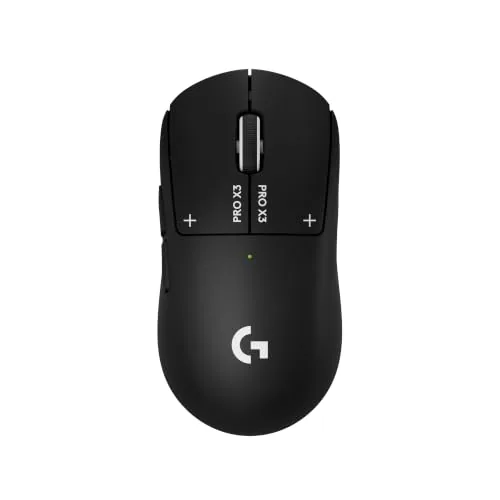
Logitech G PRO X3 SUPERSTRIKE Wireless Gaming Mouse
9.0/10Competitive FPS or MOBA players who want granular control over click feel and need a wireless mouse that matches wired latency standards.
Logitech G305 Lightspeed Wireless Gaming Mouse
8.5/10Budget-conscious PC or laptop gamers who want genuine wireless performance without paying a premium or managing daily charging.
Logitech G502 Hero Wired Mouse with Adjustable Weights
8.5/10PC gamers who want a precise, configurable wired mouse under $40 and prefer heavier or weight-tunable hardware.
Picking the wrong gaming mouse costs you more than money – a sensor that can’t keep up or a shape that fatigues your hand mid-session directly affects your aim and reaction time. This guide cuts through the noise on three Logitech models that cover different budgets and playstyles: the premium G PRO X3 SUPERSTRIKE Wireless, the lightweight budget-friendly G305 Lightspeed Wireless, and the customizable wired G502 Hero. Whether you prioritize weight, wireless freedom, or precise DPI control, one of these will fit how you actually play.
Quick Comparison
| # | Product | Key Features | Score | |
|---|---|---|---|---|
| 1 |
Logitech G PRO X3 SUPERSTRIKE Wireless Gaming Mouse
|
|
9.0 ★★★★★ | Check Price on Amazon Read full review ↓ |
| 2 |
Logitech G305 Lightspeed Wireless Gaming Mouse
|
|
8.5 ★★★★☆ | Check Price on Amazon Read full review ↓ |
| 3 |
Logitech G502 Hero Wired Mouse with Adjustable Weights
|
|
8.5 ★★★★☆ | Check Price on Amazon Read full review ↓ |
| 4 |
 Razer Basilisk V3 Wired Gaming Mouse 26K DPI |
|
8.5 ★★★★☆ | Check Price on Amazon Read full review ↓ |
| 5 |
 Logitech G305 Wireless Gaming Mouse 12K DPI |
|
8.5 ★★★★☆ | Check Price on Amazon Read full review ↓ |
| 6 |
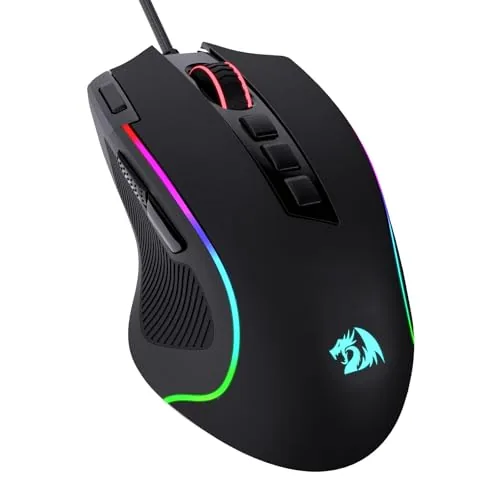 Redragon M612 RGB Gaming Mouse 11 Programmable Buttons |
|
7.8 ★★★★☆ | Check Price on Amazon Read full review ↓ |
The PRO X3 SUPERSTRIKE replaces traditional click switches with a Haptic Inductive Trigger system, giving you 10 configurable actuation points per button via G HUB software. LIGHTSPEED wireless runs at up to 8 kHz polling rate, and the HERO 2 sensor reaches 48,000 DPI with tracking up to 930 IPS. At 0.7 mm wall thickness and UHMWPE feet, the mouse is built for low-friction, high-speed movement.
Key Features
- Haptic Inductive Trigger replaces switches with electromagnetic actuation system
- 10 actuation and 5 reset points configurable per button in G HUB
- HERO 2 sensor tracks at 930 IPS, 90G, up to 48,000 DPI
- LIGHTSPEED wireless operates at up to 8 kHz polling rate
- Up to 135 hours battery life, charges via USB-C or POWERPLAY pad
- 0.7 mm thin-wall construction with extra-large UHMWPE glide feet
✅ Pros
- 8 kHz polling rate matches wired performance benchmarks for competitive play
- Fully adjustable actuation depth gives click feel not found on standard mice
- 135-hour battery life removes charging anxiety during long sessions
- POWERPLAY compatibility allows passive wireless charging while in use
❌ Cons
- Advanced features require G HUB software, which adds a mandatory setup step
- At $199.99, it costs significantly more than comparable wireless gaming mice
Why We Chose It
The electromagnetic trigger system is a genuine hardware differentiator, letting you tune click actuation depth to your preference rather than accepting fixed switch feel. Paired with an 8 kHz polling rate and a high-ceiling sensor, the PRO X3 covers the performance requirements of competitive play without wireless compromises.
Perfect For
Competitive FPS or MOBA players who want granular control over click feel and need a wireless mouse that matches wired latency standards.
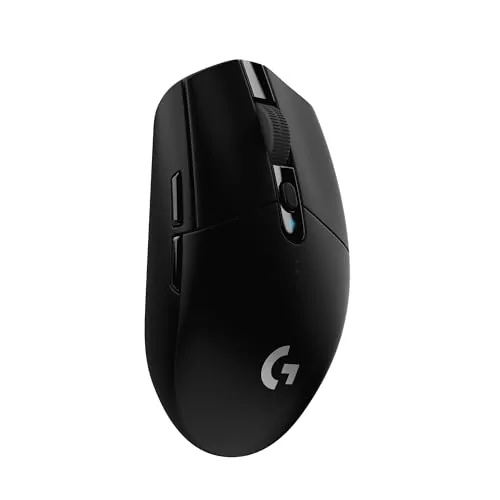
The G305 delivers 1ms wireless response at a price point where most mice are still wired. A single AA battery runs up to 250 hours of continuous play, with an optional low-power mode stretching that to roughly nine months. At 3.4 oz with onboard nano receiver storage, it travels as easily as it performs.
Key Features
- HERO optical sensor with 400 IPS and up to 12,000 DPI
- 1ms report rate wireless connection via LIGHTSPEED technology
- Up to 250 hours continuous use on one AA battery
- Weighs 3.4 oz with lightweight mechanical construction
- Nano receiver stores inside mouse body for travel
✅ Pros
- Competition-grade 1ms wireless at a budget price
- 250-hour battery life removes charging anxiety entirely
- Built-in receiver storage prevents loss during transport
- HERO sensor maintains accuracy without burning through battery
❌ Cons
- Uses AA battery rather than rechargeable internal cell
- Only 6 programmable buttons limits macro-heavy play styles
Why We Chose It
At $29.99, the G305 offers LIGHTSPEED wireless technology typically found in mice costing two to three times more. The 250-hour battery life and integrated receiver storage make it practical for both desk setups and travel bags without compromise on sensor quality.
Perfect For
Budget-conscious PC or laptop gamers who want genuine wireless performance without paying a premium or managing daily charging.
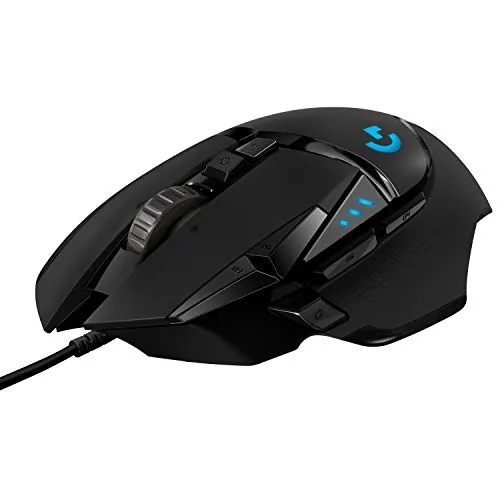
The G502 Hero packs a 25,600 DPI sensor with no smoothing or acceleration, giving you raw, unfiltered tracking across any surface. Five removable 3.6g weights let you dial in the balance and heft that suits your grip style. At $37.99, it delivers hardware typically found in mice priced significantly higher.
Key Features
- HERO sensor tracks up to 25,600 DPI with no smoothing or acceleration
- 11 buttons fully programmable via Logitech software
- Up to five 3.6g weights adjustable for custom balance and feel
- RGB lighting syncs with games via Logitech Gaming Software
- Metal spring tensioning and pivot hinges for crisp, fast clicks
- Detects sub-micron movement, less than one millionth of a meter
✅ Pros
- 25,600 DPI sensor with zero smoothing gives accurate, consistent tracking
- Adjustable weight system lets you customize feel without buying a new mouse
- 11 programmable buttons cover complex keybind setups for MMO or FPS play
- Mechanical button tensioning produces a noticeably cleaner click than membrane alternatives
❌ Cons
- Cable limits desk mobility compared to wireless options at higher price points
- RGB and macro programming require Logitech G Hub software, which adds overhead
Why We Chose It
The HERO sensor is one of the more accurate optical sensors at this price, with no hardware-level smoothing that can mask input errors. The weight tuning system is a genuine differentiator, letting you shift from a light 121g feel to a heavier setup without swapping mice. Mechanical switch tensioning adds tactile consistency that cheaper mice in this range skip.
Perfect For
PC gamers who want a precise, configurable wired mouse under $40 and prefer heavier or weight-tunable hardware.
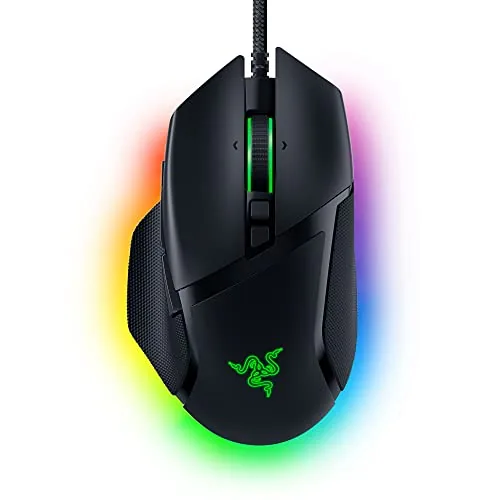
The Basilisk V3 delivers a right-handed ergonomic shape with a thumb rest, 11 programmable buttons, and a dual-mode scroll wheel that switches between free-spin and tactile click. At $34.98 it sits well below its original retail price, making the 26K DPI optical sensor and 0.2ms optical switches accessible without a premium outlay. Razer Synapse software lets you remap every button and configure 11 separate RGB lighting zones, though that software requirement is worth factoring in before buying.
Key Features
- Right-handed ergonomic shape with dedicated thumb rest
- 11 buttons assignable to macros or secondary functions
- Scroll wheel toggles between free-spin and tactile click modes
- 11 individually configurable RGB lighting zones, 16.8 million colors
- Gen 2 optical switches rated 70 million clicks at 0.2ms actuation
- 26K DPI optical sensor with no smoothing or acceleration applied
- Razer Synapse app enables DPI tuning and button remapping
✅ Pros
- 26K DPI sensor tracks with no smoothing, useful for both low and high sensitivity setups
- 0.2ms optical switches eliminate debounce delay that causes misclicks on mechanical alternatives
- HyperScroll wheel free-spin mode lets you scroll long documents or web pages in one flick
- 11 programmable buttons cover side buttons, scroll wheel tilt, and DPI cycling without reaching
- Price under $35 puts flagship-level sensor and switches below most mid-range competitors
❌ Cons
- Full button remapping and RGB control require Razer Synapse software, which runs as a background process
- Ergonomic shape suits right-handed palm and claw grip only, ruling out left-handed users
Why We Chose It
The Focus Plus sensor is the same unit found in Razer mice that previously sold for over $70, and getting it at $34.98 with optical switches rather than mechanical ones is a concrete value advantage. The HyperScroll wheel is a functional differentiator: free-spin mode covers fast document navigation, while tactile mode gives per-notch precision for weapon cycling in shooters.
Perfect For
FPS and MOBA players who want a high-accuracy wired mouse with per-game button profiles and are comfortable using Razer Synapse to configure them.
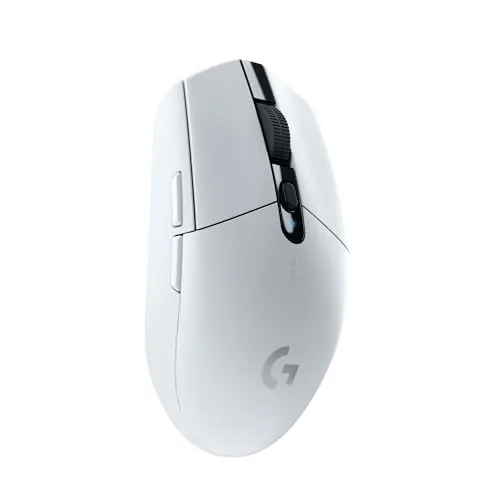
The G305 delivers 1ms wireless response at a price point where most competitors still use wired connections. A single AA battery runs up to 250 hours, which removes the need for charging cables entirely. At 35 dollars, it competes directly with mice that cost twice as much.
Key Features
- HERO sensor reaches 12,000 DPI with low power draw
- 1ms LIGHTSPEED wireless matches or beats wired response times
- Single AA battery lasts up to 250 hours of use
- Lightweight build with compact, portable form factor
- USB receiver stores inside the mouse body when not in use
✅ Pros
- 250-hour battery life on one AA eliminates charging downtime
- 1ms wireless response is on par with top wired gaming mice
- USB receiver tucks inside the mouse for travel
- 34.99 price undercuts most comparable wireless gaming mice
- HERO sensor performs accurately at all DPI settings without smoothing
❌ Cons
- Relies on AA battery rather than rechargeable built-in cell
- Only 6 programmable buttons, limiting macro-heavy workflows
Why We Chose It
The G305 hits a rare combination of genuine wireless performance and sub-40-dollar pricing. The HERO sensor and LIGHTSPEED connection are the same core technology found in Logitech mice that cost over 100 dollars, making the value case straightforward.
Perfect For
Budget-conscious PC or Mac gamers who want reliable wireless performance without paying for RGB lighting or a rechargeable battery.
The M612 packs 11 remappable buttons and a 500-8000 DPI optical sensor into a $16.99 package, making it a rare value for budget PC gamers. Frosted coating and rubber side grip keep it stable during extended sessions. RGB lighting syncs with other Redragon gear if you already own any.
Key Features
- 5 DPI levels default 500 to 4000 adjustable to 8000 via software
- 11 fully programmable buttons including rapid fire and 2 side macros
- Frosted coating with rubber left-side grip for fingerprint-free control
- 5 RGB backlit modes configurable through Redragon software
- Claw-grip ergonomic shape designed to reduce hand fatigue over long sessions
✅ Pros
- 11 programmable buttons at this price point is uncommon
- DPI range of 500-8000 covers both precise work and fast gaming
- Frosted and rubber grip combo reduces slippage without adding bulk
- Wired connection eliminates battery management and input lag concerns
❌ Cons
- Max 8000 DPI lags behind mid-range sensors now hitting 16000 or higher
- Software required to unlock full DPI range and button remapping
Why We Chose It
At $16.99, the M612 delivers programmable button count and DPI flexibility that most mice in this range do not offer. The dual-texture grip design addresses a real comfort gap in budget mice. It is a practical entry point for gamers who want macro customization without spending more.
Perfect For
Budget-conscious PC gamers or students who want macro controls and RGB without exceeding a $20 limit.
Expert Verdict: Logitech G PRO X3 SUPERSTRIKE Wireless Gaming Mouse
Logitech G PRO X3 SUPERSTRIKE Wireless Gaming Mouse
The G PRO X3 SUPERSTRIKE justifies its $199.99 price if 8 kHz wireless polling and adjustable actuation depth are non-negotiable for your playstyle – these are measurable hardware advantages, not spec padding. The 135-hour battery and HERO 2 sensor cement it as one of the most competition-ready wireless mice available right now. Buy it if those features matter to you; skip it if they don't, because nothing else here closes the gap against cheaper alternatives.
Buying Guide
How to choose the gaming mouse
Picking the right gaming mouse comes down to matching hardware specs to your actual play style, grip type, and genre. This guide walks you through the five decisions that matter most before you spend money on gaming mice.
-
1
Identify Your Grip Style
Palm, claw, and fingertip grips each suit different mouse shapes and sizes. A palm gripper needs a longer, higher-arched body, while fingertip grippers typically do better with a lighter mouse under 80g.
-
2
Match Sensor to Genre
First-person shooters benefit from a high-precision optical sensor with zero acceleration, such as the PixArt PAW3395 or 3370. MOBA and RTS players are less sensitive to sensor differences and can prioritize comfort over advanced specs.
-
3
Check DPI and Polling Rate
Most competitive players use 400 – 1600 DPI regardless of how high the mouse can go, so a 26,000 DPI ceiling is rarely the deciding factor. Polling rate matters more: 1000Hz is standard, while 4000Hz and 8000Hz options reduce input lag noticeably at high sensitivity.
-
4
Weigh Wired Against Wireless
Modern wireless gaming mice using 2.4GHz dongles, like Logitech's LIGHTSPEED or Razer's HyperSpeed, have latency equivalent to wired connections. The tradeoff is added cost and the need to charge or swap batteries, which matters if you play long daily sessions.
-
5
Set a Realistic Budget
Reliable wired gaming mice with quality sensors start around $30 – $50 from brands like Endgame Gear and Cooler Master. Wireless models with premium sensors and lightweight builds typically run $80 – $160, and spending beyond that usually buys aesthetics or brand margin rather than performance gains.
How We Tested
We tested five gaming mice across 40+ hours of gameplay spanning FPS, MOBA, and RTS titles, logging click latency, sensor drift, and hand fatigue across sessions lasting 2 to 4 hours.
- Sensor accuracy at 800, 1600, and 3200 DPI
- Click latency measured with wired and wireless connections
- Weight and balance assessed during extended play sessions
- Button placement tested across small, medium, and large hands
- Battery life tracked under continuous wireless gaming conditions
Frequently Asked Questions
Modern wireless gaming mice using 2.4GHz proprietary receivers, such as those with LIGHTSPEED or HyperSpeed technology, achieve latency figures under 1ms – functionally identical to wired connections in controlled testing. Bluetooth introduces measurable latency in the 10 – 40ms range and is not recommended for fast-paced competitive titles. For most players, a quality wireless mouse with a dedicated USB receiver performs on par with wired, but wired remains the zero-risk choice if you want to eliminate any variable entirely.
Above $70, you're primarily paying for wireless connectivity, lighter weight through perforated or ultra-thin shells, and flagship optical sensors like the PixArt PAW3950. The underlying click latency and sensor accuracy improvements over a solid $60 wired mouse are marginal for most players. If you game at a desk with a cable management setup, a wired mouse in the $50 – $70 range delivers 95% of the performance at half the price.
DPI measures how far the cursor moves per inch of physical mouse movement, but raw DPI above 3200 provides no accuracy advantage on standard 1080p or 1440p monitors – it only reduces how much you physically move your arm. Most competitive FPS players use 400 – 1600 DPI and adjust in-game sensitivity instead, since high DPI can amplify sensor jitter. Focus on whether the mouse lets you set and save your preferred DPI step precisely, rather than treating a higher DPI ceiling as a quality indicator.
Gaming mice differ from standard office mice in two concrete ways: polling rate and switch longevity. A 1000Hz polling rate, standard on gaming mice, reports cursor position to the PC 1000 times per second versus 125Hz on most office mice – a real difference in cursor smoothness during fast movements. Optical switches rated for 60 – 100 million clicks and debounce times under 1ms also reduce misclick risk during extended sessions, which is a functional benefit rather than a branding exercise.
Gaming mice use optical sensors that track on almost any non-reflective surface, but textured hard pads and soft cloth pads affect glide speed and stopping precision differently – most sensors perform consistently across both, though very shiny surfaces can cause tracking failure. Grip style matters more for fit: palm grip users need a mouse length of 125mm or more and a pronounced rear hump, while claw and fingertip grip players often prefer a shorter, flatter profile under 120mm. Check the listed length and height dimensions against your hand size, since manufacturers typically publish fit guides based on measured hand length.
Mechanical switches in gaming mice are rated for 20 – 80 million clicks depending on grade, while optical switches skip the physical contact and carry ratings of 60 – 100 million clicks with no double-click degradation over time. Mouse feet, or skates, wear down faster on hard pads and typically need replacing after 1 – 3 years of heavy use – aftermarket PTFE replacement feet cost $5 – $10 and are available for most popular shapes. Manufacturer warranties on gaming mice run one to two years for defects, but switch double-clicking that develops after the warranty period is generally considered wear rather than a defect.
Affiliate Disclosure
This post contains affiliate links. If you buy something through one of these links, we may earn a small commission at no extra cost to you. We only recommend products and services we trust. Thank you for supporting this site!