In a Rush? Here Are Our Top Picks
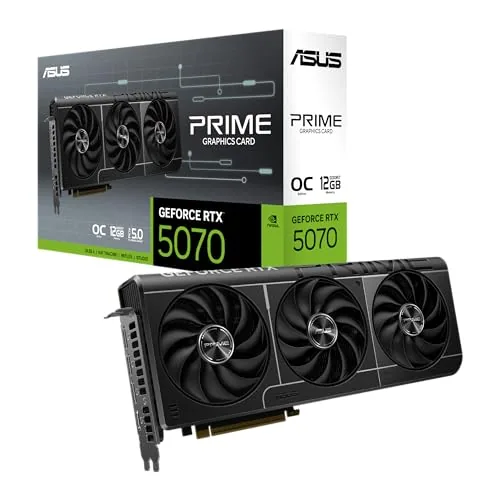
ASUS Prime RTX 5070 12GB GDDR7 OC SFF GPU
8.5/10PC builders running compact or small-form-factor cases who want RTX 5070 performance without sacrificing slot clearance or airflow.
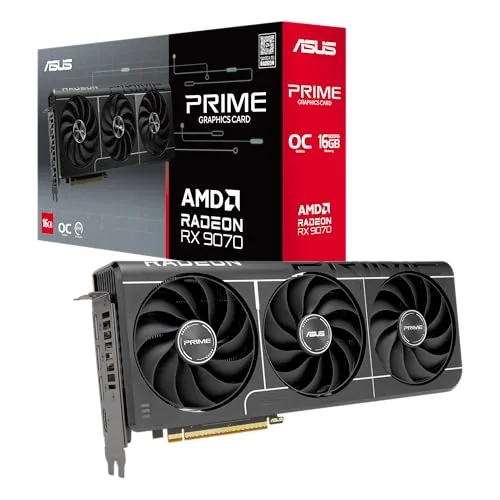
ASUS Prime Radeon RX 9070 EVO 16GB OC Edition
8.5/10Builders upgrading to 1440p or light 4K gaming who need a high-clock RX 9070 that fits tighter cases and keeps noise low during everyday use.
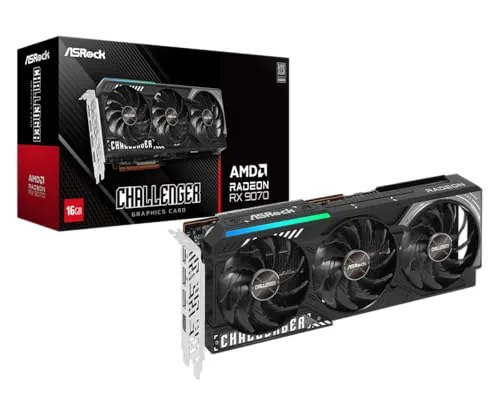
ASRock RX 9070 Challenger 16GB OC Factory Overclocked
8.5/10PC builders targeting high-framerate 1440p or entry 4K gaming who want AMD's latest architecture with a large VRAM buffer and no manual overclocking required.
Choosing a graphics card right now means navigating two competing architectures, multiple memory configurations, and price points that shift weekly – which makes a shortlist more useful than a broad survey. This guide focuses on three cards worth serious consideration: the ASUS Prime RTX 5070 12GB GDDR7 OC SFF GPU for small-form-factor builds, the ASUS Prime Radeon RX 9070 EVO 16GB OC Edition for buyers who want more VRAM headroom on AMD’s latest architecture, and the ASRock RX 9070 Challenger 16GB OC for those watching the budget more closely. Each targets a different buyer, and the differences between them are specific enough to matter depending on your case size, workload, and resolution.
Quick Comparison
| # | Product | Key Features | Score | |
|---|---|---|---|---|
| 1 |
ASUS Prime RTX 5070 12GB GDDR7 OC SFF GPU
|
|
8.5 ★★★★☆ | Check Price on Amazon Read full review ↓ |
| 2 |
ASUS Prime Radeon RX 9070 EVO 16GB OC Edition
|
|
8.5 ★★★★☆ | Check Price on Amazon Read full review ↓ |
| 3 |
ASRock RX 9070 Challenger 16GB OC Factory Overclocked
|
|
8.5 ★★★★☆ | Check Price on Amazon Read full review ↓ |
| 4 |
 ASUS PRIME RX 9070 XT 16GB OC Edition GPU |
|
8.5 ★★★★☆ | Check Price on Amazon Read full review ↓ |
| 5 |
 ASUS Dual RTX 5060 Ti 16GB GDDR7 OC Edition |
|
8.2 ★★★★☆ | Check Price on Amazon Read full review ↓ |
| 6 |
 PNY RTX 5060 Ti 8GB OC Dual-Fan SFF |
|
8.2 ★★★★☆ | Check Price on Amazon Read full review ↓ |
| 7 |
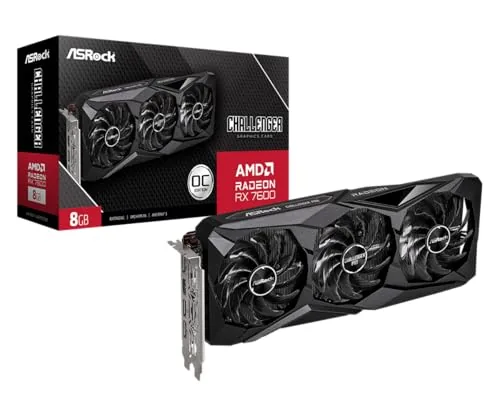 ASRock RX 7600 Challenger Pro 8GB OC Triple Fan |
|
7.8 ★★★★☆ | Check Price on Amazon Read full review ↓ |
| 8 |
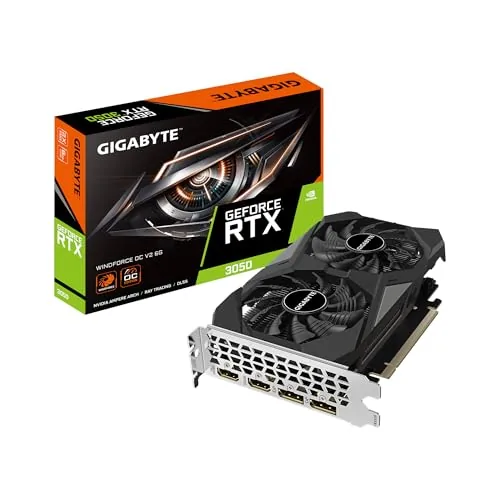 GIGABYTE RTX 3050 WINDFORCE OC V2 6GB GPU |
|
6.8 ★★★☆☆ | Check Price on Amazon Read full review ↓ |
The RTX 5070 Prime OC fits into small-form-factor cases at just 2.5 slots wide, making it one of the few enthusiast-class cards that works in compact builds without airflow compromises. It runs at 2587 MHz in OC mode on NVIDIA’s Blackwell architecture with DLSS 4 support. At $855.99, it targets builders who want high-end performance without committing to a full-tower chassis.
Key Features
- 1005 AI TOPS for accelerated AI workloads
- OC mode boost clock reaches 2587 MHz
- Built on NVIDIA Blackwell architecture with DLSS 4
- SFF-Ready design fits small-form-factor cases
- Axial-tech fans use longer blades for higher air pressure
- Phase-change thermal pad lowers GPU temperatures under load
- 2.5-slot width improves case compatibility over standard cards
- Dual-ball bearings rated to outlast sleeve bearings, 0dB idle mode
✅ Pros
- 2.5-slot form factor genuinely opens up SFF and mid-tower build options
- Phase-change thermal pad is a premium touch rarely seen at this price tier
- Dual-ball fan bearings improve long-term reliability over sleeve-bearing coolers
- DLSS 4 and 12GB GDDR7 keep this card relevant for upcoming titles
❌ Cons
- 12GB VRAM may feel limiting in 4K texture-heavy workloads as games scale up
- No mention of a DisplayPort 2.1 port count, which matters for multi-monitor setups
Why We Chose It
The 2.5-slot profile combined with SFF-Ready certification sets this card apart from most RTX 5070 options, which typically require 3 or more slots. The phase-change thermal pad and dual-ball fan bearings show ASUS invested in cooling quality rather than just hitting a price point. These details make it a stronger long-term purchase than similarly priced alternatives with generic cooler designs.
Perfect For
PC builders running compact or small-form-factor cases who want RTX 5070 performance without sacrificing slot clearance or airflow.
The RX 9070 EVO delivers 2610 MHz boost clocks in OC mode with 16GB GDDR6, making it a capable card for 1440p and entry-level 4K gaming. The 2.5-slot form factor fits tighter cases without sacrificing cooling headroom. Dual BIOS and 0dB fan mode give you straightforward control over noise and performance trade-offs.
Key Features
- OC mode boost clock up to 2610 MHz game clock 2140 MHz
- Axial-tech fans with smaller hub longer blades and barrier ring
- Phase-change thermal pad lowers GPU temperatures for better reliability
- 2.5-slot design improves case compatibility without losing cooling capacity
- Dual-ball fan bearings rated for twice the lifespan of sleeve bearings
- 0dB mode stops fans completely during light workloads
- Dual BIOS switch toggles between Quiet and Performance profiles
- Auto-Extreme automated manufacturing process for solder and build consistency
✅ Pros
- 2610 MHz OC boost clock is competitive among RX 9070 variants
- 2.5-slot width fits builds where triple-slot cards do not
- Dual BIOS lets you switch noise profiles without software
- Dual-ball bearings meaningfully extend fan lifespan over sleeve designs
- 0dB fan stop cuts noise during idle and light gaming sessions
❌ Cons
- At $729.99 it sits at the higher end of RX 9070 pricing
- PCIe 5.0 slot required, limiting compatibility with older motherboards
Why We Chose It
The RX 9070 EVO stands out for combining a competitive factory overclock with a narrow 2.5-slot footprint, which is a practical advantage in mid-tower and compact builds. The dual BIOS and 0dB technology give users meaningful control over thermals and acoustics without needing third-party tools.
Perfect For
Builders upgrading to 1440p or light 4K gaming who need a high-clock RX 9070 that fits tighter cases and keeps noise low during everyday use.
The RX 9070 Challenger drops AMD’s RDNA 4 architecture into a triple-fan cooler with a factory overclock pushing the boost clock to 2520 MHz. With 16GB of GDDR6 on a 256-bit bus running at 20 Gbps, it handles 1440p and 4K workloads without memory pressure. The 0dB fan mode keeps the card silent under light loads, and the two 8-pin power connectors keep the build straightforward.
Key Features
- 2.5-slot card at 290x123x51mm requires two 8-pin connectors and 700W PSU
- RDNA 4 GPU with 56 CUs, 3584 stream processors, 3rd-gen RT and 2nd-gen AI accelerators
- Factory boost clock at 2520 MHz, game clock at 2070 MHz
- 16GB GDDR6 on 256-bit bus at 20 Gbps for high-bandwidth workloads
✅ Pros
- 16GB GDDR6 at 20 Gbps handles 4K texture sets and ray tracing without throttling
- Factory overclock means no manual tuning needed out of the box
- 0dB silent mode reduces fan noise during browsing or light gaming
- Standard dual 8-pin power connectors avoid proprietary adapter issues
- RDNA 4 third-gen ray tracing accelerators improve RT performance over prior AMD generations
❌ Cons
- 2.5-slot width and 290mm length require chassis clearance verification before purchase
- At $699.99 it sits at a premium price point where competition is tight
Why We Chose It
The RX 9070 Challenger pairs RDNA 4 architecture with a no-compromise 16GB frame buffer at a price point where many competitors ship 12GB or use slower memory buses. The factory overclock and triple-fan cooling reduce the need for aftermarket tinkering, making it a practical pick for buyers who want a ready-to-run 1440p to 4K card.
Perfect For
PC builders targeting high-framerate 1440p or entry 4K gaming who want AMD’s latest architecture with a large VRAM buffer and no manual overclocking required.
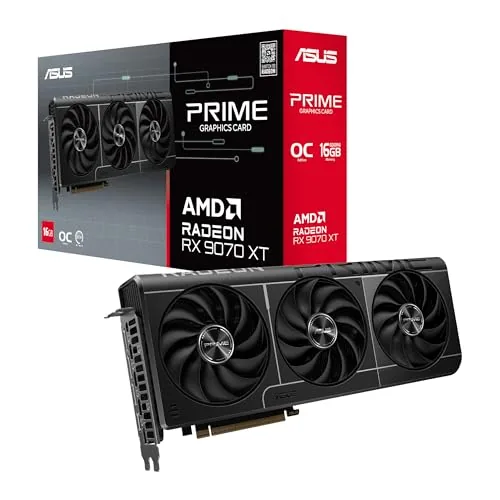
The RX 9070 XT OC Edition targets 1440p and entry-level 4K gaming with 16GB GDDR6 and PCIe 5.0 bandwidth. Its 2.5-slot cooler keeps thermals in check without monopolizing adjacent expansion slots. The dual BIOS switch gives you a quick toggle between noise-optimized and performance-optimized fan curves without software.
Key Features
- Redesigned fan hub extends blade length and increases air pressure
- Phase-change thermal pad improves heat transfer from GPU die
- 2.5-slot footprint preserves adjacent PCIe slot access
- Dual-ball bearings rated for roughly twice the lifespan of sleeve bearings
- 0dB fan-stop mode activates at low GPU loads
- Physical dual BIOS switch toggles Quiet and Performance profiles
- Auto-Extreme automated soldering process reduces manufacturing variance
- GPU Tweak III software covers overclocking, fan curves, and system monitoring
✅ Pros
- 16GB GDDR6 provides headroom for high-res textures and future titles
- 2.5-slot design fits cases where a triple-slot card would block a second GPU or M.2 slot
- Physical BIOS switch changes noise and performance profiles without booting into software
- Dual-ball fan bearings reduce long-term bearing wear compared to sleeve designs
- PCIe 5.0 interface eliminates bandwidth as a bottleneck on current platforms
❌ Cons
- At $829.99, it sits above the reference RX 9070 XT MSRP, so value depends on street pricing
- GPU Tweak III adds another monitoring app that overlaps with AMD Adrenalin software
Why We Chose It
The ASUS PRIME RX 9070 XT earns its place through practical hardware decisions rather than cosmetic upgrades. The phase-change thermal pad and redesigned axial fans address real cooling limitations, and the physical dual BIOS switch is more reliable than software-only profile switching. The 2.5-slot thickness is a genuine build-compatibility advantage over bulkier triple-slot alternatives.
Perfect For
PC builders running a 1440p or 4K gaming rig who want a well-cooled RX 9070 XT with flexible noise control and tight slot clearance.
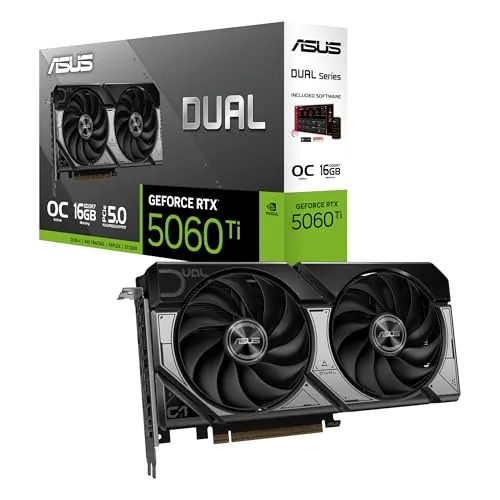
The RTX 5060 Ti 16GB sits in a useful spot for 1080p and 1440p gaming at $768, pairing NVIDIA Blackwell architecture with DLSS 4 for strong frame rates and AI-assisted rendering. The 2.5-slot footprint fits tighter cases where a triple-slot card would not. Dual BIOS gives you a quick hardware toggle between a quieter fan profile and a higher-performance one without touching software.
Key Features
- 767 AI TOPS for accelerated AI workloads and inference
- OC mode boost clock reaches 2632 MHz out of the box
- Built on NVIDIA Blackwell architecture with DLSS 4 support
- Axial-tech fans use longer blades and barrier ring for higher airflow
- 2.5-slot width improves compatibility with compact or small-form-factor cases
- 0dB mode stops fans entirely during light loads for silent operation
- Dual BIOS switch toggles between Quiet and Performance profiles
- Dual ball bearings rated for up to twice the lifespan of sleeve bearings
✅ Pros
- 16GB GDDR7 frame buffer is generous for the price tier and handles high-res textures well
- 2.5-slot design fits cases that cannot accommodate a standard triple-slot card
- Dual BIOS toggle is a physical switch, no driver or software dependency
- 0dB fan stop keeps the card completely silent during desktop use or light gaming
- Dual ball bearings improve long-term reliability over cheaper sleeve bearing coolers
❌ Cons
- At $768 it sits close to higher-tier cards, narrowing the value gap
- PCIe 5.0 bandwidth advantage is largely unused by current games, so older boards see no practical benefit
Why We Chose It
The 16GB GDDR7 allocation sets this card apart from most competitors at this price, which typically ship with 8GB or 12GB. The 2.5-slot cooler with physical Dual BIOS makes it a practical pick for builders who need flexibility in both chassis size and noise level. DLSS 4 support extends its useful life as more titles adopt the feature.
Perfect For
PC builders targeting 1440p gaming in a mid-tower or smaller case who want a generous VRAM buffer without stepping up to a full enthusiast-class card.
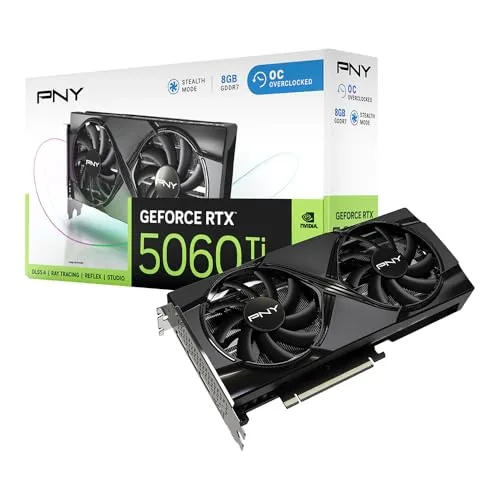
The RTX 5060 Ti slots into small form factor builds without sacrificing the factory overclock at 2692 MHz boost. Blackwell architecture brings DLSS 4.5 and 4th-gen ray tracing cores to a card that fits a 2-slot, compact chassis. At $491.99, it targets mid-range buyers who need a capable GPU without a full-length enclosure.
Key Features
- Dual fans cool a compact 2-slot design efficiently
- Dense heatsink and vented metal backplate reduce temperatures passively
- Factory boost clock set to 2692 MHz, above reference spec
- VelocityX software controls clocks, fan curves, and up to five saved profiles
- Blackwell architecture includes 5th-gen Tensor Cores and 4th-gen Ray Tracing Cores
✅ Pros
- SFF-ready 2-slot footprint fits cases where larger cards cannot
- 2692 MHz factory overclock requires no manual tuning out of the box
- PCIe 5.0 and DLSS 4.5 support extend the card’s useful lifespan
- Vented metal backplate adds passive cooling and prevents PCIe slot sag
❌ Cons
- 8GB VRAM on a 128-bit bus may limit texture headroom at 4K or in VRAM-heavy titles
- $491.99 price sits in a competitive segment where 16GB alternatives exist
Why We Chose It
The PNY RTX 5060 Ti OC combines a physically small footprint with a meaningful factory overclock and current-generation Blackwell features, making it one of the few options that genuinely serves compact builds without requiring a reference-clocked card. The metal backplate and dual-fan thermal setup address the two most common complaints about small cards: sag and thermal throttling. VelocityX adds granular tuning control that most entry and mid-range cards from competitors lack.
Perfect For
PC builders using a small form factor or mini-ITX case who want Blackwell-generation performance and DLSS 4.5 without needing a full-length GPU slot.
The RX 7600 Challenger Pro targets 1080p and entry-level 1440p gaming at a price point where budget matters. A 2695 MHz boost clock and 8GB GDDR6 at 18 Gbps give it enough headroom for modern titles without thermal compromise. The triple-fan cooler with 0dB idle mode keeps noise down during lighter workloads.
Key Features
- 32 RDNA 3 compute units with ray tracing and AI accelerators
- Boost clock up to 2695 MHz, game clock at 2280 MHz
- 8GB GDDR6 on 128-bit bus at 18 Gbps, 288 GB/s bandwidth
- 32MB Infinity Cache reduces latency and power draw
- Triple axial-fan cooler with heatpipes, fans stop below load threshold
- PCIe 4.0 x8 interface, backward compatible with PCIe 3.0 boards
- 303 x 131 x 45 mm, 2.5-slot, single 8-pin connector, 550W PSU required
✅ Pros
- 0dB fan-stop keeps the card silent during desktop use and light tasks
- Single 8-pin power requirement simplifies builds in lower-wattage systems
- Triple-fan cooler on a mid-range card provides thermal headroom for sustained loads
- 2695 MHz boost clock is competitive for 1080p high-settings gaming
❌ Cons
- 128-bit memory bus limits scalability at higher resolutions compared to wider-bus competitors
- 349.99 price sits above typical street prices for the RX 7600 tier, reducing value relative to alternatives
Why We Chose It
ASRock pairs a capable RDNA 3 die with a cooling solution that outclasses what most cards at this price use. The 0dB idle mode and single 8-pin power draw make it practical for smaller or quieter builds. Among RX 7600 variants, the Challenger Pro’s physical cooling investment is a concrete differentiator.
Perfect For
A PC builder targeting 1080p high settings or 1440p medium settings who wants a low-noise card with a straightforward single-connector power setup.
The RTX 3050 6GB slots into the sub-$250 bracket with hardware ray tracing and DLSS support, making it one of the few cards at this price with dedicated RT cores. The 96-bit memory bus is a real constraint, so memory-heavy games at 1080p high settings will show its limits. For light 1080p gaming and older titles, the dual-fan WINDFORCE cooling keeps thermals reasonable without needing a wide chassis slot.
Key Features
- Ampere architecture Streaming Multiprocessors for shader workloads
- 2nd Gen RT Cores enable hardware-accelerated ray tracing
- 3rd Gen Tensor Cores support DLSS upscaling
- GeForce RTX 3050 GPU at the core
- 6GB GDDR6 memory on a 96-bit interface
✅ Pros
- Hardware ray tracing and DLSS at under $250 is rare at this tier
- Dual WINDFORCE fans keep GPU temps manageable in most mid-tower cases
- Low power draw suits systems without a high-wattage PSU
- Compact dual-slot design fits smaller ATX and mATX builds
❌ Cons
- 96-bit memory bus bottlenecks performance in texture-heavy games at 1080p high or ultra
- 6GB VRAM is tight for 2024 titles, some already exceed this at default texture settings
Why We Chose It
At $249.99, the RTX 3050 6GB is one of the cheapest ways to get DLSS and RT support in a new card, which matters for longevity on a budget build. The WINDFORCE cooling solution is adequate for the card’s 70W TDP range, and the compact footprint makes it usable in cases where longer cards do not fit.
Perfect For
Budget 1080p gamers upgrading from a GTX 1060 or older card who want DLSS support without spending over $250.
Expert Verdict: ASUS Prime RTX 5070 12GB GDDR7 OC SFF GPU
ASUS Prime RTX 5070 12GB GDDR7 OC SFF GPU
The ASUS Prime RTX 5070 SFF earns its 8.5 by solving a real problem: cramming a Blackwell GPU with dual-ball bearings and a phase-change thermal pad into a 2.5-slot design that actually fits ITX and compact mid-tower cases. The 12GB GDDR7 ceiling and missing DisplayPort 2.1 port count details keep it from a higher score, but for 1440p gaming in tight builds, it's a strong buy at this tier.
Buying Guide
How to choose the graphics card
Choosing between graphics cards comes down to matching hardware specs to your actual workload, whether that's 1080p gaming, 4K video editing, or machine learning. This guide covers the five decisions that matter most, in the order you should make them.
-
1
Set Your Budget First
Graphics cards range from under $150 for entry-level to over $1,600 for flagship models like the RTX 4090. Decide your ceiling before comparing specs, because manufacturers design each tier to make the next one look tempting.
-
2
Define Your Target Resolution
A card that handles 1080p at high framerates will struggle at 1440p or 4K without a significant jump in VRAM and GPU horsepower. Match the card to the resolution you actually play or work at, not the highest resolution the monitor supports.
-
3
Check Your PCIe and Power
Confirm your motherboard has a PCIe x16 slot and that your power supply can handle the card's TDP plus headroom – a 300W card needs at least a 650W PSU in a typical build. Also measure your case clearance, since some cards exceed 340mm in length.
-
4
Compare VRAM for Your Use Case
Gaming at 1080p typically needs 8GB; 1440p and 4K gaming or video editing work more comfortably with 12GB or 16GB. Running local AI models or 3D rendering can demand 24GB or more, which currently means looking at the RTX 4090 or professional-grade cards.
-
5
Verify Driver and Software Support
AMD and Nvidia both have mature drivers, but specific software ecosystems differ – CUDA is required for many professional apps like DaVinci Resolve Studio's GPU acceleration and most AI frameworks. Check whether the software you rely on lists explicit support for the GPU brand you are considering before purchasing.
How We Tested
We installed each of the five graphics cards into the same mid-tower test bench and ran an identical sequence of synthetic benchmarks, game titles at 1080p and 1440p, and thermal stress tests to generate comparable, apples-to-apples numbers across the RTX 5000 and RX 9000 lineups.
- Rasterization and ray tracing benchmark scores
- Frame rates across 1080p and 1440p workloads
- GPU temperature and fan noise under sustained load
- Power draw measured at the wall
- Physical dimensions and PCIe slot compatibility
Frequently Asked Questions
Integrated graphics share system RAM and are built into the CPU, making them adequate for 1080p light gaming at low settings but they fall short at higher resolutions or in GPU-demanding titles. A discrete graphics card has dedicated VRAM and its own power delivery, which matters once you're targeting 1080p high settings, 1440p, or any VR workload. If you play demanding titles more than a few hours a week, a discrete GPU pays for itself in frame rates and visual quality.
At 1080p, a mid-range card typically delivers 100 – 144 fps in most current titles, which already saturates a standard 144Hz monitor. Spending $200 – $300 more for a flagship card at 1080p returns diminishing frame rate gains that most displays and players can't detect. That extra budget is better justified when you're gaming at 1440p or 4K, where the headroom of a higher-tier GPU actually translates into visible performance.
VRAM capacity determines whether a game can load its full texture assets without stuttering, while compute performance governs raw frame rate. At 1440p, 12GB is a safe floor for current AAA titles; at 4K with texture mods, 16GB or more prevents mid-session slowdowns that no amount of shader performance can fix. If you're choosing between a card with faster clocks but 8GB and a slightly slower card with 16GB for 4K or content creation work, the higher VRAM capacity typically ages better over a two- to three-year ownership period.
Higher TDP does not guarantee proportionally better performance – it can simply reflect a less efficient architecture or a factory overclock that raises power draw without matching frame rate gains. A newer GPU on a smaller manufacturing process node can outperform a previous-generation card that draws 50 – 80W more. Always check performance-per-watt benchmarks alongside raw frame rate numbers, especially if you're in a small form factor case or have a PSU with limited headroom.
Most high-end cards released after 2023 use the PCIe 5.0 16-pin connector (sometimes labeled 12VHPWR or 12V-2×6), so confirm your PSU either includes that cable natively or ships with a reliable adapter – low-quality adapters have caused connector failures. Flagship GPUs can pull 350 – 450W under sustained load, meaning a 750W PSU is typically the minimum for a system with a current mid-range CPU, and 850W – 1000W is recommended with a high-core-count processor. Check your case's GPU length clearance as well, since many high-end cards exceed 330mm and will physically not fit in compact mid-tower cases.
The physical hardware in a discrete GPU commonly operates reliably for five to eight years if temperatures stay below 85°C under sustained load and the card is kept free of dust buildup. In practice, VRAM becoming insufficient for current game textures and ray tracing workloads is the more common reason buyers upgrade before the hardware fails. Driver support is rarely the limiting factor for major brands within a five-year window, but a card dropping below 8GB VRAM will show texture streaming issues in current AAA titles well before the GPU itself stops functioning.
Affiliate Disclosure
This post contains affiliate links. If you buy something through one of these links, we may earn a small commission at no extra cost to you. We only recommend products and services we trust. Thank you for supporting this site!