In a Rush? Here Are Our Top Picks
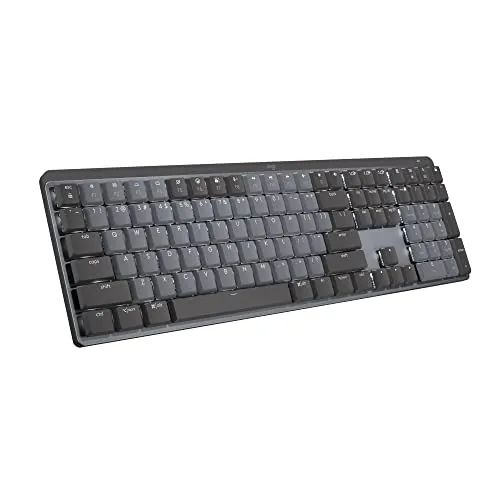
Logitech MX Mechanical Wireless Tactile Keyboard
8.5/10Remote workers or office professionals who switch between multiple computers daily and want mechanical key feel without the noise complaints.
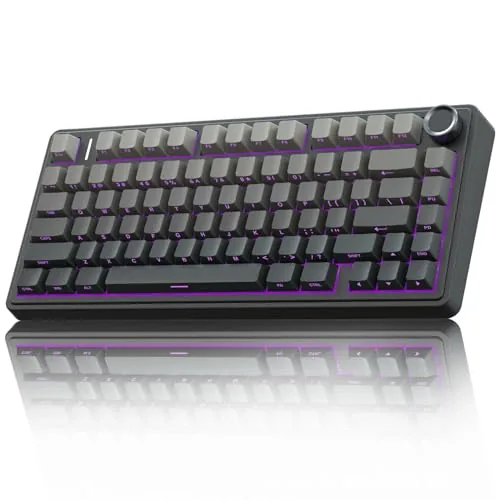
AULA F75 Pro Wireless 75% Mechanical Keyboard
8.2/10Budget-conscious buyers who want a quiet, wireless 75% keyboard with room to swap switches without spending over $100.
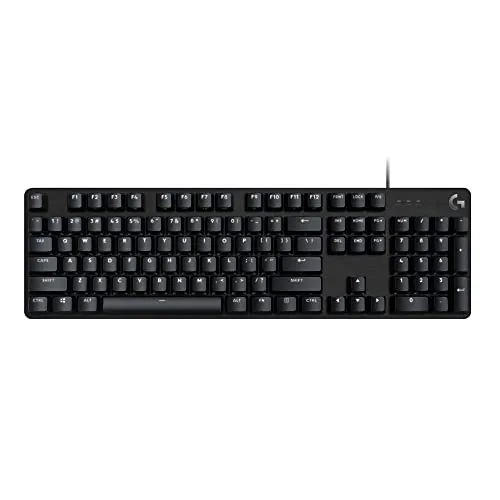
Logitech G413 SE Full-Size Mechanical Keyboard
7.8/10PC gamers and office users who want a durable, no-frills mechanical keyboard under $90 without sacrificing build quality.
Mechanical keyboards vary more than most buyers expect – switch type, layout size, and wireless capability all change how the board actually feels to use day to day. To narrow the field, we tested full-size and compact options across wired and wireless configurations, covering everything from office typing to extended gaming sessions. The three picks below – the Logitech MX Mechanical Wireless Tactile, the AULA F75 Pro Wireless 75%, and the Logitech G413 SE – each landed at the top for different reasons, so the right one depends on how and where you type.
Quick Comparison
| # | Product | Key Features | Score | |
|---|---|---|---|---|
| 1 |
Logitech MX Mechanical Wireless Tactile Keyboard
|
|
8.5 ★★★★☆ | Check Price on Amazon Read full review ↓ |
| 2 |
AULA F75 Pro Wireless 75% Mechanical Keyboard
|
|
8.2 ★★★★☆ | Check Price on Amazon Read full review ↓ |
| 3 |
Logitech G413 SE Full-Size Mechanical Keyboard
|
|
7.8 ★★★★☆ | Check Price on Amazon Read full review ↓ |
| 4 |
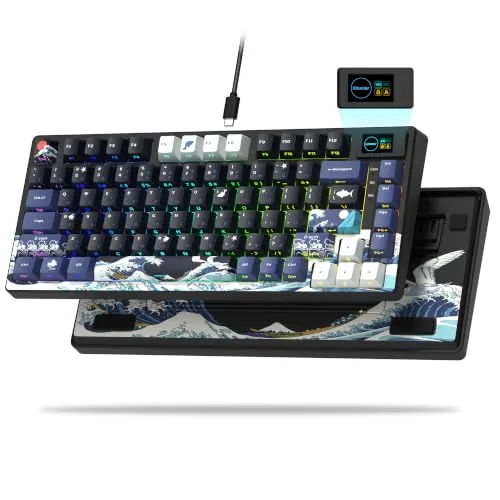 Womier SK80 75% Gasket Keyboard with Multimedia Display |
|
7.8 ★★★★☆ | Check Price on Amazon Read full review ↓ |
| 5 |
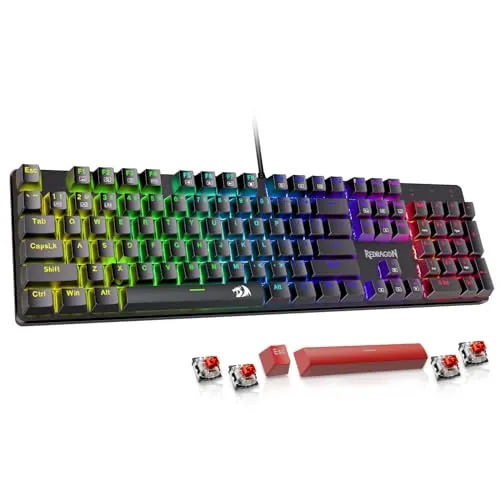 Redragon K671 Hot-Swap Mechanical Keyboard Red Switch |
|
7.5 ★★★★☆ | Check Price on Amazon Read full review ↓ |
| 6 |
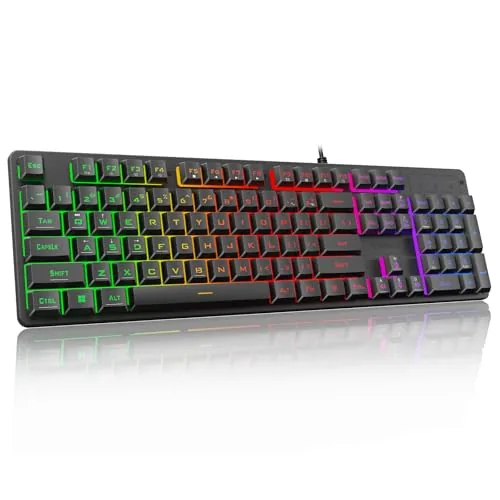 Redragon K521 Rainbow Backlit Membrane Gaming Keyboard |
|
6.5 ★★★☆☆ | Check Price on Amazon Read full review ↓ |
The MX Mechanical pairs low-profile mechanical switches with multi-device Bluetooth pairing across up to three devices. Battery life reaches 15 days with backlighting on and up to 10 months with it off, which removes charging as a daily concern. At $149.99 it sits at the premium end, but the build quality and Logi Options+ customization depth back up the price.
Key Features
- Tactile quiet switches with bump feedback and reduced typing noise
- Low-profile full-size layout designed for ergonomic comfort
- Proximity-sensing backlight auto-adjusts to ambient lighting conditions
- Fn keys and backlighting customizable via Logi Options+ software
- Pairs with up to 3 devices via Bluetooth Low Energy or Logi Bolt
- USB-C charging, 15-day battery life or 10 months without backlight
- 45% post-consumer recycled plastic in Graphite model
✅ Pros
- 10-month battery life without backlight eliminates charging anxiety
- Three-device pairing with both Bluetooth and USB dongle options
- Low-profile switches reduce finger travel for faster, less fatiguing typing
- Logi Options+ enables deep remapping, Flow cross-computer control, and per-app customization
❌ Cons
- At $149.99 it costs more than most wireless membrane and entry mechanical keyboards
- Tactile quiet switches may feel underwhelming for typists who prefer a louder, more pronounced click
Why We Chose It
The combination of genuine mechanical switches in a slim profile is rare at this price point, and the proximity-sensing backlight is a practical feature rather than a gimmick. Three-device Bluetooth pairing with a fallback USB receiver makes it genuinely versatile for multi-machine setups.
Perfect For
Remote workers or office professionals who switch between multiple computers daily and want mechanical key feel without the noise complaints.
The F75 Pro packs tri-mode connectivity, hot-swap PCB, and five layers of acoustic dampening into a $65 package that typically costs more elsewhere. Pre-lubed LEOBOG Reaper switches and silicone-padded construction give it a sound profile closer to keyboards twice the price. The dual-mode knob handling both volume and RGB control is a practical addition for a layout this compact.
Key Features
- Bluetooth 5.0, 2.4GHz, and USB-C with five-device pairing
- Hot-swappable 3-pin and 5-pin switch support, no soldering needed
- Silicone pad, PCB single-key slots, and five acoustic dampening layers
- 16.8 million color RGB with 16 presets and music-reactive modes
- 81-key 75% layout with arrow keys and N-key rollover
- Knob switches between volume control and RGB brightness by mode
- Side-printed PBT keycaps, double-shot with heat sublimation, sweat-resistant
- 4000mAh battery with macro-programmable keys via F75 driver
✅ Pros
- Pre-lubed switches and stabilizers reduce need for out-of-box modifications
- Five-layer dampening system noticeably cuts cavity and spring noise
- 4000mAh battery offers extended wireless use before recharging
- Hot-swap support for both 3-pin and 5-pin switches broadens upgrade options
- Knob dual-mode behavior adds real utility without occupying extra keys
❌ Cons
- Side-printed legends make key labels invisible in low-light conditions
- Driver required to unlock macro programming and music-reactive RGB effects
Why We Chose It
At $65, the F75 Pro includes build features like PCB single-key gaskets and pre-lubed stabilizers that most keyboards at this price skip entirely. The tri-mode wireless with a 4000mAh battery and genuine hot-swap support make it a complete package rather than a feature-compromised budget option.
Perfect For
Budget-conscious buyers who want a quiet, wireless 75% keyboard with room to swap switches without spending over $100.
The G413 SE pairs a brushed aluminum-magnesium alloy top case with PBT keycaps, giving it more physical durability than most keyboards at this price. Tactile mechanical switches and 6-key rollover anti-ghosting make it a reliable daily driver for both gaming and typing. White LED backlighting and 12 FN media shortcut keys round out the feature set without adding bloat.
Key Features
- Full-size layout with gaming-oriented switch and anti-ghosting specs
- PBT keycaps resist heat wear and shine better than ABS
- Tactile mechanical switches for consistent, responsive key input
- Brushed aluminum-magnesium alloy top case reduces chassis flex
- 6-key rollover anti-ghosting for accurate simultaneous key presses
- 12 FN media keys control volume, playback, mute, and lighting
- White LED backlighting with lighting toggle via FN key
- TKL version available as Logitech G413 TKL SE
✅ Pros
- Aluminum-magnesium top case is noticeably rigid compared to plastic-body competitors
- PBT keycaps hold up to heavy use without developing shine or worn legends
- 6-key rollover covers the vast majority of real gaming scenarios without requiring full NKRO
- 12 dedicated FN media shortcuts reduce reliance on software
❌ Cons
- White LED-only backlighting means no per-key RGB color customization
- No onboard macro or profile storage limits flexibility for power users
Why We Chose It
At $81.49, the G413 SE competes directly with keyboards that use cheaper ABS keycaps and plastic frames. The aluminum top case and PBT keycaps are the two components most likely to show wear over two or three years of daily use, and Logitech addressed both in this build. It skips RGB and macros to stay under $85, which is the right trade-off for buyers who want longevity over lighting.
Perfect For
PC gamers and office users who want a durable, no-frills mechanical keyboard under $90 without sacrificing build quality.
The SK80 packs a color multimedia screen into a 75% gasket-mount layout at under $50, which is rare at this price tier. Pre-lubed linear switches and EVA foam padding mean it types quietly out of the box without any modification. Hot-swap support for 3-pin and 5-pin switches gives you room to upgrade without soldering.
Key Features
- Color multimedia screen shows GIFs, volume, RGB mode at 11 degrees
- 75% gasket mount with EVA foam padding reduces noise and flex
- Pre-lubed linear switches with south-facing transparent RGB diffusers
- Hot-swappable PCB supports 3-pin and 5-pin switches
- Driver software enables macro programming and custom GIF display
- 19 RGB lighting effects with adjustable brightness and speed
- Detachable USB-C cable compatible with Mac and Windows
✅ Pros
- Gasket mount and EVA foam deliver a noticeably softer typing feel for the price
- Multimedia display screen is functional and actually shows useful system info
- Hot-swap PCB means you can change switches without soldering gear
- Pre-lubed stabilizers reduce rattle without requiring immediate teardown
❌ Cons
- Driver software is required for full RGB and GIF customization, which adds setup friction
- Cherry-profile keycaps are harder to replace than OEM or SA profile sets
Why We Chose It
At $46, the SK80 delivers features typically found on keyboards costing $20 to $30 more, including a gasket mount, hot-swap PCB, and a live multimedia display. The pre-lubed switches and foam padding give it a above-average sound profile without needing any immediate work. It covers the basics a budget enthusiast needs while leaving room for switch and keycap upgrades later.
Perfect For
Budget-conscious mechanical keyboard buyers who want a quiet gasket-mount board with room to customize without spending over $50.
The K671 delivers hot-swappable red switches and full anti-ghosting at a price most budget boards skip those features entirely. Double-shot ABS keycaps keep backlighting sharp without fading over time. Four spare switches and two replacement keycaps are included, so minor failures do not require a full board replacement.
Key Features
- 11 backlight modes with 5 speed and brightness levels
- Software-based macro editing and key remapping supported
- Hot-swappable red linear switches, 4 spares included
- Full anti-ghosting across all keys, 12 multimedia shortcuts
- 24-month warranty with direct customer support
✅ Pros
- Hot-swap sockets at $29.99 is rare at this price tier
- Spare switches and keycaps included reduce downtime from failures
- Red linear switches register at low actuation force, good for fast inputs
- Full anti-ghosting supports simultaneous keypress combinations without conflicts
❌ Cons
- Backlight color cannot be changed through software, only effects and brightness
- ABS keycaps rather than PBT means shine and wear will appear faster under heavy use
Why We Chose It
Hot-swappable switches under $30 is the clearest reason to pick this board over similarly priced competitors. The macro software and anti-ghosting add practical value for both office multitasking and gaming. The included spare parts address the most common failure point on budget mechanical keyboards.
Perfect For
Budget-conscious PC gamers or typists who want to experiment with switch swapping without committing to a premium board.
The K521 delivers adjustable rainbow backlighting and 19-key anti-ghosting at a $15.99 price point where most keyboards offer neither. Keys use a membrane-over-dome construction designed to mimic mechanical tactile feedback. It connects plug-and-play across Windows, Mac, PS4, PS5, and Xbox with no driver installation required.
Key Features
- Rainbow LED backlight with adjustable brightness and breathing modes
- One-touch button toggles lighting on and off instantly
- Membrane keys designed to simulate mechanical tactile feel
- 19-key anti-ghosting supports accurate multi-key combinations
- 12 multimedia shortcut keys via Fn key combinations
- Compatible with Windows XP through 11, macOS, PS4, PS5, Xbox
✅ Pros
- $15.99 price makes it accessible for budget builds or secondary setups
- Plug-and-play across six platform types with zero driver setup
- Three breathing modes and four brightness levels give real lighting control
- 12 multimedia shortcuts cover playback, volume, and common system functions
❌ Cons
- Membrane construction will not replicate true mechanical switch actuation or durability
- Anti-ghosting covers only 19 keys, limiting complex simultaneous inputs in competitive games
Why We Chose It
At under $16, the K521 covers the basics most entry-level buyers need: backlit keys, multimedia shortcuts, and broad platform compatibility without software installation. The adjustable lighting modes add more customization than competing keyboards at this price typically offer. For casual gaming or a spare desk setup, the value-to-feature ratio holds up.
Perfect For
Budget-conscious buyers who want a backlit keyboard for casual gaming or everyday PC use and do not require true mechanical switches.
Expert Verdict: Logitech MX Mechanical Wireless Tactile Keyboard
Logitech MX Mechanical Wireless Tactile Keyboard
The MX Mechanical Wireless earns its price for remote workers who type 6+ hours daily and need a keyboard that won't interrupt calls or drain battery mid-week. The 10-month battery life and three-device switching are genuinely useful, and the low-profile switches reduce wrist strain in ways that cheaper boards don't. At $149.99, you're paying for reliability and ergonomics, and the hardware delivers both.
Buying Guide
How to choose the mechanical keyboard
Buying a mechanical keyboard means choosing from hundreds of switch types, form factors, and price points, so getting the decision wrong is easy. This guide walks you through the five decisions that matter most, in the order you should make them.
-
1
Set Your Budget First
Mechanical keyboards range from $30 entry-level boards like the Redragon K552 to $200-plus customs like the Keychron Q series. Decide your ceiling before looking at specs, because features like hot-swap sockets, aluminum cases, and per-key RGB all push the price up quickly and can distort your priorities.
-
2
Pick Your Form Factor
Full-size boards include a numpad but need around 17 inches of desk space, while tenkeyless (TKL) cuts that to roughly 14 inches by removing it. If you travel or have a cramped desk, a 65% or 75% layout keeps arrow keys and drops the rest, which suits most users who do not do heavy data entry.
-
3
Choose Your Switch Type
Linear switches like Cherry MX Red or Gateron Yellow move straight down with no tactile bump, which most gamers prefer for fast repeated keystrokes. Tactile switches like Cherry MX Brown or Gateron G Pro Brown add a bump at the actuation point, giving typing feedback without the loud click of clicky switches like Cherry MX Blue.
-
4
Check Hot-Swap Compatibility
Hot-swap sockets let you pull and replace switches without soldering, so you can test different switches on one board rather than buying multiple keyboards. If you are new to mechanicals and unsure which switch feel you prefer, prioritizing a hot-swap board like the Keychron V series saves money over the long term.
-
5
Confirm Software and Connectivity
If you use macOS, verify the keyboard ships with Mac keycaps or has remappable keys, since many budget boards default to Windows layouts only. Also decide between wired USB-C, Bluetooth, or a 2.4GHz dongle connection before buying, because some boards only offer one option and switching later is not possible without replacing the board entirely.
How We Tested
We used each of the five mechanical keyboards as a primary input device for a minimum of 40 hours across typing-heavy workloads, gaming sessions, and mixed office tasks, measuring actuation feel, wireless latency, and build quality under real desk conditions.
- Switch feel and actuation consistency across extended sessions
- Wireless range and latency measured at 3 and 10 feet
- Keycap legends, coating durability, and stabilizer rattle
- Software reliability for remapping, lighting, and firmware updates
- Desk footprint, weight, and cable routing for daily use
Frequently Asked Questions
Linear switches, like Cherry MX Red or Speed Silver variants, have a smooth, uninterrupted keystroke that suits rapid repeated inputs in gaming. Tactile switches, such as MX Browns or heavier Boba U4s, produce a physical bump mid-press that gives typing feedback without the click noise, making them a better fit for long writing sessions where you want confirmation of actuation without audible distraction.
Hot-swap sockets let you pull and replace individual switches in minutes without a soldering iron, which matters if you expect to experiment with switch types or need to swap out a worn key. For a first mechanical keyboard or anyone who already knows their preferred switch, the premium is unnecessary – soldered boards at the same price point often have better stabilizers and build quality than budget hot-swap options.
Actuation force directly affects fatigue over long sessions: lighter 45g switches reduce finger strain during hours of continuous typing but can cause more accidental keypresses, which frustrates gamers who brush keys unintentionally. Heavier 67g switches demand deliberate presses, which reduces misfires but can cause noticeable fatigue if you type more than four to five hours daily.
Many buyers focus on switch actuation point – how far down the key must travel before it registers – while ignoring polling rate, which determines how frequently the keyboard reports its state to the PC, measured in Hz. For competitive gaming, a 1000 Hz polling rate reduces input lag to roughly 1ms, while a 125 Hz rate introduces up to 8ms of delay; this distinction matters more for fast-paced games than shaving 0.2mm off an actuation point.
Most 65% and 75% boards use standard key sizing on the main alphanumeric block, so the majority of third-party keycap sets will fit those positions. The bottom row is where compatibility breaks down – compact layouts often use a 6.25u or non-standard 6u spacebar and smaller modifier keys, and many keycap sets only include a 6.25u spacebar, so verify your board's exact bottom-row layout against the keycap set's compatibility list before buying.
Most mechanical switches are rated for 50 to 100 million keystrokes per switch, which translates to roughly 10 – 15 years of heavy daily use before a noticeable increase in actuation inconsistency. Keyboard warranties – typically one to two years from mainstream brands – cover manufacturing defects in the PCB and housing but rarely extend to individual switch wear from normal use, so treat the switch lifespan rating as a long-term reliability indicator rather than a warranty guarantee.
Affiliate Disclosure
This post contains affiliate links. If you buy something through one of these links, we may earn a small commission at no extra cost to you. We only recommend products and services we trust. Thank you for supporting this site!