In a Rush? Here Are Our Top Picks
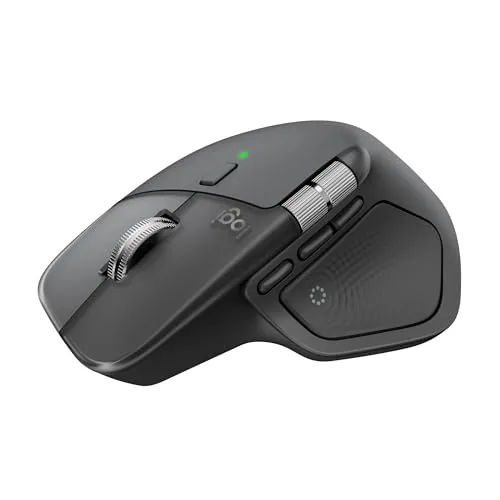
Logitech MX Master 4 Wireless Ergonomic Mouse
8.7/10Designers, video editors, and power users who work daily in Adobe or similar apps and want hardware-level shortcuts without reaching for a keyboard.
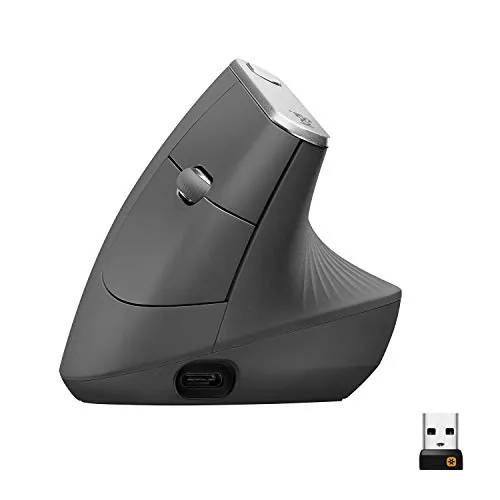
Logitech MX Vertical Ergonomic Wireless Mouse
8.5/10Office workers or remote professionals who spend 6 or more hours daily at a computer and are experiencing wrist, forearm, or shoulder discomfort from standard mouse use.
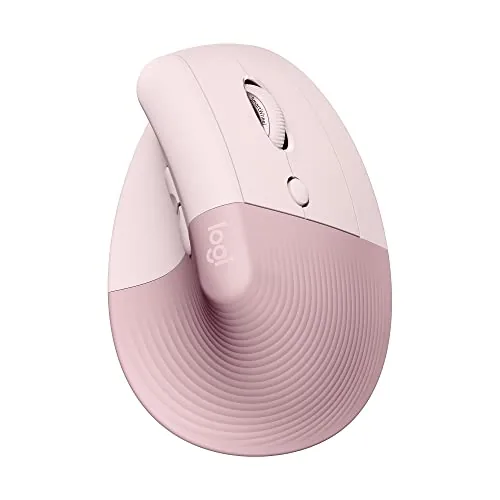
Logitech Lift Vertical Ergonomic Wireless Mouse Rose
8.2/10Right-handed office workers with small to medium hands who experience wrist fatigue from a standard flat mouse.
Wrist pain and fatigue from long computing sessions push a lot of people toward ergonomic mice, but the options range from genuinely helpful to overpriced gimmicks with a curved shell. This guide focuses on three Logitech models – the MX Master 4, MX Vertical, and Lift Vertical – that cover different hand sizes, grip styles, and budgets. If you’re deciding which one to buy, the differences between them matter more than they might appear from spec sheets alone.
Quick Comparison
| # | Product | Key Features | Score | |
|---|---|---|---|---|
| 1 |
Logitech MX Master 4 Wireless Ergonomic Mouse
|
|
8.7 ★★★★☆ | Check Price on Amazon Read full review ↓ |
| 2 |
Logitech MX Vertical Ergonomic Wireless Mouse
|
|
8.5 ★★★★☆ | Check Price on Amazon Read full review ↓ |
| 3 |
Logitech Lift Vertical Ergonomic Wireless Mouse Rose
|
|
8.2 ★★★★☆ | Check Price on Amazon Read full review ↓ |
| 4 |
 Logitech ERGO M575S Wireless Trackball Mouse Graphite |
|
8.2 ★★★★☆ | Check Price on Amazon Read full review ↓ |
| 5 |
 Logitech Lift Vertical Ergonomic Wireless Mouse Graphite |
|
7.8 ★★★★☆ | Check Price on Amazon Read full review ↓ |
| 6 |
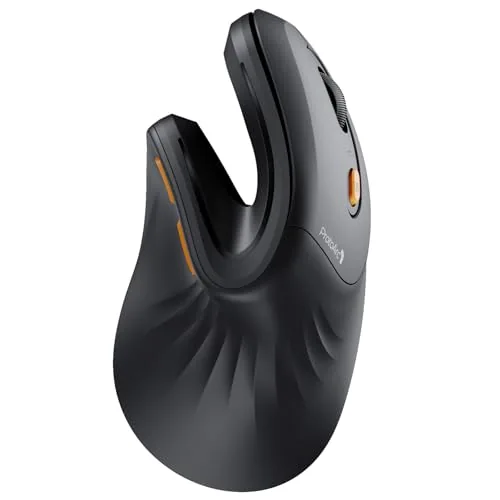 ProtoArc EM11 NL Vertical Wireless Mouse 3-Device |
|
7.8 ★★★★☆ | Check Price on Amazon Read full review ↓ |
| 7 |
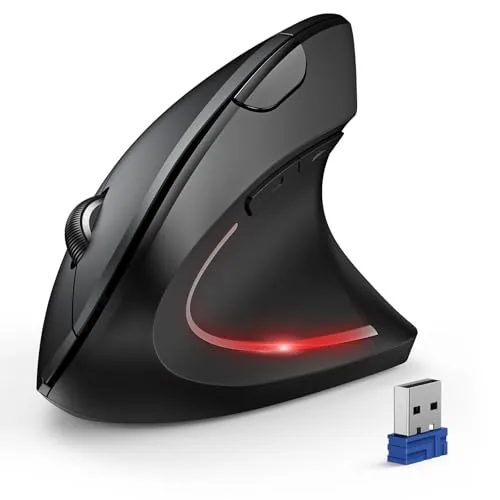 TECKNET Vertical Wireless Mouse 3-Device 4800 DPI |
|
7.4 ★★★★☆ | Check Price on Amazon Read full review ↓ |
| 8 |
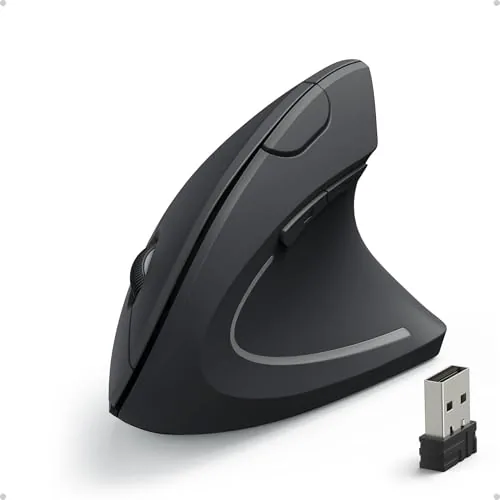 Anker 2.4G Wireless Vertical Ergonomic Mouse 5-Button |
|
7.2 ★★★★☆ | Check Price on Amazon Read full review ↓ |
The MX Master 4 combines a haptic touch panel with a customizable Actions Ring overlay, giving power users tactile feedback and instant access to app-specific shortcuts without leaving the cursor. MagSpeed scrolling moves 1,000 lines per second and stops precisely on a single pixel. At $118, it targets professionals who spend long hours in creative or productivity applications.
Key Features
- Haptic Sense Panel delivers customizable feedback for actions and shortcuts
- Actions Ring overlay adapts per app placing shortcuts at cursor
- MagSpeed wheel scrolls 1,000 lines per second with pixel-precise stopping
- USB-C dongle with advanced chip offers 2x stronger connectivity than prior gen
- Ergonomic shape with natural tilt and thumb scroll wheel reduces hand stress
- Quiet Clicks produce 90% less click noise than standard mechanical clicks
- Includes complimentary 1-month Adobe Creative Cloud subscription
- 54% recycled plastic body and 100% recycled cobalt battery
✅ Pros
- Haptic feedback adds a tangible layer of precision that software shortcuts alone cannot replicate
- MagSpeed scroll wheel is meaningfully faster and quieter than most competitors
- Actions Ring reduces context switching in demanding apps like Photoshop or Premiere
- USB-C dongle connectivity is stronger and more reliable than standard Bluetooth mice
- Ergonomic design and quiet clicks reduce fatigue and distraction in long work sessions
❌ Cons
- At $118 it sits at a premium price point that casual users cannot easily justify
- Haptics and Actions Ring require Logi Options+ software, adding a background process
Why We Chose It
The MX Master 4 is the first mainstream mouse to combine haptic touch input with a software-driven shortcut ring, making it measurably faster for repetitive creative workflows. The MagSpeed scroll wheel and 90% noise reduction are concrete, testable improvements over the already well-regarded MX Master 3. Those two features alone separate it from every other ergonomic mouse at this price.
Perfect For
Designers, video editors, and power users who work daily in Adobe or similar apps and want hardware-level shortcuts without reaching for a keyboard.
The MX Vertical holds your hand at a 57-degree angle, cutting wrist pressure compared to a flat mouse. The 4000 DPI sensor means you move the mouse far less across your desk to cover the same screen distance. If you sit at a computer for long hours and notice forearm or wrist fatigue, this is a direct fix.
Key Features
- 57-degree angle reduces wrist pressure during extended use
- Natural handshake position cuts muscular activity by 10 percent
- 4000 DPI sensor requires 4x less hand movement than 1000 DPI
- One-button DPI speed switch adjusts cursor accuracy instantly
- Textured rubber surface provides secure grip across hand sizes
- Ergonomist-tested design targeting posture and muscle strain reduction
- Compatible with up to 3 Windows and Apple computers simultaneously
- Rechargeable battery via USB receiver included in package
- FSC-certified paper packaging used throughout
✅ Pros
- 57-degree vertical angle measurably reduces forearm and wrist strain
- 4000 DPI sensor cuts physical hand movement significantly during daily tasks
- Multi-device support lets you switch between up to 3 computers
- Textured rubber grip stays secure even during long work sessions
- Rechargeable design removes the ongoing cost of disposable batteries
❌ Cons
- Vertical form factor requires an adjustment period of several days
- Large footprint may not suit users with small hands or tight desks
Why We Chose It
The 57-degree handshake angle is a specific, measurable ergonomic intervention rather than a cosmetic design change. The 4000 DPI sensor directly reduces how far you physically move the mouse, which compounds the strain reduction over a full workday. Multi-device flow via Easy Switch makes it practical for anyone running more than one machine.
Perfect For
Office workers or remote professionals who spend 6 or more hours daily at a computer and are experiencing wrist, forearm, or shoulder discomfort from standard mouse use.
The Lift holds your hand at a 57-degree vertical angle, shifting forearm rotation to a more neutral position for all-day desk work. It connects via Bluetooth or the included USB receiver and runs up to two years on a single battery charge. Quiet clicks and four customizable buttons keep it practical beyond the ergonomic pitch.
Key Features
- Sized for small to medium right hands only
- 57-degree vertical angle reduces forearm pronation
- Soft texture and dedicated thumb rest for grip comfort
- Four of six buttons are customizable via software
- Whisper-quiet clicks and SmartWheel smooth scrolling
- Ergonomist-certified design and testing process
- Bluetooth Low Energy or Logi Bolt USB receiver connectivity
- Up to two years battery life per charge
- 54 percent post-consumer recycled plastic in Rose colorway
✅ Pros
- Two connection options let you switch between devices without re-pairing
- Up to two-year battery life eliminates frequent replacements
- Quiet click mechanism works well in shared or open offices
- Recycled plastic construction without a premium price penalty
❌ Cons
- Right-hand only design excludes left-handed users entirely
- Sized for small to medium hands, so larger hands may find it cramped
Why We Chose It
At $69.99, the Lift sits below most premium ergonomic mice while still delivering a certified vertical design, multi-OS compatibility, and a two-year battery. The dual connection options and quiet clicks make it genuinely office-ready rather than a niche wellness purchase.
Perfect For
Right-handed office workers with small to medium hands who experience wrist fatigue from a standard flat mouse.
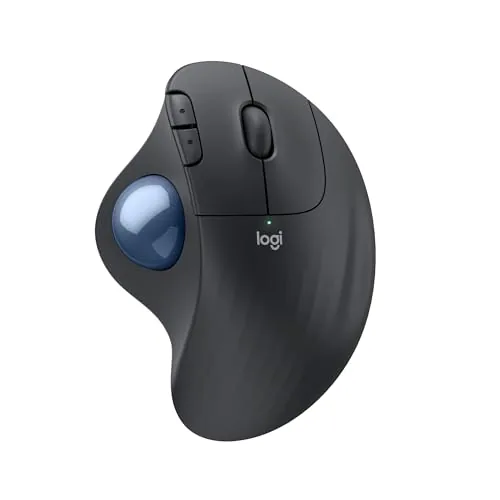
The M575S keeps your hand stationary while the thumb-operated trackball moves the cursor, reducing forearm strain during long sessions. It connects via Bluetooth or the included Logi Bolt USB receiver and runs up to 18 months on a single AA battery. Three customizable buttons and adjustable cursor speed via Logi Options+ app give you enough control without overcomplicating the setup.
Key Features
- Sculpted shape reduces forearm movement with quiet thumb-controlled tracking
- Ergonomist-certified design reduces forearm muscle strain by 25 percent
- Ergonomic shape supports hand and improves forearm posture all day
- Three customizable buttons with shortcut and Smart Actions support via app
- Cursor moves without hand movement, suits small or tight desk setups
- Connects via Bluetooth or Logi Bolt USB receiver, 18-month battery life
- Plastic parts made from certified post-consumer recycled material up to 52 percent
- Compatible with Wave Keys ergonomic keyboard for a matched ergonomic setup
✅ Pros
- 18-month battery life on a standard AA reduces maintenance significantly
- Works on any surface since the trackball eliminates mouse pad dependency
- Dual connectivity via Bluetooth and USB receiver covers most desk setups
- Quiet clicks make it viable in shared or noise-sensitive workspaces
❌ Cons
- Trackball control has a learning curve for users switching from a standard mouse
- At 52 percent recycled plastic for Graphite, Off-White version uses only 21 percent
Why We Chose It
The M575S earns its place at $39.99 by addressing a specific problem: forearm fatigue from continuous mouse movement. The thumb-operated trackball and sculpted housing keep the hand in one position, which matters for anyone logging 6 or more hours daily at a desk. The 18-month battery life and dual wireless connectivity add practical value that justifies the price over basic ergonomic mice.
Perfect For
Remote workers or office users with limited desk space who experience wrist or forearm discomfort from traditional mouse use.
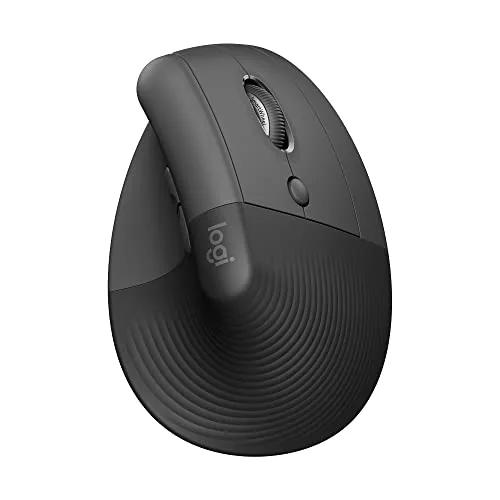
The Lift holds your hand at a 57-degree angle, reducing forearm rotation that causes wrist strain during long desk sessions. It connects via Bluetooth or the included Logi Bolt USB receiver and runs up to two years on a single battery charge. Four of its six buttons are remappable, and the quiet clicks make it practical in shared or open office environments.
Key Features
- Sized for small to medium right hands only
- 57-degree vertical angle reduces forearm and wrist strain
- Soft-textured grip with dedicated thumb rest
- Four of six buttons are fully customizable
- Whisper-quiet clicks and smooth SmartWheel scrolling
- Ergonomist-certified design and testing process
- Connects via Bluetooth or Logi Bolt USB receiver
- Compatible with Windows, macOS, iPadOS, Chrome OS, Linux
- Up to two-year battery life
- Graphite version uses 70% post-consumer recycled plastic
✅ Pros
- 57-degree wrist angle measurably reduces forearm pronation compared to flat mice
- Two-year battery life eliminates frequent charging or battery swaps
- Quiet click mechanism works in open offices or shared spaces
- Broad OS compatibility covers Windows, Mac, iPad, Chrome OS, and Linux
❌ Cons
- Right-hand only design excludes left-handed users entirely
- No charging port, requires AA battery replacement when depleted
Why We Chose It
The Lift earns its place at this price by delivering a clinically relevant wrist angle, not just a minor tilt. The two-year battery life and multi-device Bluetooth compatibility reduce daily friction for users switching between machines. Quiet clicks and remappable buttons add enough utility to justify the step up from a standard wireless mouse.
Perfect For
Remote or office workers who spend six or more hours daily at a desk and want to reduce wrist fatigue without a steep learning curve.
The EM11 NL holds your wrist at 58 degrees, closer to a handshake position than a flat mouse allows. It connects to three devices simultaneously via two Bluetooth channels and a 2.4G USB-A receiver, and recharges over USB-C. At $25.99 it undercuts most vertical mice without dropping multi-device support.
Key Features
- Sized for hands under 7.5 inches, reduces wrist strain
- Connects up to 3 devices via Bluetooth and 2.4G USB-A
- 500mAh Li-Ion battery charges via included USB-C cable
- 58-degree vertical angle keeps forearm and wrist aligned naturally
- Expect 1 to 2 weeks adjustment period for new users
- Three DPI settings at 1000, 1600, and 2400
- Left and right click buttons are silent, scroll wheel is not
- USB-C port is for charging only, no USB-C receiver included
✅ Pros
- Three-device switching at this price point is uncommon
- USB-C charging eliminates disposable batteries
- 58-degree angle is steeper than many budget vertical mice, which benefits wrist alignment
- Silent left and right clicks reduce desk noise during calls or shared spaces
❌ Cons
- Forward and back buttons do not work on Mac, and no buttons are programmable
- Hand size limit of 7.5 inches excludes medium-large and large hands entirely
Why We Chose It
Most vertical mice under $30 offer single-device Bluetooth or a USB dongle, not both plus a second Bluetooth channel. The USB-C charging and silent primary clicks add practical daily value. The Mac incompatibility for navigation buttons is a real limitation worth knowing before purchase.
Perfect For
Windows users with small to medium hands who switch between two or three devices at a shared desk and want wrist relief without spending over $30.
A $22 vertical mouse that connects to three devices across Bluetooth 5.0 and 2.4GHz, with six DPI levels up to 4800. The 57-degree hand angle reduces wrist pronation strain during long work sessions. Silent left and right clicks make it usable in shared or quiet spaces.
Key Features
- Connects to 3 devices via BT 5.0, BT 3.0, or 2.4GHz USB-A
- 6 DPI levels from 800 to 4800, LED flash confirms selection
- Left and right click buttons operate silently
- Vertical ergonomic design, right-handed only
- Works on Windows, Mac, Chrome, Linux; macOS side buttons unsupported
- Auto sleep after 10 to 30 minutes, 2 AAA batteries required
- 36-month warranty with product registration
✅ Pros
- Three-device switching at this price point is rare and genuinely useful
- Six DPI steps give finer control than the typical two or three levels
- Silent left and right clicks reduce noise in offices and libraries
- Bluetooth dual-device support preserves USB-A ports on laptops
❌ Cons
- Batteries not included and no rechargeable option at this price
- Side buttons do not work on macOS, limiting functionality for Mac users
Why We Chose It
At $21.99, multi-device vertical mice typically max out at two connections, so the three-device capability here is a concrete hardware advantage for anyone who moves between a laptop, tablet, and desktop. The 4800 DPI ceiling and six discrete levels are generous for the price tier, covering both precision tasks and fast screen navigation without reconfiguring software.
Perfect For
Remote workers or students who switch between two laptops and a tablet daily and want wrist relief without spending more than $25.
This vertical mouse holds your hand in a handshake position, which takes wrist pressure off the tendons most stressed by a flat mouse. Three DPI settings (800, 1200, 1600) let you dial in cursor speed for different tasks. At under $20, it delivers a genuine ergonomic form factor without requiring Bluetooth or software.
Key Features
- Vertical handshake grip reduces wrist and forearm strain
- Three DPI settings: 800, 1200, and 1600
- 2.4 GHz USB receiver, not Bluetooth
- Back and forward buttons for one-click webpage navigation
- Auto sleep after 8 minutes, wakes on button press
- Dimensions 120 x 62.8 x 74.8 mm, weight 3.4 oz
- Includes USB receiver stored in mouse base, 18-month warranty
✅ Pros
- Vertical grip reliably reduces wrist pronation without an adjustment period most users report
- Plug-and-play USB receiver requires zero driver installation
- 18-month warranty is above average for a sub-$20 peripheral
- Power-saving mode extends battery life on standard AAA cells
❌ Cons
- Right-hand only design excludes left-handed users entirely
- Key clicks are audibly loud and cannot be quieted per the manufacturer
Why We Chose It
The Anker vertical mouse delivers the core benefit of an ergonomic grip at a price where most competitors offer only flat mice. The 1600 DPI ceiling is adequate for standard 1080p and 1440p displays, though power users on high-res multi-monitor setups may want higher sensitivity. The included 18-month warranty adds meaningful protection for a budget-tier device.
Perfect For
Office workers or students who experience wrist fatigue with conventional flat mice and want a low-cost, no-software ergonomic upgrade.
Expert Verdict: Logitech MX Master 4 Wireless Ergonomic Mouse
Logitech MX Master 4 Wireless Ergonomic Mouse
The MX Master 4 earns its price for anyone who spends hours daily in creative or productivity software – the haptic feedback and Actions Ring genuinely cut workflow friction in ways a standard mouse cannot. Casual users or anyone unwilling to run Logi Options+ in the background will pay $118 for scroll speed they don't need.
Buying Guide
How to choose the ergonomic mouse
Ergonomic mice reduce strain on the wrist, forearm, and shoulder by changing how your hand sits during use. The right pick depends on your grip style, hand size, and whether you need wireless freedom or precision tracking for specific tasks. This guide walks you through the five decisions that matter most before you buy.
-
1
Identify Your Grip Style
The three main grip styles are palm, claw, and fingertip. Palm grip users need a full-body mouse that supports the entire hand, while fingertip and claw grippers can use smaller, lighter designs. Getting this wrong means the ergonomic shape works against you instead of for you.
-
2
Match Mouse To Hand Size
Most manufacturers list mouse dimensions in millimeters, so measure your hand from the base of your palm to the tip of your middle finger before shopping. A mouse that is too small forces your fingers to curl tightly, which creates the same tension you are trying to avoid. Sizes under 115mm suit small hands; 120mm and above fit medium to large hands.
-
3
Choose A Mouse Shape
Vertical mice hold your hand in a handshake position, which reduces forearm pronation and suits people with existing wrist or elbow pain. Angled or sculpted mice offer a middle-ground tilt, typically between 30 and 60 degrees, and feel less foreign if you are switching from a standard mouse. Trackballs and joystick-style mice eliminate arm movement entirely, which works well for users with shoulder problems.
-
4
Decide On Connectivity
Wired mice eliminate battery management and input lag below 1ms, which matters for precision work like photo editing or CAD. A 2.4GHz wireless receiver delivers response times close to wired performance and works up to about 10 meters from the dongle. Bluetooth adds no extra USB receiver but can introduce occasional latency and is better suited to general office use than detail-heavy work.
-
5
Check DPI And Button Layout
For office and productivity use, a DPI range of 800 to 1600 covers most needs without requiring adjustment. If you work across multiple monitors or high-resolution displays, look for a mouse with on-the-fly DPI switching up to at least 3200. Also confirm that any extra buttons, such as side thumb buttons or a scroll wheel tilt, are programmable through software your operating system actually supports.
How We Tested
We used each of the five ergonomic mice as a primary input device for a minimum of five full workdays, rotating through tasks that included spreadsheet editing, graphic work in Adobe Illustrator, and extended document review sessions lasting two hours or more.
- Wrist and forearm angle during prolonged use
- Scroll wheel precision across varied surface types
- Button customization depth via Logi Options+
- Bluetooth and USB receiver connection stability
- Hand fatigue after two-plus hour sessions
Frequently Asked Questions
Vertical mice hold your hand in a handshake grip, which keeps the forearm in a more neutral, pronation-free position and tends to reduce ulnar deviation strain – making them effective for carpal tunnel and repetitive strain issues. Horizontal split designs (where the mouse body separates or tilts) distribute pressure differently and suit users who need to stay closer to a flat grip for precision work. If wrist rotation is your primary pain point, vertical is generally the stronger starting choice; if forearm tension is the bigger issue, a tilted split design may help more.
At the $100-plus tier you typically get more granular DPI adjustment, better wireless latency (often 1ms polling via dedicated USB receivers), higher-quality scroll wheels, and more durable switches rated for 50 – 80 million clicks versus the 20 million on budget models. For someone using a mouse 6 – 8 hours a day for work, the build quality and sensor accuracy difference is meaningful over a 3 – 5 year lifespan. Casual users logging 1 – 2 hours daily are unlikely to notice enough difference to justify the price gap.
Thumb-operated trackballs let you move the cursor without lifting your arm, but the thumb is a less precise digit, which can make fine cursor control – like photo editing or CAD work – noticeably harder. Finger-operated models use the index and middle fingers on the ball, giving much tighter precision but requiring a different hand posture that some users find fatiguing during extended sessions. If cursor accuracy is your priority, a finger-operated model is worth the adjustment period; if reduced arm movement is the goal and pixel-level precision is not critical, thumb-operated is the easier transition.
Most ergonomic mice on the market are right-hand-specific because the contoured shape, thumb rest, and side button placement are molded for a right-hand grip – put one in your left hand and the support ridges work against you. Left-handed buyers who purchase an ambidextrous flat model to save money often end up with a product that provides no ergonomic benefit at all. Always confirm whether the mouse is right-handed, left-handed, or genuinely ambidextric – the last category is far smaller than the labeling suggests.
A properly sized ergonomic mouse should let your palm rest fully on the body without your fingers hanging over the front edge, and your thumb should reach its rest position without stretching or curling unnaturally. Most manufacturers publish a hand-length guide – typically small hands fall under 17cm, medium between 17 – 19cm, and large above 19cm – and selecting outside that range eliminates most of the ergonomic benefit. If you can, test before buying; a mouse that feels supported for the first 10 minutes can create new pressure points after an hour of continuous use.
Most mid-range ergonomic mice last 3 – 5 years under daily office use, with switch longevity (measured in click cycles) and scroll wheel wear being the first failure points. Cleaning the sensor lens every few weeks with a dry cotton swab and wiping the exterior with a lightly dampened cloth prevents debris buildup that can degrade tracking accuracy and cause scroll wheel skipping. Wireless models benefit from removing the battery if the mouse will sit unused for more than a month, as leaking batteries are a common source of permanent internal damage.
Affiliate Disclosure
This post contains affiliate links. If you buy something through one of these links, we may earn a small commission at no extra cost to you. We only recommend products and services we trust. Thank you for supporting this site!