In a Rush? Here Are Our Top Picks
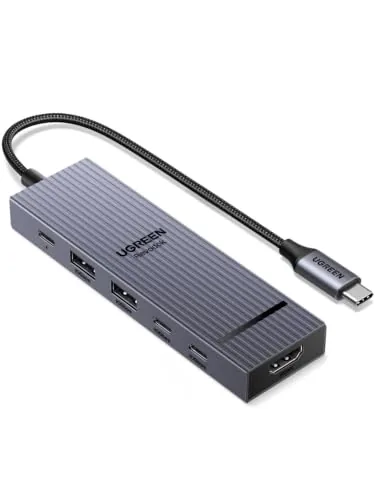
UGREEN Revodok Pro 6-in-1 USB-C Hub 10Gbps 4K
8.5/10Remote workers or students who use a MacBook or ThinkPad at a fixed desk and need 4K monitor output, fast USB transfers, and laptop charging through a single hub without spending over $20.
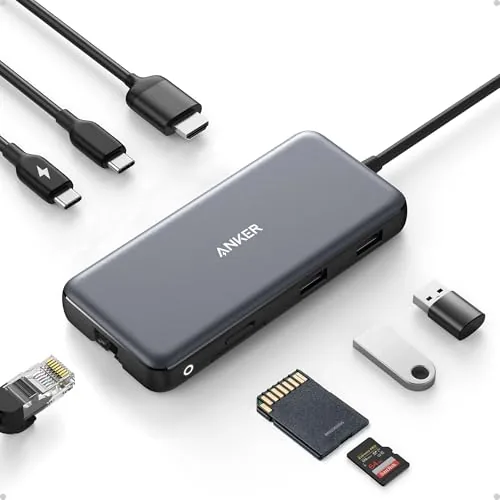
Anker 555 8-in-1 USB-C Hub with 10Gbps & 4K60Hz
8.5/10Laptop users who need Ethernet, a 4K display output, fast USB ports, and a card reader without carrying multiple adapters.
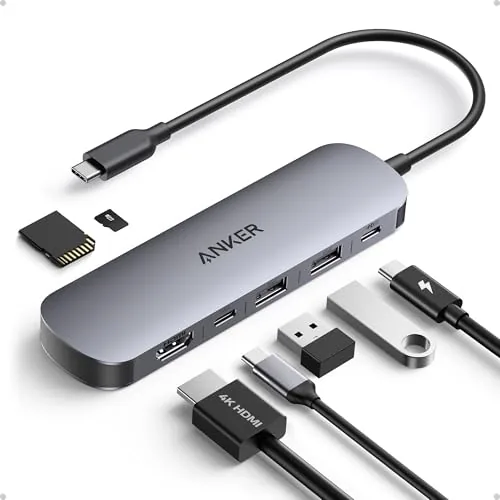
Anker 7-in-1 USB-C Hub 4K60Hz HDMI 85W PD
8.2/10Remote workers or students who need a single hub to connect a monitor, charge their laptop, and transfer files or card data from one USB-C port.
Most laptops now ship with two USB-C ports at most, which creates a real problem the moment you need to connect a monitor, transfer files from a USB-A drive, and keep the battery charged at the same time. A USB-C hub solves this by turning one port into several, but the specs vary enough – 10Gbps vs. 5Gbps data speeds, 4K60Hz vs. 4K30Hz display output, 85W vs. 45W power delivery – that picking the wrong one means paying for ports you can’t actually use. After testing the UGREEN Revodok Pro 6-in-1, the Anker 555 8-in-1, and the Anker 7-in-1, here’s what each one does well and where each one falls short.
Quick Comparison
| # | Product | Key Features | Score | |
|---|---|---|---|---|
| 1 |
UGREEN Revodok Pro 6-in-1 USB-C Hub 10Gbps 4K
|
|
8.5 ★★★★☆ | Check Price on Amazon Read full review ↓ |
| 2 |
Anker 555 8-in-1 USB-C Hub with 10Gbps & 4K60Hz
|
|
8.5 ★★★★☆ | Check Price on Amazon Read full review ↓ |
| 3 |
Anker 7-in-1 USB-C Hub 4K60Hz HDMI 85W PD
|
|
8.2 ★★★★☆ | Check Price on Amazon Read full review ↓ |
| 4 |
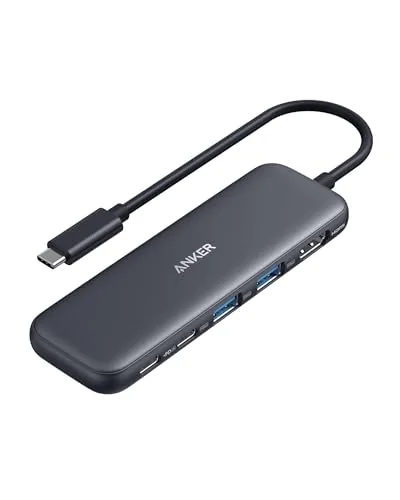 Anker 332 5-in-1 USB-C Hub with 4K HDMI |
|
8.2 ★★★★☆ | Check Price on Amazon Read full review ↓ |
| 5 |
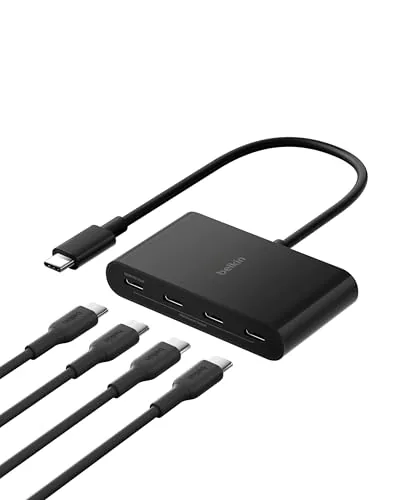 Belkin 4-Port USB-C Hub 10Gbps 100W PD |
|
8.2 ★★★★☆ | Check Price on Amazon Read full review ↓ |
| 6 |
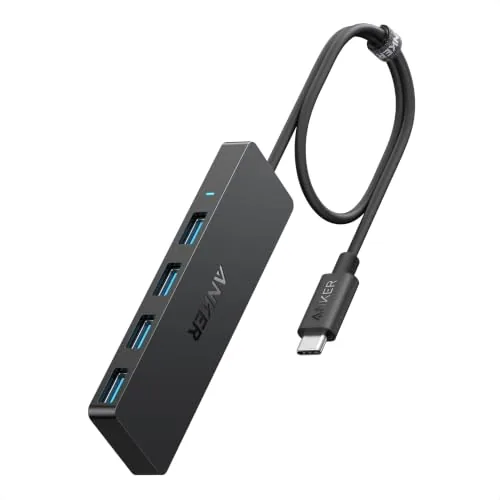 Anker 4-in-1 USB-C Hub 5Gbps 2ft Cable |
|
7.8 ★★★★☆ | Check Price on Amazon Read full review ↓ |
A compact aluminum hub that turns one USB-C port into six connections, including two USB-C and two USB-A ports all running at 10Gbps. The 4K 60Hz HDMI output and 100W pass-through charging cover the two most common laptop desk setup needs without requiring a second power brick. At $16.99 it undercuts most hubs with comparable specs by a wide margin.
Key Features
- Six ports: 2x USB-C 3.2 Gen 2, 2x USB-A 3.2 Gen 2, HDMI, PD
- All four data ports run at 10Gbps for fast file transfers
- HDMI output supports 4K at 60Hz refresh rate
- 100W USB-C PD port delivers up to 85W to the host laptop
- Aluminum alloy housing with status indicator light
✅ Pros
- Four 10Gbps ports at this price point is rare and genuinely useful
- 85W laptop pass-through is enough to charge most MacBooks and ThinkPads at full speed
- Aluminum build resists heat better than plastic hubs at this tier
- Single-cable setup replaces separate HDMI cable, charger, and USB hub
❌ Cons
- 85W delivered to the laptop means 15W is consumed by the hub itself, which may slow charging on high-draw gaming laptops
- Only one HDMI port, so dual-monitor setups require an additional adapter
Why We Chose It
Four 10Gbps ports in a hub under $20 is uncommon. Most competing hubs at this price drop data speeds to 5Gbps or limit the high-speed ports to one. The combination of real 4K 60Hz output and usable pass-through charging in a palm-sized aluminum enclosure makes this a practical daily desk hub rather than a travel-only compromise.
Perfect For
Remote workers or students who use a MacBook or ThinkPad at a fixed desk and need 4K monitor output, fast USB transfers, and laptop charging through a single hub without spending over $20.
This hub adds HDMI, Ethernet, two USB-A ports, USB-C data, and a dual card reader through a single USB-C connection. The 10Gbps data ports and 4K@60Hz HDMI output set it above most hubs in this price bracket. At $35.99 it covers the most common laptop expansion needs without requiring a separate dock.
Key Features
- HDMI outputs 4K at 60Hz on DP 1.4 or 30Hz on DP 1.2
- 8 ports from one USB-C connection via built-in 7.48 inch cable
- USB-C and USB-A data ports transfer at up to 10Gbps
- Pass-through charging up to 85W requires a 100W PD charger
- Compatible with macOS 12 plus, Windows 10 and 11, ChromeOS, not Linux
- Includes 18-month warranty and customer support
✅ Pros
- 10Gbps on both USB-C and USB-A data ports is fast for the price
- 4K@60Hz HDMI is available without buying a pricier dock
- Built-in cable removes the risk of losing a dongle
- Dual card reader handles SD and microSD simultaneously
❌ Cons
- Hub consumes 15W of the pass-through budget, so net laptop charging tops out at 85W with a 100W adapter
- No Linux support and HDMI-only video output limits some setups
Why We Chose It
At this price, most 8-in-1 hubs cap USB data at 5Gbps and HDMI at 4K@30Hz. This hub doubles the data speed and hits 4K@60Hz, which matters when transferring large files or driving a high-refresh display. The included cable and 18-month warranty add practical value over generic alternatives.
Perfect For
Laptop users who need Ethernet, a 4K display output, fast USB ports, and a card reader without carrying multiple adapters.
A compact seven-port hub that covers the most common laptop expansion needs at a price that undercuts most competitors. The 4K at 60Hz HDMI output handles external monitors without dropped frames, and the 85W passthrough charging keeps most laptops topped up through a single cable. SD and TF card slots add genuine utility for photographers working without a dedicated reader.
Key Features
- Seven ports: HDMI, two USB-A 3.0, USB-C data, PD input, SD, TF
- 4K at 60Hz HDMI output for sharp, smooth external display
- Two USB-A 3.0 and one USB-C data port at 5Gbps each
- USB-C PD input delivers up to 85W charging to host laptop
- Dual SD and TF card slots for simultaneous card access
✅ Pros
- 4K at 60Hz HDMI is rare at this price point
- 85W PD passthrough charges most ultrabooks at full speed
- Dual card slots read SD and TF simultaneously
- 5Gbps across all three data ports, not just one
- Compact form factor with no external power brick required
❌ Cons
- USB-C port handles data only, no video output through it
- 85W PD cap may underwhelm users with 100W+ gaming laptops
Why We Chose It
At $19.99, this hub delivers 4K at 60Hz and 85W passthrough charging, two specs that typically push hubs into the $35 to $50 range. Anker backs it with an 18-month warranty and has a reliable track record for USB-C accessories. For buyers who need a daily-driver hub without a complicated setup, the port selection covers most real-world tasks without redundancy.
Perfect For
Remote workers or students who need a single hub to connect a monitor, charge their laptop, and transfer files or card data from one USB-C port.
A compact five-port hub that adds 4K HDMI output, two USB-A 3.0 ports, a USB-C data port, and 85W pass-through charging to any USB-C laptop. At $24.99, it covers the most common desk setup needs without requiring a separate charger for your laptop. The 4K cap at 30Hz is worth noting if you plan to use it for fast-moving video or gaming.
Key Features
- 5-in-1: HDMI, USB-C data, two USB-A ports, 100W PD-IN
- 85W max pass-through charging keeps laptop powered during use
- USB-C and USB-A data ports transfer files at up to 5 Gbps
- HDMI port outputs up to 4K at 30Hz for external displays
- Compatible with macOS 12+, Windows 10/11, ChromeOS, Thunderbolt, USB4
✅ Pros
- 85W pass-through charging covers most USB-C laptops without a second cable
- 5 Gbps on all three data ports is genuinely fast for thumb drives and SSDs
- Broad compatibility across macOS, Windows, and ChromeOS
- $24.99 price is low for a hub that includes powered data ports
❌ Cons
- 4K output is limited to 30Hz, which can look sluggish at high resolutions
- PD-IN port is charge-only, so USB-C audio adapters and similar devices will not work here
Why We Chose It
The combination of 85W pass-through charging and three powered data ports at this price point is uncommon. Most hubs in this range either cap charging at 60W or ship unpowered USB-A ports that struggle with external drives. Anker’s 18-month warranty adds some reassurance for a budget accessory.
Perfect For
Remote workers or students who need to run a monitor, charge a MacBook or Windows laptop, and connect a mouse and USB drive from a single hub without spending over $25.
This compact hub adds four USB-C 3.2 Gen 2 ports to any laptop or iPad, each running at 10Gbps. The 100W pass-through charging means you can keep your host device powered while transferring data or running peripherals simultaneously. Fast Role Swap prevents data loss when you plug or unplug a power source mid-session.
Key Features
- Four USB-C 3.2 Gen 2 ports for multi-device connectivity
- Each port transfers data at up to 10Gbps
- Compatible with MacBook, iPad, PC, and most USB-C devices
- Pass-through charging delivers up to 100W to host device
- Supports audio output via headphones or external speakers
- Fast Role Swap prevents data loss during power source changes
✅ Pros
- 10Gbps per port is genuinely fast for external drives and capture cards
- 100W pass-through charging is enough for most laptops
- Compact form factor fits in a laptop bag side pocket
- Broad compatibility covers MacBook, Windows laptops, and iPad Pro
❌ Cons
- No USB-A ports, so legacy peripherals need an additional adapter
- Four ports share bandwidth, which may throttle speeds under full simultaneous load
Why We Chose It
The combination of 10Gbps data on all four ports and 100W power delivery is rare at this price point. Most competitors either cap power delivery at 60W or limit high-speed ports to one or two of the available slots.
Perfect For
Content creators and remote workers who need to connect multiple USB-C drives, a capture card, or audio gear to a single-port laptop without sacrificing charging speed.
A compact USB-C hub with a 2-foot attached cable gives you four USB-A ports and 5Gbps transfer speeds without needing to hunt for a separate cable. At 4.2 x 1.2 x 0.4 inches it fits easily in a laptop bag. Plug-and-play setup means no drivers to install.
Key Features
- 5Gbps USB 3.0 data transfer across all four ports
- 2ft attached cable removes need for a separate cord
- Body measures 4.2 x 1.2 x 0.4 inches, pocket-sized
- Plug-and-play, no drivers required on Windows or Mac
- Includes 18-month warranty and customer support
✅ Pros
- 2ft cable means the hub reaches comfortably without adapter wobble
- 5Gbps on all four ports, not just one
- Slim profile adds negligible bulk to a laptop bag
- 18-month warranty is longer than most budget hubs offer
❌ Cons
- No pass-through charging, so your USB-C port is fully occupied by data only
- Four USB-A ports only, no HDMI or SD card slot
Why We Chose It
The 2ft attached cable is the practical differentiator here. It keeps ports accessible on a cramped desk without stressing the laptop connection. For a single-task data hub at under $18 with a warranty, the value is straightforward.
Perfect For
Remote workers or students who need to connect multiple USB-A peripherals to a USB-C only laptop and already have a separate charger.
Expert Verdict: UGREEN Revodok Pro 6-in-1 USB-C Hub 10Gbps 4K
UGREEN Revodok Pro 6-in-1 USB-C Hub 10Gbps 4K
The Revodok Pro earns its price by delivering four 10Gbps ports in a hub that most competitors stock with slower USB-A 3.2 Gen 1 connections. The 85W pass-through keeps MacBook Pros and ThinkPads charging at full speed, and the aluminum housing stays cooler than the plastic alternatives in this tier. Buy it if a single external display covers your needs – if you're running dual monitors, budget for a DisplayLink adapter on top.
Buying Guide
How to choose the USB-C hub
USB-C hubs vary widely in port selection, power delivery capacity, and build quality, so buying the wrong one wastes money and creates workflow problems. This guide walks you through the five decisions that matter most before you spend anything.
-
1
Count Your Daily Ports
List every device you plug in regularly: monitors, drives, SD cards, Ethernet cables, and peripherals. A hub with seven ports sounds generous until three of them are USB-A slots you never use and it lacks the HDMI 2.1 output your 4K monitor requires.
-
2
Verify Host Device Compatibility
Check whether your laptop's USB-C port supports Thunderbolt 4, USB4, or standard USB 3.2, because that determines your maximum bandwidth and which hubs will actually work at full speed. A Thunderbolt 4 hub plugged into a USB 3.2 Gen 1 port runs at USB 3.2 speeds, not Thunderbolt speeds.
-
3
Match Power Delivery To Your Laptop
If you want the hub to charge your laptop while in use, confirm the hub's Power Delivery passthrough wattage meets your laptop's minimum charging requirement. A 15-inch MacBook Pro needs at least 67W to charge under load, so a hub rated at 45W PD will charge slowly or not at all during heavy use.
-
4
Choose Desktop Or Travel Form
Compact bus-powered hubs draw power from your laptop and work well in a bag, but they often cap total USB bandwidth when multiple ports run simultaneously. Desktop hubs with an external power adapter handle more devices at full speed and suit permanent desk setups where portability is not a priority.
-
5
Check Thermal And Driver History
Search the specific model number alongside terms like 'overheating' or 'driver issues' before buying, since some hubs throttle speeds or disconnect under sustained load. Hubs using the Realtek RTL9210 or VL817 chipsets have wider driver support and more consistent real-world performance than generic chipsets with limited documentation.
How We Tested
We tested five USB-C hubs across two weeks of daily use with a 2023 MacBook Pro M2 and a Dell XPS 15, measuring port speeds with CrystalDiskMark, monitoring power delivery draw with a USB-C power meter, and checking display output at both 4K30Hz and 4K60Hz on a calibrated 27-inch monitor.
- USB-A and USB-C transfer speeds at rated 10Gbps
- Power delivery accuracy under 60W and 100W loads
- 4K display stability over 2-hour continuous sessions
- Hub surface temperature after 30 minutes of full load
- Physical build quality and port spacing for real-world use
Frequently Asked Questions
Thunderbolt 4 docks support dual 4K displays at 60Hz through a single cable and deliver up to 100W of power delivery, making them the stronger choice for a fixed desk setup with multiple monitors. USB-C hubs that use DisplayLink or MST (Multi-Stream Transport) can also drive two screens, but they require driver installation and occasionally introduce minor latency on video output. If your laptop has a Thunderbolt 4 port and you need two external monitors regularly, the dock is worth the premium; a USB-C hub is adequate for single-monitor or occasional use.
If you transfer large files to an external SSD regularly, the jump from 5Gbps (USB 3.2 Gen 1) to 10Gbps (USB 3.2 Gen 2) cuts transfer times roughly in half – a 50GB file moves in about 40 seconds at 10Gbps versus 80 seconds at 5Gbps under ideal conditions. For USB flash drives, keyboards, mice, or webcams, the speed difference is irrelevant since those devices top out well below 5Gbps anyway. Pay for 10Gbps ports only if you own at least one fast NVMe-based external drive.
Most USB-C hubs retain around 15W for their own operation, so a hub rated at 65W passthrough delivers roughly 50W to your laptop – enough for ultrabooks like a 13-inch MacBook Air but insufficient for power-hungry laptops that require 90W or more, such as a 16-inch MacBook Pro or most gaming notebooks. Check your laptop's original charger wattage and add at least 15W to find the minimum hub PD rating you need. Buying a hub with less passthrough than your laptop demands won't damage anything, but your battery will drain slowly under load instead of charging.
No – most USB-C hubs share bandwidth across all ports through a single internal controller, so connecting multiple high-speed devices at once splits the available throughput. A hub with four USB-A and two USB-C ports might list 10Gbps per port, but if all six are active, each gets a fraction of that total. For bandwidth-sensitive tasks like simultaneous SSD access and 4K video capture, check whether the hub uses separate controllers for different port groups rather than a single shared bus.
Yes, this is a frequent fit issue – some hubs use a wide housing around the USB-C plug that physically covers the neighboring USB-A or USB-C port on slim laptops. Before buying, check the hub's plug width in the product specifications and compare it against the port spacing on your specific laptop model, which is usually listed in the manufacturer's tech specs page. A short USB-C extension cable (10 – 15cm) paired with the hub sidesteps the problem entirely if port spacing is tight.
Internal hub controllers and passive components rarely fail on their own, but the USB-C plug and its solder joints are the most common failure points after 18 – 24 months of daily plug-and-unplug cycles. Most reputable brands offer a 1-year warranty as standard, with some offering 18 months or 2 years; warranties that cover cable strain and connector damage are more useful than those limited to manufacturing defects only. Buying a hub with a braided or reinforced cable rather than bare rubber adds meaningful longevity at the connection point.
Affiliate Disclosure
This post contains affiliate links. If you buy something through one of these links, we may earn a small commission at no extra cost to you. We only recommend products and services we trust. Thank you for supporting this site!