In a Rush? Here Are Our Top Picks
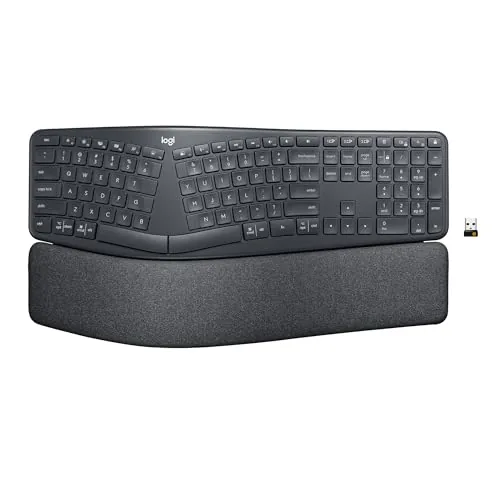
Logitech Ergo K860 Wireless Split Ergonomic Keyboard
8.5/10Office workers or remote professionals who type four or more hours daily and are experiencing wrist fatigue or forearm strain from a flat keyboard.
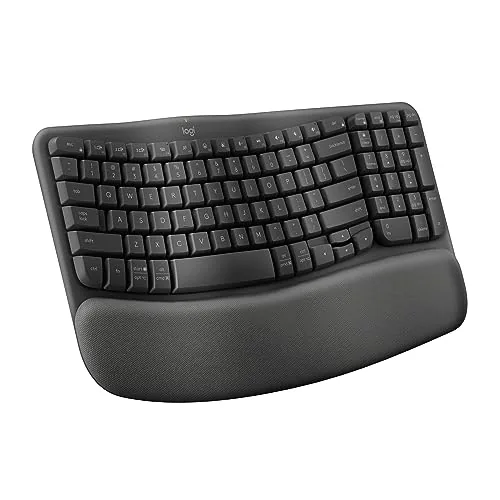
Logitech Wave Keys Ergonomic Wireless Keyboard
8.2/10Office workers who type for five or more hours daily and want wrist relief without committing to a full split keyboard.
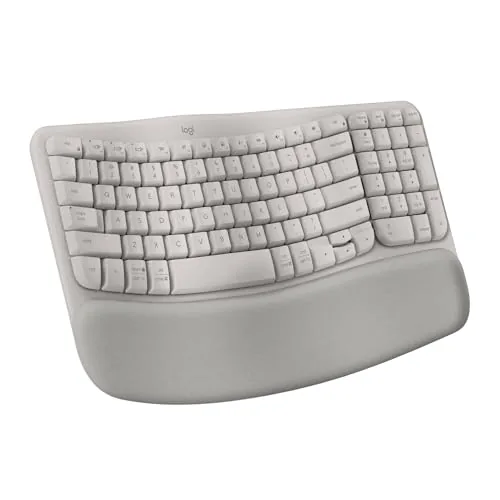
Logitech Wave Keys Ergonomic Wireless Keyboard, Sand
8.2/10Remote workers or office users who type for four or more hours a day and want a low-cost entry into ergonomic keyboards without switching to a split layout.
Wrist pain and fatigue from long typing sessions push a lot of people toward ergonomic keyboards, but the options range from subtly curved to fully split, and picking the wrong one means spending $100+ on something that sits in a drawer. We tested three Logitech models – the Ergo K860, the Wave Keys in standard, and the Wave Keys in Sand – to give you a clear picture of what each one actually delivers and who each one fits.
Quick Comparison
| # | Product | Key Features | Score | |
|---|---|---|---|---|
| 1 |
Logitech Ergo K860 Wireless Split Ergonomic Keyboard
|
|
8.5 ★★★★☆ | Check Price on Amazon Read full review ↓ |
| 2 |
Logitech Wave Keys Ergonomic Wireless Keyboard
|
|
8.2 ★★★★☆ | Check Price on Amazon Read full review ↓ |
| 3 |
Logitech Wave Keys Ergonomic Wireless Keyboard, Sand
|
|
8.2 ★★★★☆ | Check Price on Amazon Read full review ↓ |
| 4 |
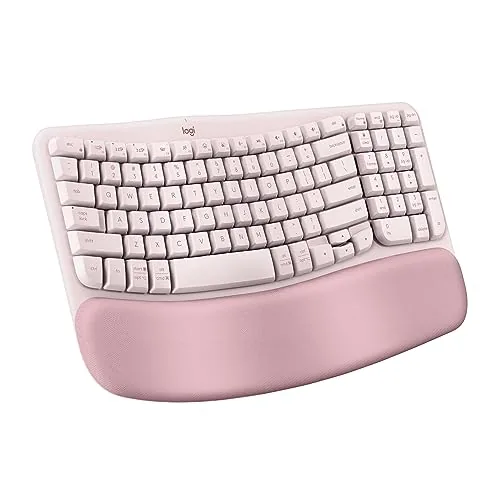 Logitech Wave Keys Ergonomic Wireless Keyboard with Palm Rest |
|
8.2 ★★★★☆ | Check Price on Amazon Read full review ↓ |
| 5 |
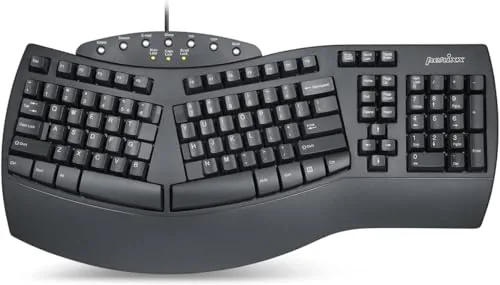 Perixx PERIBOARD-512B Split Ergonomic Wired Keyboard |
|
7.8 ★★★★☆ | Check Price on Amazon Read full review ↓ |
| 6 |
 Arteck Split Ergonomic Wireless Keyboard with Palm Rest |
|
7.8 ★★★★☆ | Check Price on Amazon Read full review ↓ |
| 7 |
 TECKNET Wireless Ergonomic Keyboard with Wrist Rest |
|
7.8 ★★★★☆ | Check Price on Amazon Read full review ↓ |
| 8 |
 Kensington Pro Fit Ergonomic Wired Keyboard K75400US |
|
7.8 ★★★★☆ | Check Price on Amazon Read full review ↓ |
| 9 |
 MEETION Wired Ergonomic Keyboard with RGB Backlit Wrist Rest |
|
7.8 ★★★★☆ | Check Price on Amazon Read full review ↓ |
The K860 splits its keyframe and curves the layout to reduce forearm rotation and wrist extension during long typing sessions. Memory foam wrist rest adds measurable support, and three negative tilt angles let you dial in posture whether sitting or standing. Bluetooth and USB receiver connectivity cover most desk setups without extra dongles.
Key Features
- Curved split keyframe reduces wrist and forearm muscle strain
- Memory foam wrist rest provides 54% more wrist support
- Scooped keycaps shaped to match fingertip contour
- Tilt legs adjust to 0, -4, and -7 degrees negative incline
- Certified by United States Ergonomics for posture improvement
- Connects via Bluetooth or included USB receiver
- Plastic parts contain 71% post-consumer recycled content
- Logitech Options software enables Fn key and shortcut customization
✅ Pros
- Three negative tilt angles accommodate seated and standing desk use
- Memory foam wrist rest reduces wrist extension more than a flat palm rest
- Dual connectivity works across two devices without re-pairing
- Full-size layout with numpad retained despite the split design
- Third-party ergonomic certification adds credibility to comfort claims
❌ Cons
- Wide footprint from wrist rest makes it impractical for compact desks
- Learning curve of one to two weeks typical when switching from a standard layout
Why We Chose It
The K860 is one of the few split keyboards that integrates a memory foam wrist rest and negative tilt in a single unit at under $130, avoiding the need to buy accessories separately. The US Ergonomics certification and quantified wrist-support figures give it more credibility than most ergonomic keyboard claims. Quiet keys and full-size layout make the transition from a standard keyboard less disruptive.
Perfect For
Office workers or remote professionals who type four or more hours daily and are experiencing wrist fatigue or forearm strain from a flat keyboard.
The Wave Keys uses a gentle curved layout to keep wrists and forearms at a lower-strain angle during long typing sessions. A built-in memory foam palm rest adds contact-point support without raising wrist height. At $69.99 it covers three-device switching and up to three years of battery life, which is solid value for a daily-driver ergonomic board.
Key Features
- Curved wave layout positions hands and wrists at a natural angle
- Memory foam palm rest reduces pressure during extended typing
- Connects to up to 3 devices via Bluetooth or Logi Bolt receiver
- Easy-Switch button toggles between paired devices instantly
- Up to 3 years battery life on a single charge
- Compatible with Windows, macOS, iPadOS, and ChromeOS
- Customizable shortcuts available through the Logi Options+ app
- Certified by United States Ergonomics after independent ergonomist testing
- 61 percent recycled post-consumer plastic in Graphite color variant
✅ Pros
- Memory foam palm rest is an uncommon inclusion at this price point
- Three-device pairing with a dedicated toggle key reduces desk clutter
- 3-year rated battery life cuts down on maintenance interruptions
- Multi-OS compatibility means one keyboard works across a mixed-device setup
❌ Cons
- Wave curve is mild rather than split, so severe wrist issues may need a more aggressive ergonomic layout
- No backlight, which limits usability in dim environments
Why We Chose It
The Wave Keys earns its place by pairing a real memory foam palm rest with multi-device wireless at under $70, a combination most competitors skip at this tier. Ergonomist certification from United States Ergonomics adds credibility beyond typical marketing claims. The three-year battery estimate and broad OS support make it a low-friction option for workers who switch between a Windows PC, Mac, and tablet.
Perfect For
Office workers who type for five or more hours daily and want wrist relief without committing to a full split keyboard.
The Wave Keys uses a sculpted key layout and memory foam palm rest to reduce wrist and forearm strain during long typing sessions. It connects to up to three devices via Bluetooth or the included Logi Bolt USB receiver, with a single button to switch between them. At $69.99 it sits in a competitive price range for certified ergonomic keyboards.
Key Features
- Compact layout moves mouse closer, improving shoulder alignment
- Curved wave profile positions hands and wrists more naturally
- Memory foam palm rest reduces pressure during extended use
- Customize shortcuts and key functions via Logi Options+ app
- Certified by United States Ergonomics after ergonomist testing
- Connects via Bluetooth or Logi Bolt receiver to Windows, macOS, iPadOS, ChromeOS
- Easy-Switch button toggles between up to three paired devices
- Battery rated up to three years on a single charge
✅ Pros
- Memory foam palm rest is a meaningful upgrade over hard plastic rests
- Three-device pairing with a dedicated switch button suits multi-device setups
- Up to three-year battery life removes the need for frequent charging
- Works across Windows, macOS, iPadOS, and ChromeOS without separate drivers
- Ergo certification gives buyers confidence beyond typical marketing claims
❌ Cons
- Compact layout removes the numpad, which may frustrate data-entry users
- Logi Options+ app is required to unlock full customization, adding a software dependency
Why We Chose It
The Wave Keys earns its price through a combination of genuine ergonomic certification, a memory foam palm rest, and broad OS compatibility that most keyboards at this price point skip. The three-device Easy-Switch pairing is genuinely useful rather than a checkbox feature, especially for users who move between a desktop, laptop, and tablet daily.
Perfect For
Remote workers or office users who type for four or more hours a day and want a low-cost entry into ergonomic keyboards without switching to a split layout.
The Wave Keys uses a curved key layout and memory foam palm rest to reduce wrist and forearm strain during long typing sessions. It connects to up to three devices via Bluetooth or the included Logi Bolt USB receiver, with a claimed battery life of up to three years. At $69.99 it sits in a practical mid-range price point for an ergonomic keyboard that works across Windows, macOS, iPadOS, and ChromeOS.
Key Features
- Compact layout moves mouse closer, improving shoulder alignment
- Wave-shaped key rows position hands and wrists more naturally
- Memory foam cushioned palm rest reduces wrist pressure over time
- Customizable shortcuts and hotkeys via Logi Options+ app
- Certified by United States Ergonomics after ergonomist testing
- Connects via Bluetooth or Logi Bolt receiver to up to 3 devices
- Easy-Switch button toggles between paired devices instantly
- Up to 3 years battery life on a single charge
✅ Pros
- Memory foam palm rest provides measurable wrist support during extended use
- Three-device pairing with one-button switching suits multi-device workflows
- Broad OS compatibility covers Windows, macOS, iPadOS, and ChromeOS
- Up to 3-year battery life means minimal maintenance interruptions
- Ergo certification adds credibility beyond manufacturer self-reporting
❌ Cons
- Compact layout removes the numpad, which may not suit data-entry users
- Logi Bolt receiver occupies a USB port if Bluetooth is unavailable
Why We Chose It
The combination of a contoured key layout, memory foam palm rest, and verified ergonomic certification gives this keyboard a meaningful edge over standard wireless boards at a similar price. Three-device Easy-Switch pairing and wide OS support make it practical for users juggling multiple machines. The Logi Options+ app adds remappable shortcuts that go beyond what most keyboards offer out of the box.
Perfect For
Remote workers or office users who type for four or more hours daily and want ergonomic relief without moving to a split keyboard layout.
The PERIBOARD-512B splits the key layout into left and right zones, reducing wrist angle during long typing sessions. At 4.2mm key travel with tactile feedback, it types closer to a mechanical board than most membrane keyboards at this price. The attached wrist rest and curved keycaps add day-to-day comfort without requiring a separate purchase.
Key Features
- One-piece split layout reduces wrist bending during extended typing
- 4.2mm key travel with tactile feedback, rated 20 million keystrokes
- Stepped curved rows promote natural hand posture and reduce fatigue
- Curved keycaps with flat tops shaped to match fingertip contours
- Adjustment period of 1 to 2 weeks typical for new users
✅ Pros
- Wrist rest is built in, no extra accessory needed
- 4.2mm travel gives tactile response uncommon in membrane boards under $50
- Available in three colors to match desk setups
- USB wired connection means no battery management or pairing issues
❌ Cons
- Fixed split angle offers no tilt or tent adjustment for wrist elevation
- Membrane switches will not satisfy users accustomed to true mechanical boards
Why We Chose It
The PERIBOARD-512B delivers a genuine ergonomic split layout with an integrated wrist rest at a price most competing ergonomic keyboards do not reach until $80 or more. The 4.2mm key travel separates it from flat, shallow membrane boards that provide little typing feedback. For office users logging several hours of daily typing who want wrist relief without a steep learning curve or budget, it covers the core bases.
Perfect For
Office workers who type for four or more hours daily and want wrist strain relief without spending over $50 or learning a fully split adjustable keyboard.
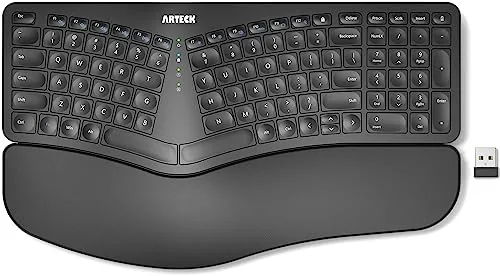
The split layout positions your wrists at a more natural angle than a standard flat keyboard, which reduces forearm strain during long typing sessions. The attached cushioned palm rest means you are not buying a separate accessory. Wireless 2.4G connection via nano USB receiver keeps the desk cable-free.
Key Features
- Split layout aligns wrists and forearms in a natural position
- Attached soft cushioned palm and wrist rest included
- Plug-and-play nano USB receiver requires no driver installation
- Rechargeable lithium battery rated for 6 months per charge
- Package includes USB-C cable, nano receiver, and 24-month warranty
✅ Pros
- All-in-one split design with built-in palm rest removes the need for add-on accessories
- 6-month battery life on a single charge is practical for daily office use
- USB-C charging port is a modern choice that avoids outdated micro-USB cables
- Nano receiver stored in the keyboard body reduces the chance of losing it
❌ Cons
- 2.4G only with no Bluetooth means it occupies a USB port and will not pair with tablets or phones
- Split angle is fixed, so users who prefer adjustable tenting have no built-in option
Why We Chose It
At $54.99 this keyboard bundles a split layout and cushioned palm rest into one unit, which puts it below the typical entry price for comparable ergonomic keyboards that sell the wrist rest separately. The 6-month rechargeable battery removes the recurring cost of AA or AAA cells. The 24-month warranty adds a reasonable confidence layer for a mid-range peripheral.
Perfect For
Office workers who type four or more hours daily on a Windows PC and want a budget ergonomic upgrade without buying a wrist rest separately.
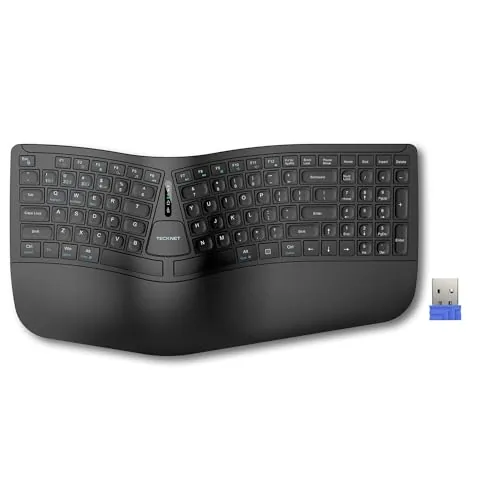
A split ergonomic keyboard at $35.99 that covers the basics most budget ergo boards skip: dual-layer memory foam wrist rest, USB-C charging, and four-device multi-pairing. The 200-hour battery life and 36-month warranty make it a low-risk buy for anyone transitioning from a flat keyboard. Connectivity covers both Bluetooth 5.0 and a 2.4GHz dongle, so it works across desktops, laptops, and tablets without re-pairing.
Key Features
- Split curved layout reduces lateral finger stretch and wrist strain
- Dual-layer wrist rest with high-density base and memory foam top
- Bluetooth 5.0 pairs up to 3 devices plus one via 2.4GHz dongle
- 500mAh battery charges in 4 hours, lasts up to 200 hours
- USB-C port supports charging while typing without interruption
- Four tilt angles: 0, 1.2, 3, and 6.2 degrees for desk flexibility
- 36-month warranty with registration required for coverage
✅ Pros
- 200-hour battery life removes daily charging from your routine
- Dual-layer wrist rest addresses both firmness and pressure distribution
- Four-device switching covers mixed desktop and mobile setups
- USB-C charging is more convenient than proprietary connectors at this price
❌ Cons
- 36-month warranty requires registration, which may be easy to overlook at setup
- 500mAh battery is modest and long-term capacity degradation is unknown
Why We Chose It
At $35.99 this keyboard delivers hardware features typically found on keyboards costing $60 or more, including a built-in memory foam wrist rest and four-stage tilt adjustment. The combination of Bluetooth 5.0 and a USB dongle gives it real flexibility for multi-device workflows without forcing a choice between connection types. USB-C charging and a 200-hour runtime reduce friction compared to most competitors in this price range.
Perfect For
Remote workers or office users who type 6 or more hours daily and want ergonomic support without committing to a high-end mechanical split keyboard.
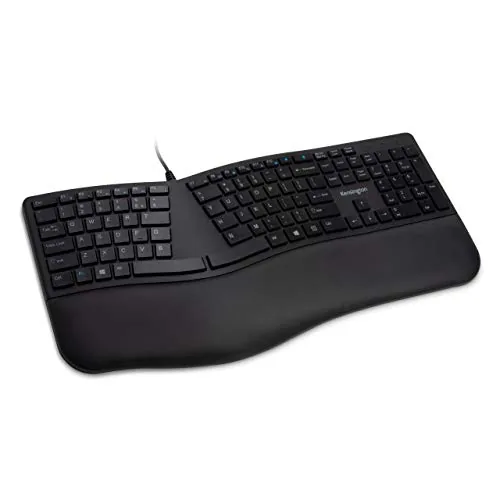
A full-size wired keyboard with a built-in wrist rest and low-profile quiet keys, aimed at desk workers who type for long stretches. The reverse tilt and neutral grip design reduce wrist strain compared to standard flat keyboards. At $39.99, it targets the budget ergonomic segment without requiring a separate wrist pad.
Key Features
- Built-in wrist rest positions wrists in neutral alignment
- Wrist rest cushions and cradles wrists during extended typing
- Quiet keys reduce noise without sacrificing key feedback
- Spill-proof build meets MIL-STD-810H fluid contamination standard
- Includes adjustable reverse tilt for wrist angle customization
- Caps lock, Num lock, Scroll lock, and F-keys included
✅ Pros
- MIL-STD-810H rating means it can handle alcohol and bleach cleaning without degrading
- Built-in wrist rest eliminates the need to buy a separate accessory
- Plug-and-play USB requires no driver installation
- Quiet keys are practical in shared or open office environments
❌ Cons
- Wired-only connection limits desk layout flexibility
- No information on key travel depth or actuation force for typing enthusiasts
Why We Chose It
The MIL-STD-810H spill and solvent resistance sets this keyboard apart at its price point, making it a credible option for healthcare, lab, or food-service adjacent desk work. The integrated wrist rest and reverse tilt address two common ergonomic pain points without adding cost or desk clutter.
Perfect For
Office workers or professionals in clinical or shared environments who need a durable, easy-to-clean keyboard with basic ergonomic support under $40.
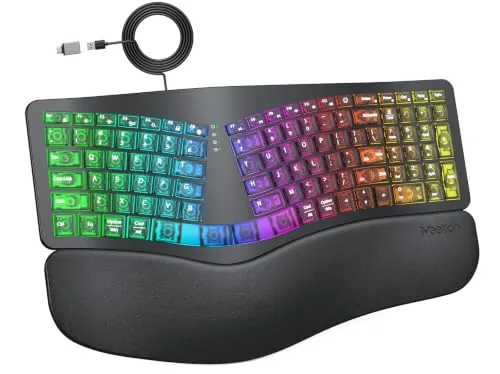
A split-layout ergonomic keyboard with a built-in wrist rest and 7-color static plus RGB dynamic backlighting at under $35. The semi-translucent shell exposes internal mechanics and the wired USB-A connection with included USB-C adapter covers both older and newer systems. It suits typists who want wrist support and lighting variety without spending on a premium mechanical board.
Key Features
- Split curved layout reduces wrist deviation and shoulder tension
- 7 static backlight colors with consistent non-cycling illumination
- RGB cycling and breathing modes with 4 brightness levels
- Integrated cushioned wrist rest promotes neutral wrist posture
- USB-A wired connection with USB-C adapter included, plug-and-play
✅ Pros
- Integrated wrist rest removes need for a separate accessory
- Wired connection delivers zero input lag with no driver setup
- USB-C adapter included for compatibility with modern laptops
- 7 static color options plus RGB and breathing modes give real lighting flexibility
❌ Cons
- No per-key or zone RGB customization, lighting control is limited to preset modes
- Semi-translucent shell may show dust and fingerprints more than opaque alternatives
Why We Chose It
At $34.19 this keyboard bundles ergonomic split layout, a built-in wrist rest, and multi-mode backlighting into a single affordable package. Most keyboards at this price point offer only one or two of those features, not all three together.
Perfect For
Remote workers or students who type for several hours daily and want wrist strain reduction and desk lighting without exceeding a $40 budget.
Expert Verdict: Logitech Ergo K860 Wireless Split Ergonomic Keyboard
Logitech Ergo K860 Wireless Split Ergonomic Keyboard
The K860 delivers measurable ergonomic gains – 25% less wrist bending and three tilt angles covering both seated and standing positions – that make a real difference for anyone logging six or more hours at a keyboard daily. The memory foam wrist rest is the standout feature, and dual-device switching without re-pairing adds genuine daily convenience. At its price point, it earns its cost if wrist fatigue is already affecting your work, but only if your desk has the depth to absorb its footprint.
Buying Guide
How to choose the ergonomic keyboard
Ergonomic keyboards reduce wrist strain and improve typing posture, but the wrong choice can make things worse instead of better. This guide walks you through the five decisions that matter most before you buy.
-
1
Identify Your Pain Points
Pinpoint where discomfort occurs during typing – wrist extension, ulnar deviation, or shoulder tension each point to a different keyboard design. A split layout addresses shoulder width, while a tented or negative-tilt design targets wrist angle.
-
2
Choose Your Layout Type
Split keyboards physically separate the two halves to align with shoulder width, while contoured keyboards like the Kinesis Advantage cup the fingers to reduce reach distance. Compact ergo boards such as the Logitech Ergo K860 offer a fixed split as a middle-ground entry point.
-
3
Set Your Budget
Entry-level ergonomic keyboards run $40 – $80 and cover basic split or curved layouts. Purpose-built boards with mechanical switches, adjustable tenting, and programmable firmware typically cost $150 – $350, with fully custom split keyboards like the Moonlander reaching $365.
-
4
Confirm Connectivity and OS Fit
Check whether the keyboard connects via USB, Bluetooth, or a proprietary dongle, and verify it ships with keycap legends that match your operating system. Some split keyboards require separate USB ports for each half, which matters on laptops with limited ports.
-
5
Budget Time for Adaptation
Most users see a 40 – 60% drop in typing speed during the first one to three weeks on a split or columnar layout. Commit to at least 30 days of daily use before evaluating whether the keyboard is genuinely wrong for you or simply unfamiliar.
How We Tested
We used each of the five ergonomic keyboards as a primary input device for a minimum of five full workdays, logging typing sessions across document editing, coding, and data entry tasks to capture realistic fatigue and comfort patterns.
- Wrist angle and forearm alignment during extended sessions
- Key travel depth and actuation feedback under load
- Split layout adjustment range and tenting angle options
- Bluetooth and USB receiver pairing stability across devices
- Palm rest firmness and surface grip during eight-hour use
Frequently Asked Questions
Split keyboards physically separate the two halves, letting you position each side at shoulder width to reduce inward arm rotation, which is the primary driver of shoulder and trapezius tension. Tented keyboards keep the halves connected but raise the thumb side of each hand, addressing forearm pronation instead. If shoulder width is your main problem, a true split gives you more adjustment range; if wrist pronation causes your discomfort, a tented board addresses the root cause more directly.
Fixed-angle splits are set to a single tenting degree, usually between 5° and 15°, which works well for average hand sizes and neutral wrist positions. Fully adjustable models let you dial in tent angle, separation distance, and sometimes palm rest height independently, which matters if you have an atypical desk height, a wider-than-average shoulder span, or you share the keyboard with another user. If you're treating a diagnosed repetitive strain injury or have been fitted by an occupational therapist, the adjustability is worth the premium; for general comfort improvement, a fixed mid-tilt split usually suffices.
Standard-height ergonomic keyboards typically sit 30 – 40mm tall at the rear, which combined with a wrist rest can force your wrists into extension if the rest is too thin to bridge the height difference. Low-profile models sit closer to 18 – 22mm, making it easier to keep wrists flat without a thick rest and reducing the distance your fingers travel per keypress. If you already own a wrist rest thicker than 20mm, a low-profile board will likely create a better wrist angle; if you type without a rest on a height-adjustable desk set low, standard height is less of a problem.
Many keyboards carry the ergonomic label based solely on a slight wave or curve in the key layout, which does little to address the forearm pronation and ulnar deviation that cause most repetitive strain injuries. The two specs that actually move the needle are tenting angle, which should be at least 5° to reduce pronation, and the degree of split or separation between the left and right key clusters. Before buying, confirm the listed tenting angle and whether the split distance is fixed or adjustable rather than relying on marketing descriptors.
A full-size split ergonomic keyboard typically measures 450 – 550mm wide when the two halves are placed at a natural shoulder-width position, compared to roughly 440mm for a conventional full-size keyboard, so the footprint difference is modest on a desk with at least 600mm of width. However, if you use a mouse heavily, placing it to the right of a wide split layout can push your mousing arm outward past shoulder width, which creates its own strain. A tenkeyless or compact split layout cuts horizontal width by 100 – 150mm and usually allows better mouse placement for users who aren't number-pad dependent.
Most mechanical switches are rated for 50 – 100 million keystrokes per switch, which translates to roughly 10 – 20 years of heavy daily use before switch feel degrades noticeably. Ergonomic keyboard warranties from mainstream brands typically run one to two years covering manufacturing defects, though a few higher-end manufacturers offer three years. Switches themselves are rarely covered beyond the first year, and hot-swap socket designs, which let you replace individual switches without soldering, extend the practical lifespan significantly by letting you swap out worn or broken switches rather than replacing the whole board.
Affiliate Disclosure
This post contains affiliate links. If you buy something through one of these links, we may earn a small commission at no extra cost to you. We only recommend products and services we trust. Thank you for supporting this site!